Semantic HTML uses HTML elements that describe what their content means, not just how it looks. When you rely on tags like header, nav, main, article, section, and footer instead of generic containers, you give browsers, assistive tools, and search engines a clearer picture of your page’s structure and purpose. These elements signal hierarchy, define topical boundaries, and help systems understand how different pieces of content relate to one another.
This guide breaks down how semantic HTML improves indexing, accessibility, and LLM comprehension. You’ll see the exact HTML5 elements worth prioritizing, the measurable SEO and accessibility benefits they provide, and a practical audit workflow you can apply immediately. You’ll also learn how semantic markup ties directly into Schema.org, knowledge graphs, and the structured data that modern search engines rely on. Finally, the article shows how automation tools can streamline semantic improvements without compromising developer oversight.
If you want to see semantic HTML issues at scale, Search Atlas’s OTTO SEO crawler can automatically surface missing landmarks, broken heading hierarchies, and schema gaps across your entire site.
What Is Semantic HTML and How Does Semantic Markup Improve SEO?
Semantic HTML communicates the role of each element, making it easier for search engines to understand content as entities, relationships, and topical sections. Crawlers use these signals to reduce ambiguity during indexing and to identify the content most likely to appear in snippets or rich results.
Clear structure improves crawl efficiency, supports structured data, and helps search engines select accurate titles, descriptions, and entities. The next sections outline the core HTML5 elements and the specific ways they strengthen search engine understanding.
What Are Semantic HTML and HTML5 Semantic Elements?
HTML5 introduced semantic elements that define common page regions, making content both discoverable and meaningful. Tags like header, nav, main, article, section, aside, footer, figure, and figcaption all express intent:
- header groups introductory content.
- nav identifies primary navigation.
- article wraps independent, standalone content.
- section organizes related themes.
- figure and figcaption provide media with context.
Examples include a blog post wrapped in article with its own header and footer, documentation that uses nav for the table of contents and main for the body, or product pages that rely on figure for images and descriptive captions.
Using these elements minimizes reliance on generic containers and improves both accessibility and machine readability. Understanding them also sets the stage for more effective Schema.org mapping.
The foundational ideas behind semantic HTML and its connection to Schema.org have long been studied in the field, and standards from the World Wide Web Consortium (W3C) and the Web Content Accessibility Guidelines (WCAG) 2.1 explicitly encourage the use of native HTML semantics as the foundation for accessible experiences.
How Does Semantic HTML Enhance Search Engine Understanding?
Semantic HTML strengthens search engine comprehension by creating labeled anchors aligned with entity extraction and content segmentation. Crawlers rely on the document outline to identify the main entity, prioritize headings, and associate metadata—such as author or publish date—with the right section.
For example, placing a blog title inside article > header > h1 sends a strong signal that the heading is the primary title and the article is the main topical unit. This makes snippet selection more reliable and reduces confusion caused by deeply nested, non-semantic containers. The next section outlines the concrete SEO and accessibility benefits you can expect.
Semantic HTML vs Non-Semantic HTML: Practical Before-and-After Examples

Non-semantic HTML relies heavily on generic containers like div and span, which force crawlers and assistive technologies to infer meaning from class names or visual layout. Semantic HTML, by contrast, encodes meaning directly in the markup.
Example 1: Blog Post Layout
Non-semantic version:
<div class=”page”>
<div class=”top”>
<h1>Semantic HTML for SEO</h1>
</div>
<div class=”content”>
<div class=”section”>
<h2>Benefits</h2>
<p>…</p>
</div>
</div>
</div>
Semantic version:
<main>
<article>
<header>
<h1>Semantic HTML for SEO</h1>
</header>
<section aria-labelledby=”benefits-heading”>
<h2 id=”benefits-heading”>Benefits of Semantic HTML</h2>
<p>…</p>
</section>
</article>
</main>
The second example gives search engines, screen readers, and LLMs explicit anchors (main, article, section, header) they can rely on for chunking, navigation, and entity extraction.
Example 2: Navigation Menu
Non-semantic version:
<div class=”menu”>
<ul>
<li><a href=”/”>Home</a></li>
<li><a href=”/blog”>Blog</a></li>
<li><a href=”/about”>About</a></li>
</ul>
</div>
Semantic version:
<nav aria-label=”Primary navigation”>
<ul>
<li><a href=”/”>Home</a></li>
<li><a href=”/blog”>Blog</a></li>
<li><a href=”/about”>About</a></li>
</ul>
</nav>
Using nav with an ARIA label makes the navigation’s role instantly clear to both assistive technologies and search engines mapping your site structure.
Key Benefits of Semantic HTML for SEO, Accessibility, and AI Visibility
Semantic HTML is a core part of modern technical SEO, because it reduces ambiguity for both crawlers and assistive technologies. These structural improvements deliver clear, measurable gains across indexing, accessibility, maintenance, and AI interpretation.
Key benefits include:
- Improved Indexing Accuracy: Search engines can more easily map content to the entities it describes.
- Better Snippet Eligibility: Organized headings and sections help search engines extract cleaner, more relevant snippets.
- Enhanced Accessibility: Screen readers navigate more predictably when semantic elements and ARIA are used correctly.
- Stronger Inputs for AI and LLMs: Labelled content blocks improve RAG retrieval and overall answer quality.
The tables below act as a practical list of HTML5 semantic elements, showing how each semantic HTML tag contributes to SEO, accessibility, and structured data outcomes.
| Semantic Tag | Benefit Type | Expected Outcome / Metric |
|---|---|---|
| header / h1–h6 | SEO & UX | Clear headline signals; improved snippet selection |
| nav | Accessibility & SEO | Faster screen-reader navigation; lower bounce rates |
| article | Structured Data & Indexing | Reliable mainEntityOfPage; improved rich result eligibility |
| section | Content Segmentation | Stronger topical clustering; more relevant internal linking |
| figure / figcaption | Media Context | Accurate caption extraction for image search |
How Does Semantic HTML Improve SEO Performance and Crawl Efficiency?
Good semantic structure makes crawling more efficient by reducing parser guesswork and helping crawlers identify the most important content faster. When headings and sections mirror the actual hierarchy, crawlers spend less time applying heuristics and more time understanding the page.
Measurable improvements include:
- Higher crawl-to-index ratios
- Faster updates appearing in the index
- Cleaner index coverage reports tied to logical sections
Tracking crawl depth, time to index, and rich result impressions helps confirm whether your semantic improvements are working. Accessibility plays a complementary role, as covered next.
Why Is Semantic HTML Essential for Web Accessibility and Screen Readers?
For assistive technologies, semantic HTML is foundational. Elements like nav, main, and other landmarks allow screen readers and keyboard users to jump directly to the content they need. A logical heading order and clear sectioning provide structure, while ARIA fills in gaps when native semantics aren’t enough.
Standards from the World Wide Web Consortium (W3C) and the Web Content Accessibility Guidelines (WCAG) explicitly encourage the use of native HTML semantics as the foundation for accessible experiences. When your markup follows these patterns, you are not only moving closer to WCAG conformance but also reducing friction for search engines and AI systems that depend on similar structural cues.
Screen-reader testing, keyboard navigation checks, and accessibility validators ensure your page behaves as intended. These validations often uncover SEO-related issues as well, making accessibility a powerful quality gate for both disciplines.
Best Practices for Implementing Semantic HTML and HTML5 Semantic Elements
Effective semantic HTML starts by choosing elements based on meaning, maintaining a clean heading hierarchy, and pairing native semantics with ARIA only when needed. Key practices include:
- Use semantic tags instead of divs when the meaning is clear.
- Keep only one main element per page.
- Follow a logical heading progression (h1 → h2 → h3) without skipping levels.
These rules reduce ambiguity for both humans and machines. The table below summarizes recommended usage for the main elements.
| Element | Recommended Practice | Accessibility Consideration |
|---|---|---|
| nav | Use for primary navigation | Use aria-label when multiple navs exist |
| main | Wrap primary page content | Avoid nesting; rely on landmarks |
| article | Use for standalone entries | Include header and footer for context |
| section | Use for thematic grouping | Add descriptive headings |
| figure / figcaption | Pair media with captions | Provide alt text and descriptive context |
Which HTML5 Semantic Elements Should Web Developers Use?
Developers should standardize a core set of semantic elements across common templates—blog posts, product pages, documentation, and marketing content. For example:
- Wrap blog posts in article with a header for the title and a footer for metadata.
- Use nav for table-of-contents sections in documentation.
- Rely on main for the primary content area.
- Avoid overusing section when a paragraph or aside is more appropriate.
Consistent templates make audits easier and ensure automated corrections behave predictably.
How Should Semantic HTML Be Structured to Maximize SEO and Accessibility?
A solid document outline starts with a single h1 in either the header or main. Subsequent h2 and h3 sections should introduce distinct topic segments.
Place structured data—like JSON-LD—in the head or near the closing body tag, and ensure the visible content appears early in the DOM. When article acts as a wrapper, it pairs naturally with properties like headline, author, and datePublished in JSON-LD.
These practices help search engines select better snippets and strengthen knowledge graph extraction.

Example: Semantic HTML Structure for This Article Template
A simplified version of this article’s template might look like:
<body>
<header>
<nav aria-label=”Primary”>
<!– main navigation –>
</nav>
</header>
<main>
<article itemscope itemtype=”https://schema.org/TechArticle”>
<header>
<h1 itemprop=”headline”>Semantic HTML for SEO: Complete Guide to HTML5 Semantic Elements, Accessibility & Structured Data</h1>
<p>
<span itemprop=”author” itemscope itemtype=”https://schema.org/Person”>
<span itemprop=”name”>Author Name</span>
</span>
·
<time itemprop=”datePublished” datetime=”2025-01-15″>January 15, 2025</time>
</p>
</header>
<section>
<h2>What Is Semantic HTML and How Does Semantic Markup Improve SEO?</h2>
<!– content –>
</section>
<!– additional sections –>
<footer>
<p itemprop=”description”>Summary of the article and key takeaways.</p>
</footer>
</article>
</main>
<footer>
<!– global footer –>
</footer>
</body>
This example shows how HTML5 elements, ARIA attributes, and Schema.org properties can work together in a single template.
Common Semantic HTML Mistakes to Avoid
Even experienced teams fall into predictable semantic markup traps:
- Using multiple <main> elements per page instead of a single primary landmark.
- Wrapping every block in <section> when a simple <div> or <p> would be more appropriate.
- Skipping heading levels (jumping from h1 to h3) and breaking the document outline.
- Styling headings visually instead of using real <h1>–<h6> tags, which hides hierarchy from assistive tools.
- Relying on ARIA roles to fix poor HTML instead of starting with native HTML semantics.
Auditing for these patterns and correcting them at the template level yields immediate wins for both accessibility and SEO.
How Semantic HTML Supports Structured Data, Schema.org, and Knowledge Graphs
Semantic HTML creates clean anchors for Schema.org properties and simplifies JSON-LD placement. Consistent use of article, figure, and similar elements makes it easier to reference content blocks and express relationships such as sameAs or about.
This clarity improves entity extraction and supports knowledge graph accuracy. The table below shows how elements map to Schema.org types.
| Semantic Element | Schema Type | How Semantic HTML Supports It |
|---|---|---|
| article | Article / TechArticle | Natural container for headline, author, and datePublished |
| figure / img | ImageObject | Captions and alt text map cleanly to metadata |
| nav | SiteNavigationElement | Helps define primary site structure |
| section | WebPageElement | Allows page subdivision into meaningful units |
The link between semantic HTML and structured data also plays a major role in building and maintaining high-quality linked open data.
What Is the Relationship Between Semantic HTML and Schema.org Markup?
Schema.org provides the shared vocabulary that JSON-LD, Microdata, and RDFa rely on. Semantic HTML provides the structure that lets you map that vocabulary to real content blocks on the page, so properties like headline, author, and datePublished point to the correct elements. Wrapping your content in an article lets mainEntityOfPage reference that block directly, and the headline can match the h1 inside it. This reduces mismatches between visible and machine-readable content and minimizes validation errors.
Modern search engines, as documented in Google Search Central guidelines, recommend using JSON-LD for Schema.org markup, but JSON-LD works best when it is grounded in semantic HTML. By mapping properties like headline, author, and datePublished to real elements in your article, you minimize the risk of validation errors and mismatched content.
Place JSON-LD in predictable locations and ensure selectors or contextual references are aligned with semantic elements.
How Can Semantic HTML Help Build a Strong Knowledge Graph Foundation?
Consistent semantic markup supports reliable entity extraction by giving each entity a logical home in the DOM. Use canonical naming, apply sameAs links to authoritative profiles, and ensure your structured data matches the entities mentioned in your content.
Regular validation and monitoring help search engines connect your content to recognized identities. This strengthens your site’s presence in knowledge graphs and improves visibility across AI-driven features.
How Semantic HTML and Clear Structure Enhance AI and LLM Visibility in Modern Search
Semantic HTML improves AI visibility by creating clean, well-bounded text chunks ideal for embedding, retrieval, and scoring. Clear headings, lists, and sections act as retrieval anchors, while schema and consistent entity naming reduce ambiguity for downstream LLM reasoning.
Stronger structure leads to better chunking, clearer entities, and more reliable attribution—essential for surfacing content in AI-generated answers.
Why Is Semantic HTML Important for AI Answer Optimization and LLMs?
LLMs depend on high-quality passages when generating answers. Semantic HTML provides the exact boundaries that embedding systems look for. When paired with Schema.org, it reinforces entity context and reduces hallucinations.
Pages with strong semantic markers are more likely to be selected as authoritative sources in Retrieval-Augmented Generation (RAG) and vector search experiences, which power modern AI-driven search features across Google, Bing, and specialized AI platforms.
How Does Search Atlas’s OTTO SEO Tool Automate Semantic HTML Optimization?
OTTO SEO analyzes pages for semantic structure, flags misused or missing elements, and generates prioritized recommendations. It identifies issues such as:
- Incorrect heading hierarchy
- Missing landmarks
- Schema alignment problems
The tool groups fixes by impact and provides examples that developers can implement directly. OTTO also tracks metrics like snippet eligibility and mainEntity consistency to show improvements over time.
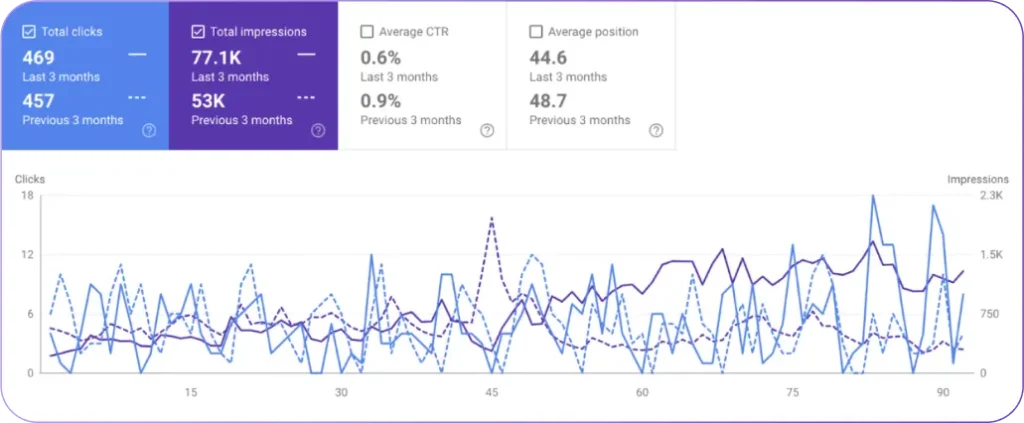
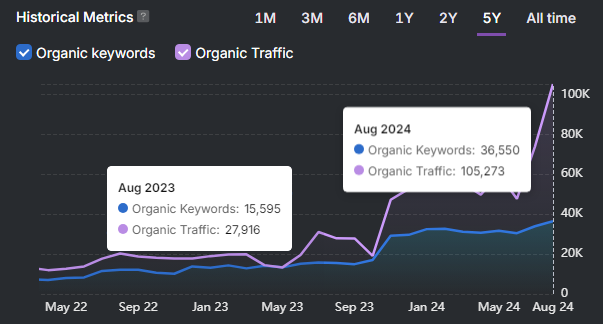
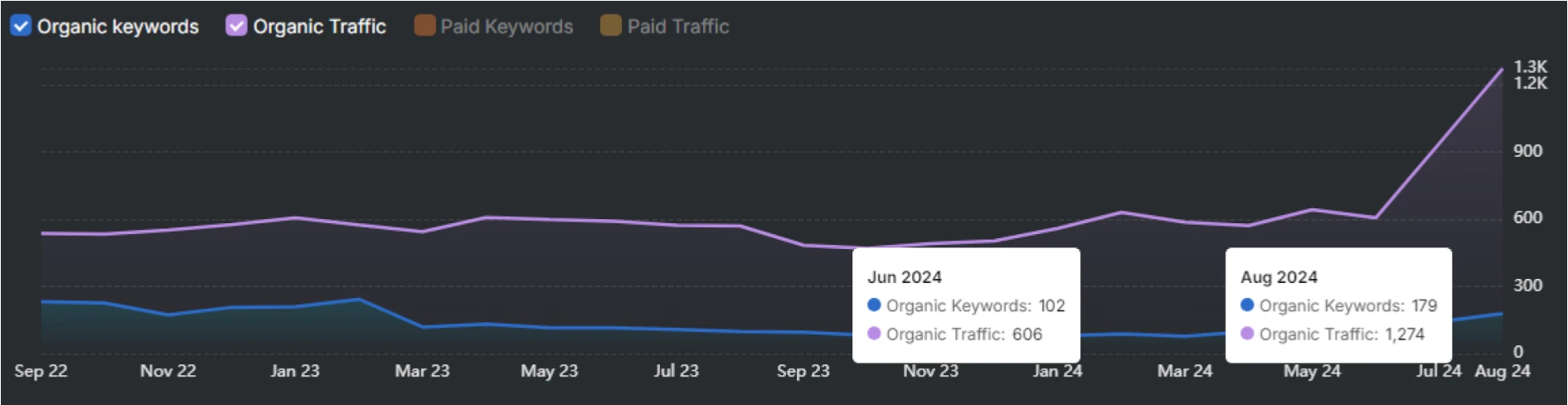
Sites that used OTTO SEO to normalize semantic templates across blogs and docs sections typically saw higher crawl-to-index ratios and more stable rich result impressions within a few weeks of deployment.
How to Audit and Implement Semantic HTML with Search Atlas (OTTO SEO Workflow)
A repeatable audit workflow includes automated scanning, manual review, remediation, and validation. Start with a full site crawl to inventory elements and structured data. Then analyze semantic structure to identify missing landmarks, broken heading order, and inconsistent entities.
Prioritize templates and pages based on traffic and AI visibility potential. Implement template-level fixes first, then update individual pages. Validate using accessibility and schema tools, and monitor changes in indexing performance.
A typical workflow looks like this:
- Crawl the site to gather element and schema inventories.
- Analyze semantic structure for missing landmarks, heading issues, and schema gaps.
- Prioritize templates and high-value pages.
- Apply fixes and align JSON-LD with semantic blocks.
- Validate accessibility and structured data, then monitor indexing and AI metrics.
The table below summarizes common audit stages.
| Stage | Description | Outcome |
|---|---|---|
| Crawl & Inventory | Collect DOM and schema data | Establish baseline |
| Semantic Analysis | Identify hierarchy and landmark issues | Actionable fixes |
| Remediation | Apply template and page updates | Improved semantic clarity |
What Are the Steps to Perform a Semantic HTML Audit with OTTO SEO?
Using OTTO SEO, you can turn the general workflow above into a concrete, repeatable process:
- Run a full-site crawl in OTTO SEO to capture DOM structure, landmarks, and existing JSON-LD across templates.
- Review the semantic audit report, focusing on missing landmarks, invalid heading hierarchies, and schema alignment issues.
- Group issues by template (blog, docs, product pages) so that single fixes improve hundreds or thousands of URLs at once.
- Implement template-level changes in your codebase to normalize main, article, section, and headings.
- Rerun the OTTO SEO audit to confirm improvements in semantic coverage and structured data validation.
- Monitor impact over time, paying attention to crawl-to-index ratios, rich result impressions, and AI-driven citations.
OTTO provides before-and-after comparisons for snippet impressions, schema validation errors, and more, so you can tie each semantic improvement to measurable outcomes.
| Approach | Pros | Cons |
|---|---|---|
| Manual semantic HTML audit | Deep understanding of templates; precise control | Time-consuming; easy to miss patterns on large sites |
| OTTO SEO automated audit | Full-site coverage; prioritized issue lists; repeatable checks | Requires initial configuration and template mapping |
How Does Content Optimization Software Leverage Semantic HTML for Better Results?
Content optimization tools rely on semantic markers—headings, lists, and labeled sections—to improve NLP recommendations for structure, internal links, and entity mentions. They identify weak anchors and suggest targeted editorial updates that strengthen retrieval relevance for both search engines and LLMs.
Typical suggestions include:
- Adding subheadings for better content chunking
- Strengthening entity mentions with schema properties
- Improving anchor text for internal linking
You can measure results by tracking snippet appearances, AI-driven citations, and other retrieval-based metrics. Before diving into the detailed checklist below, the infographic summarizes the core benefits, best practices, and the OTTO SEO workflow for semantic HTML optimization.

Semantic HTML Checklist for SEO, Accessibility, and AI
Use this checklist when reviewing templates or individual pages:
- One <main> landmark per page, wrapping the primary content.
- Exactly one <h1> that matches or closely aligns with the visible page title.
- Logical heading hierarchy (h1 → h2 → h3…) without skipping levels.
- <header>, <nav>, <main>, <footer> used consistently across templates.
- <article> used for standalone pieces such as blog posts, docs pages, or product descriptions.
- <section> reserved for meaningful thematic groups and always paired with a heading.
- Media wrapped in <figure> with <figcaption> and descriptive alt text.
- ARIA roles used sparingly, only when native semantics are insufficient.
- JSON-LD aligned with visible content, referencing the correct article and headline.
- Screen reader and keyboard testing performed on key templates.
Turning this checklist into an automated rule set inside OTTO SEO helps keep semantics consistent as your site evolves.
Frequently Asked Questions About Semantic HTML and SEO
Does semantic HTML directly improve search rankings?
Semantic HTML on its own is not a ranking factor in the same way as links or content relevance. However, it reduces ambiguity, improves snippet extraction, and strengthens structured data, all of which contribute to better visibility and more consistent performance over time.
Is semantic HTML still important if I already use JSON-LD?
Yes. JSON-LD works best when it is backed by a clean semantic structure. When your visible markup and JSON-LD reinforce each other, search engines can trust your signals more and are less likely to ignore or misinterpret structured data.
How much semantic HTML do small sites really need?
Even small sites benefit from a basic semantic foundation: a single main, clear headings, and consistent use of header, nav, and footer. These patterns make templates easier to maintain and prepare your site for future AI and search features.
Can I fix semantic HTML issues without rewriting my entire front end?
In most cases, yes. Start by updating core templates—such as blog posts, product pages, and documentation—to use main, article, and a clean heading hierarchy. Tools like OTTO SEO help identify the highest-impact templates so you avoid unnecessary refactors.
Final Notes on Scaling Semantic HTML
Teams aiming to scale semantic improvements should:
- Establish template-level standards
- Run automated scans regularly
- Prioritize high-traffic and AI-relevant pages for the biggest gains
These practices keep semantics consistent across deployments and improve both indexing and AI visibility over time.
Search Atlas’s OTTO SEO and content optimization tools help teams operationalize this process, combining automated semantic audits, prioritized recommendations, and developer-friendly workflows that keep your HTML, structured data, and AI visibility aligned.