



Search Atlas runs your marketing across every channel and fixes what breaks while you sleep

Reports That Run Before Clients Ask

Search Atlas turns GA4, GSC, rankings, GBP, backlinks, and portfolio health into client-ready reports that refresh automatically. Your team gets the story, the proof, and the next account to watch without building another deck by hand.

"Search Atlas is the only tool on the market currently that operates at the speed in which the market is moving. It has tools that respond faster, do a better job at reporting the data, and update the data sooner."

Gabe FletcherFounder @Detailing Growth
Gabe Fletcher

1

One Workspace for SEO Data

100%

Reports Sent on Schedule

40+

Data Sources Connected

+50%

Faster Client Reviews

What Report Builder Handles for Your Team

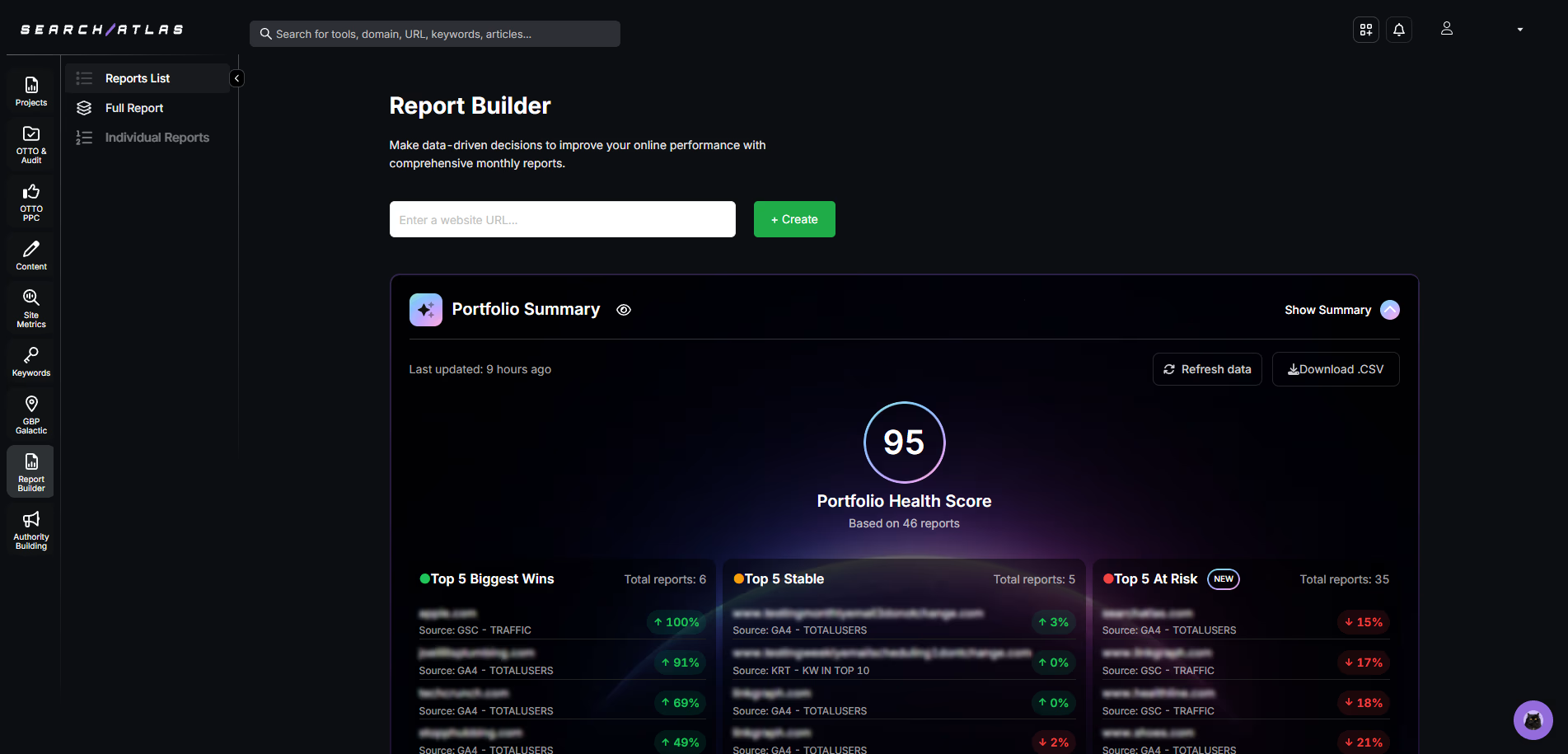
Search Atlas Report Builder dashboard showing portfolio health score, top-performing metrics, and data summary for GA4 and GSC reports

Report Builder brings rank tracking, GA4, GSC, GBP, backlinks, local visibility, and content performance into one reporting workspace.

Set the client, choose the modules, apply your branding, and schedule delivery. Search Atlas keeps the report current so account managers can spend review time on decisions instead of screenshots.

Portfolio Summary Shows Which Accounts Need Attention

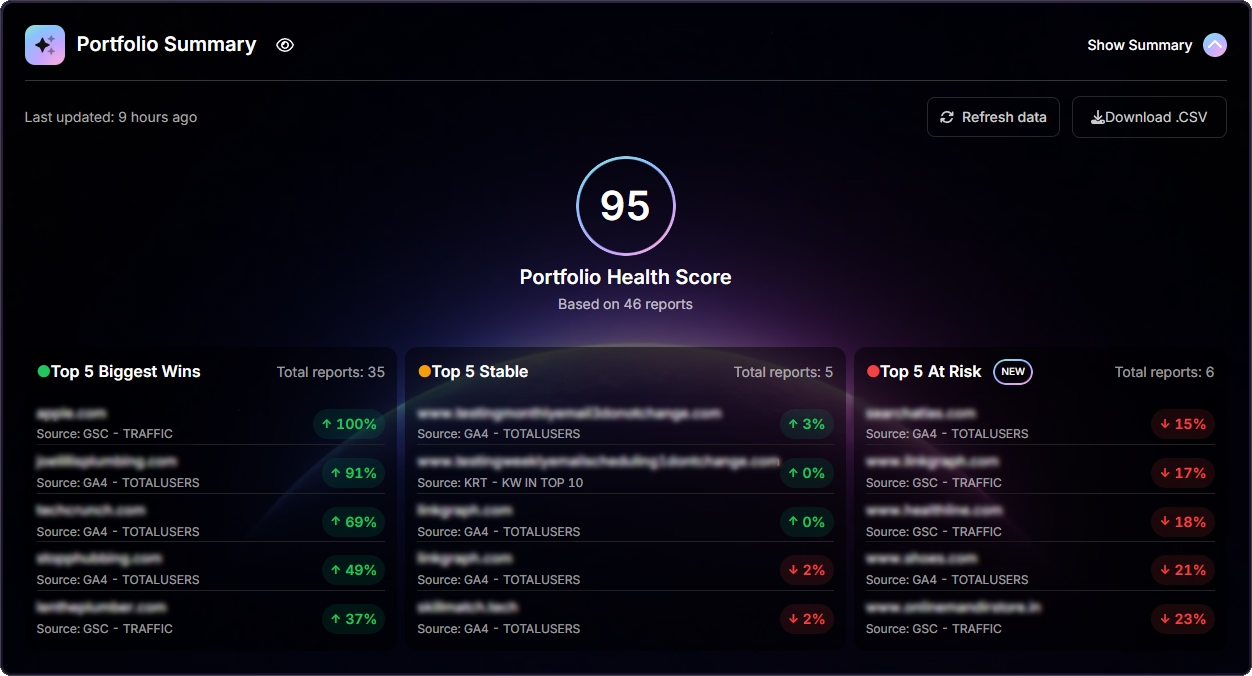
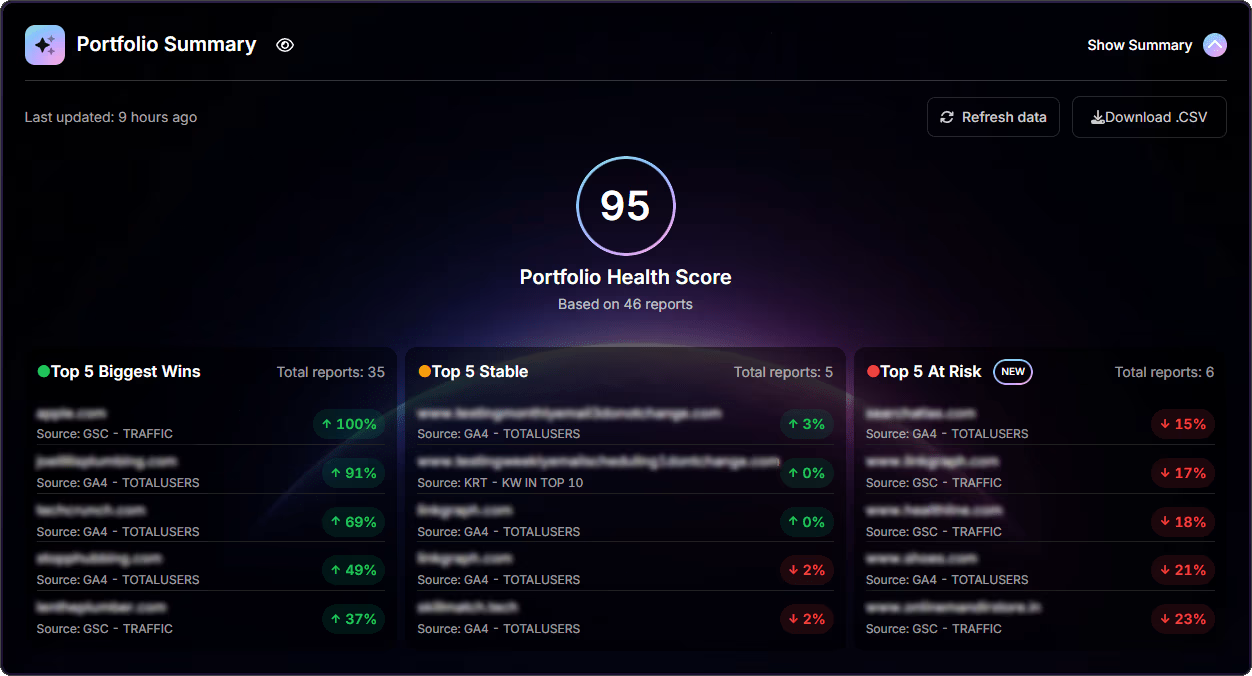
Portfolio Summary™ screen displaying a 95 Portfolio Health Score with sections for Top 5 Biggest Wins, Top 5 Stable, and Top 5 At Risk, including performance percentages and data source indicators.
Number 01

See Portfolio
Health Fast

A 0 to 100 score groups accounts into Biggest Wins, Stable, and At Risk so your team knows where to start.

Number 02

Catch Movement
Early

Daily refreshes and week-over-week tracking show which
changes deserve attention.

Number 03

Give Leaders the Short Version

Turn a multi-account portfolio into a clear
view executives can read quickly.

What Report Builder Makes Possible

SEO and Content Reporting on Autopilot

Pull rankings, backlinks,
GA4, GSC, GBP, and content
metrics into one report.

Portfolio Summary™ Dashboard

Scan account health, risk, and
momentum across every client
or brand.

White-Label Dashboards

Send reports under your own
brand with the modules each
client needs.

Multi-Brand
Portfolio Reporting

Roll up performance across brands, regions, product lines, or client groups.

Daily Data
Refresh

Keep reports current with
daily refreshes and
historical comparisons.

Executive-Ready Exports

Dashboards, PDFs, and
CSVs come out ready
for client reviews.

The Reporting Workflow

Connect the data once. Search Atlas keeps the reporting cycle moving after that.

Number 01

Connect Data Sources

Connect GA4, GSC, GBP, rank tracking, backlinks, and local visibility data.

Number 02

Build the Dashboard

Choose the modules your client or leadership team needs to see.

Number 03

Portfolio Summary™ View

Review health scores, risk categories, and account movement from one view.

Number 04

Apply Brand Settings

Add your logo, choose report sections, and set the right client view.

Number 05

Schedule Delivery

Send dashboards, PDFs, or CSV exports on the cadence each account needs.

Report Builder™ vs Other Tools

FeatureReport Builder™ (Search Atlas)Semrush My ReportsAhrefs DashboardsSE Ranking ReportsAgencyAnalyticsSerpstat Reports
Integrated SEO + Content ReportingyesYesnoPartialnoLimitedyesYesyesYesyesYes
Portfolio Summary™ Health ScoreyesIndustry-firstnonononono
Smart CategorizationyesBiggest Wins / Stable / At Risknonononono
White-Label ReportsyesIncludedyesPDF exportnoNot nativenoyesnoLimited
Multi-Source IntegrationsyesGA4, GSC, GBP, Rank Tracker, BacklinksnoLimited to GA/GSCnoLimited to Ahrefs data onlynoLimited to GA/GSCyesGA4, GSC, GBP, and morenoLimited
Real-Time DatayesDaily + TrendsnoManual exportsnoPeriodicnoRefresh onlyyesLivenoPeriodic

From Setup to Send in Three Steps

Number 01

Connect Your Accounts

Connect GA4, GSC, GBP, heatmaps, backlinks, rank tracking, and other data sources.

Number 02

Pick the Report View

Choose Portfolio Summary, SEO performance, content metrics, or a custom dashboard.

Number 03

Send the Update

Share a branded dashboard, PDF, CSV, or live link with clients and executives.

Who Uses Report Builder

Agencies (10+ Clients)

Automate client reporting so account
managers can spend reviews
on decisions.

Enterprise Marketing Teams

Roll performance up across brands,
regions, and portfolios with Portfolio
Summary
.

Account Managers

Find underperforming accounts
quickly and bring proof to
every client call.

Executives and Stakeholders

See portfolio health, trends, and
risk without opening five
dashboards.

Search Atlas Portfolio Summary health score dashboard

See Portfolio Health at a Glance

Portfolio Summary gives every account a 0 to 100 health score and groups accounts by Biggest Wins, Stable, and At Risk. Scan domain cards, review missing data, and see where visibility is moving before the client asks.
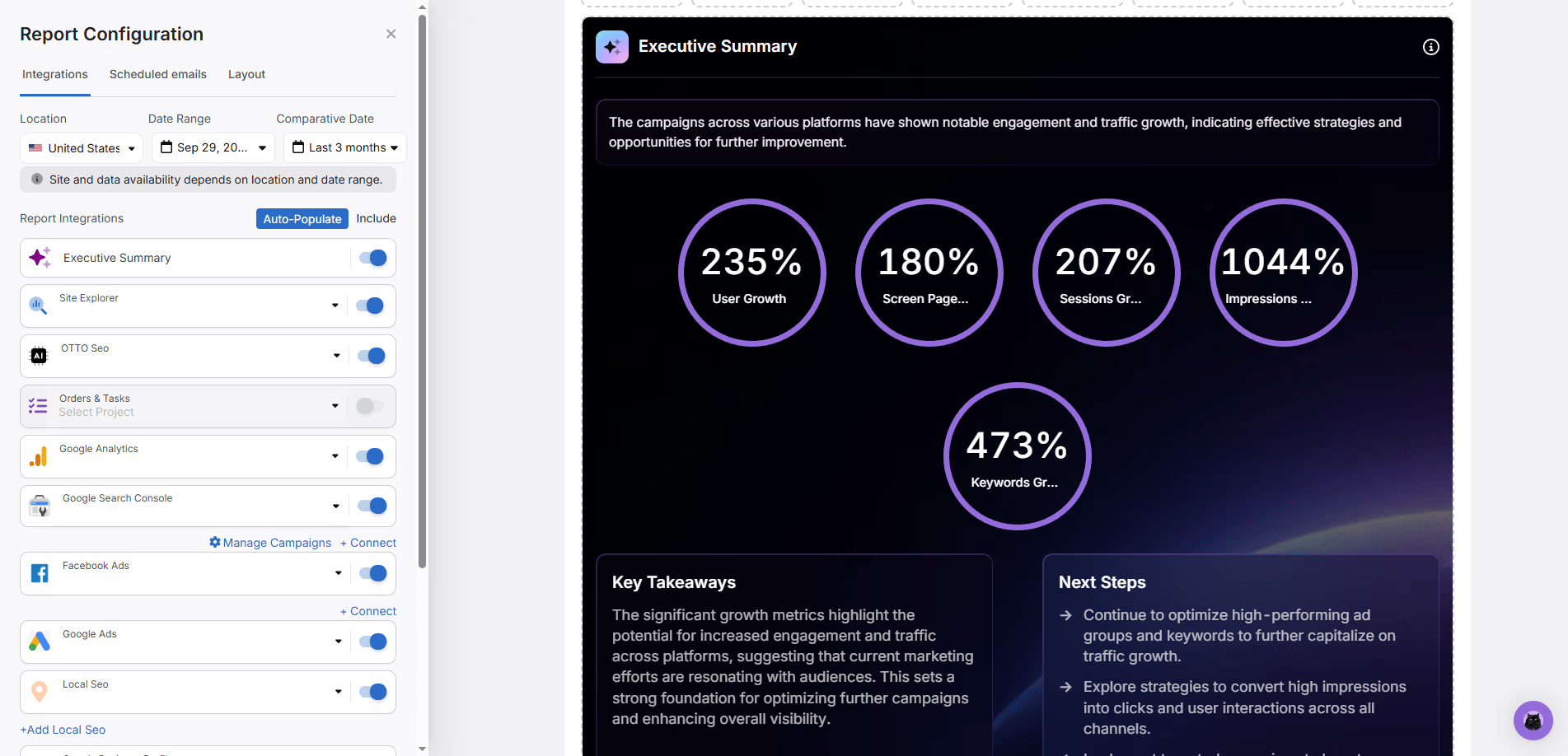
Search Atlas Report Configuration screen showing integrations selection and an Executive Summary preview with growth metrics for users, sessions, impressions, and keywords.

Turn Data Into Account Notes

AI summaries review Site Explorer, GSC, GA4, Facebook Ads, and Keyword Rank Tracker data, then write a clear account update. Refresh the summary before a meeting and walk in with the story already drafted.

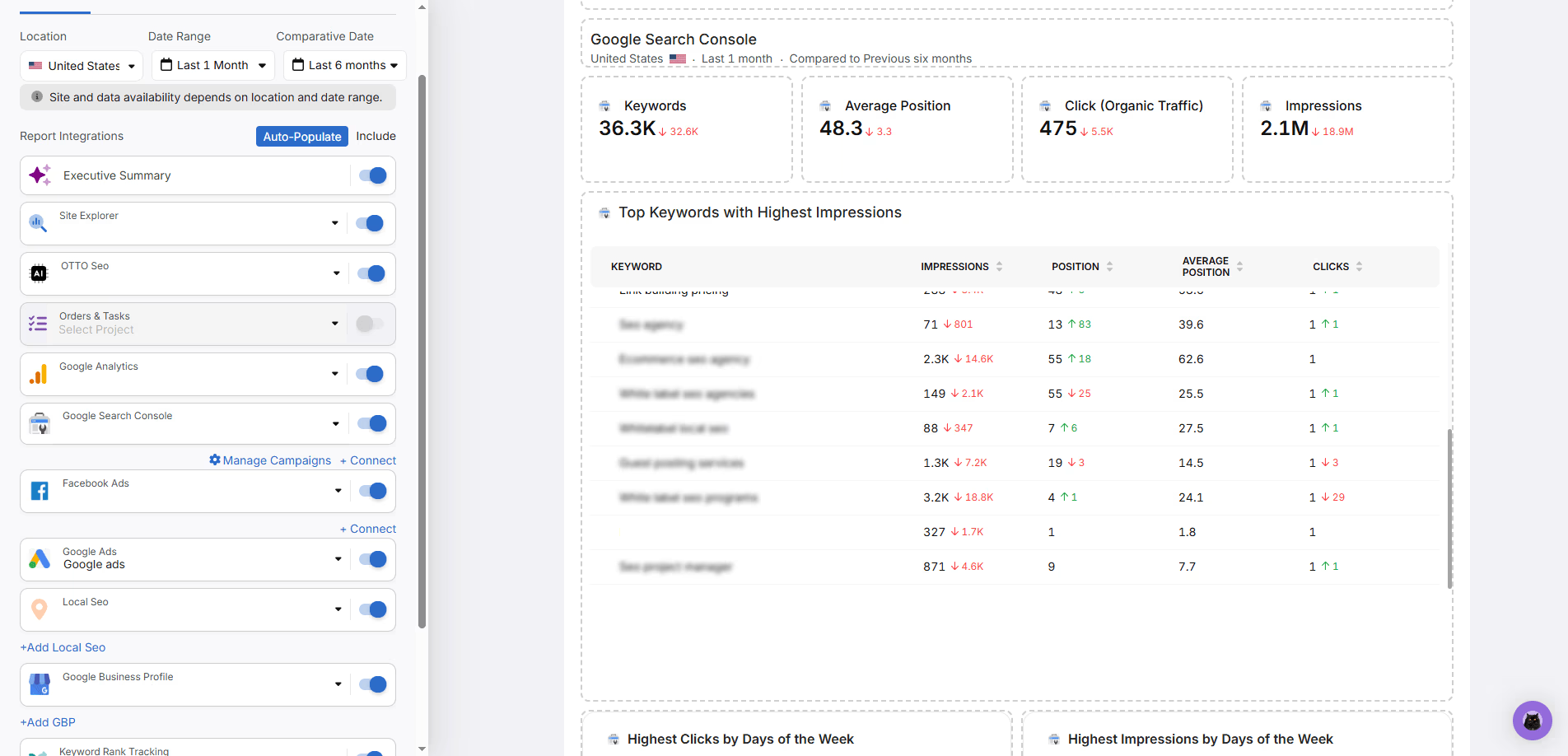
Search Atlas dashboard showing Google Search Console report with keyword counts, average position, clicks, impressions, and top keywords table for performance insights.

Unify SEO and Engagement Metrics

Report Builder connects GA4, GSC, Keyword Rank Tracker, Local SEO Heatmaps, GBP, backlink metrics, and domain metrics into one client-ready dashboard. Track sessions, conversions, impressions, clicks, rankings, and local visibility in one place.

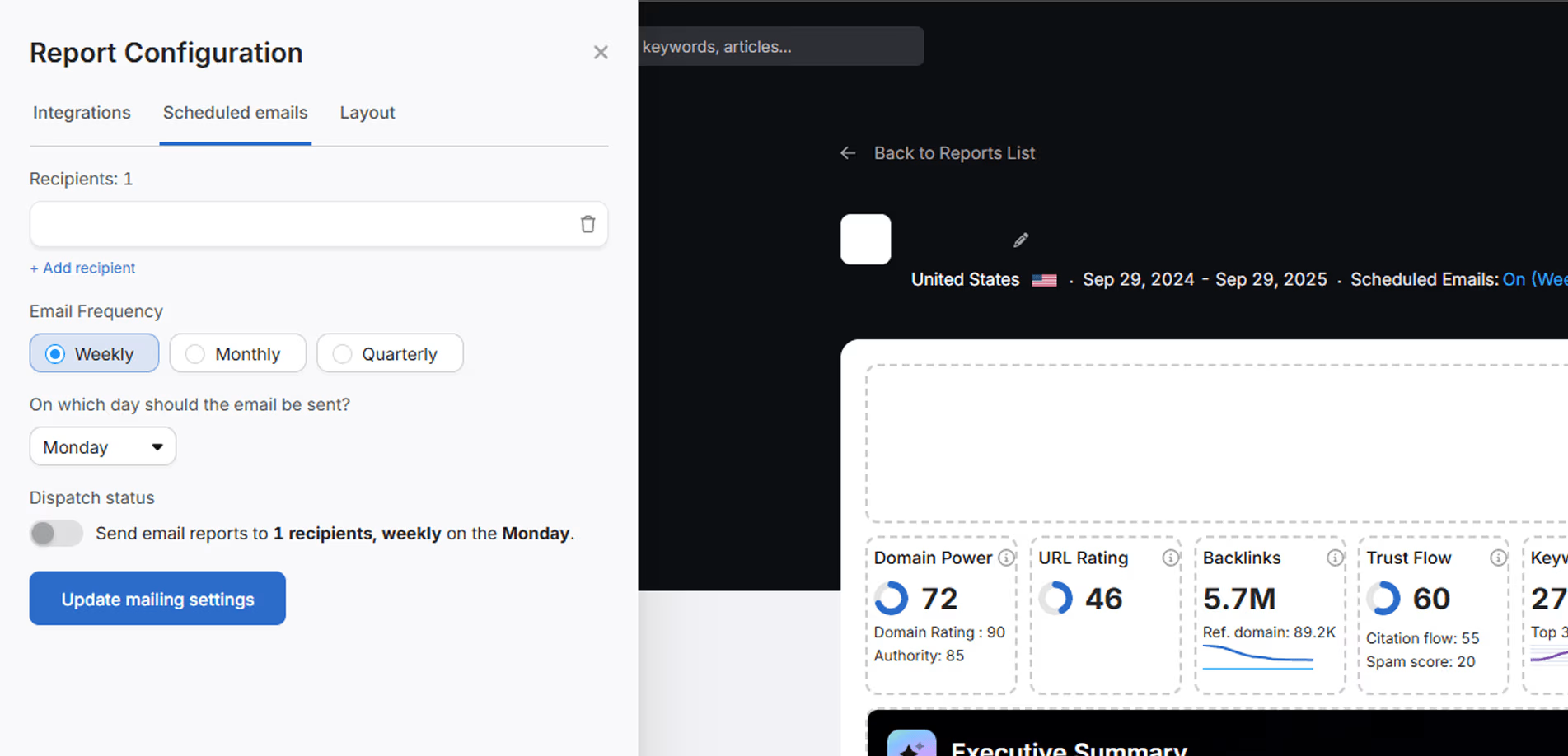
Search Atlas report configuration screen showing scheduled email settings with options for weekly, monthly, and quarterly report dispatch, and domain performance metrics overview.

Send Reports on Schedule

Choose the data sources, modules, branding, and delivery cadence for each client. Reports refresh automatically, so every weekly, monthly, or quarterly update starts with current data.

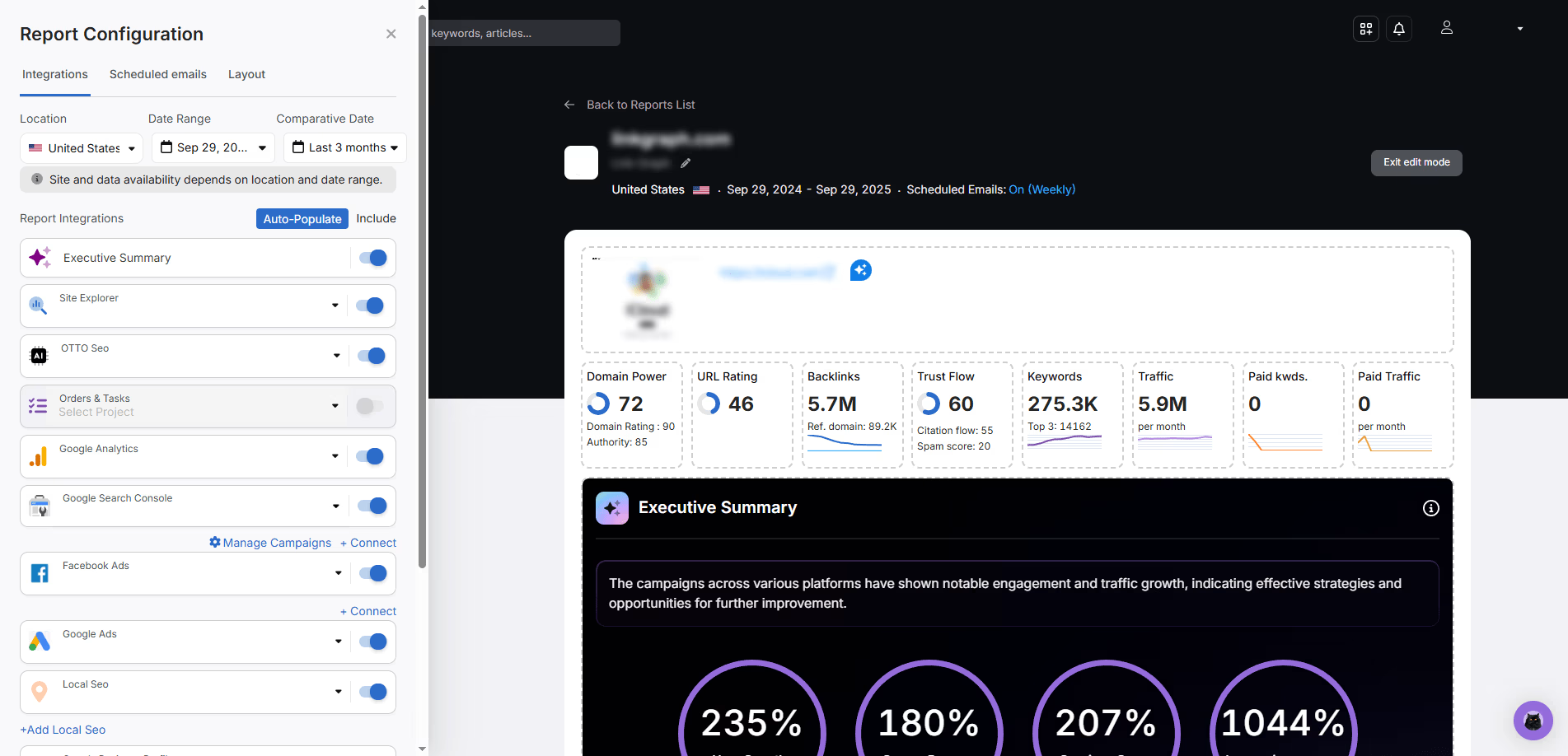
Screenshot of Search Atlas weekly SEO performance report configuration showing integrations like Site Explorer, Google Analytics, and Executive Summary with domain metrics, backlinks, keywords, and traffic data

Minutes to Set Up, Then It Runs

Define the URL, location, date range, comparison period, and integrations. Add recipients, choose the layout, and let Search Atlas handle the repeat reporting cycle.

Search Atlas Portfolio Summary health score dashboard

See Portfolio Health at a Glance

Portfolio Summary gives every account a 0 to 100 health score and groups accounts by Biggest Wins, Stable, and At Risk. Scan domain cards, review missing data, and see where visibility is moving before the client asks.
Search Atlas Report Configuration screen showing integrations selection and an Executive Summary preview with growth metrics for users, sessions, impressions, and keywords.

Turn Data Into Account Notes

AI summaries review Site Explorer, GSC, GA4, Facebook Ads, and Keyword Rank Tracker data, then write a clear account update. Refresh the summary before a meeting and walk in with the story already drafted.

Search Atlas dashboard showing Google Search Console report with keyword counts, average position, clicks, impressions, and top keywords table for performance insights.

Unify SEO and Engagement Metrics

Report Builder connects GA4, GSC, Keyword Rank Tracker, Local SEO Heatmaps, GBP, backlink metrics, and domain metrics into one client-ready dashboard. Track sessions, conversions, impressions, clicks, rankings, and local visibility in one place.

Search Atlas report configuration screen showing scheduled email settings with options for weekly, monthly, and quarterly report dispatch, and domain performance metrics overview.

Send Reports on Schedule

Choose the data sources, modules, branding, and delivery cadence for each client. Reports refresh automatically, so every weekly, monthly, or quarterly update starts with current data.

Screenshot of Search Atlas weekly SEO performance report configuration showing integrations like Site Explorer, Google Analytics, and Executive Summary with domain metrics, backlinks, keywords, and traffic data

Minutes to Set Up, Then It Runs

Define the URL, location, date range, comparison period, and integrations. Add recipients, choose the layout, and let Search Atlas handle the repeat reporting cycle.

Search Atlas Portfolio Summary health score dashboard

See Portfolio Health at a Glance

Portfolio Summary gives every account a 0 to 100 health score and groups accounts by Biggest Wins, Stable, and At Risk. Scan domain cards, review missing data, and see where visibility is moving before the client asks.
Search Atlas Report Configuration screen showing integrations selection and an Executive Summary preview with growth metrics for users, sessions, impressions, and keywords.

Turn Data Into Account Notes

AI summaries review Site Explorer, GSC, GA4, Facebook Ads, and Keyword Rank Tracker data, then write a clear account update. Refresh the summary before a meeting and walk in with the story already drafted.

Search Atlas dashboard showing Google Search Console report with keyword counts, average position, clicks, impressions, and top keywords table for performance insights.

Unify SEO and Engagement Metrics

Report Builder connects GA4, GSC, Keyword Rank Tracker, Local SEO Heatmaps, GBP, backlink metrics, and domain metrics into one client-ready dashboard. Track sessions, conversions, impressions, clicks, rankings, and local visibility in one place.

Search Atlas report configuration screen showing scheduled email settings with options for weekly, monthly, and quarterly report dispatch, and domain performance metrics overview.

Send Reports on Schedule

Choose the data sources, modules, branding, and delivery cadence for each client. Reports refresh automatically, so every weekly, monthly, or quarterly update starts with current data.

Screenshot of Search Atlas weekly SEO performance report configuration showing integrations like Site Explorer, Google Analytics, and Executive Summary with domain metrics, backlinks, keywords, and traffic data

Minutes to Set Up, Then It Runs

Define the URL, location, date range, comparison period, and integrations. Add recipients, choose the layout, and let Search Atlas handle the repeat reporting cycle.

Search Atlas Portfolio Summary health score dashboard

See Portfolio Health at a Glance

Portfolio Summary gives every account a 0 to 100 health score and groups accounts by Biggest Wins, Stable, and At Risk. Scan domain cards, review missing data, and see where visibility is moving before the client asks.

Search Atlas Report Configuration screen showing integrations selection and an Executive Summary preview with growth metrics for users, sessions, impressions, and keywords.

Turn Data Into Account Notes

AI summaries review Site Explorer, GSC, GA4, Facebook Ads, and Keyword Rank Tracker data, then write a clear account update. Refresh the summary before a meeting and walk in with the story already drafted.

Search Atlas dashboard showing Google Search Console report with keyword counts, average position, clicks, impressions, and top keywords table for performance insights.

Unify SEO and Engagement Metrics

Report Builder connects GA4, GSC, Keyword Rank Tracker, Local SEO Heatmaps, GBP, backlink metrics, and domain metrics into one client-ready dashboard. Track sessions, conversions, impressions, clicks, rankings, and local visibility in one place.

Search Atlas report configuration screen showing scheduled email settings with options for weekly, monthly, and quarterly report dispatch, and domain performance metrics overview.

Send Reports on Schedule

Choose the data sources, modules, branding, and delivery cadence for each client. Reports refresh automatically, so every weekly, monthly, or quarterly update starts with current data.

Screenshot of Search Atlas weekly SEO performance report configuration showing integrations like Site Explorer, Google Analytics, and Executive Summary with domain metrics, backlinks, keywords, and traffic data

Minutes to Set Up, Then It Runs

Define the URL, location, date range, comparison period, and integrations. Add recipients, choose the layout, and let Search Atlas handle the repeat reporting cycle.

Search Atlas Portfolio Summary health score dashboard

See Portfolio Health at a Glance

Portfolio Summary gives every account a 0 to 100 health score and groups accounts by Biggest Wins, Stable, and At Risk. Scan domain cards, review missing data, and see where visibility is moving before the client asks.

Search Atlas Report Configuration screen showing integrations selection and an Executive Summary preview with growth metrics for users, sessions, impressions, and keywords.

Turn Data Into Account Notes

AI summaries review Site Explorer, GSC, GA4, Facebook Ads, and Keyword Rank Tracker data, then write a clear account update. Refresh the summary before a meeting and walk in with the story already drafted.

Search Atlas dashboard showing Google Search Console report with keyword counts, average position, clicks, impressions, and top keywords table for performance insights.

Unify SEO and Engagement Metrics

Report Builder connects GA4, GSC, Keyword Rank Tracker, Local SEO Heatmaps, GBP, backlink metrics, and domain metrics into one client-ready dashboard. Track sessions, conversions, impressions, clicks, rankings, and local visibility in one place.

Search Atlas report configuration screen showing scheduled email settings with options for weekly, monthly, and quarterly report dispatch, and domain performance metrics overview.

Send Reports on Schedule

Choose the data sources, modules, branding, and delivery cadence for each client. Reports refresh automatically, so every weekly, monthly, or quarterly update starts with current data.

Screenshot of Search Atlas weekly SEO performance report configuration showing integrations like Site Explorer, Google Analytics, and Executive Summary with domain metrics, backlinks, keywords, and traffic data

Minutes to Set Up, Then It Runs

Define the URL, location, date range, comparison period, and integrations. Add recipients, choose the layout, and let Search Atlas handle the repeat reporting cycle.

Frequently Asked Questions

Report Builder is the automated reporting workspace inside Search Atlas. It combines SEO, content, local, and portfolio data into client-ready dashboards and scheduled reports.

Over 5,000+ AgenciesTrust Search Atlas

Picture of Frankie Fihn

Frankie Fihn

Founder @ Beyond Agency Profits

“We are canceling Ahrefs, Majestic SEO, SemRush and a few others. You need to check out this tool. This is like GHL 3 years before people realized how cool it was. I haven’t seen anything that makes ranking this easy. If you offer SEO, it saves you 90% of the grunt work.”

Picture of Josh Nelson

Josh Nelson

CEO & Founder at Plumbing & HVAC SEO Founder & CEO at Seven Figure Agency

“If you want to be on the cutting edge of SEO, Search Atlas is absolutely where it’s at. The most innovative SEO platform out there is Search Atlas.”

Facebook screenshot testimonial from Josh Nelson.
Picture of Perry Belcher

Perry Belcher

Co-Founder at DigitalMarketer

“Search Atlas is the number one ranked search engine tool in the world right now! As someone who’s been in SEO for 15 years, I’ve seen everything change. The tools offered by Search Atlas, including their powerful OTTO tool, are game-changers. We’ve integrated them into 36 of our blog properties, and the results are astounding. OTTO evaluates every blog post automatically and provides actionable insights on how to improve rankings. It keeps up with all the changes in Google’s algorithms, ensuring your content is always optimized. In my experience, other tools on the market are overhyped and overpriced compared to what Search Atlas delivers. If you’re serious about SEO, you won’t find anything better than Search Atlas!”

Picture of Dan Kelly

Dan Kelly

@DanKelly

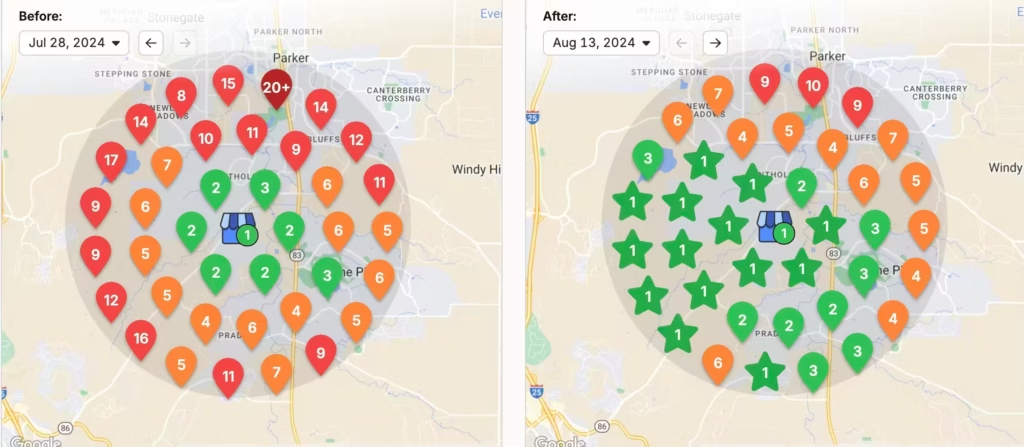
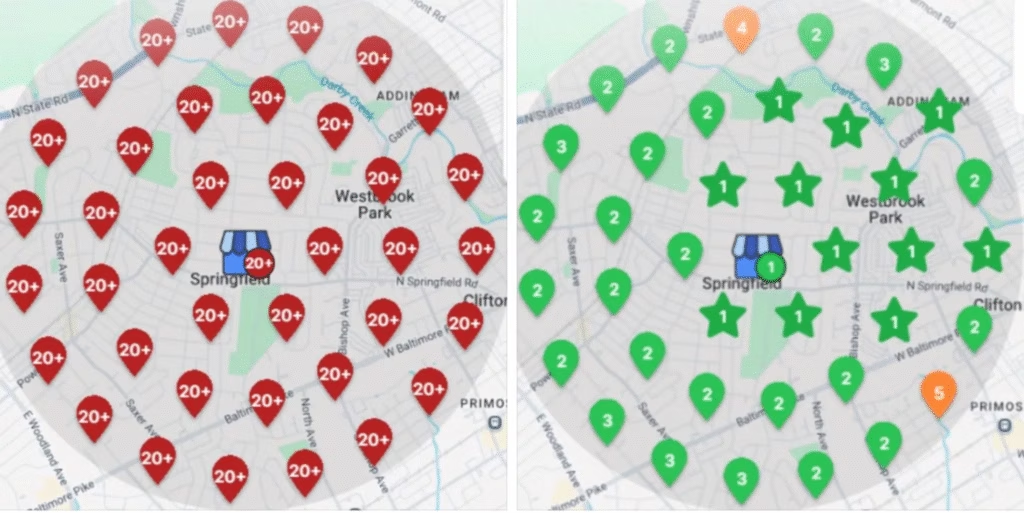
“We’ve recently helped a remodeling business go from being completely unranked to holding the top spot on Google Business Profiles! Through targeted strategies and relentless optimization, we made sure they stood out to the right audience at the right time. Imagine what being #1 could do for your business: more leads, more calls, and more projects.”

Two local map ranking screenshots for Dan Kelly.
Picture of Clayton Joyner

Clayton Joyner

@clayton_joyner

“Hey guys!!! Big shout out! I took over a brand new site with zero history and this company literally shared the same brand name as a million nearby competitors. We have crushed! This is with ZERO backlink purchasing! I am evangelizing.”

Picture of Abdul Ahmed

Abdul Ahmed

@abdul_ahmed

“Connecting sites in Search Atlas to GSC GBP and GA pulls in so much usable and easy to understand data it’s an absolute goldmine. Never seen anything like it.”

Start for Free
Start for Free