This is Part 2 of our comprehensive Ahrefs review series. In this article, we analyze all 36 Ahrefs features in detail, including Site Explorer, Keywords Explorer, Content Gap, Brand Radar, and 32 more tools. For pricing and verdict, see Part 1. For cons analysis, see Part 3.
What are the Best Ahrefs Features?
Ahrefs provides a suite of SEO tools that cover search engine optimization and digital marketing efforts.
The 36 Ahrefs features are organized below by category with a searchable table for quick reference.
| Number | Feature Name | Type of Feature | Function |
| 1 | Ahrefs Brand Radar | AI Visibility Tool | Tracks brand presence in AI search results |
| 2 | Ahrefs Site Explorer | Domain Analysis Tool | Analyzes domain SEO performance and backlink profiles |
| 3 | Ahrefs Keywords Explorer | Keyword Research Tool | Finds keyword opportunities with search volume and difficulty metrics |
| 4 | Ahrefs Rank Tracker | Position Monitoring Tool | Tracks keyword rankings across locations and devices |
| 5 | Ahrefs Content Explorer | Content Analysis Tool | Discovers high-performing content and backlink opportunities |
| 6 | Ahrefs Site Audit | Website Audit Tool | Identifies and fixes technical SEO issues |
| 7 | Ahrefs Backlink Analysis | Backlink Tool | Shows all backlinks pointing to a domain |
| 8 | Ahrefs Alerts | Monitoring Tool | Sends notifications about backlink and ranking changes |
| 9 | Ahrefs AI Content Helper | AI Writing Tool | Assists with SEO content creation and optimization |
| 10 | Ahrefs Batch Analysis | Bulk Analysis Tool | Evaluates SEO metrics for up to 200 URLs simultaneously |
| 11 | Ahrefs Traffic Potential | Traffic Estimation Feature | Shows total organic traffic potential for target keywords |
| 12 | Ahrefs Daily Backlink Growth Tracking | Backlink Monitoring Feature | Tracks backlink changes with 12-hour updates |
| 13 | Ahrefs Broken Link Building | Link Opportunity Tool | Finds broken pages for link reclamation strategies |
| 14 | Ahrefs User-Friendly Interface | Design Feature | Provides intuitive navigation and clear data visualization |
| 15 | Ahrefs Customer Support | Support System | Offers multi-channel support via chat, email, and documentation |
| 16 | Ahrefs PPC Features | Advertising Intelligence Tools | Analyzes competitor paid search campaigns and budgets |
| 17 | Ahrefs Domain Comparison | Benchmarking Tool | Compares SEO metrics across multiple competitor domains |
| 18 | Ahrefs Content Gap | Keyword Gap Analysis | Identifies keywords competitors rank for but you don’t |
| 19 | Ahrefs Internal Linking Suggestions | Technical SEO Tool | Recommends optimal internal link placements automatically |
| 20 | Ahrefs Web Analytics | Website Tracking Tool | Provides privacy-focused analytics without personal data collection |
| 21 | Ahrefs Customizable SEO Audits | Audit Configuration Feature | Allows custom configuration of SEO issue tracking |
| 22 | Ahrefs Social Media Tools | Social Management Feature | Plans and schedules posts across multiple platforms |
| 23 | Ahrefs Reporting Tools | Dashboard Feature | Creates custom reports and automated performance dashboards |
| 24 | Ahrefs AI Detector | Content Analysis Tool | Identifies and rewrites AI-generated text |
| 25 | Ahrefs SEO Toolbar | Browser Extension | Provides instant SEO metrics for any webpage |
| 26 | Ahrefs Historical Ranking Tracking | Ranking History Feature | Shows keyword position changes over time |
| 27 | Ahrefs Global Competitor Analysis | International SEO Tool | Compares SEO performance across countries and languages |
| 28 | Ahrefs Subfolder Traffic Analysis | Site Section Analysis | Measures organic traffic for specific website subfolders |
| 29 | Ahrefs Content Marketing Tools | Content Suite | Integrated toolkit for content research, creation, and optimization |
| 30 | Ahrefs URL Details Panel | Page Analysis Feature | Shows comprehensive technical issues for individual URLs |
| 31 | Ahrefs Custom Filters and Presets | Efficiency Feature | Saves frequently used search criteria for quick access |
| 32 | Ahrefs Enterprise Features | Advanced Management Suite | Provides API access, SSO, and advanced user management |
| 33 | Ahrefs Big Data Capabilities | Data Infrastructure | Powers analysis with massive, continuously updated datasets |
| 34 | Ahrefs Podcast Linking Opportunities | Link Building Strategy | Identifies podcast guest opportunities for backlinks |
| 35 | Ahrefs Image Attribution | Link Reclamation Feature | Secure proper attribution links for your images |
⚡ Core Features: Head-to-Head Comparison
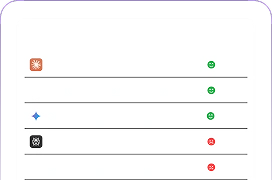
Side-by-side analysis of Ahrefs vs Search Atlas across 7 essential SEO tools. Search Atlas wins 5/7 when considering price-to-value ratio and implementation capabilities.
Verdict: Search Atlas Wins 5/7 Core Features
When considering price-to-value ratio, implementation capabilities, and included features vs costly add-ons, Search Atlas delivers superior ROI for most SEO workflows.
1. Ahrefs Brand Radar
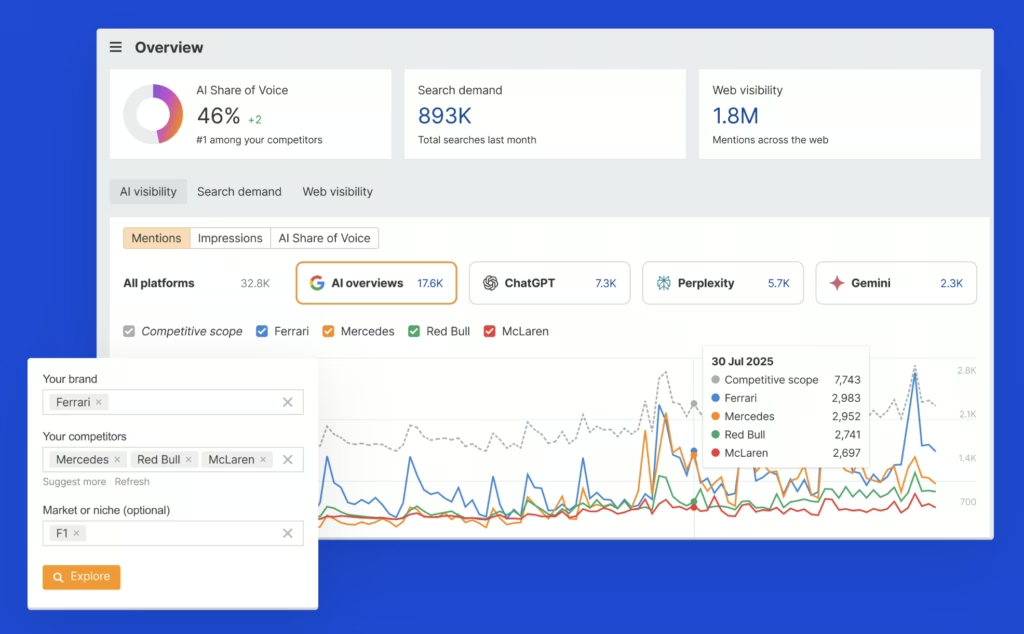
Ahrefs Brand Radar tracks brand mentions across AI platforms (ChatGPT, Gemini, Perplexity) but costs $199/month extra—Search Atlas includes equivalent brand monitoring at no additional charge.
What does the Brand Radar feature of Ahrefs do? Brand Radar is a unique feature of Ahrefs because it bridges SEO, AEO (Answer-Engine-Optimization), and AI visibility in one dashboard. Marketers use Brand Radar to monitor branded search demand, benchmark visibility against competitors, and uncover opportunities to improve their brand’s presence in AI-generated answers, search results, and web citations.
How does the Ahrefs Brand Radar track brand share of voice and identify content gaps? Ahrefs Brand Radar gives access to the AI visibility database with over 100 million tracked prompts across major AI platforms. It clusters AI prompts by topic, tracks brand share of voice, and identifies gaps in content or citations.
How does the Brand Radar by Ahrefs work? Brand Radar by Ahrefs works by collecting AI answers, branded search volumes, and online mentions from five core indexes. It visualizes AI share of voice, web citations, and branded keyword trends, so users are able to react to shifts in perception and fill brand gaps.
Teams are able to add custom prompts to track how LLMs answer questions about their brand and monitor performance against competing brands in real time.
2. Ahrefs Site Explorer
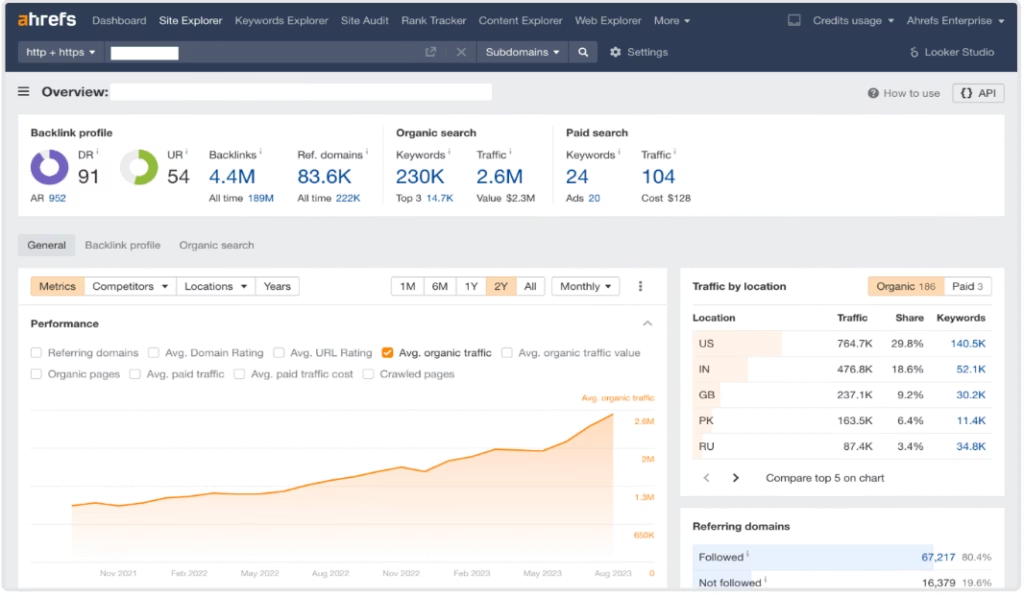
Ahrefs Site Explorer provides comprehensive backlink analysis with 43 trillion links, though Search Atlas offers comparable depth at 23% lower cost with superior AI-driven insights.
Ahrefs Site Explorer Tool performs backlink analysis by showing live backlinks, broken links, referring domains, anchor texts, and internal linking structure. The Ahrefs Site Explorer feature enables users to track new and lost backlinks to gauge link-building efforts and analyze competitor link strategies. Site Explorer by Ahrefs shows organic search metrics such as monthly traffic, top-ranking keywords, and keyword position changes over time.
Ahrefs Site Explorer Tool offers limited visibility into competitor paid search strategies, including competitor ad keywords and sample ad copy. The Ads Position History chart attempts to highlight trends in paid traffic, but the visibility into PPC data is not as comprehensive as that of dedicated ad intelligence platforms.
Features like historical comparisons and the Outgoing Links section enables users to understand the content and linking shifts, although practical takeaways often require additional manual interpretation.
To analyze a website using the Ahrefs Site Explorer Tool, enter a domain or URL into the search bar and choose “domain” or “URL” mode.
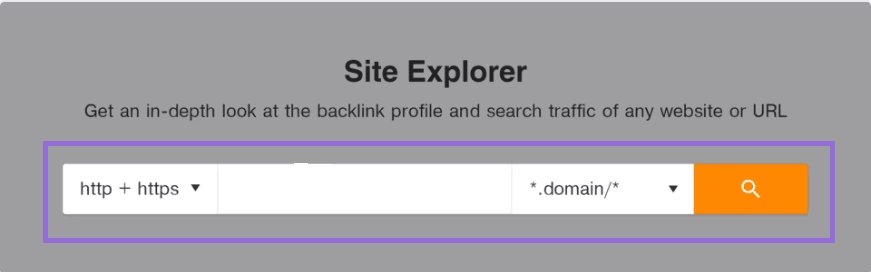
You then review the overview section to get insights into the backlink profile, organic search, and metrics of your website.
3. Ahrefs Keywords Explorer
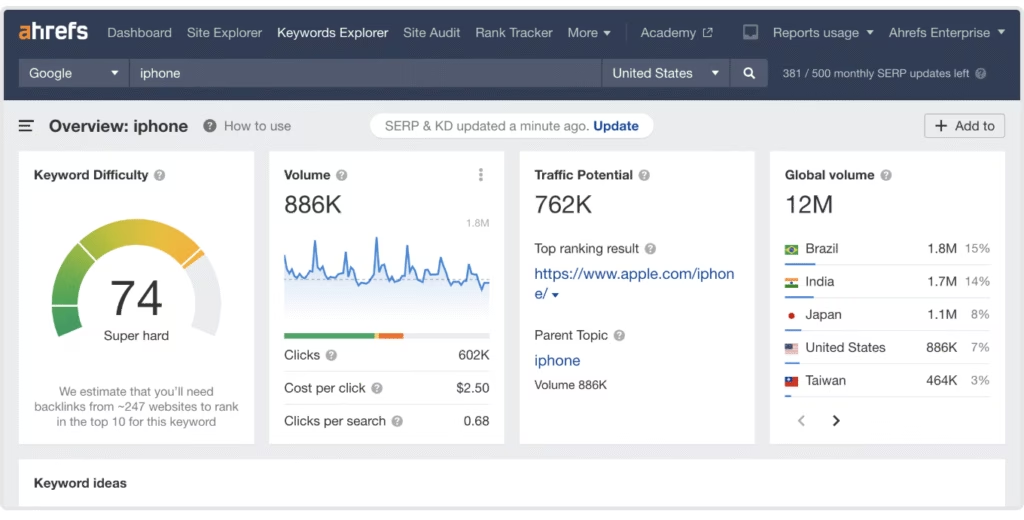
Ahrefs Keywords Explorer delivers keyword research from a 26.4 billion keyword database, but its credit quota system on lower-tier plans makes heavy research prohibitively expensive compared to Search Atlas’s unlimited approach.
What keyword metrics does the Ahrefs Keywords Explorer Tool provide? Ahrefs Keywords Explorer delivers common SEO metrics such as search volume, keyword difficulty, traffic potential, clicks, CPC, and parent topic. Ahrefs Keywords Explorer Tool pulls keyword data from an extensive keyword database, which gives users a reasonably broad keyword set. Users get metrics like search volume, clicks, and keyword difficulty based on backlink data.
What information does backlink-based keyword difficulty not fully capture for technical SEO planning? The inclusion of backlink-based keyword difficulty is useful for technical SEO planning, but it does not fully capture user intent or on-page relevance. The metrics traffic potential and clicks per search predict traffic impact, but real-world results often depend on external factors not captured by the tool.
What information Ahrefs keyword clustering does not capture in the keyword clusters? Ahrefs keyword clustering groups related keywords by semantic similarity and SERP overlap, helping users target multiple terms with one page. Ahrefs keyword clustering shows cluster size, search volume, and keyword difficulty, but it doesn’t always capture differences in user intent.
What information doesn’t Ahrefs trend tracking explain when it highlights seasonal spikes? Ahrefs trend tracking tracks keyword popularity over time with trendlines, search volume history, and traffic shifts. Ahrefs trend tracking highlights seasonal spikes and ranking opportunities but doesn’t explain cultural or external drivers behind changes.
How does the Ahrefs Keyword Tool data compare to niches or platform-specific tools? The Ahrefs Keyword Tool offers regional and device-based data, however the feature is not granular as that provided by niches or platform-specific tools (Search Atlas, Semrush, and SE Ranking).
What features does Ahrefs Keywords Explorer offer to analyze the SERP? Ahrefs Keywords Explorer includes SERP analysis to offer context, such as showing top-ranking pages, backlink counts, and domain strength. The position history and SERP volatility features detect ranking fluctuations, but interpreting this data effectively often requires a deeper understanding of market dynamics.
The tool includes ad history data, and it offers a snapshot of how long keywords have been targeted in paid campaigns. This data lacks the depth of tools focused solely on paid advertising.
To conduct keyword research using the Ahrefs Keywords Explorer Tool, enter a seed term into the field.
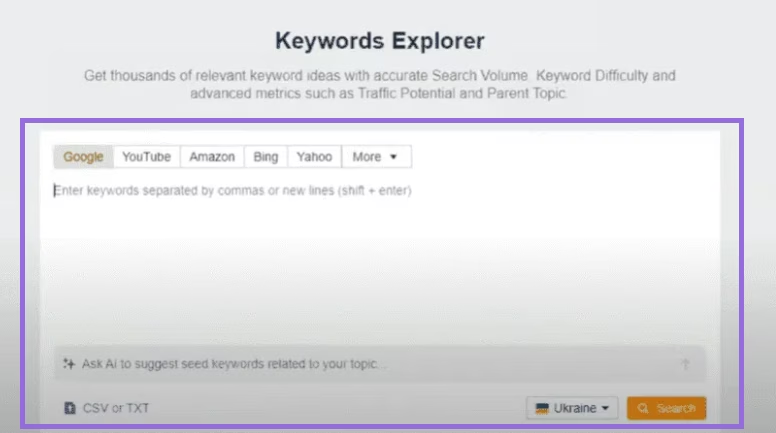
The tool will then generate keyword ideas across matching terms, matching phrases, related questions, and search suggestions, along with metrics such as keyword difficulty, search volume, and traffic potential.
4. Ahrefs Rank Tracker
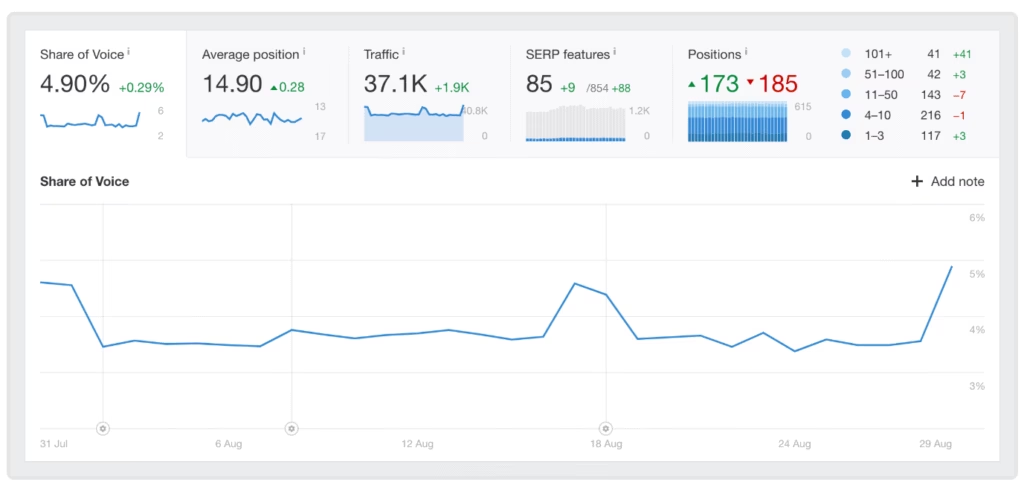
Ahrefs Rank Tracker monitors keyword positions but restricts users to 750-5,000 keywords depending on plan ($129-$449/month), while Search Atlas offers unlimited keyword tracking at $99/month.
What are the limitations of the Ahrefs Rank Tracker? Ahrefs Rank Tracker covers ranking data from over 190 countries, but the accuracy of localized results depends on niche and language coverage. Users are not able to visualize performance of the keywords with interactive graphs that show ranking history over time for selected keywords.
What metrics does the Ahrefs Rank Tracker Tool report on? Ahrefs Rank Tracker Tool reports on metrics such as share of voice, average position, traffic trends, and position distribution. The figures are approximations and do not reflect real-time shifts, especially in volatile SERPs.
How does Ahrefs Rank Tracker track competitor data? The Competitors Overview section in Ahrefs Rank Tracker enables users to track up to ten competitors, comparing rankings, traffic, and visibility in SERP features. Competitive data is limited to the keywords entered, which restrict deeper analysis without an extensive setup.
What information does the Ahrefs Rank Tracker provide about SERP features and content gaps? Ahrefs Rank Tracker includes features to identify SERP features, such as featured snippets, site links, and image packs, and shows which domains occupy those positions. It identifies content gaps, but interpreting this data requires strategic context and content alignment efforts that exceed what the tool provides.
How do the Ahrefs Rank Tracker features for keyword grouping and reporting compare to other enterprise solutions? Ahrefs Rank Tracker tagging and segmentation features allow users to group keywords by topic, location, or business objective. This grouping enables organized reporting, but the interface becomes complex for those managing large-scale projects.
Ahrefs Rank Tracker has a feature to automate and schedule reports weekly or monthly. The customization of these reports is limited compared to flexible enterprise solutions (Search Atlas, Semrush, SE Ranking).
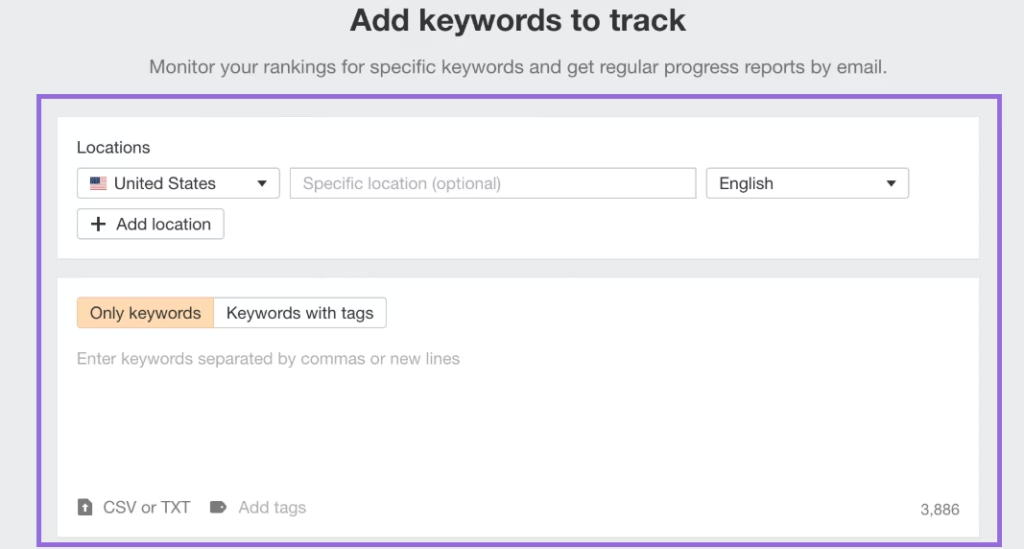
The Ahrefs Rank Tracker feature tracks the keywords positions and changes over time now. To use the ahrefs rank tracker feature, firstly input or import a list of keywords, secondly add multiple countries for each keyword and thirdly list the competitor URLs.
5. Ahrefs Content Explorer
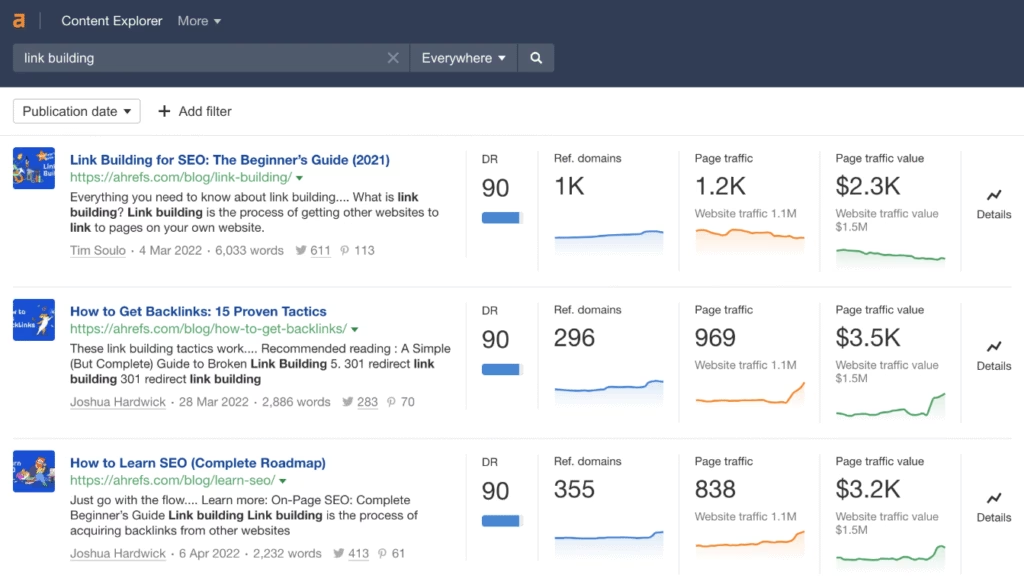
Ahrefs Content Explorer identifies high-performing content opportunities but lacks integrated content creation—Search Atlas combines research with AI writing tools in one platform.
How does the Ahrefs Content Explorer find content that has gained visibility through backlinks, social shares, or organic traffic? Ahrefs Content Explorer adds millions of new pages daily and refreshes metrics for hundreds of millions more. Users search by keywords or topics to find content that has gained visibility through backlinks, social shares, or organic traffic.
What factors influence the replication of successful content from Ahrefs Content Explorer? Ahrefs Content Explorer content ideation highlights pages that historically perform well. This feature is useful for identifying broad trends, but success with replication depends on the competitiveness of the topic and the ability of the user to offer unique value.
How do users find low-competition content using the Ahrefs Content Explorer? Ahrefs Content Explorer attempts to detect content gaps where popular topics lack depth because to interpret these keywords gaps accurately requires human judgment and industry insight. Ahrefs Content Explorer enables users to filter results to find low-backlink, high-traffic content, which indicates lower competition.
What does the Ahrefs content explorer list? The platform lists websites that frequently publish content on a given topic and functions as outreach or guest blogging targets. The quality and relevance checks of these targets need to be done manually.
What information does the Ahrefs Content Explorer provide that can be used for link-building strategies? Ahrefs Content Explorer includes tracking for competitor publishing frequency and highlights brand mentions without backlinks. The features of Ahrefs content explorer guide outreach, but the process of converting mentions to backlinks remains manual, and success rates vary. The tool identifies broken pages with strong backlink profiles, potentially enabling users to pursue link reclamation strategies, assuming outreach is done strategically.
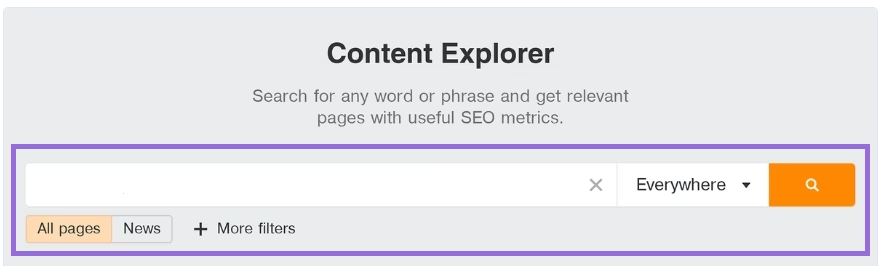
Enter the keyword or topic into the search field to use the Content Explorer feature of Ahrefs. The tool will then generate a list of top-performing pages that include that keyword, along with the metrics of the Content Explorer feature of Ahrefs (Referring Domains, Organic Traffic, Domain Rating).
6. Ahrefs Site Audit
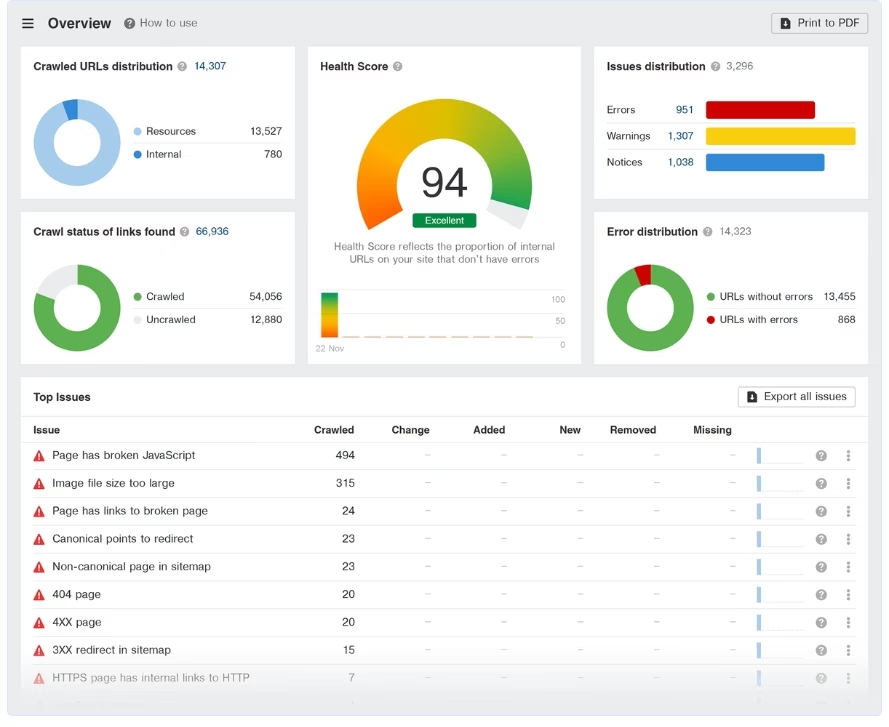
Ahrefs Site Audit identifies 170+ technical SEO issues but requires manual fixes, whereas Search Atlas OTTO engine automatically deploys corrections, saving 10-20 hours weekly.
How do the features of the Ahrefs site audit compare to the features of specialized auditing platforms? The Ahrefs site audit feature covers a broad range of factors (crawl errors, page speed, and on-page SEO issues). The depth of analysis does not match specialized auditing platforms with advanced diagnostics (Search Atlas, Screaming Frog SEO Spider, DeepCrawl).
What is the function of the Ahrefs Site Audit? Ahrefs Site Audit categorizes issues by type and severity, which streamlines prioritization. The Site Audit assigns a health score to websites, which offers a high-level view of site performance. Charts and trend reports identify recurring problems, but acting on them requires external tools (Search Atlas, Screaming Frog SEO Spider, PageSpeed Insights), or manual follow-up.
How does the Ahrefs Site Audit improve website architecture? Ahrefs Site Audit provides internal linking suggestions and detects crawl-depth issues, which improves the website architecture. The tool supports JavaScript rendering to audit modern websites effectively. The results vary based on the website complexity. The export and integration options of the Ahrefs Site Audit function in existing workflows, but they remain limited because the Ahrefs Site Audit does not offer advanced functionalities (automated issue tracking, API connectivity, automated reporting).
How do the Ahrefs Site Audit new additions streamline issue resolution? The recent additions to Ahrefs Site Audit (Always-on Audits, IndexNow integration, and the Patches feature) streamline issue resolution by enabling faster fixes. The effectiveness of the recent Ahrefs Site Audit updates depends on the technical capacity of the user using the feature and how well the platform integrates with the content management system of the user.
Firstly add the site homepage and project name, secondly ahrefs site audit crawls the site, and thirdly the Ahrefs provides an overview dashboard with the website health score and issues.
7. Ahrefs Backlink Analysis (Ahrefs Backlink Profile Tool)
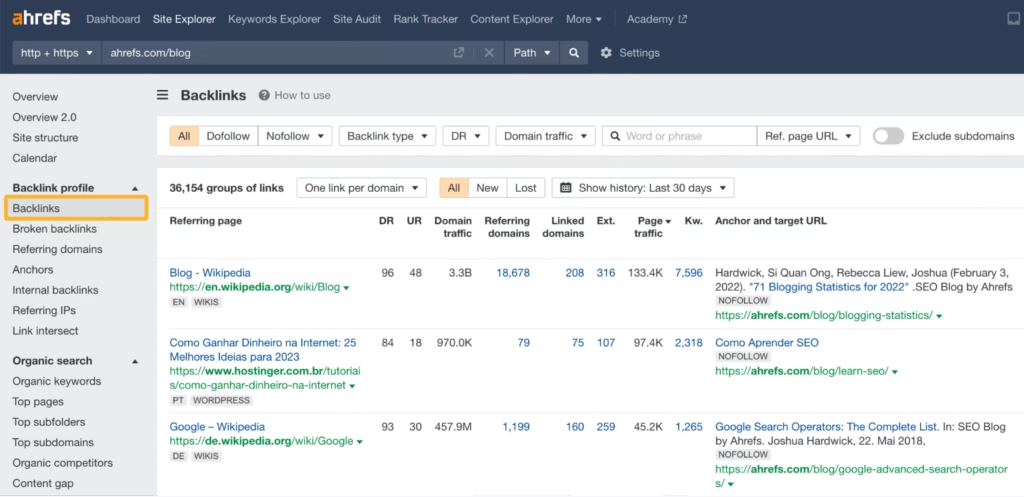
Ahrefs Backlink Analysis excels at competitor link profiling but provides research-only data—Search Atlas adds actionable outreach automation and link reclamation workflows that Ahrefs lacks.
How does the Ahrefs Backlink Profile Tool organize and filter backlink data? The Ahrefs Backlink Profile Tool organizes backlink data by referring page, anchor, target URL, and link attribute, allowing SEOs to filter for dofollow, nofollow, UGC (User-Generated Content), or sponsored links. Users apply filters such as domain traffic, Domain Rating (DR), or link type to focus on high-quality or high-impact backlinks, which supports outreach planning and competitive analysis.
How does the Ahrefs Backlink Profile Tool help find resource links, podcasts, and guest post opportunities? SEOs use the search and filter features to find resource links, podcasts, or guest post opportunities by searching for specific keywords in referring domains or anchors. The Ahrefs Backlink Profile Tool supports link building, competitive benchmarking, and ongoing monitoring, but strict usage limits and credit consumption restrict analysis for smaller teams.
8. Ahrefs Alerts
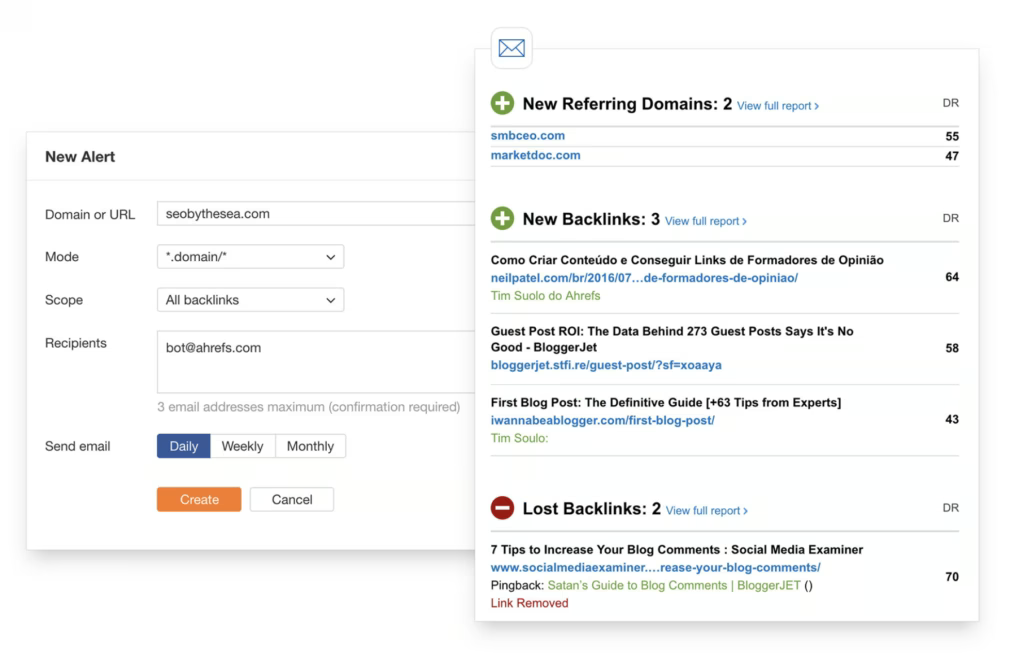
Ahrefs Alerts sends notifications for backlink and ranking changes, though the alert frequency and depth are limited on Lite plans due to credit restrictions.
How do the Ahrefs alerts function? Alerts by Ahrefs work by setting up automated monitoring for specific domains, keywords, or brand mentions. Users receive notifications when new backlinks are discovered, rankings change significantly, or competitors gain new links, which enables proactive SEO management and rapid response to opportunities.
9. Ahrefs AI Content Helper
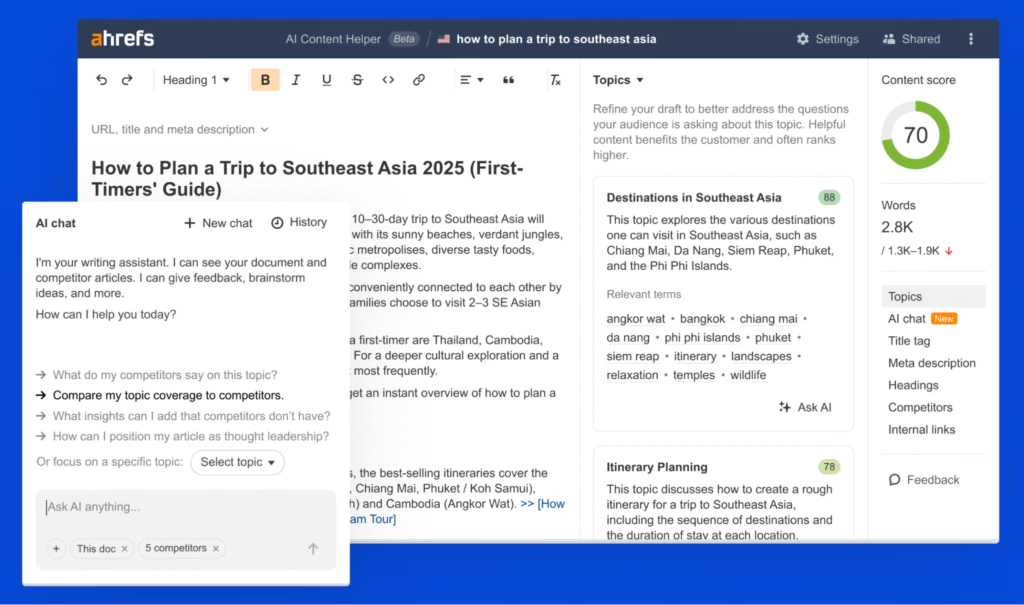
Ahrefs AI Content Helper assists with SEO content creation but costs $99/month extra and lacks the implementation capabilities of Search Atlas’s included AI engine.
How does the Ahrefs AI Content Helper tool help teams create content? Ahrefs AI Content Helper tool automates research, suggests content improvements, and enables teams to produce people-first content that meets E-E-A-T (Experience, Expertise, Authoritativeness, and Trustworthiness) standards and SEO requirements at scale.
How does the Ahrefs AI Content Helper streamline the content workflow? Ahrefs AI Content Helper use case is streamlining the content workflow (research, writing, optimization) within a unified platform. The AI Content Helper feature functions by detecting multiple search intents, scoring drafts against top-performing articles, and generating click-friendly titles and headings. It enables users to publish high-quality, search-friendly content while collaborating with team members in over 173 languages.
10. Ahrefs Batch Analysis
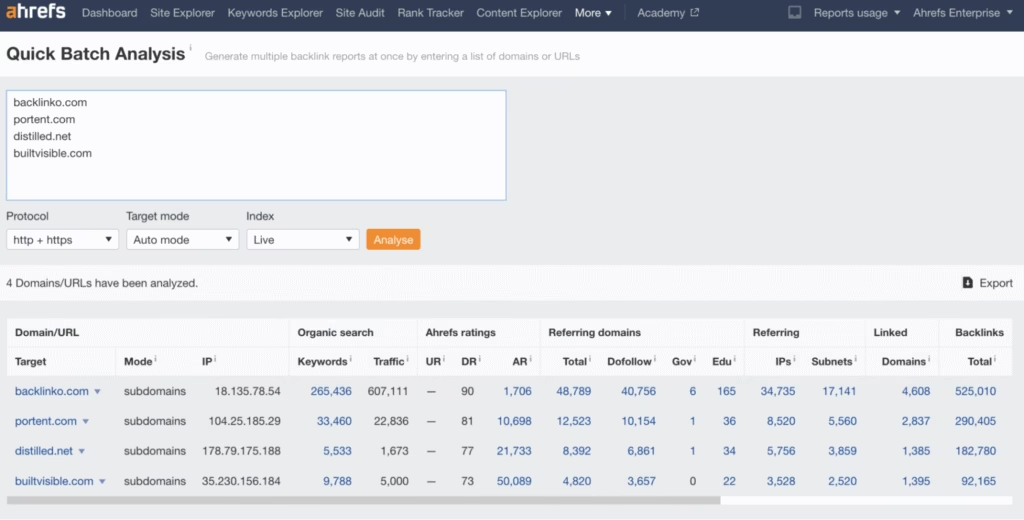
Ahrefs Batch Analysis evaluates up to 200 URLs simultaneously for SEO metrics, providing bulk efficiency for large-scale audits though credit consumption limits usage on lower-tier plans.
What does the Ahrefs Batch Analysis tool automate? Ahrefs Batch Analysis tool automates the process of gathering domain-level and page-level data (Ahrefs Rank, Domain Rating, number of referring domains, backlink count, and social signals). This saves time for SEOs working on audits or competitive research.
How does the Ahrefs Batch Analysis feature process large lists of URLs? The Ahrefs Batch Analysis feature processes large lists of URLs quickly, which enables users to compare dozens or hundreds of pages side by side without manual data entry.
How to export a CSV file using Ahrefs Batch Analysis? To use Ahrefs Batch Analysis, firstly copy and paste a list of URLs, secondly generate the metrics report instantly in-browser, and thirdly export the results as a CSV file for further analysis.
What tasks does the Ahrefs Batch Analysis tool perform? Ahrefs Batch Analysis enables backlink audits, domain prospecting, and performance benchmarking for entire site sections or competitor lists.
11. Ahrefs Traffic Potential Estimation
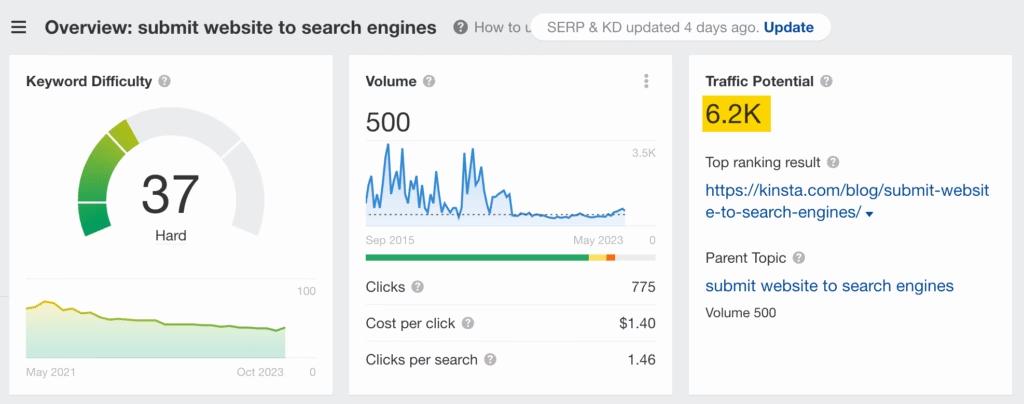
Ahrefs Traffic Potential Estimation is a metric that shows the total organic traffic received by the #1 ranking page for a target keyword from all keywords it ranks for. Ahrefs Traffic Potential Estimation tool enables users to estimate the real opportunity behind a keyword by accounting for every query that drives traffic to the top-ranking page.
The Ahrefs Traffic Potential Estimation feature is best used for keyword prioritization, as it reveals topics where a high-ranking page attracts visits from hundreds of related queries.
How does the Ahrefs Traffic Potential Estimation function? Ahrefs Traffic Potential Estimation works by summing the organic visits from all keywords sending traffic to the top page. This allows SEOs to target keywords and topics with maximum return instead of focusing only on individual search volumes.
12. Ahrefs Daily Backlink Growth Tracking
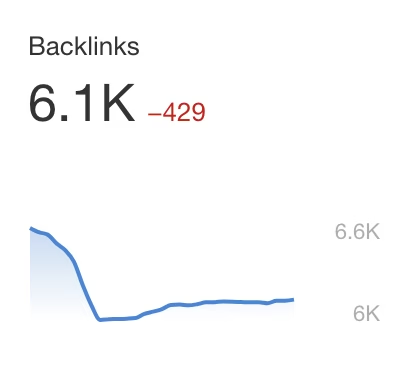
Ahrefs Daily Backlink Growth Tracking is an off-page SEO monitoring feature that shows the total number of backlinks to a target site, with updates every 12 hours and detailed change tracking over any selected period.
How does the Ahrefs Daily Backlink Growth Tracking tool use data from Site Explorer to display the latest backlink totals? Ahrefs Daily Backlink Growth Tracking tool uses data from Site Explorer to display the latest backlink totals and the delta (the difference in backlink count between the start and end date). This enables users to track link acquisition or loss trends.
What are the benefits of the Ahrefs Daily Backlink Growth Tracking feature for SEOs? The Ahrefs Daily Backlink Growth Tracking feature highlights new and lost backlinks directly in the Site Explorer Backlinks report, which enables SEOs to diagnose link-building progress and spot negative trends quickly.
This function enables regular monitoring by letting users click the metric for an in-depth breakdown of backlink changes and historical data.
13. Ahrefs Broken Link Building
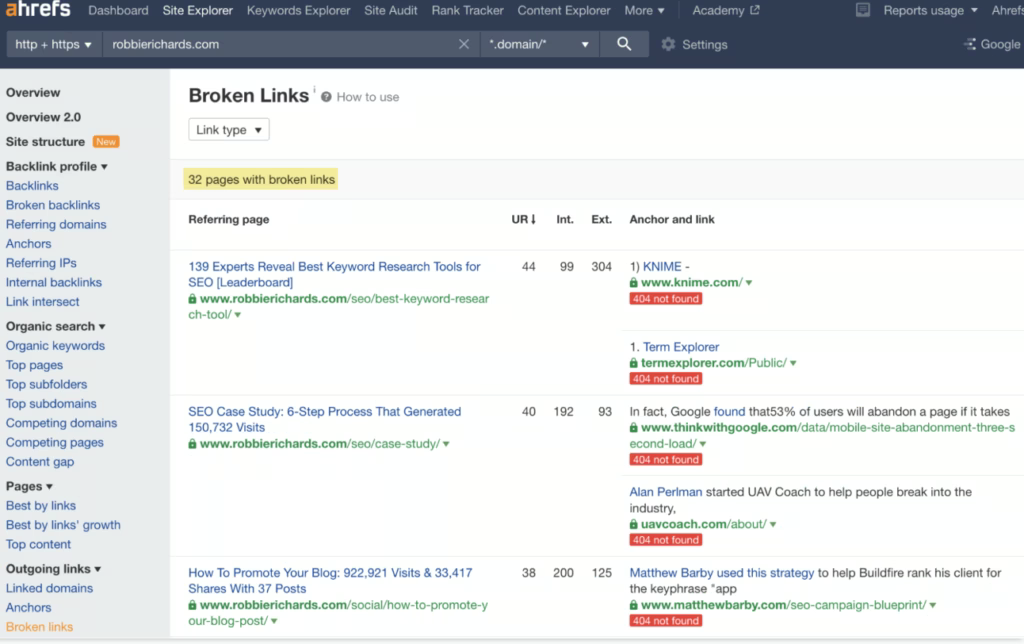
Ahrefs Broken Link Building is a link opportunity feature that finds broken pages and their referring domains (404 errors, lost link sources, and anchor context) to enable SEOs to reclaim link equity and pursue scalable off-page SEO strategies.
How does the Ahrefs Broken Link Building tool function? Ahrefs Broken Link Building tool works through reports like Broken Links, Best by Links, and Content Explorer, which reveal 404 pages, their referring domains, and the anchor context for each link.
The Ahrefs Broken Link Building feature automates the detection and analysis of broken links for competitor sites and resource pages. This streamlines the link prospecting process for SEOs focused on scalable, opportunity-driven link acquisition.
14. Ahrefs User-Friendly Interface
Ahrefs User-Friendly Interface is a design feature that provides intuitive navigation, clear data visualizations, and logical workflow organization throughout the Ahrefs platform. The Ahrefs User-Friendly Interface tool represents usability design because it makes complex SEO data accessible to users regardless of experience level.
How does the Ahrefs User-Friendly Interface function? The Ahrefs User-Friendly Interface feature functions through consistent design patterns, helpful tooltips, and logical information hierarchy. Users navigate between tools easily, understand data presentations quickly, and access advanced features without overwhelming complexity.
15. Ahrefs Customer Support
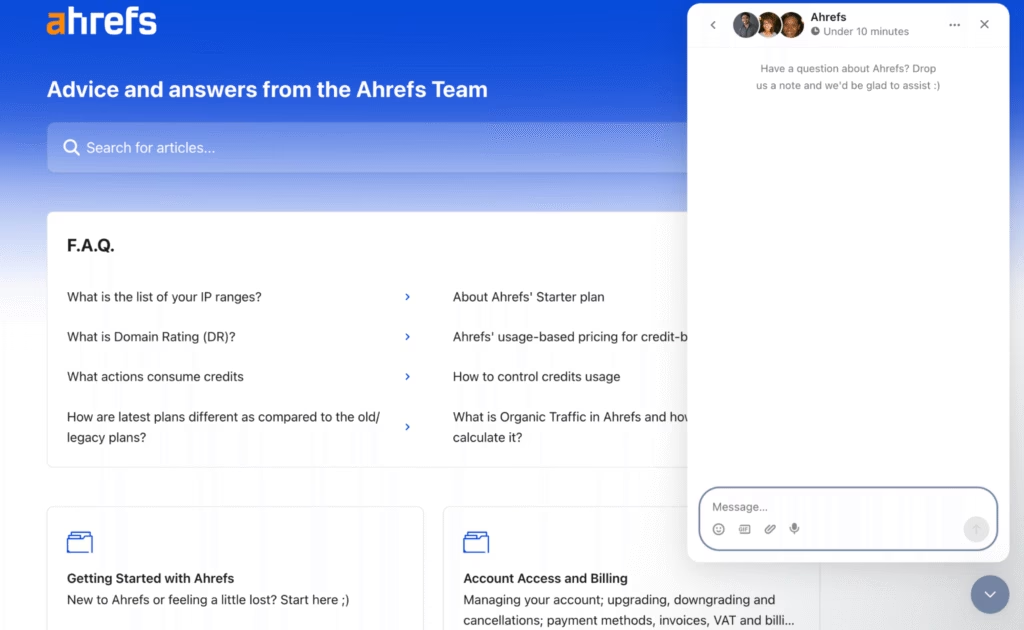
Ahrefs Customer Support is a multi-channel help system that guides users through resolving technical SEO issues, platform onboarding, and troubleshooting account or billing concerns (via live chat, email support, and detailed Help Center resources).
What are the functions of the Ahrefs Customer Support and the Ahrefs Help Center? Ahrefs Customer Support is a feature of Ahrefs because it enables users receive accurate troubleshooting, onboarding help, and tool education. Ahrefs Help Center provides a searchable database of step-by-step guides, video tutorials, and troubleshooting FAQs for every Ahrefs tool and workflow.
What are the channels for the Ahrefs Customer Support? Ahrefs Customer Support functions through three main channels. Firstly, users access the Help Center to search detailed articles covering account, billing, and technical issues. Secondly, users use live chat within the dashboard to get immediate answers from support agents during business hours. Thirdly, email support addresses complex or account-specific inquiries that need personalized follow-up.
Ahrefs provides support five days a week, with limited coverage during weekends, typically a Saturday or Sunday every other week.
16. Ahrefs PPC Features
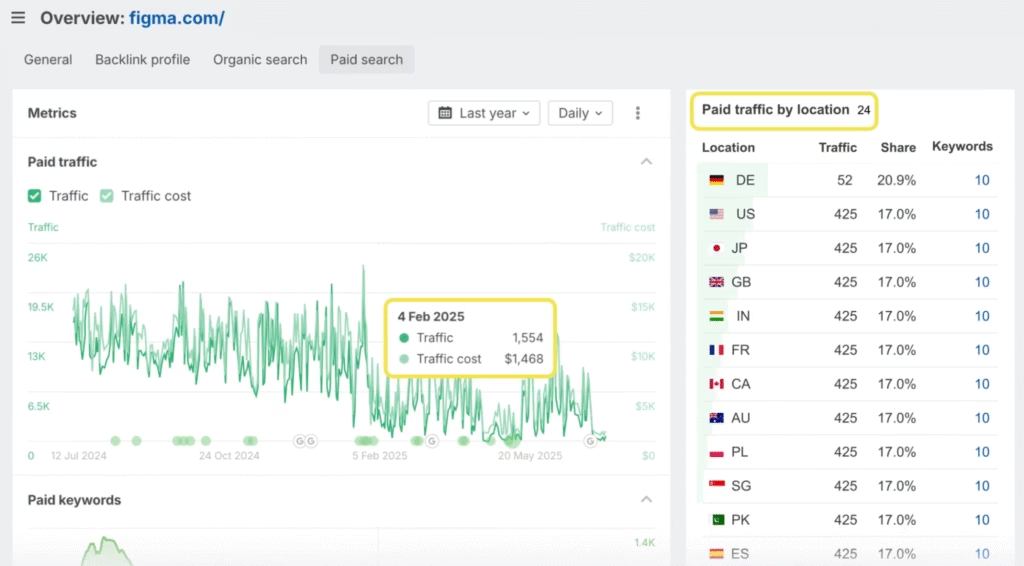
Ahrefs PPC Features are a set of competitive intelligence tools that enable advertisers to study paid search campaigns, optimize PPC budgets, and track advertising trends to improve return on ad spend.
Ahrefs AI Marketing Platform for PPC Specialists is a feature of Ahrefs to allow marketers to analyze competitor ads, discover high-performing paid keywords, and measure share of voice for any search term, directly within the same platform used for organic SEO research.
Ahrefs PPC features fall into 3 main categories. The types of Ahrefs PPC features are listed below.
- PPC Strategy Analysis. Review the competitive search landscape, uncover ad copy and creatives that drive results, and spot gaps to outbid competitors.
- PPC Budget Optimization. Identify which landing pages and keywords generate paid traffic for competitors, compare CPCs and ad positions, and shift spend to winning tactics.
- Advertising Trend Tracking. Detect seasonal paid keywords, monitor ad activity over time, and measure share of voice to adapt campaigns before competitors react.
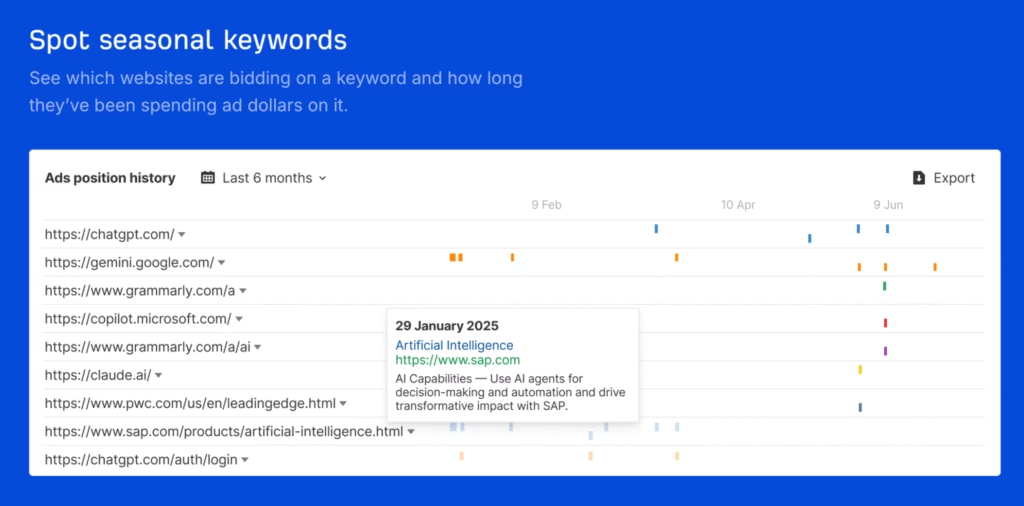
Ahrefs PPC features function by aggregating paid keywords, ads, and landing page data. Users enter a competitor or target keyword, then review the paid keywords, ad copy, ad position history, and paid vs. organic performance.
What are the purposes of the Ahrefs PPC tools? Ahrefs PPC tools are designed to reverse-engineer successful campaigns, avoid costly mistakes, and allocate PPC budgets for maximum impact – although users across the web report inaccuracy of the PPC data Ahrefs provides.
17. Ahrefs Domain Comparison
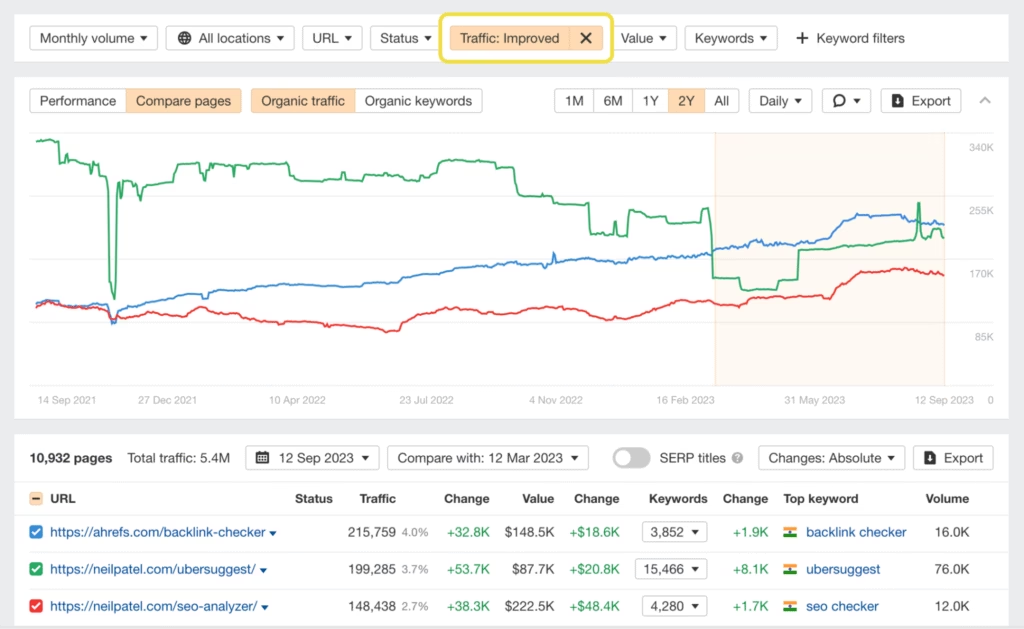
Ahrefs Domain Comparison is a competitor benchmarking tool that evaluates technical, content, on-page, and off-page SEO signals across multiple domains (including backlink gaps, organic traffic, and keyword portfolio overlap) for advanced market analysis.
What makes the Ahrefs Domain Comparison a valuable Ahrefs feature? Ahrefs Domain Comparison is a valuable Ahrefs feature because it identifies gaps in backlink profiles, discovers untapped keywords, and benchmark traffic, which gives marketers a clear view of where competitors are winning or losing.
Ahrefs Domain Comparison works through several integrated tools listed below.
- Ahrefs Portfolios groups up to 10 competitor domains and shows aggregated trends for referring domains, organic and paid traffic, top-performing pages, and backlink growth.
- Ahrefs Batch Analysis pulls SEO metrics for up to 200 domains at once, and displays key stats like Ahrefs Rank, Domain Rating, referring domains, backlinks, and social signals.
- Ahrefs Organic Competitors Report visualizes the main competitors of a domain, and maps their organic traffic, traffic value, and total pages.
- Ahrefs Content Gap Tool identifies keywords that multiple competitors rank for but your domain does not, and shows new content opportunities.
Users input a set of domains, then view side-by-side charts, tables, and lists of key competitive SEO metrics. The domain comparison process supports advanced benchmarking, reveals actionable gaps, and prioritizes new SEO and content strategies.
18. Ahrefs Content Gap
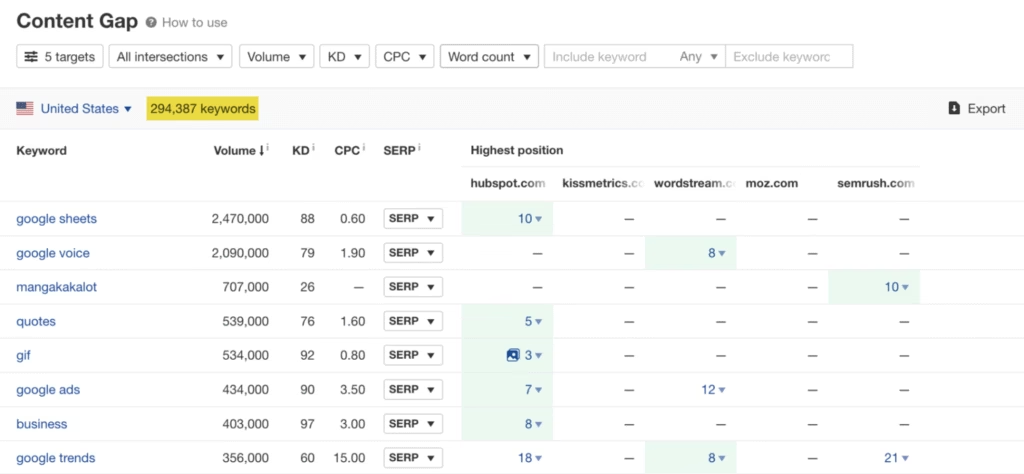
Ahrefs Content Gap is a keyword analysis tool that uncovers topics and queries competitors rank for but your site does not (displaying missing keywords, ranking URLs, and search volumes) to strengthen content SEO and on-page keyword targeting strategies.
What does the Content Gap feature of Ahrefs do? Content Gap is a feature of Ahrefs to enable marketers to expand their keyword portfolio, identify missed opportunities, and close the gap between their site and top-ranking competitors. Content Gap by Ahrefs compares the entire keyword set of one or more competitor domains with your domain and outputs a list of keywords that only the competitors rank for. Users filter results to show keywords ranked by any, a set number, or all competitors, which allows for tailored opportunity discovery.
What is the process for using the Ahrefs Content Gap tool? The process for using Ahrefs Content Gap includes three main steps. Firstly, enter your own domain and select one or more competitor domains. Secondly, run the analysis to compare the keyword footprints. Thirdly, filter the results by criteria such as position, volume, or the number of competitors ranking, then export a prioritized list of target keywords.
What does the content gap analysis from Ahrefs enable sites to do? The Ahrefs content gap analysis (competitor input, analysis, and filtering) enables users to compare their domain or specific URLs against competitors to uncover keywords they rank for but the user’s site does not. The Ahrefs content gap analysis highlights overlapping keywords that represent proven traffic opportunities by inputting multiple competitor sites.
19. Ahrefs Internal Linking Suggestions
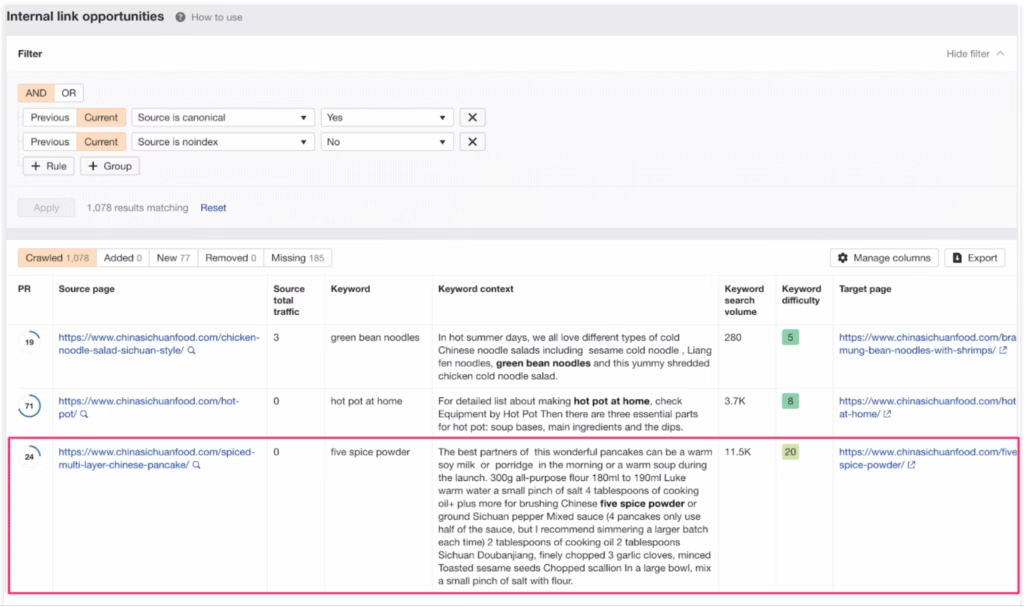
Ahrefs Internal Linking Suggestions is an automated tool that improves technical SEO and on-page SEO by analyzing keyword relevance across site pages and recommending optimal internal link placements (such as anchor text matches, source pages, and target URLs) to strengthen site structure and pass authority efficiently.
Why does Ahrefs include the internal linking suggestions feature? Ahrefs Internal Linking Suggestions feature is part of Ahrefs because internal links boost crawlability, consolidate topical signals, and elevate important pages, all of which directly impact rankings and user experience.
How does the Ahrefs Internal Linking Suggestions tool work? Ahrefs Internal Linking Suggestions analyzes the top 10 keywords each page ranks for and scans the site for those keyword mentions on other pages. The tool then recommends adding internal links from those source pages to the relevant target pages using contextually matched anchor text.
What columns are in the Ahrefs internal linking report and what do the columns in the report show? The main columns in the report include the source page (where the internal link should be placed), the keyword (the phrase to use as anchor text), and the target page (the page to receive the internal link). The keyword context column shows exactly where the keyword appears in the source content.
Ahrefs Internal Linking Suggestions works in three steps. Firstly, run a fresh crawl with Site Audit; secondly, open the Link Opportunities tool; and thirdly, review the suggestions to add new internal links.
20. Ahrefs Web Analytics
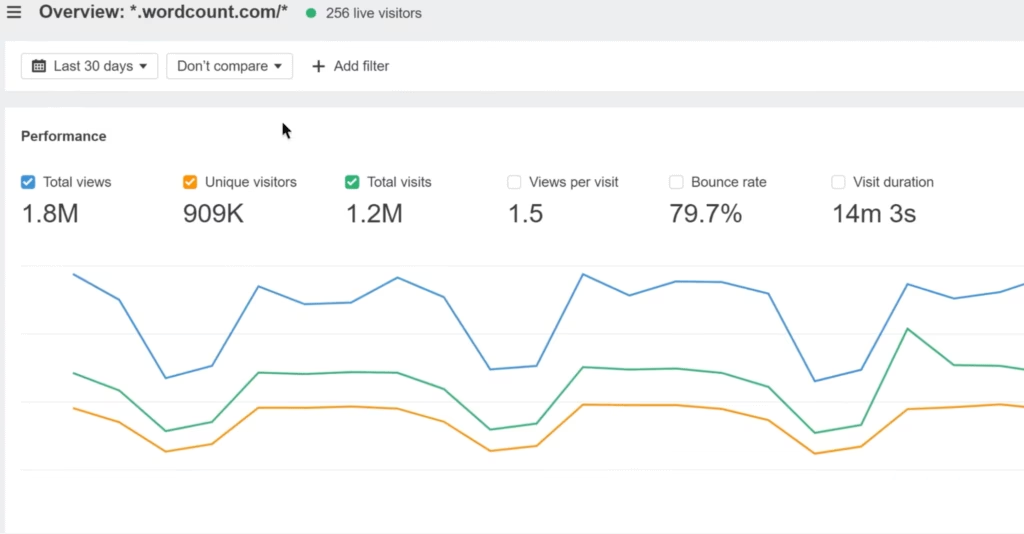
Ahrefs Web Analytics is a privacy-focused website tracking tool that supports technical, on-page, and content SEO by providing real-time data on user behavior, traffic sources, and AI bot visits (such as live event tracking, outbound link clicks, and conversion paths). Ahrefs Web Analytics provides focused metrics without collecting personal data, and it offers a lightweight 2 KB script.
What capabilities does the web analytics by Ahrefs give site owners? Web Analytics by Ahrefs enables site owners to monitor SEO wins, analyze user journeys, capture outbound links, and detect visits from AI chatbots such as ChatGPT and Perplexity.
What are the features and setup for Web Analytics by Ahrefs? The core features of Ahrefs Web Analytics include privacy compliance, zero cookies, unlimited historical data, and fast, simple setup. Install the JavaScript snippet on the site, confirm the installation, and then access the live data to start with Web Analytics by Ahrefs.
Ahrefs Web Analytics is free for up to 1 million events per month for verified sites, with scalable add-ons available for higher traffic.
21. Ahrefs Customizable SEO Audits
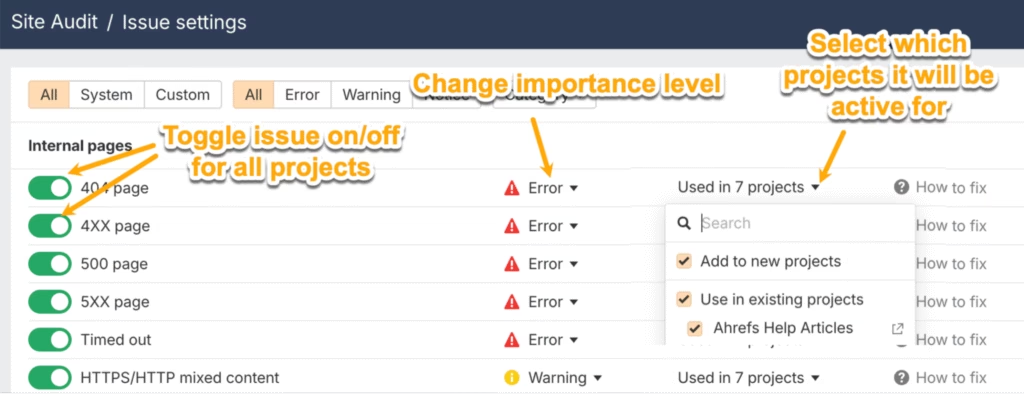
Ahrefs Customizable SEO Audits is a technical and on-page SEO feature that allows users to configure, prioritize, and toggle over 100 pre-set SEO issues at both global and project levels. The customizable SEO audit system in Ahrefs Site Audit gives full control over which issues are tracked, their importance (Error, Warning, Notice), and whether each issue impacts the overall Health Score metric.
How does Ahrefs allow users to customize SEO audits? Customizable SEO audits in Ahrefs work by letting users enable or disable specific checks and adjust their priority, which enables audits to align with unique site needs, compliance, and risk tolerance.
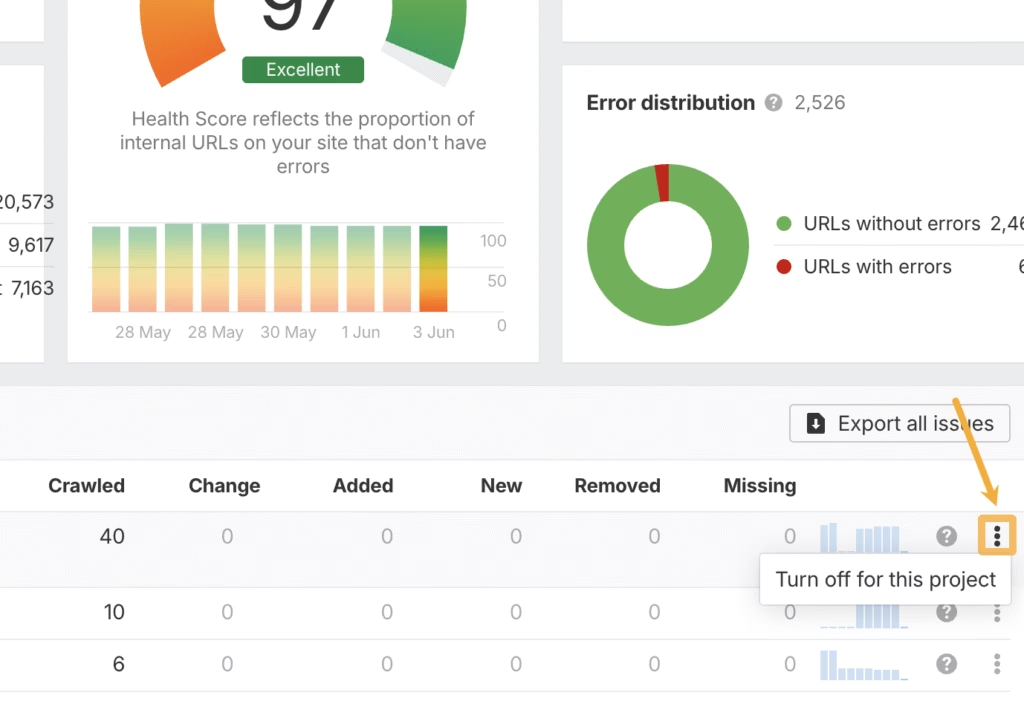
The flexibility to create custom audit issues and modify default settings in Ahrefs Site Audit exists to enable actionable, relevant, and accurate reporting from every crawl. Customization supports better prioritization of fixes, relevant tracking, and clear communication between teams and stakeholders.
22. Ahrefs Social Media
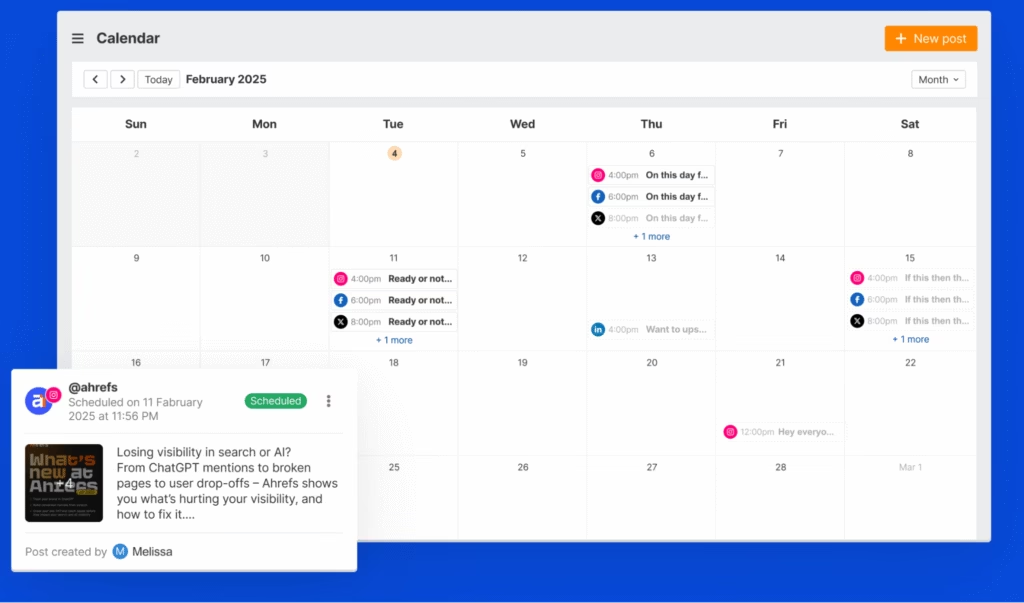
Ahrefs Social Media Tools are content and off-page SEO features that plan, schedule, and optimize posts across multiple platforms (enabling calendar-based publishing, engagement tracking, and AI-assisted content creation) to expand reach, drive brand mentions, and acquire authoritative backlinks.
How does the Ahrefs Social Media Manager help SEOs and marketers? The Ahrefs Social Media Manager enables SEOs and marketers to amplify content distribution, boost visibility beyond search, and generate off-page signals that improve organic rankings.
How do social media marketers create and schedule content using ahrefs social media? Firstly, use the visual calendar to map and preview posts across all platforms. Secondly, drag and drop to reschedule posts and adjust timing without friction. Thirdly, leverage AI suggestions to speed up content writing, generate hashtag ideas, and craft engaging CTAs.
What benefits does the Ahrefs Social Media Manager provide for social media planning, editing, and analytics? The Ahrefs Social Media Manager interface for social media planning, editing, and analytics enables brands and agencies to save time, improve collaboration, and maximize campaign reach without switching between multiple tools.
23. Ahrefs Reporting Tool
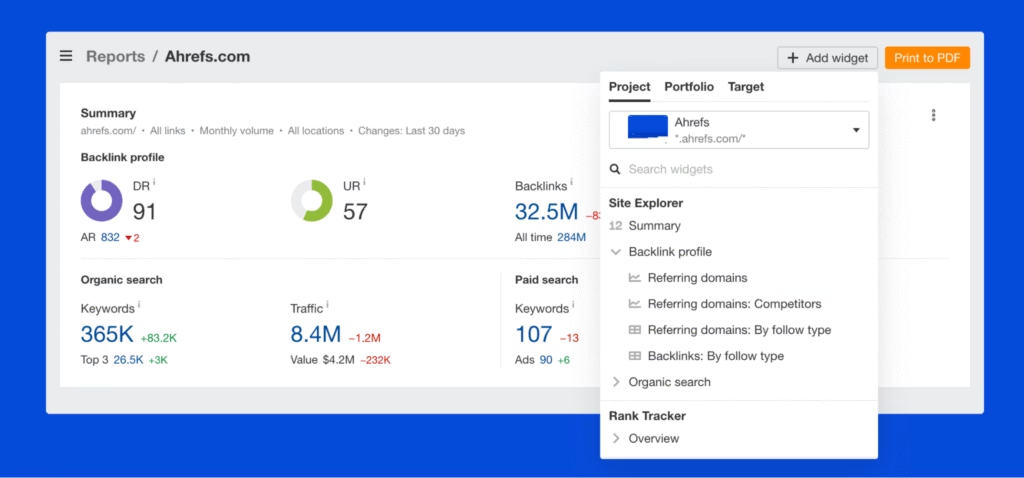
Ahrefs Reporting Tools is a platform-wide feature that consolidates data from technical, on-page, content, and off-page SEO activities (delivering custom dashboards, automated reports, and key metric tracking) to enable teams monitor performance and share insights.
The SEO Reporting Tool by Ahrefs allows users to create tailored dashboards, combine over 15 core SEO metrics, and monitor performance across projects, portfolios, and URLs.
What are the benefits of the reporting tools in Ahrefs for the marketing teams? Reporting tools in Ahrefs empower marketing teams to visualize campaign results, automate recurring reports, and deliver insights faster. Configure custom widgets to highlight organic traffic, keyword positions, or link growth. Export reports as PDFs, share with clients or colleagues, and track the impact of ongoing optimization efforts.
Comprehensive reporting with Ahrefs drives better decisions, improves transparency, and reduces time spent on manual data collection.
24. Ahrefs AI Detector
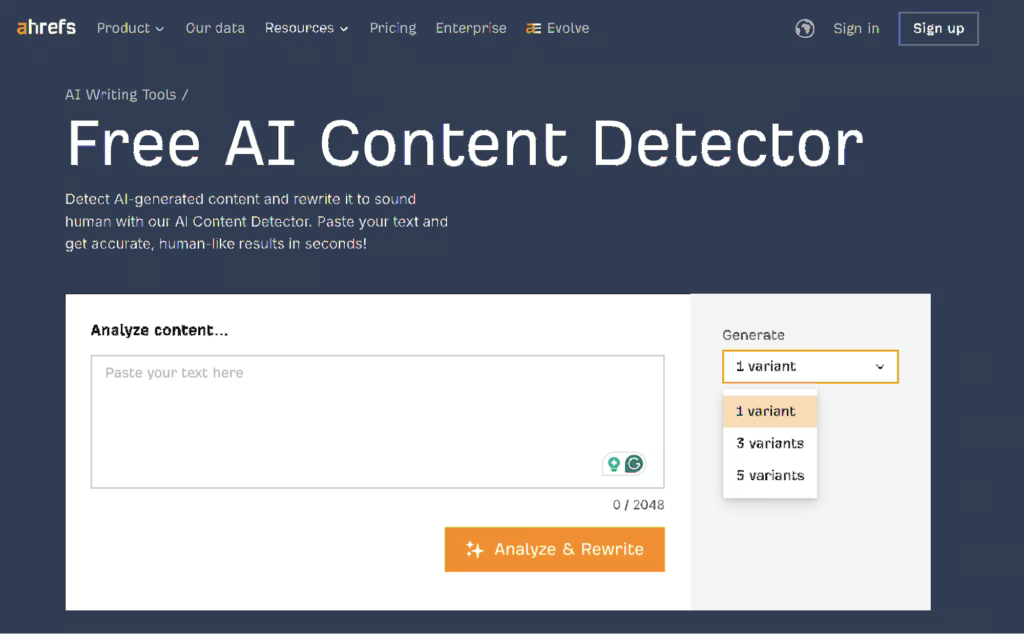
Ahrefs AI Detector is a content analysis tool that identifies AI-generated text and rewrites it to sound human, which enhances authenticity and engagement.
How does the Ahrefs AI Detector enhance content and on-page SEO? Ahrefs AI Detector connects to and enhances content SEO and on-page SEO by enabling users to enable their website, blog, or social media copy is original, human-like, and credible, which supports higher rankings, user trust, and adherence to E-E-A-T standards.
Why does Ahrefs include an AI detector feature? Ahrefs includes an AI Detector feature because the rise of AI-generated content poses risks for SEO performance, academic integrity, and professional communication, which makes authenticity checks essential for competitive sites and brands.
How does the Ahrefs AI Detector tool function? The Ahrefs AI Detector tool functions by letting users paste text into an analyzer, which then uses language models to detect AI patterns, highlight generated sections, and offer a quick rewrite that mimics natural, human writing for better search performance and audience connection.
25. Ahrefs SEO Toolbar
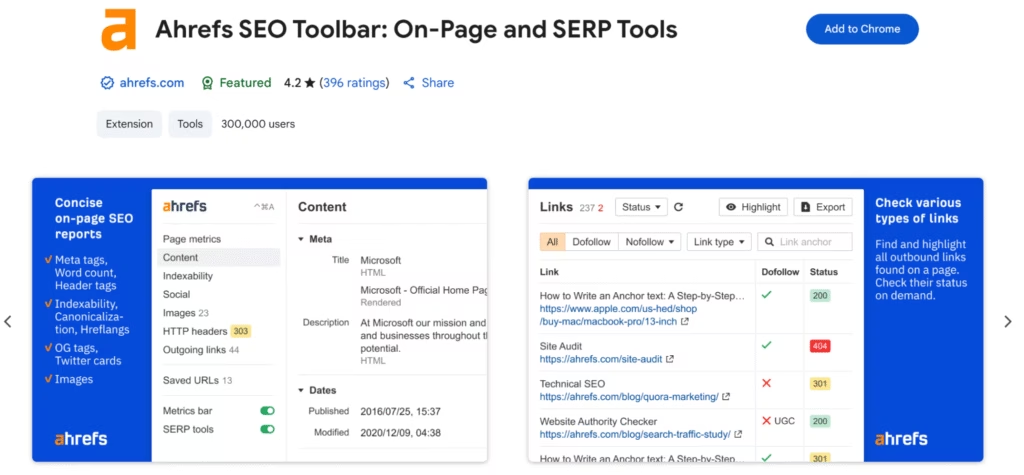
Ahrefs SEO Toolbar is a free browser extension that delivers instant on-page SEO analysis, SERP metrics, and link insights directly within Chrome, Firefox, or Safari. Ahrefs SEO Toolbar streamlines research and optimization for any web page or search result.
Why does Ahrefs include the SEO toolbar? Ahrefs includes the SEO toolbar because instant access to SEO data and optimization signals improves research efficiency and speeds up problem identification during everyday browsing.
What are the functions and features of the Ahrefs toolbar? The Ahrefs toolbar overlays a metrics bar and pop-out panels as users navigate, which show Domain Rating, backlink counts, traffic estimates, indexability status, image alt text, and keyword ideas. Users save URLs, export SERP data, and compare raw versus rendered HTML directly from their browser.
26. Ahrefs Historical Keyword Ranking Tracking
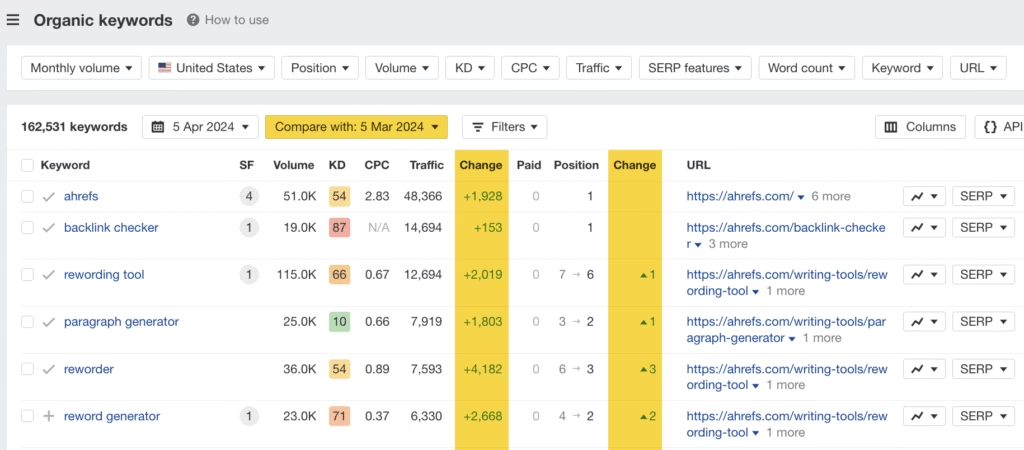
Ahrefs Historical Keyword Ranking Tracking is a feature that shows how keyword positions change over time for any domain or URL using both Site Explorer and Rank Tracker.
How does Ahrefs Historical Keyword Ranking Tracking help on-page and content SEO? Ahrefs Historical Keyword Ranking Tracking enhances on-page SEO and content SEO because it shows ranking trends, highlights gains or losses, and links those patterns to specific site updates or content changes.
Why does Ahrefs include historical keyword tracking? Ahrefs includes historical keyword tracking because teams require clear, visual evidence of keyword movement over time to evaluate SEO strategy and competitive performance.
How does the Ahrefs Historical Keyword Ranking Tracking feature function? The Ahrefs Historical Keyword Ranking Tracking feature functions by letting users select a keyword and view its position history graph, compare date ranges, filter results, and export data for further analysis. Users access SERP comparisons and toggle between desktop and mobile rankings depending on their needs.
27. Ahrefs Global Competitor Analysis
Ahrefs Global Competitor Analysis is a workflow that uses Rank Tracker, Site Explorer, and third-party integrations to compare SEO performance, keyword rankings, and backlink profiles across countries and languages.
How does the Ahrefs Global Competitor Analysis tool improve the technical, on-page, content, and off-page search engine optimization of a website? Ahrefs Global Competitor Analysis enhances technical SEO, on-page SEO, content SEO, and off-page SEO by letting users track keyword positions for different countries, analyze traffic sources and backlinks by region, and benchmark international competitors to identify market-specific strengths and weaknesses.
How does Ahrefs support global competitor analysis? Ahrefs supports global competitor analysis (covers 187 countries) because international and multilingual websites need to assess SEO visibility, optimize for local search intent, and refine campaigns for each market to achieve global growth.
How does a user analyze the global website performance of the website? Users add target keywords to Rank Tracker with specified countries, which shows keyword positions and trends for each region. Users enter URLs into Site Explorer to review country-level traffic, ranking pages, and local backlink profiles. Integrating with Google Analytics or Search Console displays visitor counts, top-performing pages, and user engagement by country, which completes the analysis of global website performance.
28. Ahrefs Subfolder Traffic Analysis
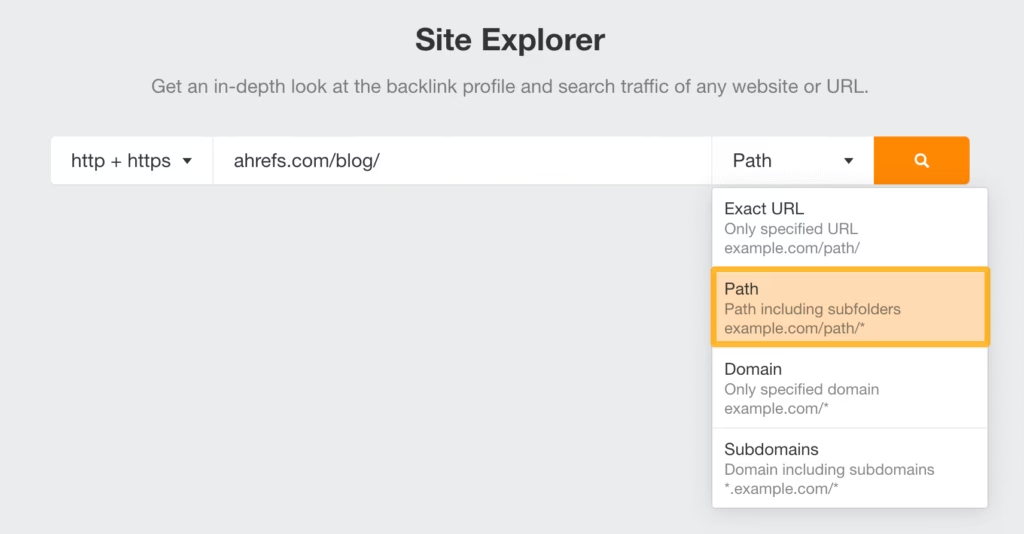
Ahrefs Subfolder Traffic Analysis is a reporting feature in Site Explorer that measures organic traffic, top pages, and keyword performance for specific subfolders on any website.
How does Ahrefs Subfolder Traffic Analysis aid the technical SEO, the on-page SEO, and the content SEO? Ahrefs Subfolder Traffic Analysis enables technical SEO, on-page SEO, and content SEO by isolating high-traffic sections, surfacing top-performing content topics, and highlighting technical issues that affect only certain site areas.
Why does Ahrefs include subfolder analysis? Ahrefs includes subfolder analysis because users need to audit content hubs, compare blog or category performance, and uncover content or technical gaps at a granular level to refine their SEO strategy.
What information does Site Explorer display for a subfolder? Users enter a full domain or subfolder path in Site Explorer and select the “Path” option. The tool then displays key metrics for each subfolder and shows a breakdown of traffic-driving pages, keyword rankings, and backlink profiles within that section.
29. Ahrefs Content Marketing Tools
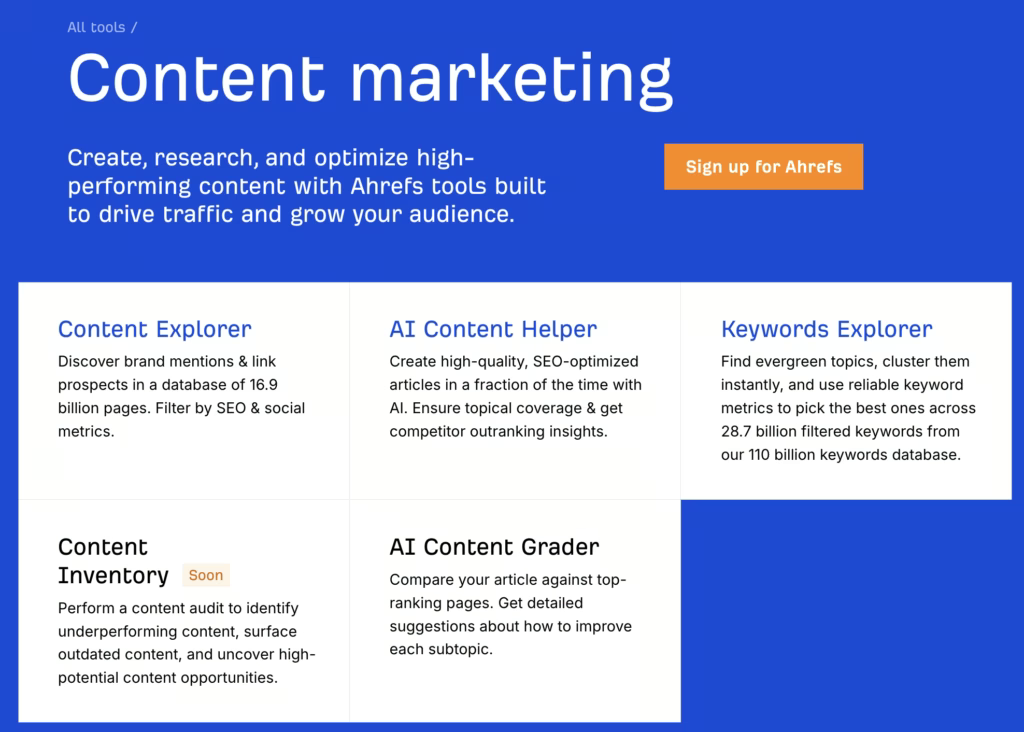
What is the function of the Ahrefs Content Marketing toolkit? The Ahrefs Content Marketing toolkit enhances content SEO and on-page SEO by allowing users to discover link prospects and brand mentions (Content Explorer), generate and optimize articles with AI (AI Content Helper), find and cluster high-potential topics using keyword metrics (Keywords Explorer), audit and update underperforming or outdated content (Content Inventory), and benchmark drafts against top-ranking pages with actionable grading (AI Content Grader).
What does the Ahrefs platform offer content creators? Ahrefs offers an integrated suite of content marketing tools because driving organic traffic and audience growth requires tools that streamline research, ideation, optimization, and competitive analysis across every stage of the content lifecycle. Users access all these tools within the Ahrefs platform, which enables a unified workflow for content discovery, creation, audit, and ranking improvement.
30. Ahrefs Comprehensive URL Details Panel
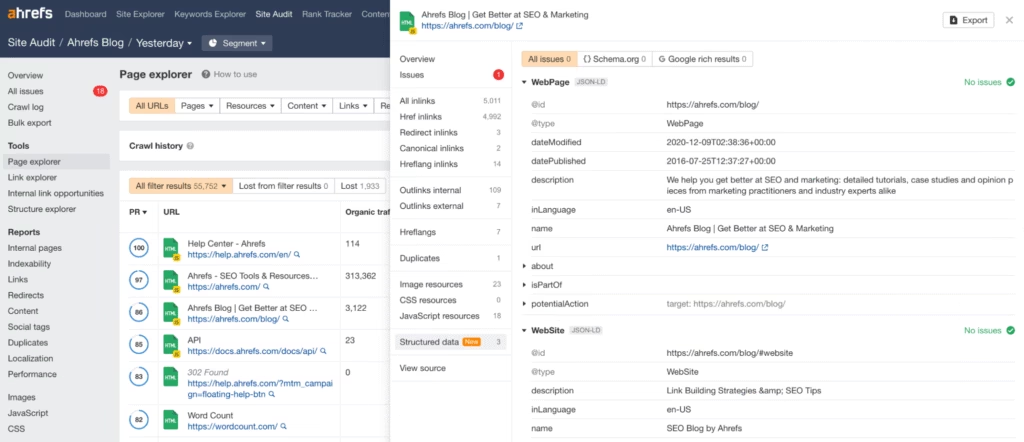
Ahrefs Comprehensive URL Details Panel is a Site Audit feature that displays technical and on-page SEO issues for a specific URL after you select it in the Page Explorer report.
How does the Ahrefs URL details panel support technical SEO? Ahrefs URL details panel supports technical SEO by surfacing crawl errors, structured data problems, hreflang issues, and on-page factors in a unified dashboard for rapid diagnostics and resolution. You review all audit findings for a single page in one place. The panel shows crawl changes, structured data, hreflang clusters, and historical HTML/text snapshots, which let you track page evolution and fix both technical and on-page problems.
What do the Ahrefs URL details panel do? The Ahrefs URL details panel allows direct IndexNow submission for instant indexing updates, and it centralizes every site audit signal needed for precise page-level optimization.
31. Ahrefs Custom Filters and Presets
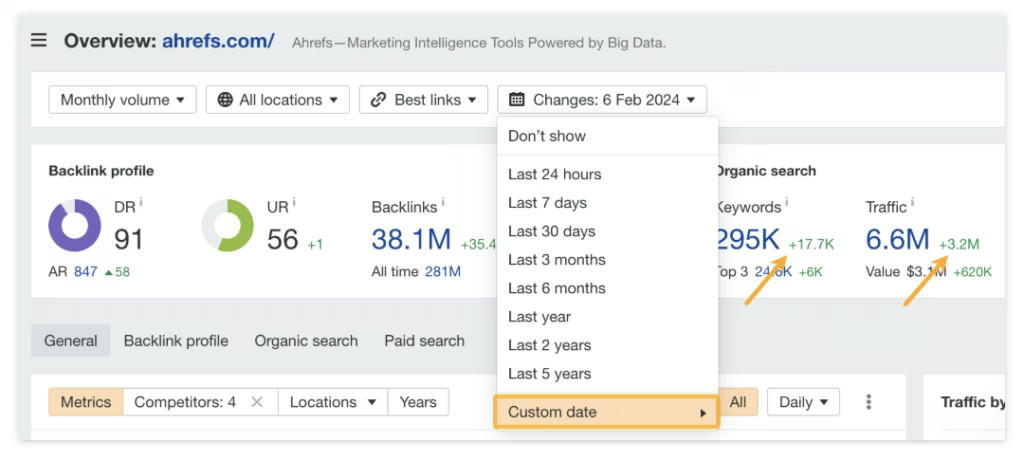
Ahrefs Custom Filters and Presets is an efficiency feature that allows users to save frequently used search criteria and filtering options for quick access to relevant data. The Ahrefs Custom Filters and Presets efficiency feature excels because it significantly reduces the time required for repetitive analysis tasks.
How do Custom Filters and Presets in Ahrefs function? Custom Filters and Presets in Ahrefs function by storing user-defined search parameters and filtering criteria for reuse across different analysis sessions. Users quickly apply complex filters and focus on the most relevant data.
32. Ahrefs Enterprise Features
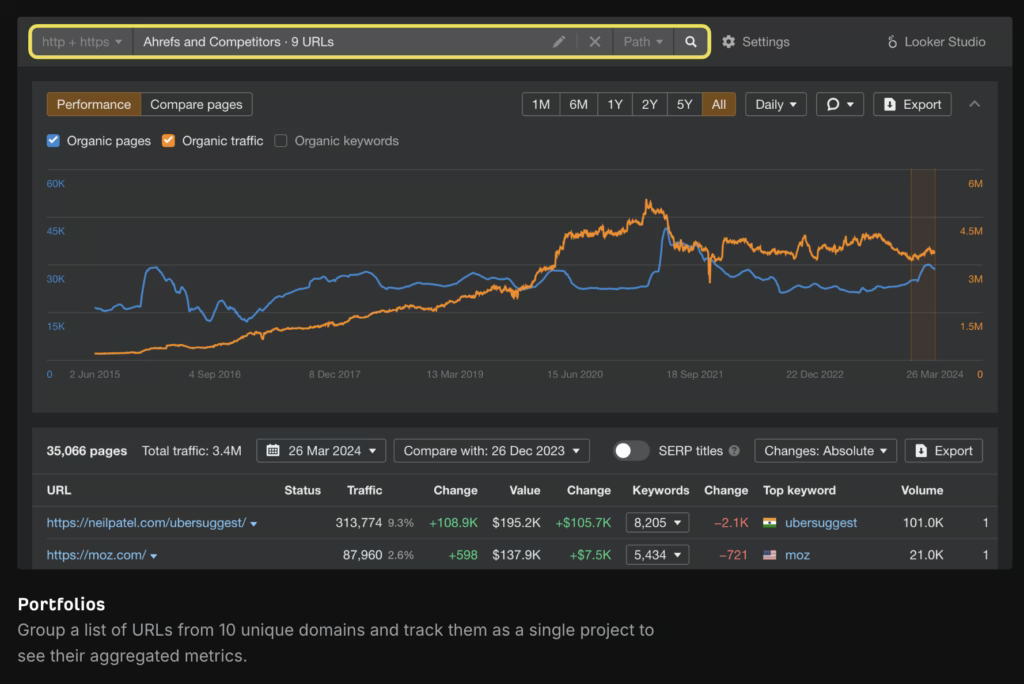
Ahrefs Enterprise is a platform tier that equips large organizations with enterprise-grade SEO infrastructure, advanced security, and extended data access for scalable analysis and reporting. Ahrefs Enterprise improves analysis because it integrates secure authentication, expands API endpoints, and supports multi-domain performance tracking.
How does the Ahrefs Enterprise plan support technical SEO, on-page SEO, and off-page SEO? Ahrefs Enterprise supports technical SEO, on-page SEO, and off-page SEO by delivering enterprise-only reports (Portfolios, Calendar, and Opportunities), by integrating GSC data directly into Rank Tracker; and by unlocking full API access (APIv3) for building automated dashboards and custom workflows that combine keyword, backlink, and traffic metrics across multiple projects.
Why does Ahrefs include enterprise-specific security and integration features? Ahrefs includes enterprise security and integration features because larger teams require single sign-on (SSO) for authentication, granular access management to control user permissions, audit logs to enable compliance, and integrations with BI platforms or AI systems to unify SEO data with other enterprise datasets.
What information does an enterprise user analyze with Ahrefs? Enterprise users create portfolios to track aggregated performance for multiple domains, generate opportunity reports that show prioritized keyword and content gaps, review calendar views of SEO changes over time, and connect the API to external analytics platforms or AI assistants for advanced analysis. Enterprise users access dedicated account management, tailored onboarding, and 24/7 multilingual support to enable all technical capabilities are fully utilized across teams.
33. Ahrefs Big Data Capabilities
Ahrefs Big Data Capabilities are the foundation of the SEO and marketing intelligence platform of Ahrefs. Ahrefs Big Data Capabilities combine scale, speed, and precision to power backlink analysis, keyword research, content discovery, and traffic estimation. Ahrefs Big Data Capabilities includes AhrefsBot, Ahrefs Infrastructure, Ahrefs Keyword Index, Ahrefs Backlink Index, Ahrefs Content Index, Ahrefs Organic Search Traffic Index, and Ahrefs API.
AhrefsBot is a distributed web crawler optimized for large-scale data acquisition. AhrefsBot executes 5 million page fetches per minute, generating over 170 trillion rows in a key-value storage schema. Its crawl frequency and breadth enable near real-time data fidelity for link graph construction, anchor text mapping, and index freshness across domains and URLs.
Ahrefs Infrastructure is an in-house compute and storage cluster engineered for sustained high-volume throughput. Ahrefs Infrastructure consists of 4000 physical servers, 694.5K CPU cores, 4 PB of RAM, 32 PB of HDD, and 505 PB of SSD capacity. The cluster avoids an estimated $900M in three-year cloud expenditures and is optimized for latency-sensitive query execution, large-scale batch processing, and incremental index updates.
Ahrefs Yep1 Supercomputer is a high-performance computing system designed to maximize floating-point operation throughput. Ahrefs Yep1 Supercomputer sustains 23.32 PFlops and is ranked within the global Top 50 HPC systems by FLOPS benchmarks. It executes compute-intensive workloads such as link graph recalculation, keyword co-occurrence modeling, and real-time metric computation.
Ahrefs Keyword Index is a multi-regional lexical dataset structured for search query analysis. Ahrefs Keyword Index contains 110B total observed keywords, with 28.7B filtered entries across 217 geographic locations. The U.S. sub-index contains 4.4B keywords, representing the largest national corpus in the dataset. This index underpins query volume estimation, keyword clustering, and semantic distribution modeling.
Ahrefs Backlink Index is a relational link database optimized for high-frequency updates. Ahrefs Backlink Index contains 35T external link records, 493.9B indexed pages, and 500.4M validated domains. The dataset refreshes every 15–30 minutes, maintaining up-to-date link state for authority scoring (Domain Rating, URL Rating) and link velocity analysis.
Ahrefs Content Index is a document-level dataset supporting content retrieval and analysis. Ahrefs Content Index ingests 10M new documents per 24-hour cycle and recalculates metrics for 300M existing documents, maintaining a total corpus of 17.7B records. Data is structured for topic modeling, content performance tracking, and publication frequency analysis.
Ahrefs Organic Search Traffic Index is a query-to-document mapping dataset derived from SERP-level observations. Ahrefs Organic Search Traffic Index spans 582M active keywords across 207 geographies, correlating ranking position with estimated click-through volume. This dataset enables traffic distribution modeling, ranking impact analysis, and query-level forecasting.
Ahrefs Metrics are proprietary numerical indicators generated from integrated datasets. Ahrefs Metrics include Domain Rating (log-scaled backlink authority score), URL Rating (page-level authority score), Keyword Difficulty (SERP competition index), and Traffic Potential (aggregate traffic estimation across ranking keywords). These metrics are derived through regression models, co-linking patterns, and keyword frequency distributions.
Ahrefs API is a programmatic access layer for structured data retrieval. Ahrefs API supports extraction of backlink records, keyword indices, content datasets, and traffic estimations via RESTful endpoints. It is designed for batch data processing, workflow automation, custom analytics integration, and enterprise-scale reporting pipelines.
34. Ahrefs Podcast Linking Opportunities
Ahrefs Podcast Linking Opportunities are a backlink acquisition method that identifies and exploits podcasts as structured link sources. Ahrefs Podcast Linking Opportunities trace how podcasts publish guest profiles and episode pages that link directly to participant websites, providing high-value backlinks that strengthen authority and diversify link profiles.
What are the steps to acquire backlink using Ahrefs Podcast Linking Opportunities? Open Site Explorer within Ahrefs and navigate to the backlinks report where raw link data is stored. Analyze X (formerly Twitter) profiles of common podcast guests in your industry because these accounts include outbound links to podcast episodes. Configure filters in the backlinks report to display referring page titles containing terms related to “podcast” or “episode,” which isolates relevant domains and eliminates unrelated link noise. Experiment with multiple profiles to expand the range of podcasts discovered and map backlink opportunities across shows that maintain consistent outbound linking practices. Identify a set of relevant podcasts, pitch as an expert guest, and secure an appearance where the brand or website is cited in the episode listing. The recording and publishing of the episode finalizes the backlink creation process, which generates a contextual link from the podcast’s domain.
The workflow of the Ahrefs Podcast Linking Opportunities transforms podcast appearances into systematic backlink acquisition, integrates off-page SEO with digital PR, and enhances online visibility through both brand exposure and authoritative link signals.
35. Ahrefs Image Attribution
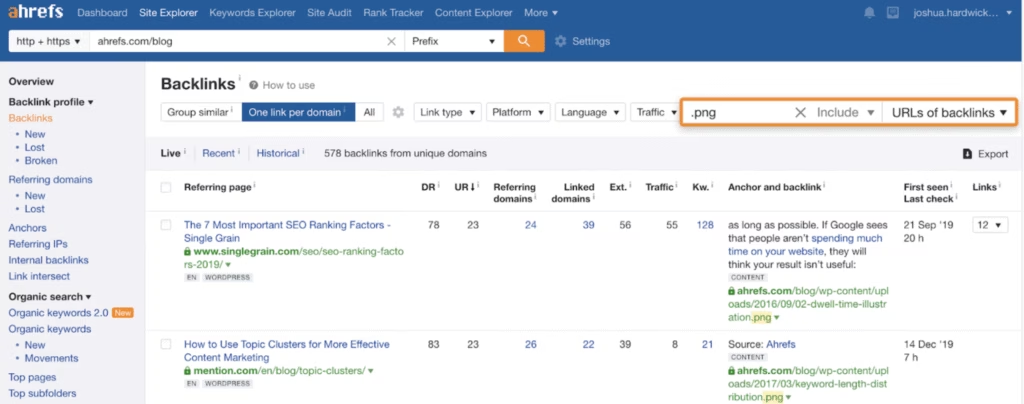
Ahrefs Image Attribution is a feature that identifies uncredited image use, enables proper backlink credit, and strengthens site authority. Ahrefs Image Attribution detects embedded visuals, locating missing links, and reclaiming attribution. Ahrefs Image Attribution enables users to identify and reclaim backlinks from websites that embed their images without properly crediting the brand or person that owns the image.
The Ahrefs Image Attribution enables the user to do Ahrefs Image Link Building, which is a strategy that turns images into backlink assets, expands SEO authority, and amplifies visibility. Ahrefs Image Link Building matters because visual assets (infographics, charts, unique and branded images) attract organic references across industries.
There are three steps to using Ahrefs Image Attribution. Firstly, select images that hold informational or visual value, such as infographics, data charts, or branded graphics. Secondly, search opportunities using Ahrefs Content Explorer to find articles using similar visuals and through Site Explorer to find competitor image backlinks. Thirdly, analyze backlink profiles and contact site owners requesting attribution with a link to the content page.
Brands strengthen visibility using Ahrefs Image Attribution because they monitor backlinks, optimize image files (PNG, JPG, WEBP, AVIF) with descriptive metadata, and publish dedicated pages that showcase visuals. Teams expand authority because they share images on social platforms, highlight value through outreach, and repeat campaigns with new visual assets. Marketers build sustainable SEO growth because Ahrefs tracks live links, measures traffic impact, and verifies domain authority gains.
How does Ahrefs Tool Work?
The Ahrefs tool works by crawling the web to collect data on websites, pages, and backlinks. The proprietary crawler of Ahrefs scans billions of pages and compiles the results into an internal index.
The Ahrefs platform centralizes the crawler data in tools like Site Explorer, Keywords Explorer, and Site Audit, which allows users to assess elements such as backlink profiles, keyword rankings, and crawl issues.
While the coverage is broad, users should note that all Ahrefs insights are based on crawl scope and estimation models, which lag behind real-time changes or miss emerging trends in smaller or regional markets.
How Accurate is Ahrefs Tool?
The Ahrefs tool is generally considered accurate when it comes to backlink analysis and keyword tracking, mainly due to its active crawler and regularly updated index.
Ahrefs keyword data, such as search volume and traffic estimates, relies on third-party clickstream data and modeling, so numbers do not always match real-time figures from sources like Google Search Console (GSC).
A recent study by AuthorityHacker found that traffic estimations of Ahrefs had an average discrepancy of 22.5% when compared to GSC data, while search volume estimates were roughly accurate for 60% of keywords. Earlier studies found larger deviations, with traffic estimates missing actual values by up to 50%.
SEO professionals should treat Ahrefs data as directional guidance and not as precise measurements. The Ahrefs tool shows trends and reveals relative performance, but it should be combined with other tools for validation and accurate insights.