Struggling to make sense of Google Ads? 😩
Many beginners waste money on clicks that don’t convert because they don’t fully understand how the system works. That’s why Google Ads 101 is essential—learning the basics upfront saves time, prevents costly mistakes, and sets you up for success.
Google Ads is one of the most powerful ways to get in front of potential customers, but only if you know how to use it effectively.
This guide walks you through everything from the different types of ads to setting up your first campaign. You’ll also discover best practices and time-saving automation and PPC tools.
By the end, you’ll have a clear strategy to run profitable ads with confidence. 💪
What is Google Ads?
Google Ads is an online advertising platform that helps businesses show their products or services to people searching on Google. 🧐
When someone types a keyword related to your business, your ad can appear at the top of the search results—right where potential customers are looking!
But Google Ads isn’t just about search. It also lets you run ads on YouTube, websites, and even mobile apps. You decide who sees your ads based on location, interests, and search behavior, so you’re reaching the right audience at the right time.
The best part? You only pay when someone clicks on your ad, making it a cost-effective way to attract leads, drive sales, and grow your business. 🌱
Most Commonly Used Types of Google Ads
Each ad type serves a unique purpose, helping you reach different goals and audiences. Here’s a quick breakdown to guide your decisions.
Search Ads
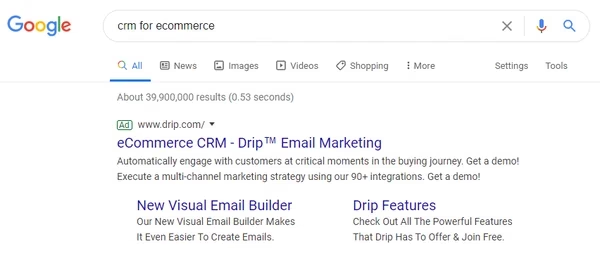 Via G2
Search Ads are text-based ads that appear on Google’s SERPs when users search for terms related to your business. They’re highly targeted, showing ads to people actively looking for what you offer.
Key Features
- Appear at the top or bottom of search results
- Triggered by specific keywords
- Ideal for direct response and conversions
When to Use
- To capture high-intent traffic and drive immediate actions like purchases or sign-ups.
Responsive Search Ads (RSAs)
RSAs are flexible text ads that adapt to user searches by combining different headlines and descriptions you provide. Google tests these combinations to find the best-performing version.
Key Features
- Google automates ad creation and testing
- Increases reach by adapting to various search queries
When to Use
- To test multiple combinations and maximize your ad’s relevance.
Performance Max Campaigns
Performance Max campaigns use AI to automatically deliver ads across multiple Google platforms (Search, YouTube, Display, etc.), optimizing based on your campaign goals.
Key Features
- Multi-platform reach from one campaign
- AI-driven optimization
When to Use
- For cross-platform advertising and automated campaign management.
Display Ads
Display Ads appear across the Google Display Network (websites, apps, and videos). They are ideal for brand awareness and remarketing to previous site visitors.
Key Features
- Visual content, including images and video
- Extensive reach across millions of sites
When to Use
- To increase brand visibility or re-engage past visitors.
Shopping Ads
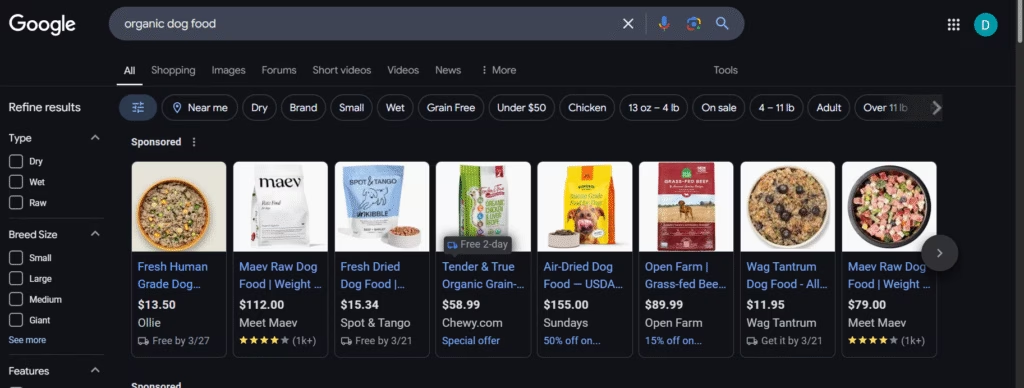 Via Google
Shopping Ads are designed for e-commerce businesses and display product images, prices, and store info directly in Google Search results.
Key Features
- Product-focused, with images and prices
- Target users ready to make a purchase
When to Use
- For e-commerce businesses wanting to showcase products and drive sales.
App Promotion Ads
App ads promote mobile apps across Google platforms, using automated ad creation and optimization.
Key Features
- Automated ad creation
- Promotes apps across Search, YouTube, and Google Play
When to Use
- To drive app downloads and increase engagement.
Video Ads
Video Ads are visually engaging ads that appear on platforms like YouTube and across Google’s Display Network. They are great for capturing attention and telling a story through motion, sound, and visuals.
Key Features
- Appear on YouTube and Google partner sites
- Can be skippable or non-skippable
- Great for brand storytelling and engagement
When to Use
- To build brand awareness or engage users with your story, especially when targeting audiences who enjoy visual content.
How Google Ads Works: A Deeper Dive
Google Ads is fundamentally a pay-per-action advertising platform, most commonly operating on a pay-per-click (PPC) model.
This means you, as an advertiser, only pay when someone interacts with your ad in a specific way, usually by clicking on it. Think of it like a highly targeted, digital billboard, you only pay when someone actually “looks” (clicks).
The Auction System (But It’s Not Just About Money)
The core of Google Ads is a real-time auction. Every time someone searches on Google, an auction takes place to determine which ads will appear and in what order. Here’s how it works, in the simplest of terms:
- Keywords: You select keywords relevant to your business (e.g., “organic coffee beans,” “tax preparation services”).
- Bidding: You set a maximum bid, the highest amount you’ll pay for a click (or other action).
- The Auction: When a user searches a keyword you’re bidding on, your ad enters the auction. Google considers your bid, competitor bids, and other factors like search volume and time of day.
- Ad Rank (Simplified): Ad Rank is a combination of your bid and your Quality Score, which decides how your ad is prioritized by Google.
Since Google prioritizes relevant and useful ads using Ad Rank, a high Quality Score can allow you to win the auction even with a lower bid than a competitor, which may require competitor analysis.
Bidding Options: Choose How You Pay
You decide what action you want to pay for:
- Cost-Per-Click (CPC): Pay only when someone clicks your ad (common for sales or website traffic).
- Cost-Per-Mille (CPM): Pay per 1,000 ad impressions (ideal for brand awareness).
- Cost-Per-Engagement (CPE): Pay for specific actions, like video views or sign-ups.
For example, if you set a max bid of $2.56 for a click and Google values that click at $2.55, your ad shows. But if your max bid is $2, you’ll lose the auction.
Budgeting: Daily vs. Maximum Bids
You control your budget through:
- Daily Budget: An average amount you’re willing to spend each day.
- Maximum Bid: The highest amount you’ll pay for a single click (or action).
Beginner Tip: Start with a daily budget and let Google optimize individual bids automatically.
Quality Score: The Secret to Better (and Cheaper) Results
While Quality Score isn’t a metric you should obsess over, it’s a crucial indicator of your ad’s health. It can mean a higher position, lower costs, and more people seeing your ad.
The thing is, Google wants to show users the most relevant and useful ads. To do this, it calculates an Ad Rank, which is heavily influenced by your Quality Score.
Quality Score is Google’s rating of the overall quality and relevance of your ad and landing page. A higher score (closer to 10) is better. It’s based on:
- Expected Click-Through Rate (CTR): How likely people are to click on your ad when it’s shown.
- Ad Relevance: How closely your ad matches the user’s search query.
- Landing Page Experience: How relevant, user-friendly, and trustworthy your website is after someone clicks your ad.
How to Set Up Your First Google Ads Campaign
Okay, now let’s see how setting up a campaign looks like in practice.
1. Getting Started with Google Ads: Your Initial Setup
First, head to the Google Ads website. Sign in using your existing Google Account.
Once logged in, you’ll be prompted to set your time zone and currency. These are important for accurate reporting and billing, so choose carefully! They can’t be easily changed later.
Next, and this is crucial, you’ll need to select your campaign objective. Think of this as your advertising mission statement. What do you really want to achieve with these ads? Google offers several options, including:
- Sales: Drive online, in-app, phone, or in-store sales. This is ideal if you’re selling products or services directly.
- Leads: Gather contact information from potential customers (e.g., email addresses, phone numbers). This is perfect for building an email list or generating sales inquiries.
- Website Traffic: Simply get more people to visit your website. This is a good option if you want to increase brand awareness or share information.
- Product and Brand Consideration: Encourage people to explore your products or services.
- Brand Awareness and Reach: Reach a broad audience and build awareness of your business.
- App Promotion: Get more installs, engagement, and pre-registration for your app.
- Local Store Visits and Promotions: Drive visits to local stores, including restaurants and dealerships.
Choosing the right objective is absolutely essential. It tells Google’s algorithms how to optimize your campaign for the most cost-effective results. For example, if you choose “Sales,” Google will prioritize showing your ads to people who are more likely to make a purchase.
Now, it’s time to decide how much you’re willing to spend. You can set a daily budget, which is the average amount you want to spend per day. Google Ads will automatically manage your spending to stay within this limit (although it might fluctuate slightly on any given day). 💸
You can adjust your budget at any time.
Choose Your Bidding Strategy: How You Pay
Finally, select your bidding strategy. This determines how you pay for your ads. Here are the two main options you’ll encounter initially:
- Cost-Per-Click (CPC): You pay each time someone clicks on your ad. This is a great choice if your primary goal is to drive traffic to your website or generate leads.
- Cost-Per-Thousand Impressions (CPM): You pay for every 1,000 times your ad is shown (an “impression”), regardless of whether anyone clicks. This is often a better option for brand awareness campaigns where you want to reach a large audience.
There are other, more advanced bidding strategies (like Target CPA, Target ROAS, Maximize Conversions), but CPC and CPM are the most common starting points. Google will often recommend a bidding strategy based on your chosen campaign objective.
2. Keyword Research and Targeting
Mastering keywords is crucial for Google Ads success. These are the terms people use when searching, connecting your ads to the right audience.
First of all, you shouldn’t guess the keywords. Use keyword research tools to discover:
- Search Volume: How often people search for a keyword.
- Competition: How many other advertisers are bidding on it.
- Cost-Per-Click (CPC): The estimated price you’ll pay for a click.
- Related Keywords: Discover new, potentially valuable keywords.
Next, you should aim for keywords that are highly relevant to your business and have decent search volume. Too niche, and you won’t get enough traffic; too broad, and you’ll waste money on irrelevant clicks.
Also, control how your keywords trigger ads:
- Broad Match: Widest reach, but can attract irrelevant clicks and waste your money. Use caution and negative keywords.
- Phrase Match: A good balance. Your ad shows for searches containing your keyword phrase or close variations.
- Exact Match: Most targeted, but lowest reach. Ideal for high-value keywords.
You can begin with phrase and exact match for core terms, then cautiously test broad match with a strong negative keyword list. Focus on relevance and earch intent.
Also, set up negative keywords (words that should not trigger your ad). These are words that are not relevant to your product, and you’re basically telling Google what to avoid.
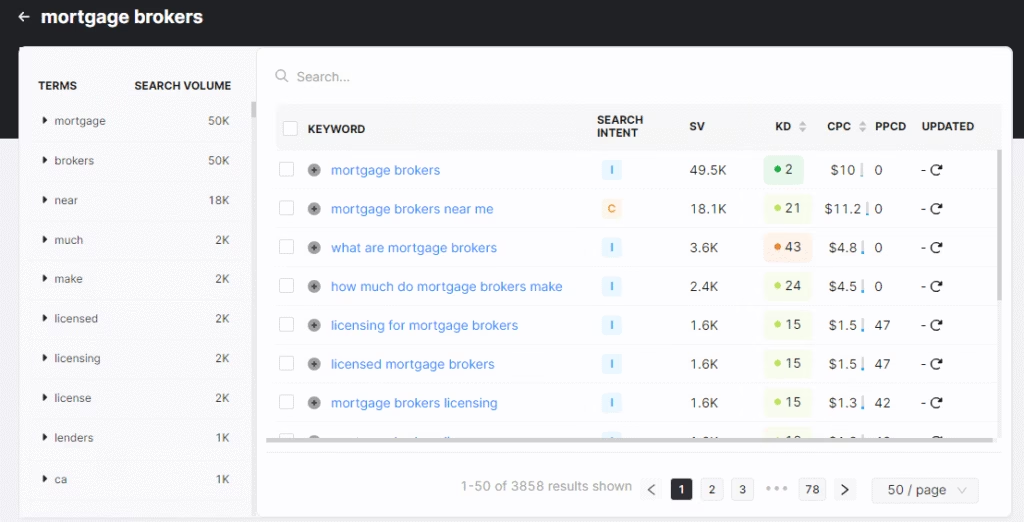
Finally, consider using long-tail keywords (3+ words) like “organic dog food for puppies”—they’re cheaper and convert better.
3. Crafting High-Converting Ads
Start with a headline that grabs attention and speaks directly to what your audience needs. Instead of just listing what your product does, focus on how it makes people’s lives better or solves their problems. Then add a clear next step – whether that’s “Shop Now,” “Get Started,” or “Book Today.”
Make your ad work harder by adding extensions, or those extra bits of information like your phone number, location, or links to specific pages on your site. They make your ad more helpful and more likely to get clicked.
Just make sure when someone clicks, they land on a page that delivers what your ad promised. And finally, test different versions of your ads. Keep what works, and ditch what doesn’t.
4. Landing Page Optimization
A landing page is a dedicated webpage designed to convert traffic from marketing campaigns, such as ads or emails. Unlike a homepage, which offers a general overview, a landing page focuses on a single, specific objective, like lead capture, sales, or promoting a particular offer.
Search Atlas makes landing page creation super easy.
Our Landing Page Builder, powered by AI, creates custom pages for different locations. Get more local customers, more calls, and better results.
Just enter your business info, and boom! Local search visibility. ✨
5. Tracking and Measuring Success
Conversion tracking is like having a scorecard for your ads. It shows you how effectively your ads are driving valuable actions, like sales or new leads. Setting it up lets you track important things like click-through rate, Quality Score, and, most importantly, your conversion rate.
For a really clear picture of how things are going, use Google Analytics. It gives you a much more in-depth look at how people are using your website after they click your ad. And when you connect it with Search Atlas, you unlock even more insights about visitor behavior, so you can see exactly where to make improvements. It’s all about understanding what’s working and what’s not.
6. Optimizing and Scaling Your Campaigns
To get the best results from your Google Ads, you need a smart strategy, organized campaigns, and constant improvement. Smart Ads helps by automatically structuring your campaigns and ad groups to align with your overall advertising goals.
First, focus on analyzing your performance. Continuously track key metrics like Click-Through Rate (CTR), Engagement or Conversion Rate, and Quality Score. A/B testing is essential—try different ad headlines, images, and calls to action to see what resonates best with your audience. This lets you optimize for better engagement and conversions.
Boost Efficiency with Smart Ads
OTTO GA takes the complexity out of running Google Ads campaigns. Once you connect your account, it handles the essential tasks automatically—from creating campaigns and finding relevant keywords to writing effective ad copy and managing bids.
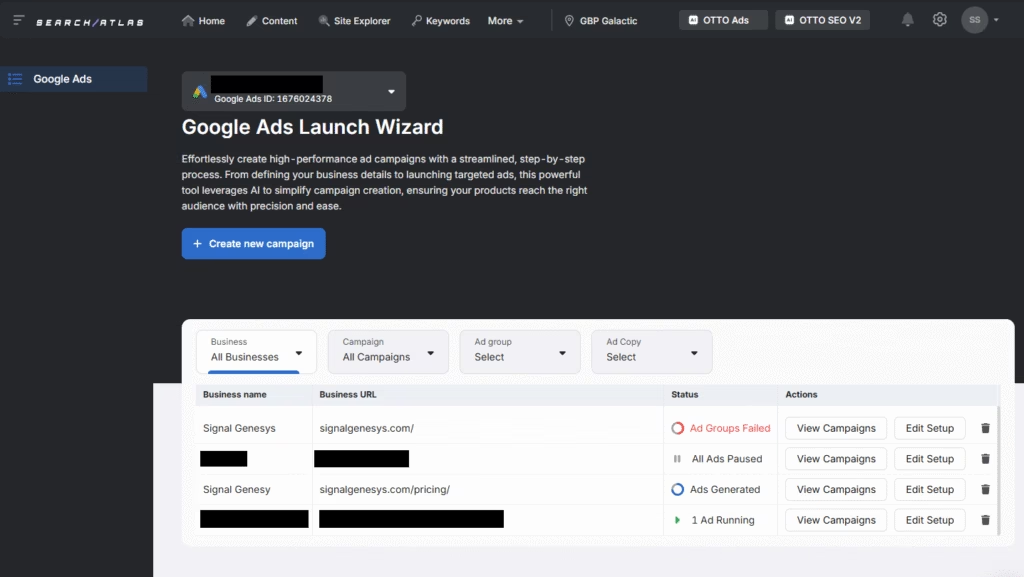
The system continuously monitors your campaigns’ performance and makes adjustments to improve results. It’s particularly helpful with bid management, watching market changes and adjusting in real-time to keep your campaigns cost-effective.
As part of a broader marketing platform, OTTO GA works alongside SEO, content, and digital PR tools, keeping all your marketing data organized in one place.
This integrated approach helps you better understand and improve your overall marketing performance, making campaign management more straightforward and efficient.
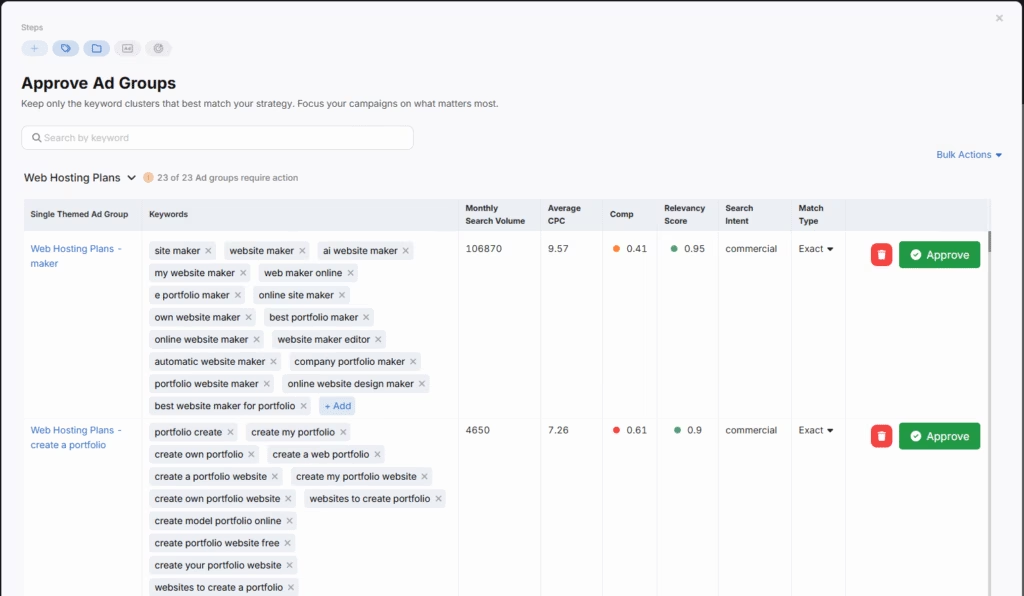
Google Ads Made Easy
At its core, Google Ads success comes down to understanding your audience, creating clear and compelling messages, and consistently measuring what works.
Start small, test different approaches, and let data guide your decisions. While it might seem complex at first, remember that every successful campaign began with the basics.
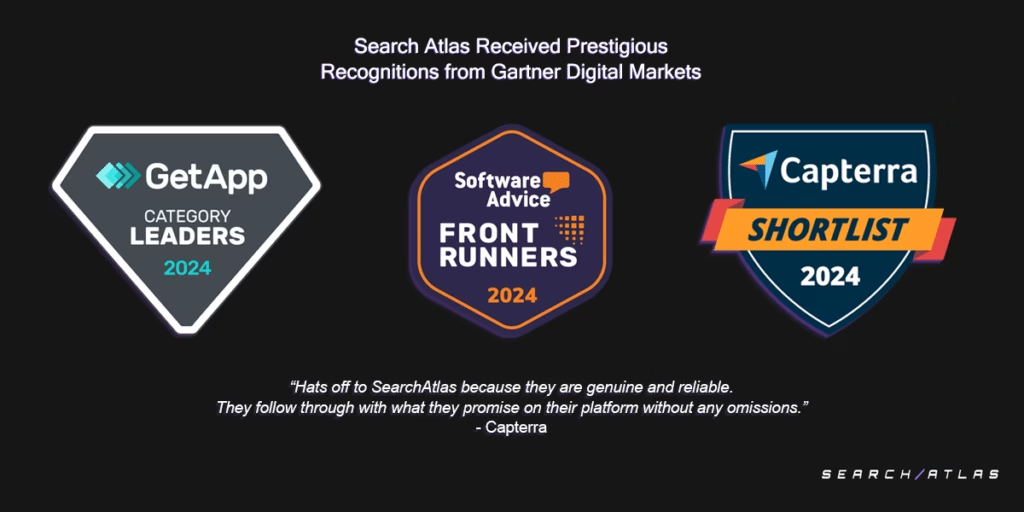 Search Atlas has earned multiple accolades from the Gartner Digital Markets brands: Capterra, Software Advice, and GetApp.
Whether you choose to manage campaigns yourself or use tools like OTTO GA to automate the process, focus on relevance and value for your audience. Keep your ads honest, your landing pages focused, and your goals clear.
For more efficiency and a better ROI, try Smart Ads with a free trial. No commitment, just opportunity.