Ranking in Microsoft Copilot requires indexing content in Bing, configuring the IndexNow protocol, and structuring HTML with machine-readable OpenGraph and JSON-LD markup. Microsoft Copilot does not maintain an independent web crawler; it grounds its responses in the live Bing search index.
If your web pages are missing from Bing Webmaster Tools, Copilot cannot retrieve or cite your content. Optimizing for Copilot requires technical alignment with Microsoft's search ecosystem.
How Does Microsoft Copilot Ground Its Responses?
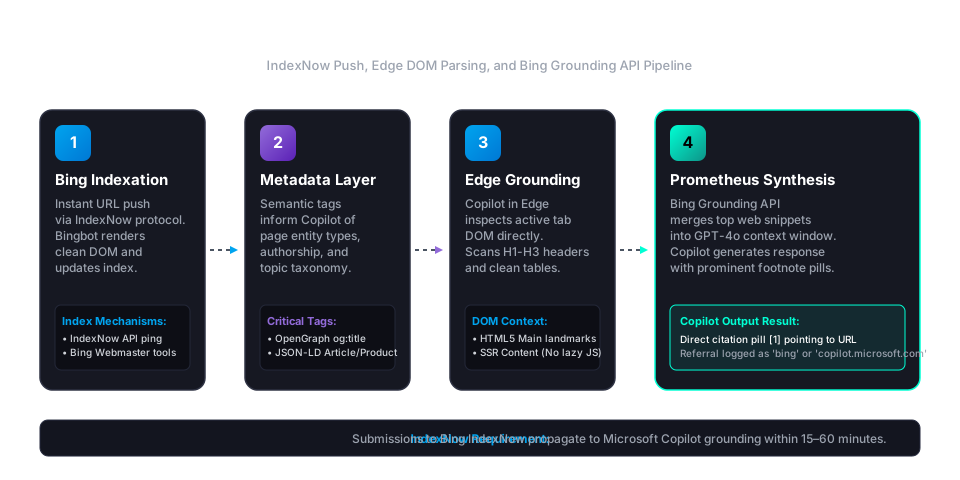
Microsoft Copilot grounds its responses through the Prometheus orchestration model, which combines OpenAI GPT-4o with real-time Bing search results.
When a user submits a query to Copilot, the Prometheus orchestrator generates contextual search queries, executes them against the Bing search API, and extracts the top passage snippets. The LLM then synthesizes these retrieved passages into an answer containing numbered footnote citations linking back to the source pages.
In Microsoft Edge, Copilot has an additional grounding layer: the active tab's Document Object Model (DOM). When a user asks Copilot to summarize or compare an open web page, the browser supplies the raw HTML text directly to the model.
Why Is the IndexNow Protocol Critical for Copilot Visibility?
The IndexNow protocol is critical for Copilot visibility because it notifies Bing the moment you publish or update a web page. Instead of waiting days for Bingbot to crawl your XML sitemap, IndexNow triggers instant crawl requests.
Publisher CMS -> IndexNow API Ping -> Bingbot Instant Crawl -> Bing Web Index -> Copilot Grounding API
IndexNow is supported by Microsoft Bing, Yandex, and Naver. When you submit an updated URL via IndexNow, Bingbot typically recrawls the target URL within 15 to 60 minutes.
To automate instant URL submissions across large websites, tools like the Search Atlas URL Indexer submit URLs directly to search engine APIs to speed discovery.
How Does Copilot Parse OpenGraph and JSON-LD Markup?
Copilot parses OpenGraph and JSON-LD markup to extract clean entity relationships, page summaries, and publication dates without relying on heuristic HTML scraping.
1. OpenGraph Metadata Requirements
Microsoft Copilot relies on standard OpenGraph tags to generate source preview cards in its chat interface. Include the following tags in the <head> of every published URL:
<meta property="og:title" content="Specific, Fact-First Page Title" />
<meta property="og:description" content="Direct 150-character summary answering the primary query." />
<meta property="og:type" content="article" />
<meta property="og:url" content="https://example.com/canonical-url/" />
<meta property="og:image" content="https://example.com/social-preview.jpg" />
If og:description is missing or contains promotional marketing copy, Copilot extracts raw snippet text from the body, which frequently distorts your intended positioning.
2. JSON-LD Schema Formatting
Copilot's retrieval models parse Schema.org structured data to disambiguate corporate entities, product pricing, and editorial authorship. For educational and comparative content, deploy Article, TechArticle, or Product schemas:
{
  "@context": "https://schema.org",
  "@type": "TechArticle",
  "headline": "How to Rank in Microsoft Copilot",
  "description": "Technical guide explaining Microsoft Copilot citation mechanics and Bing grounding.",
  "author": {
    "@type": "Person",
    "name": "Manick Bhan"
  },
  "publisher": {
    "@type": "Organization",
    "name": "Search Atlas",
    "url": "https://searchatlas.com"
  }
}
Structured JSON-LD clarifies parent-child entity hierarchies. This prevents Copilot from confusing your platform with third-party software mentioned in comparison tables.
How Should You Structure Content to Win Copilot Footnote Citations?
You should structure content to win Copilot footnote citations by answering target questions within the first sentence beneath each heading, using clean semantic HTML elements, and presenting comparative data in HTML tables.
1. Use Question-Formatted H2 Headings
Copilot's internal query planner breaks complex user prompts into discrete sub-questions. When your H2 subheadings mirror these exact questions, the retrieval model matches your section headers directly:
- Poor Heading: "Copilot Optimization Techniques"
- Effective Heading: "How Does Microsoft Copilot Ground Its Responses?"
2. Provide the Direct Answer Immediately
Copilot passage-ranking models score snippet relevance based on the proximity of direct answers to section headers. State the core answer in the opening sentence, followed by supporting evidence and real numbers.
3. Replace Complex Scripts With Clean HTML Tables
Avoid rendering data tables via client-side JavaScript libraries that fail to execute during lightweight crawler passes. Copilot extracts data from static <table>, <thead>, <tbody>, and <tr> HTML tags.
For broader optimization strategies across other answer engines like ChatGPT and Gemini, see our detailed guide on generative engine optimization.
How Do You Measure Microsoft Copilot Brand Visibility?
You measure Microsoft Copilot brand visibility by tracking citation inclusion across unbranded category prompts and analyzing referral traffic in web analytics.
Copilot referral visits appear in Google Analytics 4 under several referring sources, including copilot.microsoft.com, bing.com, and edgeservices.bing.com. In GA4, these visits often roll into the Organic Search or Referral default channel groups, depending on user browser configurations.
To monitor whether Copilot recommends your brand over competitors across your priority commercial terms, use Search Atlas LLM Visibility. The platform audits model outputs across ChatGPT, Copilot, Perplexity, and Gemini, providing unified share of voice and citation tracking.
For additional monitoring frameworks, review our guide on monitoring brand AI visibility.