An important element that many websites forget to include on their web pages are open graph meta tags. These tags are important for ensuring that your content is appealing and clickable when shared on popular social media sites.
Here is a guide to what open graph tags are, why they matter, and how to implement them across your web pages.
What Are Open Graph Tags?
Open Graph tags are a set of HTML tags that help you control how your content is displayed on social media websites.
When someone shares one of your web pages on a social network like Facebook or LinkedIn, open graph communicates how to display and format the shared content.
On the frontend, open graph tags make your content appear with the title, image, and display that you prefer, like this:

But without Open Graph meta tags on your web pages, your content on social media sites may look like this:

Which post would you be more likely to click on?
Are Open Graph Tags Important?
Open Graph is important because it allows you to control how your content appears when it is shared on social media.
They allow platforms to pull in specific details about the website and its contents to create a richer, more engaging social media post. It is very similar to a schema.org markup.
Open Graph is a great way to ensure that your content looks its best, displays your branding, and projects your content as valuable whenever it is shared online.
Are Open Graph Tags a Ranking Factor?
Open Graph is not a ranking factor that Google relies on when promoting web pages. But they still can indirectly impact your SEO.

How? Because social media is a great avenue for sharing content to grow brand visibility and site authority. If a webmaster sees your content on a social media site and enjoys it, they may choose to link to it on their own web pages, giving you a backlink and valuable link equity.
But if your content doesn’t utilize open graph meta tags, the content looks less appealing whenever shared on social networks or other popular sites, making users less likely to click on it, and webmasters less likely to link to it.
Who Uses OG Tags?
Open Graph Tags are used on major social media platforms, but some of the most important are:
- Google+
- Slack
Twitter has their own version of Open Graph which are called Twitter Cards. To learn more, check out our post on Twitter Cards best practices.
Types of Open Graph
There are a number of different tags that you should be implementing on your web page.
If you do not have these open graph tags present on your web pages, they will be flagged in your Search Atlas Site Audit Report as “Missing”.
og:title
The title of the webpage is important for your users understanding the purpose and focus of your content. In HTML, the og:title tag looks like this:

Best practices for og:titles include the following:
- Should be present on all shareable web pages on your website
- Character count should be between 40-60
- Focused on accuracy, brevity, and clickability
og:description
Similar to a meta description for SEO, the og:description should offer a brief description of the web page’s content to give the user more reason to click.
In HTML, the og:description looks like this:

Best practices for og:description include:
- Should be present on all shareable web pages on your website
- Character count should be between 120-160
- Accompanies the title to make a clickable, sharable piece of content
og:image
The og:image is arguably one of the most important open graph tags because of the visual nature of social media platforms.
The og:image tag includes the URL of an image that represents the content of the webpage. In HTML, it will look like this:

Ideally, you should also use the og:image:width and og:image:height tags to let the social media websites know the size of your image.

Best practices for og:image open graph include:
- Should be present on all shareable web pages on your website
- Uses images with a 1.91:1 ratio for the best clarity on desktop and mobile
- Also includes og:image:width and og:image:height to ensure that the image loads properly when it is shared
og:url
The og:url tag tells social media websites the url of the webpage. It looks like this in HTML:

Best practices for og:url include the following:
- Follows SEO-friendly url best practices
- Points to the canonical url, especially if they are multiple versions of the page
og:type
The og:type tag helps social media sites understand the type of webpage (e.g. “article”, “blog”, “website” “video” etc.). In HTML, it looks like this:

Best practices for og:type include the following:
- Use “article” for blogs and “website” for all other pages
- Only define one type per page
og:locale
For international websites with content in multiple languages, the og:locale tag indicates the language of the web page content. In HTML, it looks like this:

Best practices for og: locale are pretty simple:
- Use the appropriate country code (Here’s a complete list of HTML country codes)
- Only use for pages that are not written in English
Common Mistakes with Open Graph
There are a few common issues that webmasters make with open graph tags that will be flagged in your Site Auditor report.
Missing Open Graph Tags
The most common mistake that webmasters make is they simply do not include open graph tags on their web pages.
If open graph is missing from a web page, you will see this issue displayed in your Search Atlas site audit report.
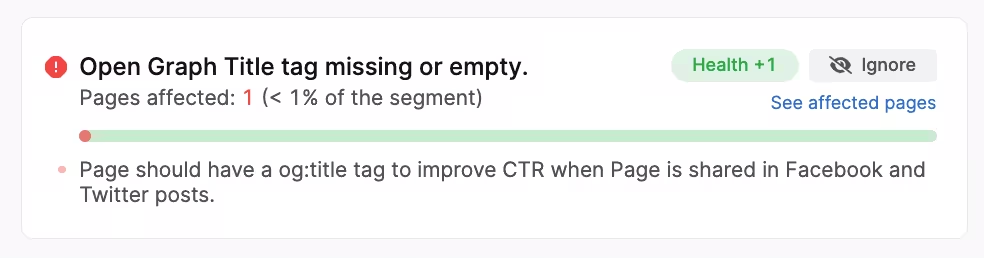
This is an easy fix, and simply involves adding the missing open graph tag into the HTML header of your web page (according to the best practices listed above).
Improper Character Counts
For og:title and og:description, your character counts will be flagged if they do not follow best practices.
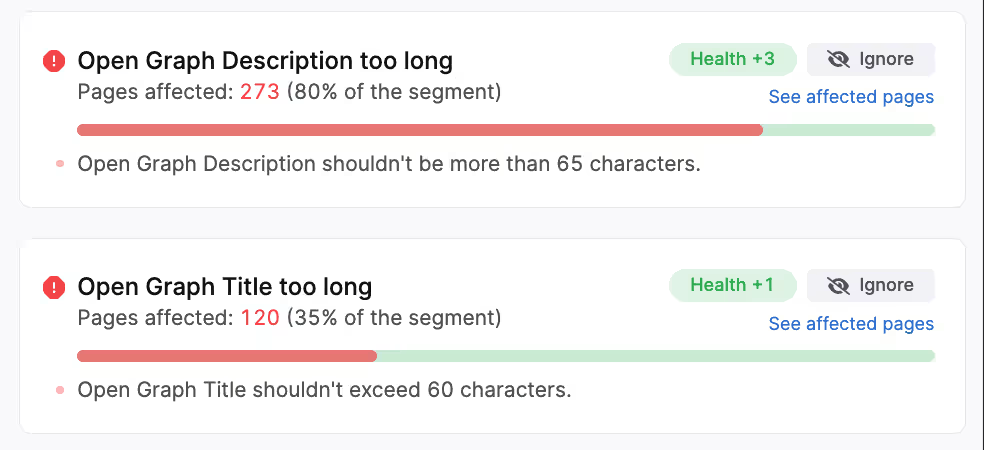
To resolve this issue, you will need to either shorten or lengthen the character count of your open graph tags.
This can be done by editing the HTML of your individual web pages.
How to Implement Open Graph on your Web Pages
There are two primary ways that you can add open graph tags to your web pages.
The first is utilizing a popular plugin. For WordPress websites, the most common used by webmasters is Yoast SEO.
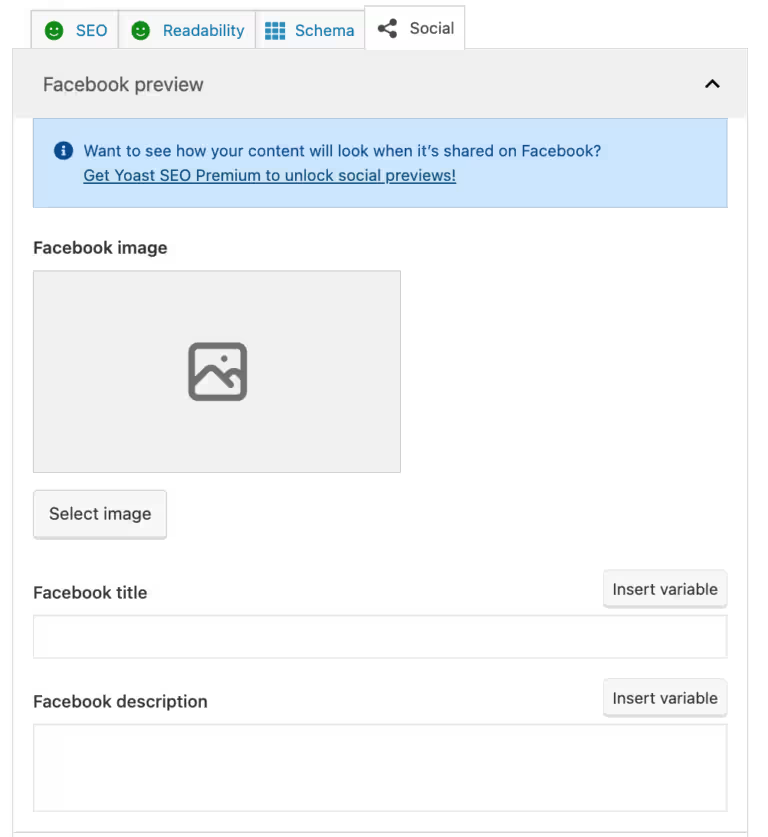
Other popular CMS like Wix, Shopify, and others have plugins that make adding open graphs simple.
You can also add open graph tags manually by editing your web page HTML code. Open graph tags should go in the <header> section of your website.
To ensure you have the required fields, you can use a tool like an open graph generator.
Conclusion
If you need assistance adding open graph to your website, our team of web development experts are here to help. Simply request a proposal from our team.
You can also run a site audit yourself after registering for a trial of our SEO software.