An orphan page is a live, indexable page on your website that has zero internal links pointing to it, which means crawlers and most visitors can only reach it if they already know the exact URL. Search engines discover new content by following links from page to page, so a page sitting outside that link graph is effectively invisible, no matter how good the content on it is. Fix the missing links and the page rejoins the rankings conversation. Leave it orphaned and it burns crawl budget, link equity, and content investment for nothing.
This guide explains what causes orphan pages, how they damage both classic search rankings and newer AI-search visibility, how to find every orphan on a site of any size, and how to fix and prevent them without a full site rebuild.
What Are Orphan Pages?
An orphan page exists on a live website but has no internal links from any other page pointing to it. It can be fully indexed, ranking, even receiving occasional direct or referral traffic, and still count as an orphan, because "orphan" describes a page's position in the site's link structure, not its indexation status. The two most common signs of an orphan page are that it returns a normal 200 status code when requested directly, and that nothing on the rest of the domain, no nav item, no footer link, no related-content module, no in-body link, points to it.
Search engines and AI crawlers alike rely on links to discover and re-crawl content. Google's own crawling documentation still frames discovery around following links from known pages, and that hasn't changed with the addition of AI-driven answer engines. GPTBot, OAI-SearchBot, ClaudeBot, and PerplexityBot all traverse sites the same structural way, by following the links they can see. A page no crawler can reach through your site's internal architecture is a page that never enters the conversation, whether that conversation is a Google SERP or a ChatGPT citation.
What Causes Orphan Pages?
Most orphan pages aren't created on purpose. They're a side effect of normal site growth, and the same handful of causes explain the vast majority of cases.
Poor site architecture
A site built without a clear pillar-and-cluster structure tends to accumulate pages that were never planned into the navigation in the first place. New landing pages, campaign pages, or one-off blog posts get published to hit a deadline, and nobody circles back to connect them to the rest of the site. The bigger the site, the easier it is for this to compound, because no one person can hold the full link map in their head. Sites that lay out a topical authority mapping plan before publishing avoid this compounding effect entirely, since every new page is pre-assigned a place in the hub-and-spoke structure before it goes live.
Missing internal links
Internal linking is what turns a pile of pages into a site Google can actually understand. Beyond simple discovery, the anchor text of an internal link tells search engines what the destination page is about and how it relates to the page linking to it, which matters for ranking specific keywords.
An internal link also helps Google understand how two pages relate, particularly when they're topically connected or belong in the same topic cluster. A page with strong content but zero inbound internal links still reads to Google as disconnected and low-priority, no matter how well it's written.
Page deletion or site migration
Migrations, redesigns, and content reorganizations are the single most common source of large-scale orphan problems. When pages move to new URLs or old sections get restructured, the 301 redirects and internal links pointing to the old paths need to be updated in the same pass. Skip that step and you end up with either broken links or, worse, links that technically resolve but no longer point anywhere useful, leaving the new destination unlinked and orphaned.
Canonical and URL parameter confusion
Canonical tags tell search engines which version of a page to treat as authoritative when duplicates exist, whether that's a www vs. non-www split, a tracking-parameter variant, or a print-friendly copy of the same URL. When canonicalization is set up inconsistently, internal links can end up pointing at the wrong version of a page, which effectively strands the canonical version without the internal link signals it needs.
Weak navigation and site menus
Navigation menus, footers, and breadcrumbs are the load-bearing internal links on most sites, since they appear on every page and give crawlers a predictable path through the site. When a page never makes it into any of those systems, and isn't linked from body content elsewhere either, it has no route in at all. This is especially common with large product catalogs, filtered category pages, and older blog content that fell out of any related-posts rotation.
How Orphan Pages Hurt SEO and AI Visibility
Orphan pages don't just sit there quietly. They actively cost a site rankings, authority, and increasingly, visibility in AI answers.
Reduced discoverability and indexation
Google can't index what it can't find a path to. A large-site log-file analysis will typically turn up a meaningful share of URLs with zero inbound internal links, pages that may still show up in Search Console's coverage data as discovered but not indexed, or that drop out of the index entirely once Google stops finding a reason to recrawl them. On big sites this isn't a rare edge case. It's routine enough that a link audit on a site of any real size should be a standing maintenance task, not a one-time cleanup.
Diminished authority and link equity
Search engines use internal linking patterns as one of the signals for understanding which pages a site itself considers important. A page with no internal links receives none of the link equity that flows through a site's internal architecture, so its ranking potential is capped at whatever external backlinks it can attract on its own, which for most pages is close to zero. A page that's well written but poorly linked will consistently underperform a weaker page that sits inside a strong internal linking structure.
Wasted crawl budget
Google allocates a finite crawl budget to every domain, shaped by how much a server can handle and how much Google wants to crawl based on a URL's perceived value and freshness. Orphan pages that Google does happen to know about, through an old sitemap entry or a stray external link, still consume crawl requests without delivering ranking value, which means fewer crawl passes are available for the pages actually worth indexing and refreshing. This shows up most clearly on large e-commerce and publisher sites, where discontinued products, retired campaign pages, and old blog archives can quietly account for a large share of total crawl activity while contributing nothing to organic revenue.
Invisibility to AI crawlers and answer engines
This is the piece that's changed the most since this topic was last worth revisiting. AI-driven search traffic has grown sharply as ChatGPT, Perplexity, Gemini, and Copilot increasingly answer queries directly instead of sending users to a results page, and the crawlers behind those answers, GPTBot, OAI-SearchBot, ClaudeBot, and PerplexityBot, discover content the same structural way Googlebot does, by following links. An orphan page has no better odds of becoming an AI citation than it has of ranking in classic search. If anything the bar is higher, because these systems tend to favor content that shows clear topical relationships to other pages on the same domain, which is exactly the signal an orphan page lacks.
How to Find Orphan Pages
Finding every orphan page on a site means comparing what actually exists against what the internal link structure can reach, since neither list alone tells the full story.
Run a full site crawl and cross-reference it against known URLs
A crawl on its own only shows what a crawler can reach by following links, so it can't surface pages that are live but unlinked. The fix is to build a master list of every URL that should exist, pulled from the CMS, the XML sitemap, Google Search Console's indexing report, and analytics, then cross-reference that list against the crawl's discovered URLs. Anything present in the master list but absent from the crawl's link graph is a candidate orphan.
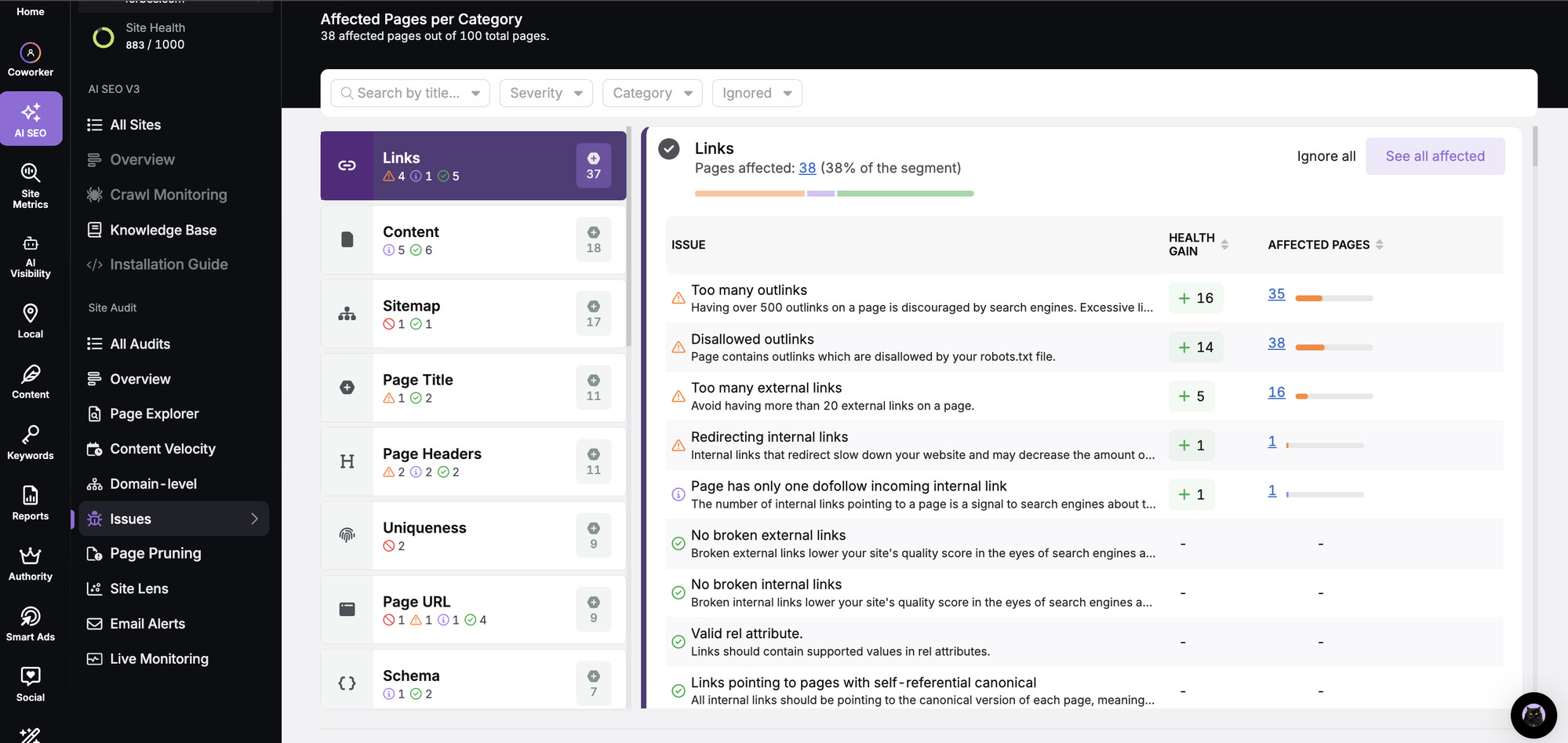
Search Atlas's Site Auditor runs this cross-reference automatically. It crawls a full domain at up to 20 pages per second, across sites ranging from 100 pages to 1,000,000, pulls in Google Search Console and GA4 data, and flags disconnected indexed pages directly in its Page Explorer, alongside a 0-to-1000 site health score that moves as the underlying link issues get fixed. Screaming Frog and Sitebulb can run a similar crawl, but both require exporting the results and cross-referencing them manually against a separate source of known URLs, which is workable on a 100-page site and considerably more error-prone at scale.
Check Google Search Console's indexing reports
The Pages report under Indexing, the section long-time users still call Coverage, shows which URLs Google has indexed, which it's discovered but not indexed, and which it's excluded, along with the reason. A page marked "Crawled, currently not indexed" for months with no obvious quality problem is often an orphan Google found once, likely through an old sitemap entry, and has since deprioritized because nothing on the site reinforces it.
Read server log files for crawl behavior
Log file analysis shows exactly which bots hit which URLs and how often, which is the most direct way to see whether Googlebot, GPTBot, or any other crawler is actually reaching a given page rather than inferring it from a sitemap listing. Search Atlas's Crawl Monitoring feature tracks this in real time across Google, Google-Mobile, Bing, and AI bots, breaking down discovery crawls versus refresh crawls and surfacing URLs that appear in the sitemap but never get a crawl hit, which is a strong orphan signal on its own.
Review analytics for pages with no internal traffic
Pulling pages with organic sessions but zero traffic arriving from internal site links is a useful secondary check, particularly for catching pages that get external backlinks or occasional direct visits despite having no internal link path. These pages are often high-value content that simply fell out of the site's internal linking system during a redesign.
Deciding What to Do With Each Orphan Page
Not every orphan page deserves to be rescued. The right fix depends on whether the page still has value.
Once a list of orphan pages exists, the practical next step is triage, not a blanket relink-everything pass:
- High-quality, still-relevant content should get real internal links from topically related pages, ideally from body content where the connection reads naturally, not just a footer mention.
- Outdated but salvageable content is worth updating and then linking, since relinking thin or stale content just makes the thinness more visible to crawlers and readers.
- Duplicate or near-duplicate pages usually need a canonical tag or a 301 redirect to the stronger version rather than a new set of links.
- Pages that no longer serve any purpose, old campaign landers, discontinued product pages, superseded guides, are usually better served by a 301 redirect to the closest live equivalent or, if nothing fits, a deliberate 404 or 410 rather than a forced link from an unrelated page.
Search Atlas's Content Pruning automates the first pass of this triage. It scores every URL on organic impressions, clicks, indexability, ranking keywords, and content quality, then groups pages into categories like low-impression, thin, outdated, and duplicate, so the relink-vs-redirect-vs-remove decision starts from data instead of a manual page-by-page judgment call.
How to Fix Orphan Pages
Fixing an orphan page almost always comes down to giving it a real, contextual internal link, but a few related fixes matter depending on how the page became orphaned in the first place.
Add contextual internal links
Every page worth keeping needs at least one link from a relevant, already-linked page on the site, ideally more than one. The strongest links come from body content where the anchor text describes what the destination page is actually about, since that's the signal search engines and AI crawlers use to understand topical relationships between pages. A related-content module or footer link is better than nothing, but it carries less weight than an in-body link placed where the topic naturally comes up.
Prioritize by potential rather than working alphabetically down a list. A well-written, product-relevant page that never got linked deserves attention before a thin support article nobody was ever going to rank anyway. Two or three strong contextual links, placed where the topic genuinely fits, do more for a page's recovery than a dozen link mentions crammed in wherever there's space.
Rebuild link structures after a migration
If the orphan problem traces back to a site migration or restructuring, the fix has to happen at the structural level, not page by page. That means auditing every internal link that pointed at an old URL, updating it to point at the new one directly instead of relying on a redirect chain to carry the link equity, and rebuilding any navigation or related-content modules that referenced the old structure.
Publish content that naturally links to the orphan
Sometimes the cleanest fix is writing something new that would naturally reference the orphaned page, which gives search engines and readers a legitimate reason to land there through normal site navigation rather than a link that feels bolted on.
Resubmit through sitemaps and indexing requests
Once a page has real internal links, adding it to the XML sitemap and submitting it through Search Console's URL Inspection tool speeds up the recrawl. Search Atlas's OTTO SEO can do the heavier version of this automatically. It deploys internal link fixes directly through a CMS connector or a single script tag, then submits every changed URL for indexing through Google Search Console's Instant Indexing and IndexNow for Bing in the same pass, instead of waiting for the next scheduled crawl to pick the change up. For sites without OTTO in place, Search Atlas's URL Indexer handles the batch resubmission step on its own once links go live.
Preventing Orphan Pages Before They Happen
The cheapest fix for an orphan page is never creating one, which means treating internal linking as part of the publishing process, not a cleanup task that happens later.
The most durable fix is structural. Planning content around a pillar-and-cluster model, where every new page is mapped to a parent topic and a set of sibling pages before it's written, makes it far harder for a page to launch without a link path already built in. Search Atlas's Topical Map Generator builds this structure from a single seed keyword, mapping pillar, cluster, and supporting-page relationships before content production starts, so the internal linking plan exists before the orphan risk does.
Beyond planning, a few habits keep the problem from creeping back in. Add an internal-linking checklist item to the publishing workflow. Run a recurring site crawl instead of a one-time audit, Search Atlas's Site Auditor defaults to a 7-day recrawl, frequent enough to catch new orphans before they've been live for a month. And build a standing rule that any page removed from the main navigation gets either redirected or reassigned a link path, never just deleted from the menu and left live.
Frequently Asked Questions
Is an orphan page the same as a page blocked by robots.txt? No. A robots.txt block deliberately tells crawlers not to access a page. An orphan page is fully crawlable and often fully indexed, it just has no internal links pointing to it, so crawlers rarely find their way there in the first place.
Can an orphan page still rank in Google? It's possible if the page has strong external backlinks or was indexed before it became orphaned, but its ranking ceiling is far lower than a properly linked page, since it receives no internal link equity and Google deprioritizes recrawling pages that nothing else on the site reinforces.
How many orphan pages is normal for a large site? There's no universal number, but link audits on large, mature sites regularly turn up a meaningful share of pages with zero inbound internal links, often concentrated in old blog archives, discontinued product lines, and pages orphaned during a past migration. The right benchmark is trend, not a fixed target. The count should shrink after a cleanup and stay low afterward, not creep back up.
Do orphan pages affect visibility in AI search tools like ChatGPT or Perplexity? Yes. The crawlers behind AI answer engines, including GPTBot, OAI-SearchBot, ClaudeBot, and PerplexityBot, discover content by following links in the same structural way Googlebot does. A page with no internal link path is just as invisible to an AI citation as it is to a traditional search ranking.
What's the fastest way to check whether a single page is orphaned? Search the exact URL in Google using the site: operator alongside the URL, then separately check whether any other page on the domain links to it, either by searching the site's own search function for the page title or by running that one URL through a crawler's "inlinks" report. If the page returns a normal 200 status but shows zero internal inlinks anywhere on the domain, it's orphaned.