An SEO-friendly URL is a web address written in plain, descriptive words that tell both a visitor and a search engine what the page contains before anyone clicks it. It uses a short slug, hyphens between words, lowercase letters, and no unnecessary numbers or parameters. A URL like searchatlas.com/blog/seo-friendly-urls does that job. A URL like searchatlas.com/index.php?p=4471&cat=3a does not, because nothing in it describes the page. The difference matters for two audiences now instead of one: search engines that crawl and rank the page, and AI answer engines like ChatGPT and Perplexity that decide which page to cite when they summarize an answer.
What Exactly is a URL?
A URL, short for Uniform Resource Locator, is the text address that tells a browser exactly where to find a specific resource on the web, whether that's a page, an image, a PDF, or a video file. Every page on the internet has exactly one, and it functions as both a machine-readable address and a human-readable label at the same time: a browser uses it to locate and fetch the resource, and a person reading it in a search result or a shared link uses it to guess what they're about to open. searchatlas.com/blog/seo-friendly-urls is one URL. Nothing else on the web shares it.
That dual purpose is what makes URL structure an SEO concern in the first place. A URL that only a machine needs to parse could be an arbitrary string of numbers and still work; browsers, servers, and crawlers don't care whether a URL is readable. But a URL that a person has to evaluate before clicking, in a search result, in a shared link, in a citation from an AI answer engine, has to communicate something in plain words. Getting that plain-language half right is the entire discipline this article covers.
What Are the Parts of a URL?
A URL (Uniform Resource Locator) is the full address a browser uses to locate a specific page, broken into distinct segments that each carry meaning. Understanding each segment is what makes it possible to write one well, since a mistake in any single part can create duplicate pages, broken links, or a slug that means nothing to a reader.
The Protocol
The protocol is the first segment of a URL and tells the browser how to connect to the server, almost always https:// today. HTTPS encrypts the connection between the browser and the server, and Google has confirmed it as a ranking signal since 2014. A site still serving pages over plain http:// in 2026 is both a security risk and a minor but real ranking disadvantage, and most browsers now flag unencrypted pages as "Not Secure" directly in the address bar.
The Subdomain
A subdomain is an optional prefix, like blog. or shop., that separates a section of a site into what search engines can treat as a distinct crawlable property. blog.searchatlas.com and searchatlas.com/blog can both work, but a subfolder generally keeps authority consolidated under one domain, since search engines sometimes evaluate a subdomain's trust and backlink profile independently of the root domain.
The Domain and TLD
The domain is the site's registered name, and the top-level domain (TLD) is the suffix after it, like .com, .org, or a country code such as .co.uk. The domain name itself has almost no direct effect on rankings today. A domain packed with the exact keyword, like bestchicagoinjurylawyer.com, was an SEO tactic in the 2000s and early 2010s, but Google's algorithm updates since then treat exact-match domains as a weak signal at best and a spam pattern at worst when paired with thin content.
For a site serving more than one country or language, the choice sits between a country-code domain and a subdirectory, and Google's own guidance treats both as workable. example.de (a ccTLD) signals a country target on its own; example.com/de/ (a subdirectory) needs an explicit hreflang setup to do the same job but keeps all the site's authority under one domain instead of splitting it across several registrations. Most sites expanding internationally choose the subdirectory route for that reason: one domain to build authority for, one crawl budget, one backlink profile.
Subfolders and the Slug
A subfolder is a directory-style segment (/blog/, /products/) that groups related pages, and the slug is the final segment that names the specific page. In searchatlas.com/blog/seo-friendly-urls, /blog/ is the subfolder and seo-friendly-urls is the slug. The slug is the part a writer controls most directly and the part that carries the most SEO weight, because it is the only segment that typically changes from page to page and the one search engines and readers scan first to judge relevance.
Query Parameters and Fragments
A query parameter is a key-value pair appended after a question mark, like ?sort=price&color=red, used to filter, sort, or track a page without creating a new one. Google's own developer documentation recommends an equal sign to pair each key and value and an ampersand to separate multiple parameters, and it explicitly advises trimming any parameter that does not change what a visitor sees on the page. A fragment, the part after a #, points to a spot within a page and Google does not treat it as a way to serve different content; if a page's content actually changes, it needs its own URL, not a fragment.
How Does URL Structure Affect Rankings and AI Citations?
A clean URL does not carry heavy ranking weight on its own, but it removes friction at every stage where a page gets found and understood well enough to get chosen over another. Google's crawlers work through a finite crawl budget on every site, and a URL structure bloated with session IDs, duplicate parameters, or infinite filter combinations wastes that budget on pages that add nothing. Google's own URL structure guidance is explicit that overly complex URLs, especially ones stacking multiple parameters, can push crawl rates in either direction: too aggressive, hammering a server, or effectively zero, because the crawler gives up on a domain that looks like an infinite maze.
Beyond crawling, the words in a URL are one of the signals search engines use to understand what a page is about. A slug like /wiki/aviation tells a crawler more, immediately, than /index.php?topic=42&area=3a5ebc944f41daa6f849f730f1, which is the exact comparison Google itself uses in its developer documentation to illustrate the point. Backlinko's analysis of roughly 11 million Google search results found that URLs ranking in position one are on average shorter than URLs ranking in position ten, and a separate analysis of organic click-through rate found that shorter, keyword-matching URLs earn a meaningfully higher click rate in the search results than longer ones, likely because a reader can tell what they're about to click before they click it.
The newer piece is that URLs now double as a trust signal for AI answer engines, and those systems are far less forgiving of duplication than Google is. ChatGPT and Perplexity deduplicate sources aggressively when they decide which page to cite in an answer, so a site that serves the same content at multiple URLs (with and without www, with and without a trailing slash, across paginated variants) risks splitting its own citation signal across versions that the AI treats as separate pages. A single, canonical, descriptive URL per page gives an answer engine one clean target to point to, and one clean anchor for the citation link a reader actually sees.
How to Write an SEO-Friendly URL
Writing an SEO-friendly URL comes down to eight concrete habits, most of them about removing anything that does not help a reader or a crawler understand the page.
1. Put the Target Keyword in the Slug
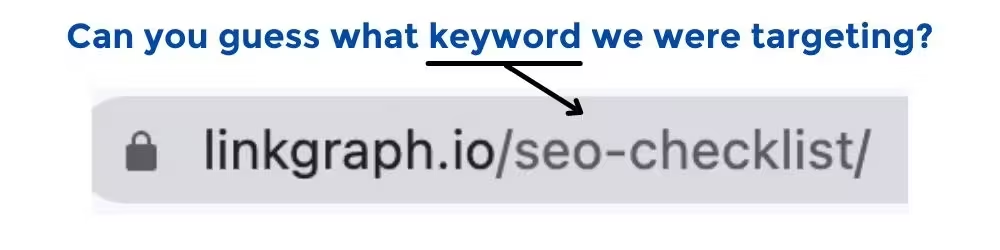
The slug should contain the primary keyword the page is trying to rank for, written the way a person would search it. For a page about SEO-friendly URLs, the slug /seo-friendly-urls beats /how-we-think-about-links-in-2026, because the exact phrase in the slug reinforces the same phrase in the title tag and the H1, and it's one more place a search engine can match the page to the query. An on-page SEO audit checks that the slug, title tag, and H1 stay aligned instead of drifting apart as a page gets edited over time.
2. Keep It Short
Short means the slug itself stays close to three to five words, and the full URL stays under roughly 60 characters where the page hierarchy allows it. Cut filler words: /the-complete-guide-to-seo-friendly-urls says nothing that /seo-friendly-urls doesn't already say. A shorter slug is also easier to paste into a Slack message, a text, or an email without it wrapping or truncating, which is a small but real factor in how often a link actually gets clicked.
3. Use Hyphens, Never Underscores

Hyphens separate words the way search engines expect; underscores don't. Google's own guidance states plainly that hyphens should separate words in a URL, and it explains why: an underscore is commonly used in programming to join concepts into a single token, so seo_friendly_urls can be read by a crawler as one word, seofriendlyurls, rather than three. seo-friendly-urls removes that ambiguity entirely.
4. Use Lowercase Letters Only
A URL should be all lowercase, with no mixed case anywhere in the slug. Some servers are case-sensitive, which means /SEO-Friendly-URLs and /seo-friendly-urls can resolve as two separate pages with duplicate content, splitting both link equity and crawl attention between two URLs that were meant to be one.
5. Keep Modifiers That Change Meaning
Not every extra word in a slug is filler, and cutting a modifier that changes what the page is actually about creates a URL that misleads before anyone even clicks. A page about "best running shoes for flat feet" loses real meaning if it's trimmed to /best-running-shoes, since flat feet is the specific angle the content covers and the exact phrase someone with that need is searching for. Cut stop words (the, and, of, a), not the words that carry the page's actual topic.
6. Skip Special Characters and Symbols
A URL should stick to letters, numbers, and hyphens, and skip characters like &, %, $, or spaces that need percent-encoding to display correctly. Encoded characters turn a clean slug into a string like seo%20friendly%20urls, which is unreadable to a person scanning a search result or a shared link and adds nothing a crawler needs.
7. Leave Out Dates and Unnecessary Numbers
A URL should avoid a publish date like /2022/02/28/ unless the date itself is the point of the content, because a dated URL makes evergreen content look outdated the moment the year in the address no longer matches the calendar. Refreshing an article's advice for 2026 does nothing for how current it looks if the URL still reads /2022/. WordPress and several other CMS platforms insert this by default; check the permalink settings and remove it before publishing, not after the URL has been indexed and linked from other sites.
8. Limit Folder Depth
A page reachable in two or three clicks from the homepage generally gets crawled more often and carries more inherited authority than one buried five subfolders deep. /blog/seo-friendly-urls is easier for both a crawler and a reader to parse than /resources/guides/2026/technical/on-page/urls/. If a site's navigation naturally nests content that deep, that's usually a sign the information architecture needs flattening, not that the URL needs to reflect every category a page happens to sit in.
SEO-Friendly URL Examples: Good vs. Bad
A bad URL usually fails for one of three reasons: it's too long, it hides the topic behind IDs or parameters, or it repeats the same word structure inconsistently across the site. Seeing the fix next to the problem makes the eight habits above easier to apply than reading them as a list.
| Bad URL | Why It Fails | SEO-Friendly Fix |
|---|---|---|
example.com/index.php?p=4471&cat=3a | No descriptive words; crawlers and readers can't tell what the page covers | example.com/blog/seo-friendly-urls |
example.com/2022/02/28/seo_tips_for_beginners/ | Underscores instead of hyphens, plus a date that ages the content | example.com/blog/seo-tips-for-beginners |
example.com/Products/Running-Shoes/ | Mixed case can create duplicate URLs on case-sensitive servers | example.com/products/running-shoes |
example.com/resources/guides/2026/technical/on-page/best-running-shoes-for-flat-feet | Six subfolders deep; buries a page that should rank on its own | example.com/blog/best-running-shoes-flat-feet |
example.com/page and example.com/page/ both live | Trailing-slash inconsistency splits one page's ranking signal across two URLs | Pick one version, 301 redirect the other, and set the canonical tag to match |
How Do You Fix URLs That Are Already Live and Ranking?
A URL that is already indexed and ranking should almost never be changed casually, because every existing backlink, bookmark, and internal link still points to the old address. If a URL genuinely needs to change (a rebrand, a site migration, a slug with a typo that's been live for years), a permanent 301 redirect from the old URL to the new one is what preserves the ranking signals and link equity the old page built up. A redirect that goes to an unrelated page, or a chain of three or four redirects stacked on top of each other, tells crawlers something is broken and can slow both indexing and page load for the visitor who lands there.
Search Atlas's Site Auditor crawls a domain and flags exactly these problems at scale: redirect chains, orphaned URLs no internal link points to anymore, and canonical tags that contradict each other across a site. It calculates a health score out of 1000 for the domain and walks through fix instructions for each issue it finds, which matters most on larger sites where a URL restructuring can touch thousands of pages at once and a single missed redirect quietly bleeds ranking history. Anyone running a technical SEO audit after a migration should treat redirect verification as the first thing to check, not the last.
Common URL Mistakes That Quietly Hurt SEO
Most URL problems aren't dramatic, they're small inconsistencies that compound across hundreds of pages. Duplicate content from serving the same page at both example.com/page and example.com/page/ (with and without the trailing slash) is one of the most common, and it's usually invisible until a site audit surfaces it as duplicate URLs competing against each other in search results.
Dynamic parameters left unmanaged are the other frequent offender. An e-commerce category page that generates a new URL for every combination of size, color, and sort order can produce thousands of near-identical URLs from a single page of real content, and Google's guidance recommends either canonicalizing those variants to one URL or blocking the low-value combinations in robots.txt before they consume crawl budget that should go to pages that actually need to rank.
A slug that was never updated after the page's focus shifted is a subtler version of the same problem. A URL still reading /old-product-name after a rebrand, or /seo-tips-2023 on an article that's been refreshed twice since, mismatches the content it points to. Pairing URL hygiene with the rest of an on-page SEO checklist, title tags, headings, and internal links included, catches these mismatches before they pile up.
A Clean URL Structure Compounds Over Time
None of these eight habits move a page from page two to page one by themselves, but together they remove the friction that keeps a page from getting crawled fully and understood correctly, which is also what gets a page cited with confidence. A site with thousands of pages feels the compounding effect most. Consistent slugs and one canonical version of every URL, with no orphaned redirect chains between them, add up to a crawl budget spent on content instead of confusion. Building that structure page by page works for a small site; keeping it consistent across a site that publishes constantly is where a tool like a sitemap generator and a recurring technical crawl earn their place, catching the slug that drifted or the redirect that broke before a reader, or an AI answer engine, ever notices.
Frequently Asked Questions
What happens if I change a URL that's already ranking? The page can lose its ranking history and any backlinks pointing to the old address stop working, unless a 301 redirect is put in place immediately to pass that authority to the new URL.
Does my domain name affect my ranking? The domain name itself carries almost no direct ranking weight in 2026; content quality, backlinks, and technical health matter far more than whether a keyword appears in the domain.
What are dynamic URLs, and are they bad for SEO? A dynamic URL is one generated on the fly with query parameters, like a filtered product listing, and it isn't inherently bad, but leaving too many parameter combinations uncanonicalized creates duplicate content that dilutes ranking signals across near-identical pages.
Should URLs end with a trailing slash? Either choice works as long as it's applied consistently across the entire site, since Google treats /page and /page/ as two distinct URLs and will index whichever version it's shown most consistently through internal links and canonical tags.
Do URL changes affect whether AI engines cite my page? Yes. AI answer engines like ChatGPT and Perplexity deduplicate sources aggressively, so a page served at multiple URL variants risks splitting its citation signal, while a single, consistent, descriptive URL gives the AI one clean target to cite.
Does anchor text in a link affect how a search engine reads the URL it points to? Yes, anchor text is one more signal about the destination page's topic, which is why internal links to a page about semantic HTML should use text describing that topic rather than generic phrases like "click here."