Businesses in ChatGPT is OpenAI's official merchant and brand console (chatgpt.com/business-hub), launched in beta on November 10, 2026 to let companies claim their profile, verify ownership, submit policies and product feeds, and read 28-day discovery insights. While over 1.2 billion people use ChatGPT every week, claiming a profile in Business Hub carries zero ranking guarantees and does not influence how ChatGPT selects organic sources.
To unlock profile edits, product catalog uploads, an eligible customer chat agent, and the verified blue check, businesses must pass two distinct checks rather than one: a link verification check (phone, email, DNS TXT record, or Shopify login) followed by a Persona identity check. The sections below break down every component of OpenAI's November 2026 release, the legal fine print, the multi-location agency playbook, and the technical crawler requirements your website still needs.
ChatGPT Business Hub Eligibility and Verification Evaluator
Evaluate profile claiming rules, Two-Check verification readiness (Claim + Persona), Business Agent gates, and multi-location constraints based on OpenAI documentation as of November 2026.
Eligible (Claim + Persona check). Full edit rights, product feeds, 28-day Insights, and blue check unlocked.
Eligible once Claim + Persona are approved (category subject to Business Agents Policy)
Add OpenAI TXT verification record to your domain DNS settings. This is the primary enterprise fallback when listed phone lines or general inboxes cannot receive automated codes.
Single brand profile. Online mention counts only when ChatGPT references your website.
Key Takeaways
- OpenAI launched Businesses in ChatGPT (
chatgpt.com/business-hub) in beta on November 10, 2026 across an ecosystem serving 1.2 billion weekly ChatGPT users. - Verification requires two separate approvals: Check 1 (The Claim via phone, email, domain DNS TXT record, or Shopify) opens Business Hub, while Check 2 (Persona identity verification) unlocks profile edits, 28-day Insights, product feeds, an eligible Business Agent, and the blue check.
- Claiming a profile is not a ranking signal: verified profiles receive zero algorithmic boost, recommendations remain independent, and paid ads do not alter organic answers.
- Multi-location brands have no parent profile in Business Hub today (
1 brand = 1 profile), meaning claiming a brand does not unlock its physical locations, and store or restaurant claims are limited to existing U.S. listings. - Online business mentions in the 28-day Insights tab count only when ChatGPT references your website, requiring
OAI-SearchBotpermission inrobots.txtand firewall whitelisting for OpenAI's IP ranges (openai.com/searchbot.json).
TL;DR
What is Businesses in ChatGPT?
Businesses in ChatGPT is OpenAI's merchant console at chatgpt.com/business-hub where eligible businesses claim their listing, verify identity through Persona, update company details and product feeds, publish an eligible customer chat agent, and review 28-day aggregate discovery metrics.
How do you verify a business profile in ChatGPT Business Hub?
You verify a profile in two steps: first, prove your link to the business using a listed phone number, business email, domain DNS TXT record, or Shopify account; second, complete a Persona identity check using a government ID, business registration records, and proof of authorization.
Does claiming a profile in ChatGPT Business Hub improve rankings?
No. Claiming a profile in Business Hub provides zero ranking guarantees. It improves the accuracy of the business facts displayed when users view your profile, but ChatGPT's organic answer engine remains independent.
Can an agency claim a profile on a client's behalf?
The client should initiate the claim and invite the agency into Business Hub. Every agency team member must sign in with their own individual ChatGPT account, and personal claim invitation links must never be forwarded.
What Four Components Launched in Businesses in ChatGPT?
Four separate components launched in the Businesses in ChatGPT beta: Business Hub, Business Agent, Sponsored Business Agent, and Get Quote. Claiming a profile, publishing an interactive agent, and running paid placements are independent choices, and adopting one does not require adopting the others.
| Component | Core Function | Current Availability (November 2026) |
|---|---|---|
| 1. Business Hub | Claim your business profile, submit verified company details and policies, connect product feeds, and read 28-day insights. | Open to eligible businesses at chatgpt.com/business-hub. |
| 2. Business Agent | A clearly labeled customer chat interface that answers questions for your business using your approved products and policies. | U.S. ecommerce and online service businesses only. |
| 3. Sponsored Business Agent | A paid placement inside ChatGPT that opens a conversation directly with your Business Agent. | Rolling out to eligible advertisers via Ads Manager. |
| 4. Get Quote | A quote action button displayed on local service results that opens a provider's quote form inside ChatGPT. | Beta with approved local service integration partners. |
Each component operates under separate eligibility gates and policy rules. For a deep breakdown of agent capabilities, the 6-point pre-publish QA test matrix, Ads Manager campaign rules, and local partner plugins, read our dedicated guide to ChatGPT Business Agents and Sponsored Agents.
How Do Customers Discover a Business Profile in ChatGPT?
Customers move from a conversational ChatGPT answer to your business website through a four-stage discovery flow. OpenAI separates its own generated responses from the merchant's claimed profile and labeled agent chat so users always know whether they are reading an independent answer or speaking with the business.
- Stage 01 (Shows up in an answer): A user asks ChatGPT a commercial or local question, and the business appears inside the generated response.
- Stage 02 (Opens the ChatGPT profile): The user clicks the business entity to open its ChatGPT profile card displaying verified hours, description, category, policies, and visual assets.
- Stage 03 (Chats with the Business Agent): If the merchant has published an eligible Business Agent, the user can open a clearly labeled chat with the business that runs separately from ChatGPT's own answers.
- Stage 04 (Finishes on the business website): The user clicks through to the merchant's website, which remains the final destination where product purchases, appointment bookings, and order status inquiries are completed.
Because transactions and bookings still close on your domain, a claimed ChatGPT profile complements rather than replaces your website conversion funnel.
How Does Profile Claiming and Persona Verification Work?
Claiming and unlocking a profile in ChatGPT Business Hub requires completing a four-step workflow anchored by two separate verification checks. Many teams stall during onboarding because they assume proving domain or phone access completes the verification process.
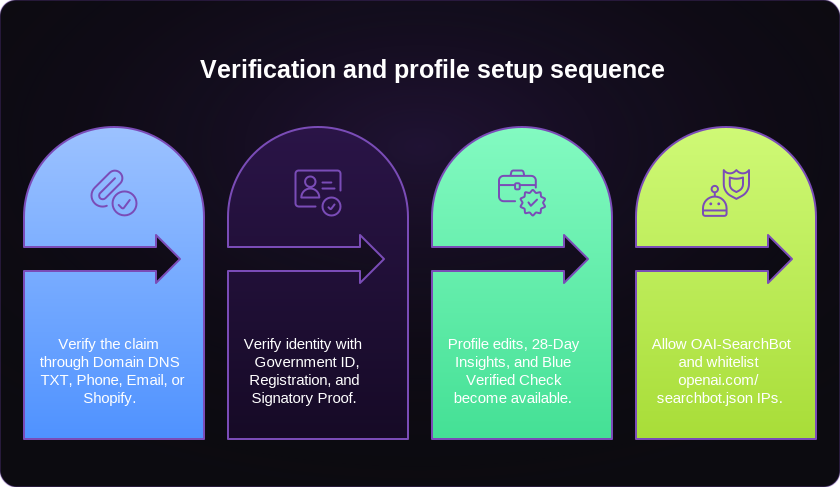 Four-step onboarding workflow showing link claim verification, Persona identity checks, profile unlocking, and OAI-SearchBot IP whitelisting.
Step 01: Find your listing in Business Hub (chatgpt.com/business-hub)
   ↓
Step 02: Verify your link to the business (Check 1: Phone, Email, DNS TXT, or Shopify)
   ↓
Step 03: Pass the Persona identity check (Check 2: Government ID + Registration + Auth Proof)
   ↓
Step 04: Edit business details, connect Shopify/CSV product feeds, and read 28-day Insights
OpenAI divides verification into Two Checks, Not One:
- Check 1 (The Claim): Proves your technical or operational link to the business via phone, email, domain DNS, or Shopify. Completing Check 1 unlocks access to the Business Hub console.
- Check 2 (Persona): Proves your personal identity and legal authority to act for the entity. Completing Check 2 unlocks profile edits, the 28-day Insights tab, product feed connections, an eligible Business Agent, and the verified blue check.
Which of the Four Link Verification Methods Should You Use?
Businesses can complete Check 1 (The Claim) using one of four verification paths depending on their technical access and commerce stack. When an automated phone tree blocks voice calls or shared corporate inboxes filter verification codes, domain DNS verification serves as the most reliable path.
| Verification Method | How It Works in Business Hub | Best Operational Use Case |
|---|---|---|
| Business phone | Sends an SMS text or automated voice call to the phone number currently listed on the profile. | Single-location businesses with direct access to the listed phone line (no IVR call tree blocker). |
| Business email | Sends a one-time verification code to an email inbox tied directly to the business domain. | Businesses where the person claiming holds an active corporate email address matching the listing. |
| Website domain | Requires adding a TXT record to your domain's DNS settings. | Primary enterprise fallback when listed phone lines or general inboxes fail or route through reception. |
| Shopify store | Connects your Shopify store and verifies ownership when you sign in. | Ecommerce merchants on Shopify planning to sync their product catalog directly into Business Hub. |
If a listing in Business Hub displays "Contact support" instead of a claim button, that listing is currently locked by OpenAI. Once both Check 1 and Check 2 (government ID, business registration details, and proof of authorization in Persona) are approved, you can update the following profile attributes:
- Core Identity & Visuals: Website URL, business description, primary category, logo, and cover photo.
- Commercial Policies: Delivery policies and return policies.
- Product Catalog: A connected product feed via native Shopify integration or CSV upload.
OpenAI reviews each profile edit before publishing it to live users. Keeping your domain's on-page entity data aligned with your Business Hub submissions also reinforces technical optimization for ChatGPT Search.
Does Claiming a Profile Improve Rankings, and What Is in the Fine Print?
Claiming a profile in ChatGPT Business Hub does not improve your organic ranking position or citation frequency in ChatGPT answers. OpenAI explicitly states that claiming buys zero visibility boost, organic recommendations remain independent, and buying Sponsored Business Agent ads has zero effect on ChatGPT's answers.
What claiming actually improves is the factual accuracy of your profile card, your delivery and return policy disclosures, your product feed coverage, and your access to 28-day discovery metrics. Understanding how ChatGPT selects and cites organic sources remains essential because organic synthesis and profile claiming operate on separate tracks.
Before a company or agency client accepts the Business Hub terms, legal and marketing stakeholders should review six fine-print rules in OpenAI's documentation:
| Fine-Print Rule | What OpenAI's Documentation States | Operational Impact for Brands & Agencies |
|---|---|---|
| 1. Listings exist either way | OpenAI can generate and display unclaimed business listings in ChatGPT using third-party and public web data. | Opting out of Business Hub does not remove your business from appearing in ChatGPT answers. |
| 2. No exclusive control | OpenAI can add to, edit, or replace information submitted by the business inside Business Hub. | Submitted descriptions and attributes are treated as inputs rather than locked copy. |
| 3. License on basic info | The license you grant OpenAI to display basic business information is perpetual and irrevocable. | Only submit factual, public-ready corporate data and assets that carry permanent distribution clearance. |
| 4. AI phone calls | Using Business Hub authorizes OpenAI's AI assistant to call the business by phone on behalf of users (an opt-out setting is available). | Review the AI voice call opt-out toggle immediately after claiming if your reception lines cannot handle AI assistant calls. |
| 5. No quick takedown | Contacting OpenAI support does not guarantee a listing removal or an immediate edit override. | Set realistic client expectations around review queues and editorial control before initiating claims. |
| 6. Already claimed listings | If a profile has already been claimed by an unauthorized party, use Dispute ownership on the profile menu. | Audit existing listing states first so you can trigger the formal dispute workflow rather than opening generic tickets. |
The Agency Playbook: How to Manage Client Claims and Multi-Location Brands
Agencies managing Business Hub onboarding must structure access around individual accounts and strict single-brand profile boundaries. In OpenAI's current architecture, the client claims the profile and invites the agency, and every participant signs in with their own individual ChatGPT account. Never forward a personal claim invitation email to another team member or external contractor.
For franchises, retail chains, and multi-location enterprises, there is no parent profile in Business Hub today:
- 1 Brand = 1 Profile: Each brand entity maps to a single profile.
- Claiming a brand does not claim its locations: Verifying the corporate brand profile does not unlock or verify individual branch or store profiles.
- Location profiles stay locked by default: Multi-location branch listings remain locked unless specifically eligible.
- Store and restaurant restriction: Physical stores and restaurants can claim only an existing U.S. listing for now.
Six Questions to Take to OpenAI Before Scoping a Multi-Location Rollout
Before quoting a multi-location deployment or signing a client Statement of Work, confirm six open boundary questions through help.openai.com:
- Multi-location: When can one brand claim and manage multiple physical locations under a unified hierarchy?
- Agency role: Is there a dedicated multi-client agency view, or is access managed strictly per profile invite?
- Outside the U.S.: Which non-U.S. countries are open for profile claiming today, and which are next on the rollout schedule?
- Already claimed: What is the exact SLA and documentation requirement when a legitimate owner clicks Dispute ownership?
- What shows live: When OpenAI blends merchant-submitted data with other web sources, which source takes precedence on the live card?
- Review time: How long do profile edits, Persona checks, and CSV product feeds take to clear OpenAI review?
The Eight-Stage Agency Execution Playbook
Run every client onboarding through an eight-stage operational sequence so ownership authority, DNS fallbacks, and crawler permissions are confirmed before touching Business Hub:
| Stage | Stage Name | Required Action |
|---|---|---|
| 01 | Establish authority | Identify the legal client signatory who will complete Persona and hold primary owner status in Business Hub. |
| 02 | Define scope | Classify the business model (U.S. online, U.S. store/restaurant, multi-location, or non-U.S.) and separate unlocked vs locked listings. |
| 03 | Prepare facts | Assemble the 12-Field Location Register, verified policies, logos, cover photos, and Persona authorization documents. |
| 04 | Confirm route | Select the primary Check 1 verification method and pre-stage domain DNS TXT access as the fallback. |
| 05 | Verify | Guide the client through Check 1 (The Claim) and Check 2 (Persona) and accept the official agency account invite. |
| 06 | Validate | Submit approved profile edits, connect the Shopify or CSV product feed, and verify OAI-SearchBot + IP allowlist access. |
| 07 | Expand | If eligible, build and test the Business Agent against the 6-point QA protocol before clicking Publish. |
| 08 | Maintain | Track each profile across the 4 operational states and review the rolling 28-day Insights tab monthly. |
Track every client profile across four standardized status gates: Information prepared -> Claim submitted -> Approved by OpenAI -> Live result checked.
The 12-Field Location Register and Two Hard Guardrails
Even though location profiles stay locked by default for multi-location chains, preparing a clean 12-field register ensures your team can verify the main brand profile immediately and claim individual locations as OpenAI unlocks them:
- Official Entity / Location Name (exact legal and consumer-facing DBA)
- Corporate vs Franchise Ownership Classification
- Current ChatGPT Listing Status (Unclaimed, Locked / Contact Support, or Already Claimed)
- Physical Street Address (no P.O. boxes or virtual offices)
- City, State/Province, and Postal Code
- Listed Business Phone Number (tested for direct SMS or automated voice reception)
- Primary Website Domain & Canonical URL
- Designated Check 1 Verification Route (Phone, Email, DNS TXT, or Shopify)
- Designated Check 2 Persona Signatory & Authorization Proof
- Approved Operating Hours, Delivery Policy, and Return Policy
- Product Feed Source & Crawler Status (Shopify or CSV;
OAI-SearchBot+searchbot.jsonverified) - Current Operational State (
Information prepared,Claim submitted,Approved by OpenAI, orLive result checked)
Enforce Two Hard Guardrails across every account team when managing local SEO workflows with AI agents:
- Guardrail 1 (Don't Invent): Never submit SEO city landing pages or service-area pages as physical business locations.
- Guardrail 2 (Don't Promise): Never promise a client that claiming a Business Hub profile will boost ChatGPT rankings or generate automated bookings.
What Does the ChatGPT Insights Tab Count and Leave Out?
Once a business passes both Check 1 (The Claim) and Check 2 (Persona), Business Hub unlocks a rolling 28-day Insights tab containing three aggregate discovery metrics. OpenAI provides aggregate counts and topic themes only, and never exposes individual user prompts or chat transcripts.
| 28-Day Insights Metric | What OpenAI Counts | Critical Reading Rule |
|---|---|---|
| 1. Mentions | Online business: ChatGPT referenced the business's website (a plain-text brand name mention alone does not count). Local business: ChatGPT displayed a result for that physical location. | If your website blocks OpenAI's crawler, your online business mentions will undercount or fail to register. |
| 2. Website clicks | Aggregate user clicks from ChatGPT profile surfaces and citations to your website over the last 28 days. | Counts may be incomplete; evaluate directional 28-day trends rather than treating totals as an exact ledger. |
| 3. Discovery topics | Common themes and subject categories where your business appeared in ChatGPT responses. | Shows high-level topic clusters only; never displays individual user prompts, user identities, or Business Agent chat transcripts. |
When interpreting the Insights tab for leadership or clients, remember that a blank metric does not equal zero (it indicates the metric is below OpenAI's privacy threshold, still collecting, or temporarily unavailable). Furthermore, OpenAI prohibits publishing, selling, or using Insights data to identify individuals without a written agreement. For a complete walkthrough of how to pair these 28-day numbers with Google Analytics 4 and our four-tier True LLM & Organic Authority (T-OLA) model, see our guide on reconciling ChatGPT Business Hub Insights with GA4.
Technical Checklist: Why the Profile Does Not Replace Your Website
A claimed profile in ChatGPT Business Hub never replaces your website because online mentions, product feeds, and customer checkouts all depend on live website accessibility. For an online business, OpenAI counts a mention in Insights only when ChatGPT references your website URL, and connecting a Shopify or CSV product catalog requires OpenAI's crawlers to verify your landing pages.
Execute this two-part technical configuration across your web server, CDN, and firewall:
# 1. Allow OpenAI's search crawler in robots.txt (allow ~24 hours for changes to register)
User-agent: OAI-SearchBot
Allow: /

# 2. Whitelist OpenAI's published SearchBot IP ranges at your host, CDN (Cloudflare/Akamai), and WAF:
# Source JSON: https://openai.com/searchbot.json
If your CDN or bot firewall challenges requests from the IP blocks published in openai.com/searchbot.json, product feed validation and website citation links will fail even if your robots.txt file permits OAI-SearchBot. Review our technical documentation on controlling AI search bot crawler access to verify that your server returns clean 200 OK HTML responses to OpenAI's retrieval bots.
This Week's Six-Item Implementation Homework
- Look up your primary brand listing at
chatgpt.com/business-huband record whether it is unclaimed, locked ("Contact support"), or already claimed. - Confirm Check 1 and Check 2 readiness by securing domain DNS TXT access alongside the Persona signatory's government ID, business registration, and authorization proof.
- Verify
OAI-SearchBotand IP whitelisting by checkingrobots.txt(allowing ~24 hours to propagate) and confirmingopenai.com/searchbot.jsonIP ranges are unblocked at your CDN. - Review the six fine-print rules with legal or client stakeholders, including the perpetual license on basic business info and the AI assistant phone call opt-out setting.
- Build your 12-Field Location Register so corporate brand facts are ready today and physical branch data is staged as multi-location claiming expands.
- Record a 28-day baseline across GA4 (
chatgpt.comreferrals) and Business Hub Insights before publishing profile edits or product feeds.
Primary OpenAI Documentation Sources (Verified November 2026)
- ChatGPT Business Hub Console: chatgpt.com/business-hub
- OpenAI Help Center & Claiming Guides: help.openai.com
- OpenAI SearchBot IP Ranges & Crawler Spec: openai.com/searchbot.json
- Local Services Get Quote Conversion Specification: developers.openai.com/plugins/guides/local-services-request-quote-conversion-spec