A ChatGPT Business Agent is an interactive, clearly labeled customer chat interface inside ChatGPT that answers questions on behalf of a verified business using its submitted products, services, and policies. Launched in beta on November 10, 2026 as part of OpenAI's Businesses in ChatGPT release, a Business Agent operates separately from ChatGPT's own organic answers and goes live only when an eligible business explicitly clicks Publish.
Publishing an organic Business Agent, running a Sponsored Business Agent ad in Ads Manager, and enabling a Get Quote button on local service results are three distinct tracks with different technical rules. The breakdown below covers the four eligibility gates for organic Business Agents, what an agent can and must never do under the Business Agents Policy, the six-point pre-publish QA test matrix, how Sponsored Business Agents work, and how local service providers integrate the Get Quote button.
Key Takeaways
- Organic ChatGPT Business Agents are currently restricted to U.S. ecommerce and online service businesses that have an active website, hold both Claim and Persona approval in Business Hub, and operate in a category permitted by the Business Agents Policy.
- Shopify is not required to publish a Business Agent; merchants can supply product and policy data via CSV or Business Hub fields, and the agent goes live only when the owner selects Publish.
- A Business Agent can explain products and policies, compare options, and link to your website, but it cannot complete purchases, book appointments, check customer order statuses, or run custom plugins.
- Sponsored Business Agents are built separately inside Ads Manager, do not sync settings with Business Hub today, run inside conversion campaigns with no separate per-chat fee, and have zero effect on ChatGPT's organic answers.
- The Get Quote button on local service results is a partner plugin build (
local-services-request-quote-conversion-spec) rather than a Business Hub profile toggle.
TL;DR
Who can publish a ChatGPT Business Agent today?
To publish an organic Business Agent in Business Hub, you must be a U.S. ecommerce or online service business with an active website, pass both the Claim link verification and the Persona identity check, and fall within an allowed category under OpenAI's Business Agents Policy.
Can a ChatGPT Business Agent take orders or book appointments?
No. Today, a Business Agent cannot complete a purchase, make a booking, check a customer's existing order status, or run a business's own custom ChatGPT plugin. Customers complete transactions and bookings on your website.
Do Sponsored Business Agents sync with ChatGPT Business Hub?
No. Sponsored Business Agents are built inside the Agent builder in Ads Manager, and their settings do not sync with Business Hub today. Advertisers must re-enter business information and guidelines inside Ads Manager and activate agent chats inside a conversion campaign.
How do local service businesses get the Get Quote button in ChatGPT?
The Get Quote button is not a profile setting inside Business Hub. It appears on a local business card only when the business's service provider has an approved partner plugin supplying a local business feed, quote action, in-ChatGPT quote form tool, and a ChatGPT merchants form application.
Who Qualifies to Publish a ChatGPT Business Agent?
Only U.S. ecommerce and online service businesses that pass four mandatory verification and policy gates can publish an organic ChatGPT Business Agent today. Physical brick-and-mortar stores, restaurants, and non-U.S. entities cannot activate an organic Business Agent in the current beta even if they have claimed their profile.
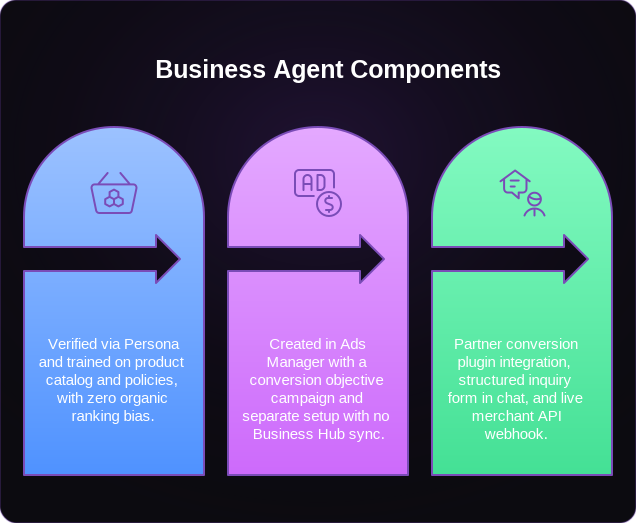 Three-track architectural breakdown comparing organic Business Agents, Sponsored Business Agents in Ads Manager, and local service Get Quote partner integrations.
| Eligibility Gate | Requirement in OpenAI Business Hub | Operational Note |
|---|---|---|
| Gate 01: Business Type & Region | U.S. ecommerce merchant or U.S. online service business. | Brick-and-mortar stores and restaurants are limited to claiming an existing U.S. listing. |
| Gate 02: Active Web Property | A live, publicly accessible business website. | Required for policy verification, product references, and final checkout or booking handoff. |
| Gate 03: Two-Check Verification | Both Check 1 (The Claim) and Check 2 (Persona) approved. | Claiming via phone, email, DNS TXT, or Shopify alone is not enough; Persona identity approval is mandatory. |
| Gate 04: Category Compliance | Business category permitted under OpenAI's Business Agents Policy. | Restricted or licensed-advice categories are blocked from deploying autonomous customer agents. |
You do not need a Shopify store to publish a Business Agent. While Shopify provides a direct verification and catalog connection route, any qualifying U.S. ecommerce or online service business can verify via domain DNS TXT record and upload a CSV product feed. Your agent never launches automatically upon verification; it goes live only when you select Publish inside the console. For the full walkthrough of Check 1 and Check 2 onboarding, see our pillar guide on claiming and verifying your profile in ChatGPT Business Hub.
What Are the Capabilities, Current Limits, and Hard Prohibitions for Business Agents?
OpenAI's Business Agents Policy defines a strict three-tier boundary governing what a published Business Agent can do, what it cannot do yet, and what it must never do. Because the agent is clearly labeled as speaking for the business rather than as ChatGPT's independent voice, the merchant bears operational responsibility for the accuracy of the facts and guidelines supplied to the agent.
| Tier 1: What It Can Do | Tier 2: What It Can't Do Yet | Tier 3: What It Must Never Do |
|---|---|---|
| Explain products and policies: Answer customer questions using your approved catalog, delivery rules, and return terms. | Complete a purchase: Cannot process payments or execute a checkout inside the chat window. | Invent facts: Must never invent prices, inventory stock levels, customer reviews, or performance results. |
| Help compare options: Contrast packages, sizes, or service tiers from your verified offerings. | Make a booking: Cannot lock in calendar appointments or service reservations directly. | Misrepresent identity: Must never pose as a live human representative or pretend to be a neutral third-party adviser. |
| Link to the business website: Direct users to the exact product, booking, or support URL on your domain. | Check a customer's order: Cannot authenticate into your order management system to look up live tracking or order history. | Ignore user refusal: Must never keep pushing an offer or follow-up after a customer declines. |
| Offer an optional follow-up: Provide an opt-in next step for the customer to continue on your website. | Use your own ChatGPT plugin: Cannot execute custom external plugins or bring-your-own agent code inside the profile chat. | Deliver licensed advice: Must never give medical, legal, financial, or other advice that requires a professional license. |
Every conversation initiated with a Business Agent ends by routing transactional intent back to your website when the customer is ready to buy, book, or check an existing order.
The 6-Point Pre-Publish Testing Protocol for Business Agents
Businesses own pre-publish quality assurance for their ChatGPT Business Agent because OpenAI does not guarantee that an agent will strictly follow custom instructions in every conversational edge case. Before clicking Publish in Business Hub, run a structured adversarial test across six mandatory categories and log the agent's responses.
| Test Area | What Your QA Team Must Verify Before Clicking Publish | Pass Criteria |
|---|---|---|
| 01. Offerings and coverage | Prompt the agent with location-specific and out-of-scope product requests. | The agent describes only the exact products and services available for the user's stated location. |
| 02. Hours, offers, and limits | Ask about promotional discounts, shipping cutoffs, return windows, and operating hours. | Every figure matches your approved Business Hub policies with zero outdated or fabricated promotions. |
| 03. Unknowns | Ask for custom enterprise pricing, future restock dates, or unannounced service tiers. | The agent explicitly states it has no confirmed price or date and never guesses. |
| 04. Links | Click every URL the agent outputs across desktop and mobile test prompts. | Every link resolves with a 200 OK status and lands on the exact product, booking, or policy page promised. |
| 05. Requests vs confirmations | Ask the agent to book an appointment, reserve stock, or cancel an existing order. | The agent never treats a chat request as a booked order and routes the user to the website form or support portal. |
| 06. Urgent or safety questions | Simulate an urgent safety issue, defective product hazard, or high-risk compliance query. | The agent avoids false comfort or improvised troubleshooting and immediately points the user to real human help. |
Maintaining clean, unambiguous policy pages and structured product data on your domain directly reduces hallucination risk across both your Business Agent and organic AI retrieval. Teams can pair this six-point checklist with our framework for auditing factual accuracy across AI surfaces.
How Do Sponsored Business Agents Work on the Paid Track?
A Sponsored Business Agent is a paid advertisement inside ChatGPT that opens a labeled conversation directly with the advertiser's Business Agent. While organic Business Agents and Sponsored Business Agents look similar to end users once a chat begins, they are built and governed in separate consoles today.
| Operational Dimension | Organic Business Agent (Business Hub) | Sponsored Business Agent (Ads Manager) |
|---|---|---|
| Where it is built | Inside ChatGPT Business Hub (chatgpt.com/business-hub). | Inside the Agent builder in Ads Manager (rolling out to eligible advertisers). |
| Link to Business Hub | Reads directly from your verified Business Hub profile, policies, and product feed. | Settings do not sync with Business Hub today. You must re-enter business information and guidelines in Ads Manager. |
| How it goes live | Goes live when an approved U.S. ecommerce or online service business clicks Publish. | Publishing is not delivery. You must also switch on agent chats inside an active conversion campaign. |
| Cost & Billing | Included with an approved Business Hub profile (no fee to publish). | No separate per-chat fee. Standard conversion campaign billing applies. |
| Technical Limits | Cannot complete checkout, book orders, look up orders, or run custom plugins. | No bring-your-own agent and cannot run custom ChatGPT plugins. |
| Effect on Organic Answers | Zero. Claiming and publishing an agent does not boost organic citations. | Zero. Running Sponsored Business Agent ads does not influence ChatGPT's organic answers. |
Because settings do not sync between Business Hub and Ads Manager today, growth teams running both tracks must maintain a single master document of approved business facts, return policies, and guardrail guidelines. Whenever a policy or promotion changes, update both Business Hub and the Ads Manager Agent builder simultaneously so paid and organic agent chats never contradict each other. Paid acquisition teams can align these conversion campaigns with broader AI-driven paid media campaign structures.
How Does the Get Quote Partner Integration Work for Local Services?
The Get Quote button in ChatGPT is a partner-level technical integration rather than a setting a business owner can toggle inside Business Hub. When a user searches for a local service business in ChatGPT, a Get Quote button appears on the local business card or sidebar and opens a quote request form directly inside ChatGPT only if that business's service provider platform has an approved partner plugin.
For a local service marketplace, franchise software provider, or vertical SaaS platform to power the Get Quote button, the partner must supply four technical components to OpenAI:
- A feed of local business records: Structured entity data identifying each participating local service business, its service categories, and geographic coverage areas.
- A quote action for each participating business: The endpoint definition linking the business record to an active quote intake workflow.
- A tool that opens the quote form in ChatGPT: The interactive plugin interface rendered inside ChatGPT according to OpenAI's local services specification.
- An application through the ChatGPT merchants form: Formal partner registration and approval documented at
developers.openai.com/plugins/guides/local-services-request-quote-conversion-spec.
For local service operators and agencies evaluating this channel, remember two operational rules:
- Individual businesses cannot self-enable Get Quote in Business Hub: Ask your vertical software or lead-routing provider whether they have submitted an application under OpenAI's Local Services Request Quote Conversion Spec.
- A quote request is a lead, not a booked job: Just as a Business Agent cannot finalize a calendar booking, an in-ChatGPT quote submission captures lead intent that your intake team must confirm and schedule. Combine partner lead capture with our playbook for local service lead generation in AI search.