Jetpack is a WordPress plugin suite that provides security monitoring, performance optimization, and site analytics through consolidated features. A Jetpack alternative is a single-purpose or focused multi-feature tool that replaces one Jetpack module with a leaner implementation, which reduces overhead, clarifies ownership, and improves diagnostics.
Jetpack WordPress plugin reviews reveal limitations in granular control, feature bloat that slows site performance, and dependency on WordPress.com accounts that restrict flexibility for users who prefer self-hosted solutions.
Jetpack pricing starts at free for basic features (downtime monitoring, brute force protection, CDN), scales to $9.95/month for Security (real-time backups, spam protection, malware scanning), $9.95/month for Growth (stats, social media tools, newsletter features), and extends to $24.95/month for Complete (all security features, site search, video hosting, social tools). Jetpack prices reflect a 50% first-year discount, with regular pricing doubling after year one ($19.95 for Security and Growth, $49.95 for Complete).
The best Jetpack alternatives are Search Atlas, Matomo, and Plausible Analytics.
What are the Best Jetpack Alternatives?
The 30 best Jetpack alternatives are listed below.
| # | Jetpack Alternative | Best For | Price |
| 1 | Search Atlas | Complete SEO automation | $99/month |
| 2 | Matomo | Self-hosted privacy analytics | Free to $99/month |
| 3 | Plausible Analytics | GDPR-compliant dashboards | $9/month |
| 4 | Koko Analytics | Lightweight WordPress analytics | Free to $25/month |
| 5 | Site Kit by Google | Official Google integrations | Free |
| 6 | Independent Analytics | Script-free analytics | Free to $199/year |
| 7 | Clicky | Real-time visitor tracking | Free to $19.99/month |
| 8 | MonsterInsights | Google Analytics for WordPress | Free to $299.50/year |
| 9 | All In One SEO | WordPress SEO optimization | Free to $299.50/year |
| 10 | UserFeedback | On-site user surveys | Free to $149.50/year |
| 11 | WPForms | Form creation | Free to $299.50/year |
| 12 | Analytify | Visualizing Google Analytics | $99/year |
| 13 | OptinMonster | Lead generation | From $7/month |
| 14 | SearchWP | WordPress search enhancement | $99/year |
| 15 | Smush | Image optimization | From $1.5/month |
| 16 | Ahrefs Web Analytics | Privacy-friendly traffic insights | Free |
| 17 | WP Meta SEO | Bulk on-page SEO and redirect management | $49/year |
| 18 | WP Statistics | On-server analytics | Free to $449/year |
| 19 | WP Activity Log | Security audit logging | Free to $189/year |
| 20 | Statify | Minimal analytics | Free |
1. Search Atlas: Best Jetpack Alternative
Search Atlas is the best Jetpack alternative in 2025. Search Atlas is an AI-powered SEO platform that consolidates technical audits (Core Web Vitals, broken links, schema markup), keyword research, content optimization, backlink analysis, and rank tracking in one unified platform that eliminates the need for multiple disconnected plugins.
Search Atlas replaces Jetpack with centralized control over content, rankings, audits, schema, and outreach across WordPress and non-WordPress environments.
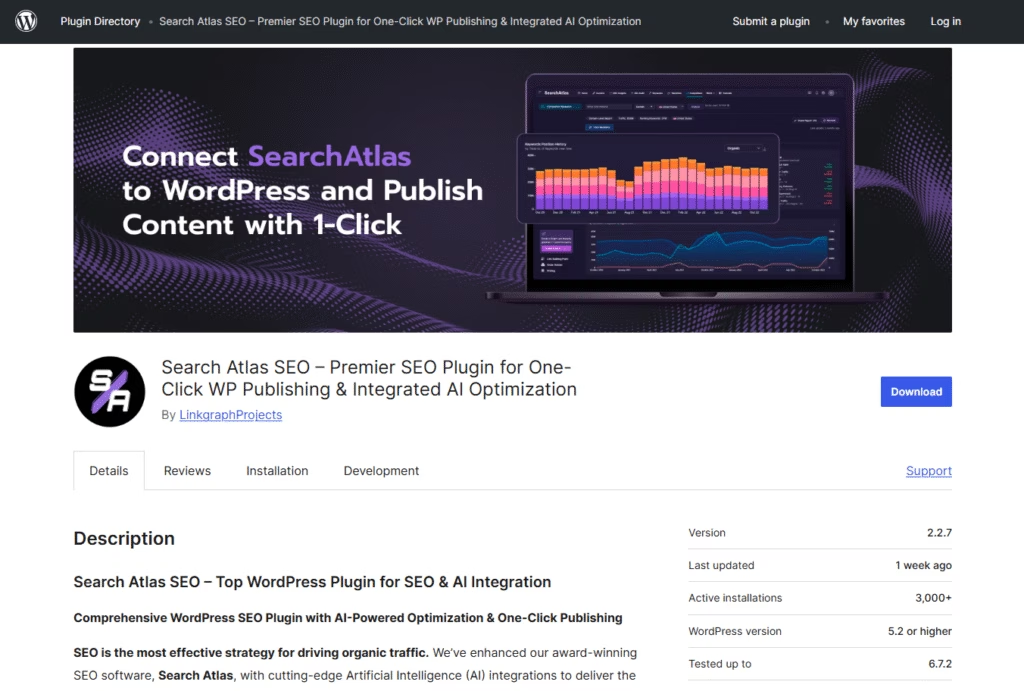
Search Atlas WordPress plugin features include one-click content publishing, AI-powered bulk meta tag updates for titles and descriptions, Google Search Console integration within the WordPress interface, automatic schema markup deployment, Google Instant Indexing for faster crawling, redirection management for link preservation, 404 error monitoring, local business SEO optimization, and custom code snippets insertion.
 Via WordPress
The Search Atlas platform delivers real-time keyword rank tracking across global locations, AI search visibility monitoring (ChatGPT, Perplexity, Google SGE), local SEO software dashboards with grid-based ranking heatmaps, digital PR outreach workflows, and white-label reporting that agencies customize with brand identity.
The Search Atlas OTTO SEO agent automates technical fixes (canonical tags, internal linking, meta optimization) through real-time application without manual intervention, which prioritizes actions using Google Search Console signals and semantic scoring.
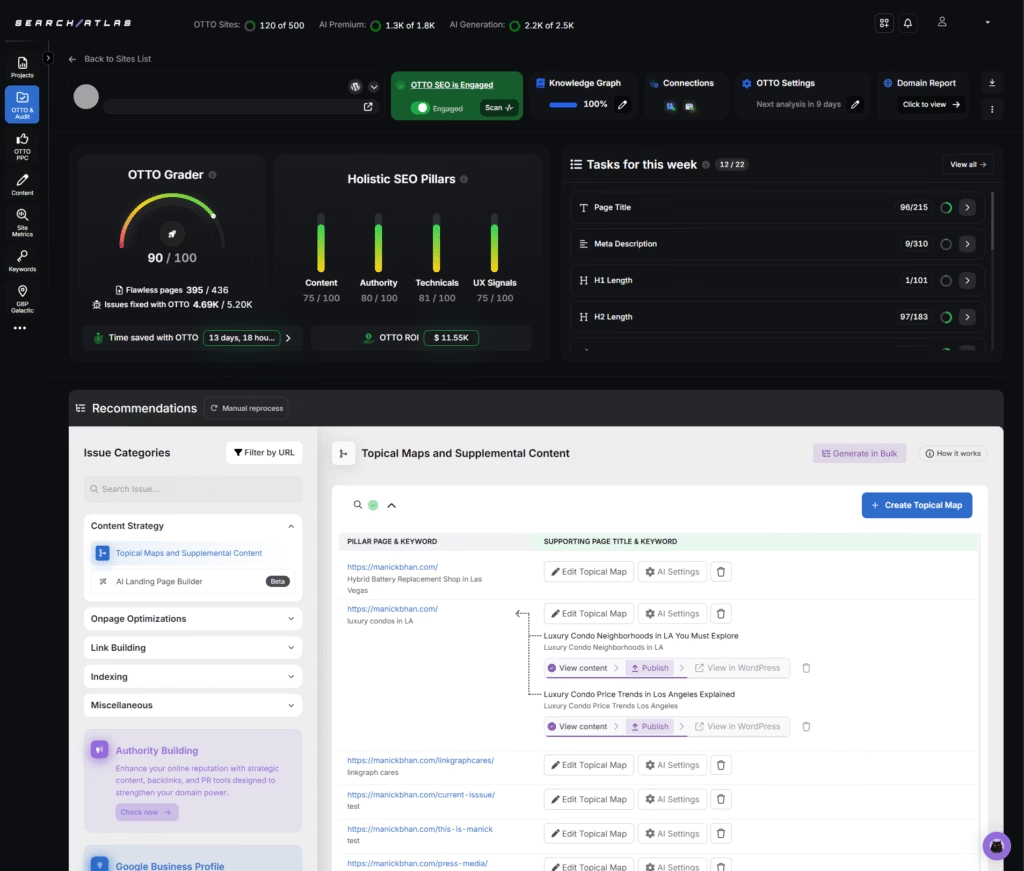
Search Atlas operates as a Jetpack alternative because it prioritizes complete SEO lifecycle management (research, optimization, implementation, reporting) through automation and native WordPress integration, while Jetpack focuses on site statistics and basic security without advanced SEO capabilities.
Search Atlas is a paid alternative to Jetpack. Pricing starts at $99/month for Starter, $199 for Growth, and $499 for Pro, with custom enterprise plans available. Each plan includes all core features, and users typically save $150 to $400 per month compared to combining Jetpack with tools for keyword research, audits, analytics, and outreach. A 7-day free trial is available with full access and no credit card required.
The pros highlighted in the Search Atlas review are the unified platform, AI-powered execution, cross-platform integration, and real-time data visibility.
The con of Search Atlas is the learning curve for teams that are transitioning from simple stat trackers to comprehensive SEO platforms. However, the extensive automation, WordPress plugin integration, and consolidated features justify the investment once workflows are established.
The Search Atlas WordPress plugin maintains 7,000-plus active installations with continuous updates for WordPress compatibility, which demonstrates reliable WordPress integration that Jetpack statistics and security features cannot replicate for comprehensive SEO management.
2. Matomo: Best Jetpack Alternative for Self-Hosted Privacy-Friendly Analytics
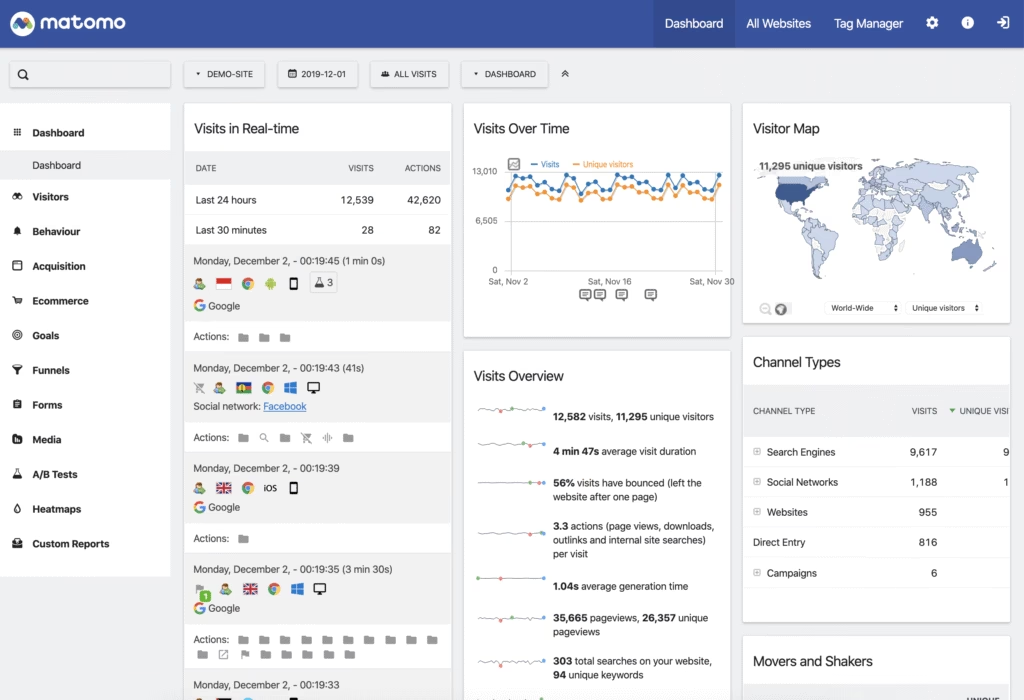
Matomo is the best Jetpack alternative for self-hosted, privacy-friendly analytics. Matomo supplies complete website analytics (visitor tracking, conversion funnels, goal tracking) through a self-hosted deployment that eliminates third-party data sharing and ensures GDPR (General Data Protection Regulation) compliance without external dependencies.
Matomo delivers detailed visitor profiles, heatmaps, session recordings, and A/B testing capabilities that exceed the basic statistics dashboard in Jetpack.
 Via Matomo
Matomo features include unlimited websites and segments, 100% data ownership through on-premise hosting, privacy-focused tracking without cookies, customizable reports and dashboards, ecommerce analytics with revenue tracking, media analytics for video engagement, event tracking for user interactions, and SEO reporting with keyword rankings.
Matomo features roll-up reporting that consolidates data across multiple websites, white-label options for agency branding, and API (Application Programming Interface) access for custom integrations.
Matomo is an alternative to Jetpack because it specializes in comprehensive analytics with complete data control, while Jetpack provides basic site statistics within a broader feature bundle.
Matomo enables organizations to maintain full data sovereignty through self-hosting, which contrasts with Jetpack stats that process data through WordPress.com servers and limit granular analysis without premium tiers.
Matomo pricing starts at free for self-hosted installation with unlimited features, while Matomo Cloud begins at $29/month for 50,000 monthly hits. The Cloud pricing scales to $59/month for 100,000 hits, $99/month for 250,000 hits, and custom enterprise pricing for higher volumes.
Compared to Jetpack at $24.95/month for Complete, Matomo Cloud costs $4.05 more monthly but allows for comprehensive analytics, heatmaps, session recordings, and A/B testing that Jetpack stats cannot deliver.
The pros mentioned in the Matomo review include 100% data ownership through self-hosting, GDPR compliance without third-party tracking, comprehensive analytics features (heatmaps, session recordings, funnels), unlimited websites and custom segments, and an extensive plugin ecosystem for functionality expansion.
The cons of Matomo include technical expertise required for self-hosted installation and maintenance, server resource requirements that increase with traffic volume, and a steeper learning curve compared to simplified analytics dashboards.
3. Plausible Analytics: Best Jetpack Alternative for GDPR-Compliant, Simple Dashboards
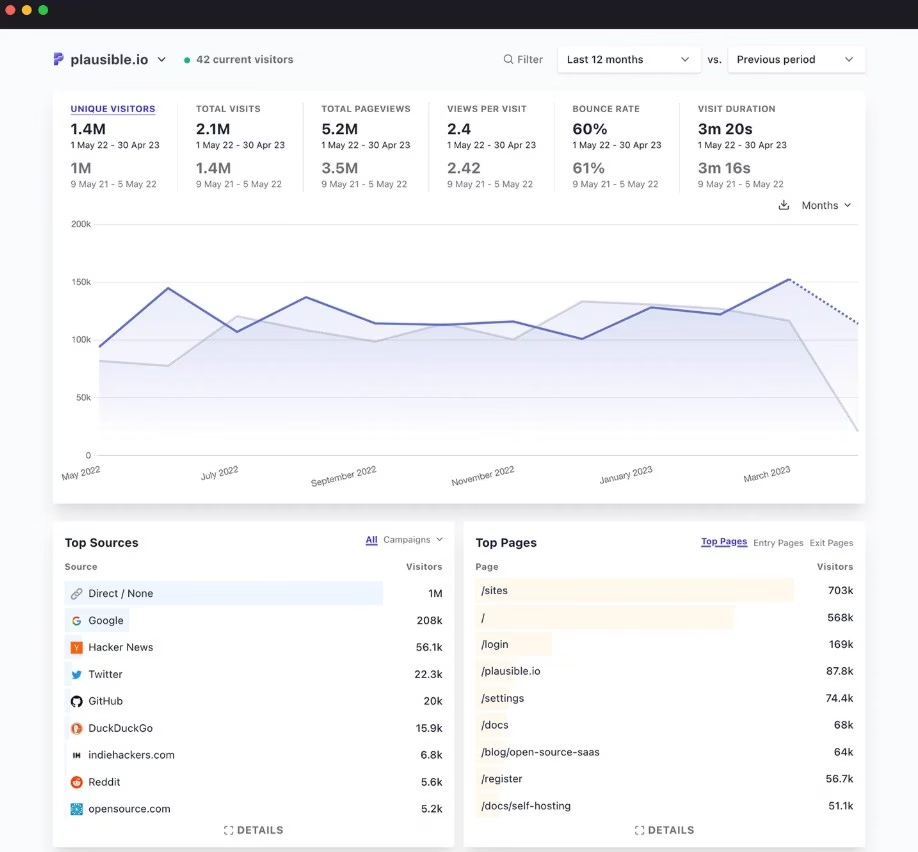
Plausible Analytics is the best Jetpack alternative for GDPR-compliant, simple dashboards. Plausible provides lightweight website analytics (page views, visitor sources, device types) through privacy-focused tracking that eliminates cookie requirements and simplifies compliance.
Plausible delivers essential metrics through clean single-page dashboards that reduce complexity compared to feature-heavy analytics platforms (75 times smaller than Google Analytics).
 Via Plausible Analytics
Plausible features include cookie-free tracking compliant with GDPR and CCPA (California Consumer Privacy Act), a lightweight script under 1 KB that minimizes page load impact, and a simple dashboard that displays all metrics on one page.
Plausible Analytics includes traffic source attribution (search engines, social media, referrers), page performance ranking, device and browser breakdown, custom event tracking for conversions, and public dashboard sharing for transparency. The platform enables real-time visitor monitoring, email reports with scheduled delivery, and goal tracking without complex funnel setup.
As a Jetpack alternative, Plausible emphasizes simplicity and privacy through minimal data collection, while Jetpack combines stats with security and performance features in a bundled approach.
Plausible enables website owners to monitor essential metrics without cookie banners or consent management, which contrasts with Jetpack stats that process data through WordPress.com infrastructure and require an account connection for full access.
Plausible Analytics pricing starts at $9/month for 10,000 monthly pageviews, scales to $19/month for 100,000 pageviews, and extends to custom enterprise pricing for higher volumes.
Compared to Jetpack at $24.95/month for Complete, Plausible costs $15.95 less monthly at the entry tier while providing privacy-compliant analytics, simple dashboards, and lightweight tracking that Jetpack stats deliver through heavier infrastructure.
The pros highlighted in the Plausible Analytics review include a lightweight script that improves page load speed, GDPR and CCPA compliance without cookie banners, a simple single-page dashboard reducing learning curve, transparent pricing based on pageview volume, and an open-source codebase enabling a self-hosting option.
The cons of Plausible include limited advanced features (funnel analysis, user segmentation, session recordings), higher cost per pageview compared to free alternatives (Google Analytics, Site Kit), absence of heatmaps or scroll tracking, and basic conversion tracking without detailed attribution modeling.
4. Koko Analytics: Best Jetpack Alternative for Lightweight, WordPress-Native Analytics
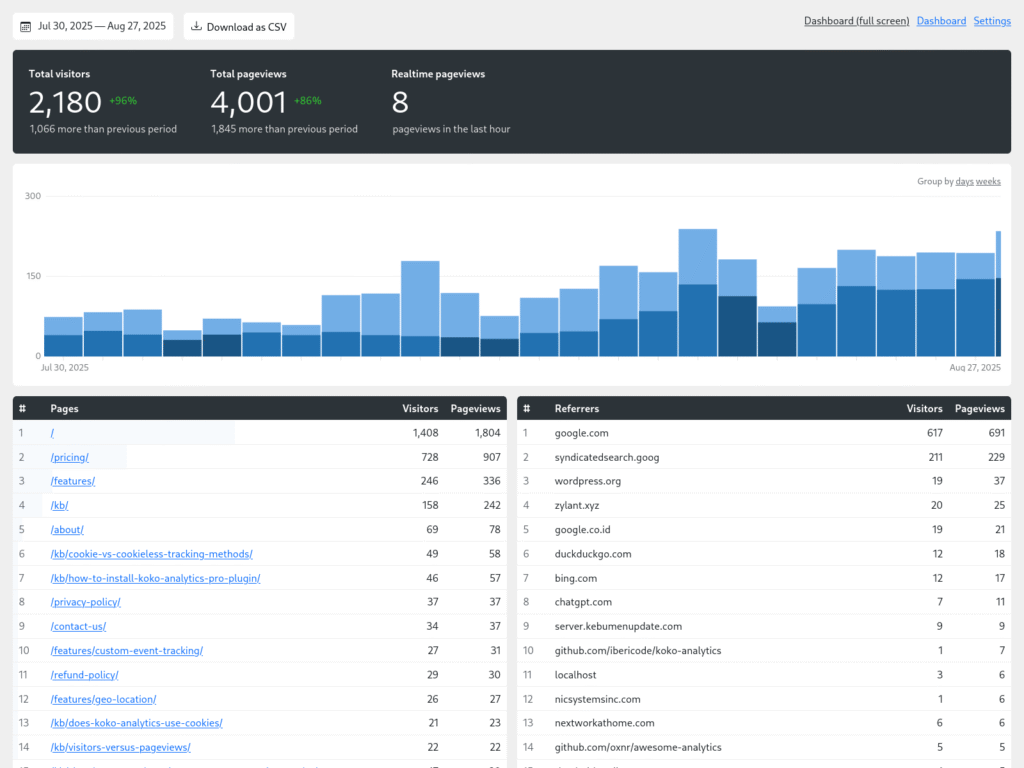
Koko Analytics is the best Jetpack alternative for lightweight WordPress-native analytics in 2025. Koko Analytics displays essential website statistics (visitor counts, page views, referrer tracking) through minimal code that reduces page load impact and eliminates external dependencies.
Koko Analytics stores all data within the WordPress database, which enables complete data ownership without third-party services or cookie consent requirements.
 Via Koko Analytics
Koko Analytics provides real-time traffic monitoring through a plug-and-play WordPress-native interface. Core metrics include page view tracking, referrer identification (search engines, social media, direct traffic), top posts and pages, and customizable date filtering.
The free version covers basic analytics, while Koko Analytics Pro adds premium features such as geo-location reporting, custom event tracking, outbound link monitoring, email summaries, and admin bar charts. All data is stored locally, processed in aggregate, and never shared externally.
Compared to Jetpack, Koko Analytics is the best alternative for users who prioritize privacy, simplicity, and performance. Koko loads with a script under 1 KB and avoids external API calls, which significantly reduces page weight and improves speed.
Jetpack, by contrast, increases plugin bloat by bundling unrelated modules like backups, AI, and social automation into a single framework. Koko Analytics delivers the core stats Jetpack Stats provides, without the weight or vendor lock-in.
Koko Analytics is a freemium tool. The base plugin is completely free and includes essential features. Koko Analytics Pro is a paid add-on, starting at $5/month for 1 site, $10/month for 5 sites, and $25/month for unlimited sites (billed monthly). Annual billing discounts are available.
Compared to Jetpack Complete at $24.95/month, Koko Analytics Pro saves $15 to $20 monthly while offering greater control over analytics and no unnecessary bundling.
The main pros noted in the Koko Analytics review include its privacy-by-design structure, open-source model, lightweight script, and ease of use inside WordPress. The plugin works out of the box and gives users fast access to clean metrics without overwhelming users.
The cons of Koko Analytics include limited advanced features (conversion tracking, goal funnels, user segmentation), the absence of heatmaps or session recordings, basic reporting compared to comprehensive analytics platforms (Matomo, MonsterInsights), and a lack of external integrations with marketing tools.
5. Site Kit by Google: Best Jetpack Alternative for Connecting Analytics, Search Console, and AdSense
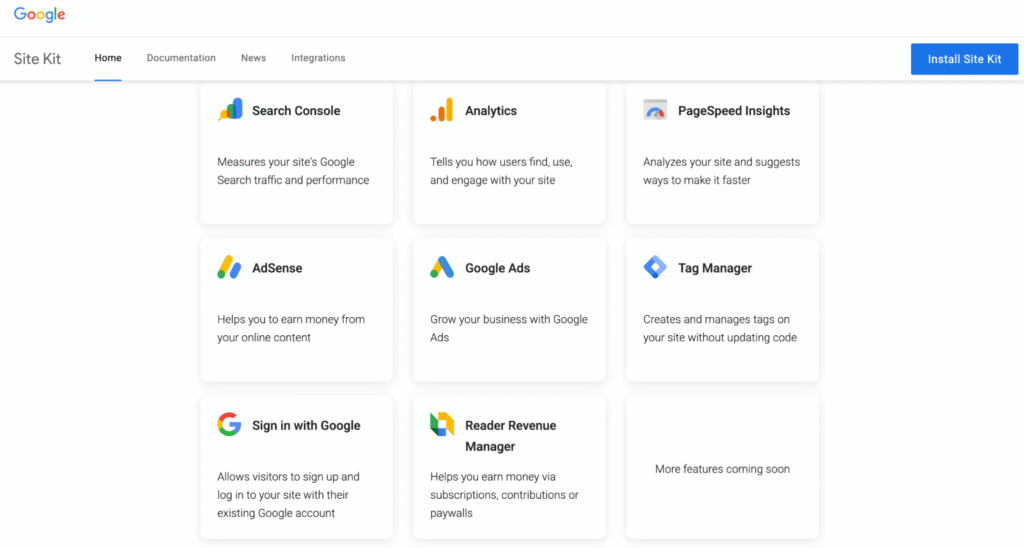
Site Kit by Google is the best Jetpack alternative for official Google service integration. Site Kit consolidates Google Analytics, Google Search Console, Google AdSense, and PageSpeed Insights directly within the WordPress dashboard without requiring separate account access or external platforms.
Google Site Kit presents unified reporting that displays key metrics (traffic sources, popular pages, search queries, earnings) in centralized interfaces that eliminate context switching between multiple Google properties.
 Via Google Site Kit
Site Kit features include one-click setup for Google services, a unified dashboard displaying analytics across tools, Search Console integration for performance tracking, AdSense revenue monitoring, PageSpeed Insights for Core Web Vitals, Tag Manager support for advanced tracking, and automatic verification code placement.
The Site Kit plugin lets site owners view critical metrics (impressions, clicks, revenue) without leaving WordPress, streamlining daily monitoring workflows.
Site Kit operates as a Jetpack alternative because it specializes in official Google integrations with accurate first-party data, while Jetpack provides basic site statistics through WordPress.com infrastructure.
Site Kit delivers authoritative data directly from Google properties (Analytics, Search Console, AdSense), which contrasts with Jetpack stats that approximate traffic patterns through server logs and lack integration depth with Google tools.
Site Kit by Google is completely free with unlimited features and no premium tiers. Compared to Jetpack at $24.95/month for Complete, Site Kit saves $24.95 monthly while providing official Google Analytics, Search Console, and AdSense integration that Jetpack is not able to match through native development.
Site Kit requires existing Google accounts (Analytics, Search Console, AdSense) to display data. The plugin itself imposes no costs or feature restrictions.
The pros outlined in the Site Kit by Google review include official Google development, which ensures accurate data, free access to all features without premium tiers, a unified dashboard, simplified setup through automated verification, and continuous updates aligned with Google platform changes.
The cons of Site Kit include dependency on multiple Google accounts for full functionality, limited customization compared to dedicated analytics plugins, and a lack of advanced features (heatmaps, session recordings, A/B testing) that are found in specialized analytics platforms (Matomo, Clicky, Plausible).
6. Independent Analytics: Best Jetpack Alternative for Analytics Without External Scripts
Independent Analytics is the best Jetpack alternative for privacy-first site analytics without external scripts or cookies. The Independent Analytics plugin stores all visitor data locally in the WordPress database, which eliminates the need for third-party tracking, cookie banners, or external API calls, and makes it fully compliant with GDPR and CCPA.
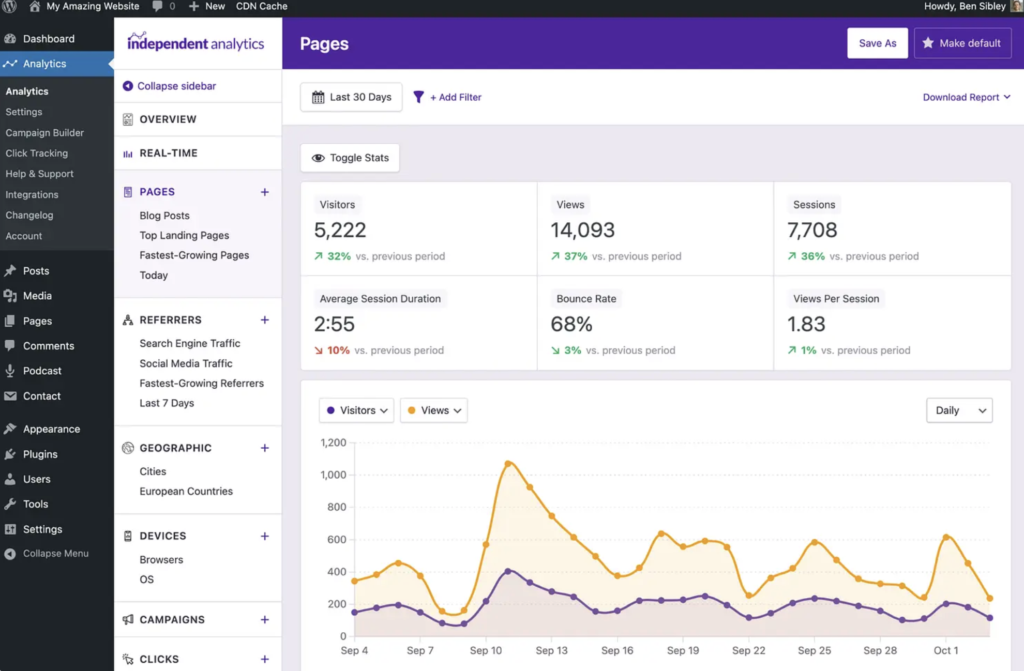 Via Independent Analytics
Independent Analytics simplifies website stats with a clean, WordPress-native interface. The free version includes basic metrics like page views, referrers, devices, and geographic location. The Pro version adds advanced features like real-time tracking, click monitoring, eCommerce analytics, campaign reporting, form tracking, email summaries, and Solo Reports for deeper engagement insights.
Compared to Jetpack, Independent Analytics offers a faster, lighter, and fully private solution. Jetpack requires an Automattic account and relies on third-party data handling, which introduces legal compliance complexity and plugin bloat. Independent Analytics starts tracking instantly after activation, without slowing down the site or requiring external consent scripts.
Independent Analytics pricing starts at $49/year for a single site, with upgrades available at $79/year for three sites (Pro Hobbyist) or $199/year for unlimited domains (Pro Agency). All plans include a 30-day refund window and access to premium features. A completely free version is also available with no site limit and core reporting features.
By contrast, the Complete plan in Jetpack costs US $24.95/month (≈ US $299.40 per year), which means choosing Independent Analytics saves roughly US $150 to US $250 per year for single‑site usage while delivering essential analytics functionality.
The benefits included in the Independent Analytics review are its zero-cookie architecture, real-time analytics, WordPress-first design, and no vendor lock-in. It works with popular plugins like WooCommerce, WPForms, and Elementor.
Limitations of Independent Analytics are the absence of advanced funnel analysis or behavioral visualization tools like heatmaps.
7. Clicky: Best Jetpack Alternative for Real-Time Website Analytics
Clicky is the best Jetpack alternative for real-time website analytics. Clicky supplies live visitor monitoring (current pageviews, active sessions, visitor actions) through real-time dashboards that update instantly as users navigate websites.
Clicky delivers detailed individual visitor profiles, heatmap generation, uptime monitoring, and conversion tracking that exceed the delayed statistics reporting in Jetpack.
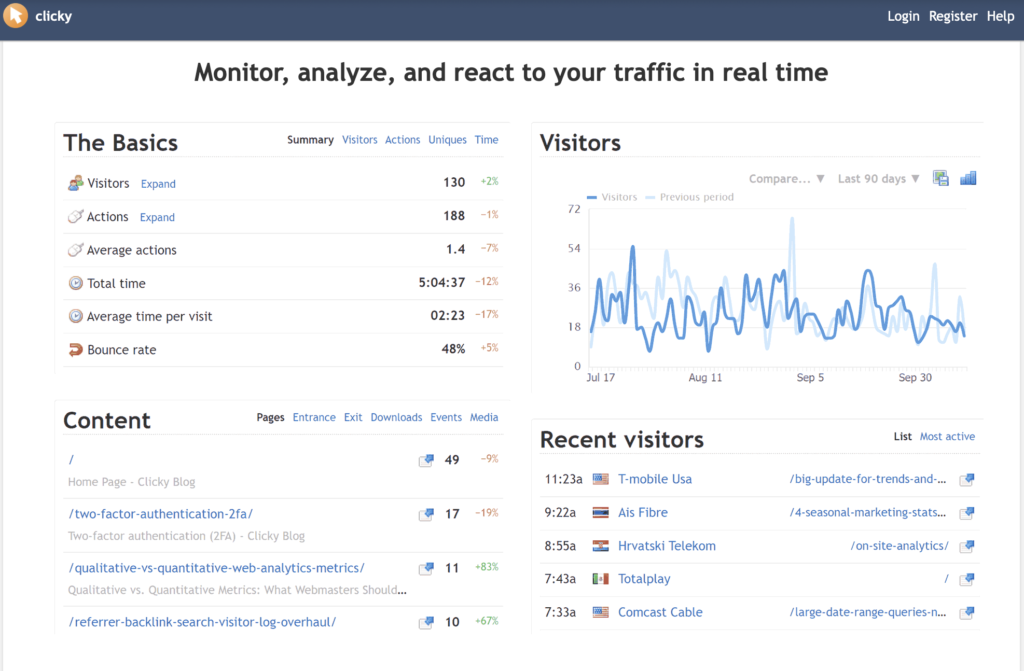 Via Clicky
Clicky features include real-time visitor monitoring with second-by-second updates, individual visitor session tracking with action history, heatmap visualization showing click patterns, and split testing for A/B experiments.
It includes goal and conversion tracking, campaign attribution reporting, Twitter analytics integration, video analytics for engagement, and custom data tracking through API.
Clicky provides automated email reports, mobile apps for monitoring, and white-label options for agency branding.
Clicky operates as a Jetpack WP alternative because it prioritizes real-time data visibility with instant updates, while Jetpack provides delayed statistics with hourly or daily refresh cycles.
Clicky enables website owners to monitor live visitor behavior (current pages, actions, referrers) as it occurs, which contrasts with Jetpack stats that aggregate historical data without real-time session tracking or visitor-level detail.
Clicky pricing starts at free for one website with 3,000 daily pageviews, extends to $9.99/month for Pro with 10 websites and 30,000 daily pageviews, scales to $14.99/month for Pro Plus with 30 websites and 120,000 daily pageviews, and reaches $19.99/month for Pro Platinum with 50 websites and unlimited pageviews.
Compared to Jetpack at $24.95/month for Complete, Clicky Pro Platinum costs $4.96 less monthly while providing real-time analytics, heatmaps, split testing, and uptime monitoring that the Jetpack stats do not match.
The advantages outlined in the Clicky review include real-time visitor monitoring with instant updates, detailed individual session tracking, heatmap visualization for behavior analysis, included uptime monitoring, and affordable pricing for multiple websites.
The disadvantages of Clicky include daily pageview limits on lower tiers restricting high-traffic sites, dated interface design compared to modern analytics platforms (Plausible, Fathom), absence of advanced segmentation features, and limited integration ecosystem compared to Google Analytics.
8. MonsterInsights: Best Jetpack Alternative for Google Analytics Integration in WordPress
MonsterInsights is the best Jetpack alternative for Google Analytics integration in WordPress. MonsterInsights connects Google Analytics data directly to the WordPress dashboard through an automated setup that eliminates manual tracking code installation and configuration.
MonsterInsights comes with pre-built reports (traffic sources, top content, user behavior) within the WordPress admin, which simplifies analytics access for non-technical users.
MonsterInsights features include one-click Google Analytics setup, enhanced ecommerce tracking for WooCommerce, form conversion tracking, custom dimension tracking, file download monitoring, outbound link tracking, affiliate link tracking, scroll depth tracking, and EU compliance mode for GDPR.
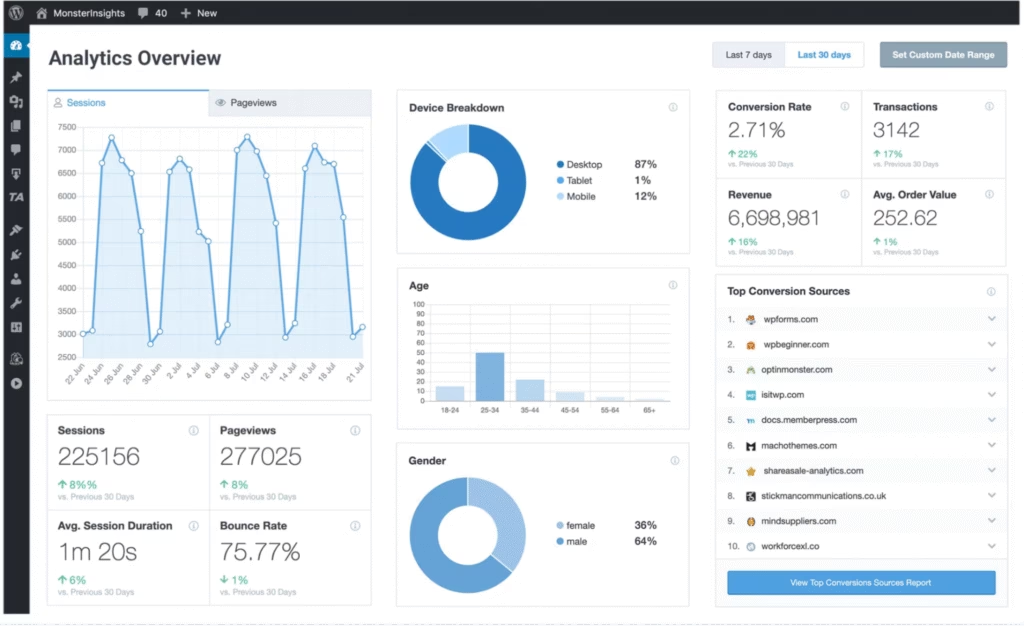 Via MonsterInsights
The MonsterInsights plugin enables real-time stats viewing, email summaries with scheduled delivery, and a popular posts widget for content promotion.
MonsterInsights operates as a Jetpack alternative because it specializes in comprehensive Google Analytics integration with advanced tracking, while Jetpack provides basic site statistics through proprietary infrastructure.
MonsterInsights delivers detailed conversion tracking (forms, downloads, purchases) and user behavior analysis that connect to Google Analytics reporting, which contrasts with Jetpack stats that offer simplified metrics without deep integration to external analytics platforms.
MonsterInsights pricing starts free with a basic Google Analytics connection, extends to $99.50 per year for Plus with enhanced ecommerce and form tracking, scales to $199.50 per year for Pro with custom dimensions and real-time stats, and reaches $299.50 per year for Elite Bundle.
Compared to Jetpack at $299.40 per year ($24.95 monthly) for Complete, MonsterInsights Plus costs $199.90 less annually while providing Google Analytics integration, ecommerce tracking, and form conversion monitoring that Jetpack stats cannot match through native development.
According to our MonsterInsights review, the benefits include simplified Google Analytics setup without technical knowledge, comprehensive ecommerce tracking for WooCommerce, form conversion monitoring, and popular posts functionality that boosts engagement.
The downsides of MonsterInsights include dependency on Google Analytics for data processing, limited functionality without paid tiers that restrict free users, performance impact from additional tracking scripts, and the absence of alternative analytics platform capabilities (Matomo, Plausible).
9. All In One SEO (AIOSEO): Best Jetpack Alternative for WordPress SEO and Schema Optimization
All In One SEO (AIOSEO) is the best Jetpack plugin alternative for WordPress SEO and schema optimization. AIOSEO offers comprehensive on-page SEO management (meta titles, descriptions, schema markup) through intuitive interfaces that eliminate technical complexity.
AIOSEO automates schema markup generation, XML sitemap creation, and social media optimization that exceed the basic features in Jetpack.
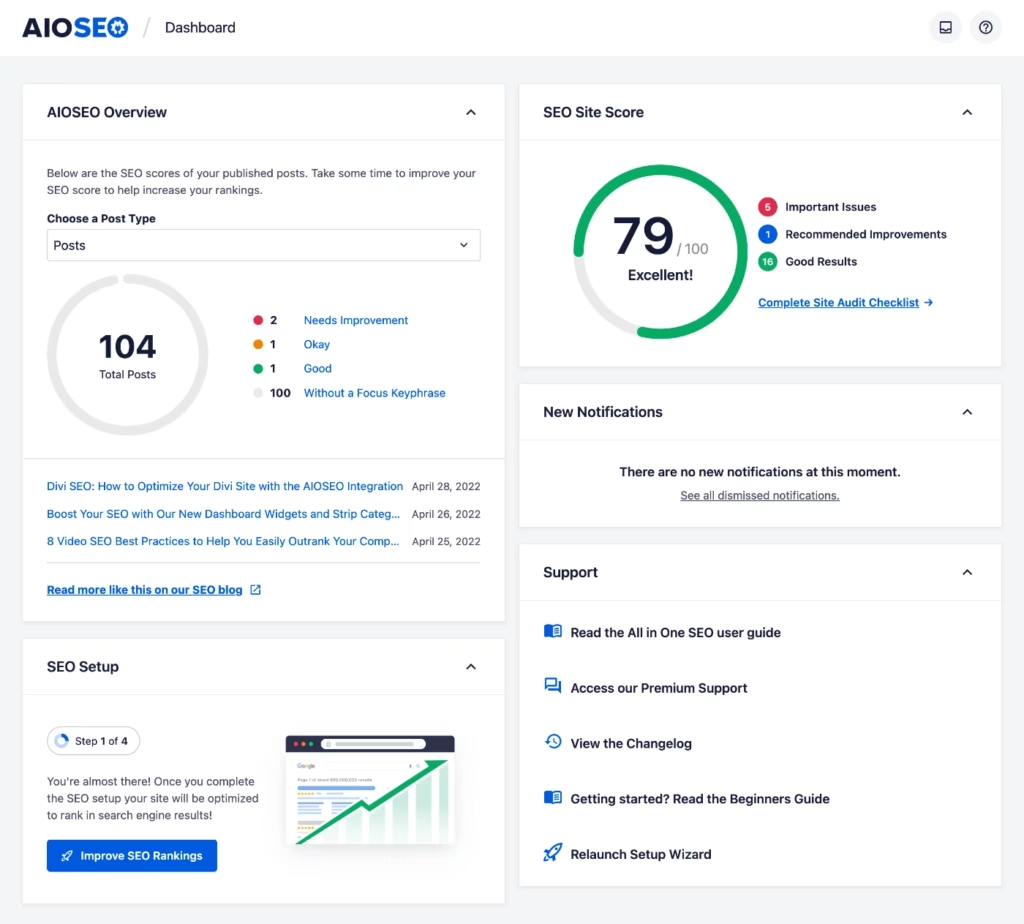 Via AIOSEO
AIOSEO features include TruSEO score analysis for content optimization, smart XML sitemaps with automatic generation, local business SEO with schema markup, WooCommerce SEO for product optimization, image SEO with alt text automation, breadcrumb navigation generation, redirect manager for link management, robots.txt editor for crawl control, and integration with Google Search Console.
The plugin includes a headline analyzer for engagement optimization, a link assistant for internal linking, and SEO revisions for tracking changes.
AIOSEO operates as a Jetpack alternative because it specializes in comprehensive SEO functionality with advanced schema markup, while Jetpack focuses on site statistics and security without dedicated SEO tools.
AIOSEO enables automated schema deployment (Organization, Person, LocalBusiness) and rich snippet optimization, which contrasts with Jetpack, which lacks structured data capabilities and provides limited SEO features within its broader feature bundle.
AIOSEO pricing starts at free with basic SEO features, extends to $49.50 per year for Basic with 1 site license, scales to $99.50 per year for Plus with 10 sites, reaches $199.50 per year for Pro with unlimited sites, and offers $299.50 per year for Elite with advanced functionality.
Compared to Jetpack at $299.40 per year for Complete, AIOSEO Plus costs $199.90 less annually while providing comprehensive SEO tools, schema automation, and WooCommerce optimization that Jetpack cannot deliver through its statistics-focused approach.
The pros highlighted in the AIOSEO review include a user-friendly interface that simplifies SEO implementation, comprehensive schema markup automation, TruSEO score providing actionable optimization guidance, local business SEO capabilities, and WooCommerce integration for product optimization.
The cons of AIOSEO include feature overlap with Yoast SEO, which creates redundancy for some users, premium pricing required for advanced features, performance impact from extensive functionality, and the absence of link-building or backlink analysis tools.
10. UserFeedback: Best Jetpack Alternative for Quick On-Site Surveys
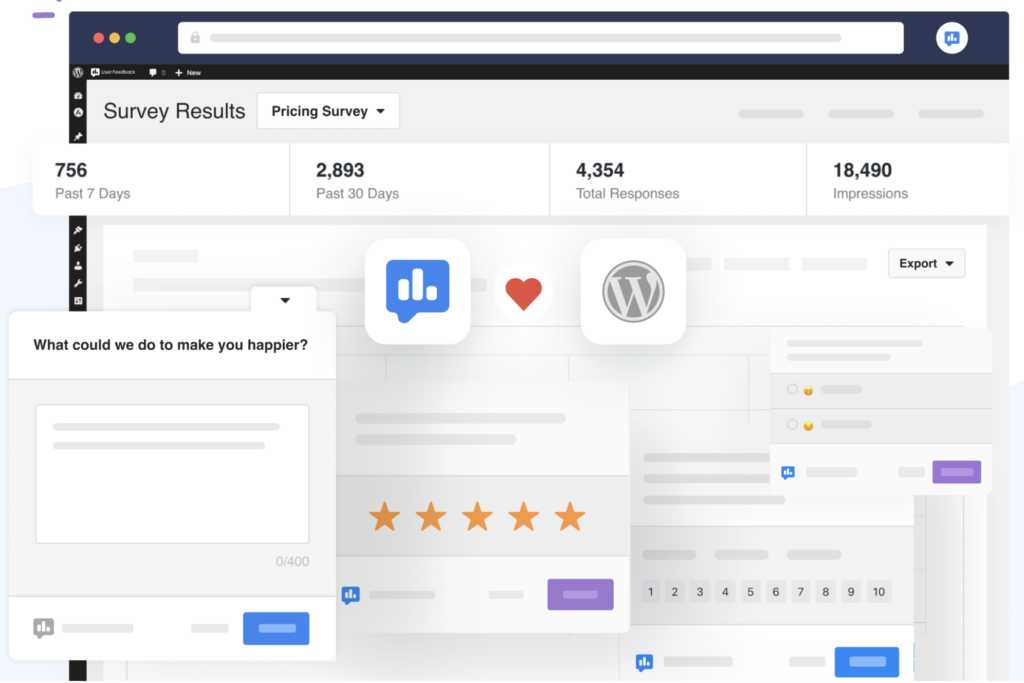
UserFeedback by MonsterInsights is the best Jetpack alternative for on-site user surveys. UserFeedback enables website owners to create pop-up surveys (satisfaction ratings, feedback forms, poll questions) that collect visitor input directly on pages without external survey platforms.
UserFeedback by MonsterInsights provides customizable survey templates, response analytics, and email notification capabilities that Jetpack does not include in its feature set.
 Via UserFeedback
UserFeedback features include a drag-and-drop survey builder, pre-built question templates, page-level targeting for survey display, device-specific targeting (desktop, mobile, tablet), response analytics with sentiment analysis, conditional logic for dynamic questions, integration with email marketing platforms (Mailchimp, AWeber, Constant Contact), and export capabilities for external analysis.
The UserFeedback plugin enables A/B testing for survey variations, scheduled survey campaigns, and response rate optimization.
UserFeedback, as a Jetpack alternative, specializes in user feedback collection through surveys and forms, while Jetpack gives contact forms without advanced survey functionality or response analytics.
UserFeedback enables targeted survey deployment based on page context and visitor behavior, which contrasts with Jetpack forms that offer basic contact submission without sophisticated targeting or analysis capabilities.
UserFeedback pricing starts at free with basic survey features, extends to $49.50 per year for Plus with advanced targeting, scales to $99.50 per year for Pro with integrations, and reaches $149.50 per year for Elite with unlimited surveys.
Compared to Jetpack at $299.40 per year for Complete, UserFeedback Plus costs $249.90 less annually while providing dedicated survey functionality, response analytics, and targeting capabilities that Jetpack forms do not match through general-purpose contact submission.
Our UserFeedback review includes advantages such as easy survey creation without technical knowledge, advanced targeting options for relevant feedback collection, integration with popular email marketing platforms, response analytics providing actionable insights, and affordable pricing for small businesses.
The disadvantages of UserFeedback include a limited free tier restricting advanced features, survey fatigue potential from excessive pop-ups, absence of advanced analytics (cohort analysis, funnel tracking), and dependence on MonsterInsights for deeper visitor behavior analysis.
11. WPForms: Best Jetpack Alternative for Form Creation
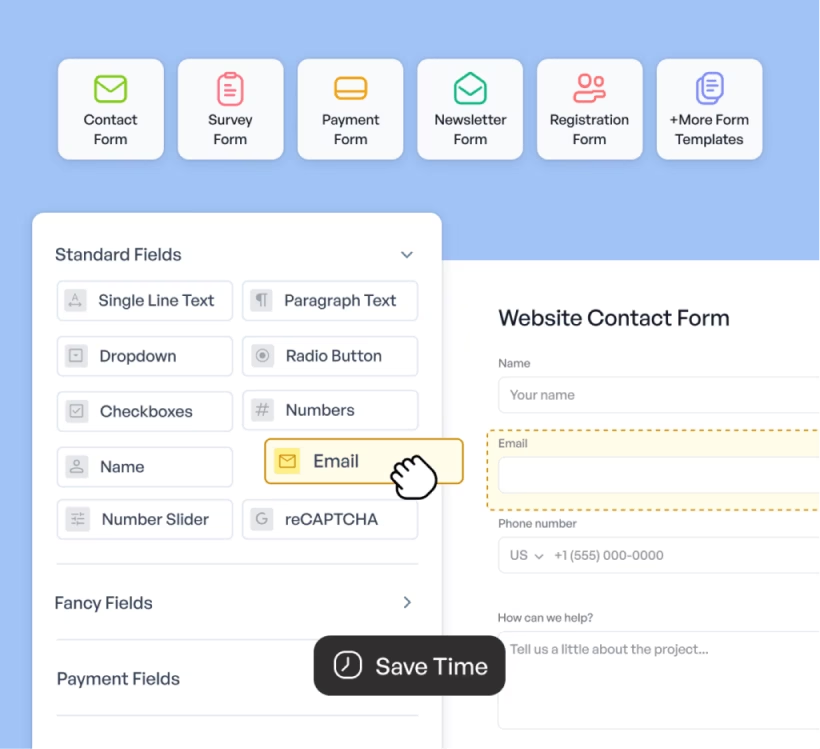
WPForms is the best Jetpack alternative for building forms inside WordPress using drag‑and‑drop logic. WPForms removes the need for coding by offering a no‑code editor with over 1,800 form templates. Users build contact forms, payment forms, surveys, polls, and lead capture funnels without developer involvement.
WPForms includes advanced functionality like conditional logic, digital signatures, multi‑page layouts, and real‑time automation. Forms integrate with Stripe, PayPal, and Authorize.Net to accept one‑time or recurring payments.
WPForms addons include file uploads, smart routing, AI enhancements, PDF exports, and integrations with Google Drive, Sheets, Calendar, Dropbox, Salesforce, and HubSpot.
 Via WPForms
Compared to Jetpack, WPForms offers deeper control over form design, layout, and third‑party integrations. Jetpack Forms are basic and limited to contact functionality. WPForms replaces multiple Jetpack modules (forms, surveys, lead capture, automation) with one dedicated plugin.
WPForms pricing starts at $49.50/year for the Basic plan, $99.50/year for Plus, $199.50/year for Pro, and $299.50/year for Elite. The Pro tier unlocks payments, surveys, AI features, and 2,000+ templates. The Elite plan includes unlimited sites, client management, and advanced permissions.
The equivalent Jetpack feature set is only available in the Jetpack Complete plan ($299.40/year), which includes fewer customization options. WPForms delivers more granular control at comparable or lower cost.
Pros of WPForms include visual form building, full WordPress integration, payment processing, form automation, and deep template variety. WPForms review highlights ease of use, reliable support, and powerful workflows.
The main limitation of WPForms is a learning curve for complex conditional flows, especially on Pro and Elite plans.
12. Analytify: Best Jetpack Alternative for Visual Google Analytics Dashboards in WordPress
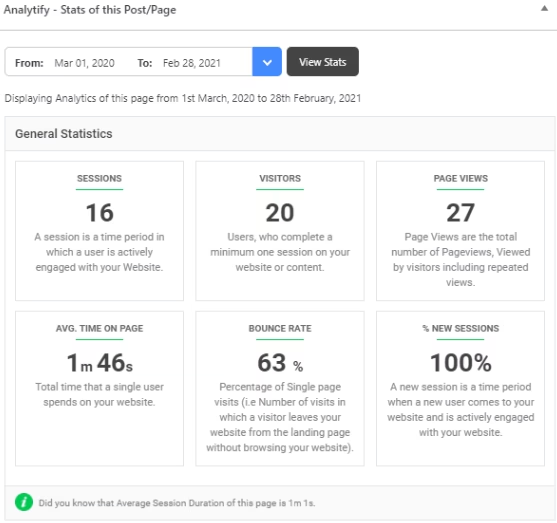
Analytify is the best Jetpack alternative for visualizing Google Analytics data directly inside the WordPress admin. Analytify offers real-time metrics, post-level reports, and eCommerce tracking in a clean, user-friendly interface.
Analytify removes the need for users to navigate the complex Google Analytics platform by embedding simplified dashboards and performance stats directly into WordPress. This makes it ideal for bloggers, marketers, and WooCommerce store owners who need actionable insights without analytics expertise.
 Via Analytify
Key Analytify features include real-time user activity, UTM (Urchin Tracking Module) campaign tracking, WooCommerce and Easy Digital Downloads integrations, scroll depth and form tracking, author and category stats, and multilingual support.
Users view traffic metrics on each post/page, generate front-end reports, and export analytics data for internal reporting. Features like shortcodes, email summaries, and AMP compatibility further streamline decision-making for content-heavy sites.
Compared to the basic site stats in Jetpack, which only show simple pageviews and referrers, Analytify delivers deeper, segmented insights that facilitate growth-focused strategies.
Jetpack lacks real-time data, campaign attribution, eCommerce reporting, and engagement metrics like scroll depth. It doesn’t provide post-level UTM analysis or flexible report exports, which limits its utility for scaling sites.
Analytify pricing starts at $99/year for the StartUp plan (2 sites), $199/year for the Agency plan (unlimited sites), and $499 one-time for the Developer lifetime plan. Each plan includes advanced modules like eCommerce tracking, campaign dashboards, real-time analytics, and automation options.
In contrast, Jetpack includes its analytics module only in the Security and Complete plans (priced at $143.88/year and $299.40/year, respectively) without comparable depth or segmentation. This makes Analytify a more analytics-focused and budget-efficient option.
Pros mentioned in the Analytify review include rapid setup, advanced tracking features, WooCommerce analytics, and granular dashboards tailored to WordPress users.
The main drawback of Analytify is that users must still configure and connect Google Analytics manually. But for marketers and store owners who need rich insights inside WordPress, Analytify outclasses the basic stats module in Jetpack across accuracy, depth, and usability.
13. OptinMonster: Best Jetpack Alternative for Lead Generation and Popups
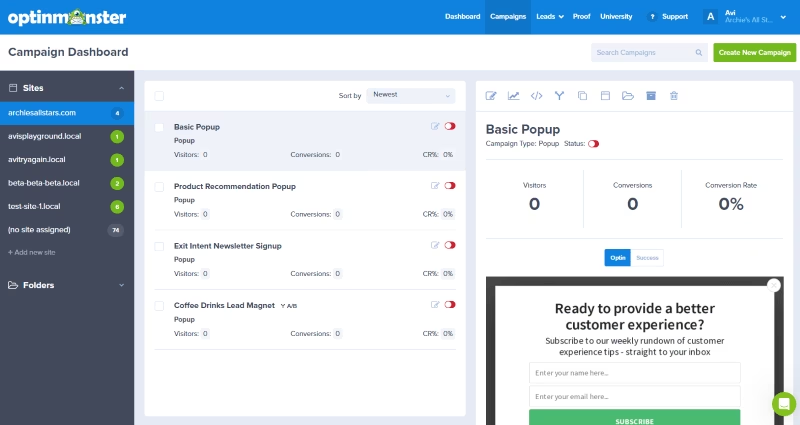
OptinMonster is the best Jetpack alternative for lead generation, email capture, and pop-up campaigns. OptinMonster works across all platforms and enables users to build lightbox popups, floating bars, slide-ins, and full-screen overlays that capture leads through behavioral targeting and conversion triggers.
OptinMonster features a drag-and-drop campaign builder, over 700 customizable templates, A/B testing, page-level targeting, geo-location rules, exit-intent detection, and real-time analytics.
 Via OptinMonster
OptinMonster includes countdown timers, gamified wheels, device targeting, two-step optins, content locking, referral tracking, and onsite retargeting. OptinMonster enables integration with email and CRM platforms such as Mailchimp, ConvertKit, ActiveCampaign, Constant Contact, and HubSpot.
OptinMonster replaces Jetpack subscription forms by adding behavioral targeting, personalized messaging, and real-time conversion optimization tools. Jetpack provides basic form blocks without campaign scheduling, mobile-specific triggers, or contextual segmentation.
OptinMonster connects with Shopify, WooCommerce, WordPress, and custom platforms, which makes it more flexible than the native form blocks in Jetpack.
OptinMonster pricing starts at $7/month for Basic, $19 for Plus, $29 for Pro, and $49 for Growth (billed annually). Plans differ by campaign impression volume and feature access. Basic includes 2,500 monthly impressions and 1 site, while Growth enables 100,000 monthly impressions and 5 sites.
Compared to Jetpack Complete at $24.95 per month, OptinMonster Basic costs $17.95 less per month, while Plus provides more targeting features for $5.95 less.
Pros mentioned in the OptinMonster review are advanced exit-intent detection, real-time A/B testing, customizable triggers and targeting, gamified engagement options, and multi-step opt-in flows.
The cons of OptinMonster are impression-based pricing that restricts high-traffic websites, a learning curve for advanced automations, and the need for external platform access rather than WordPress-native configuration.
14. SearchWP: Best Jetpack Alternative for Search Enhancement
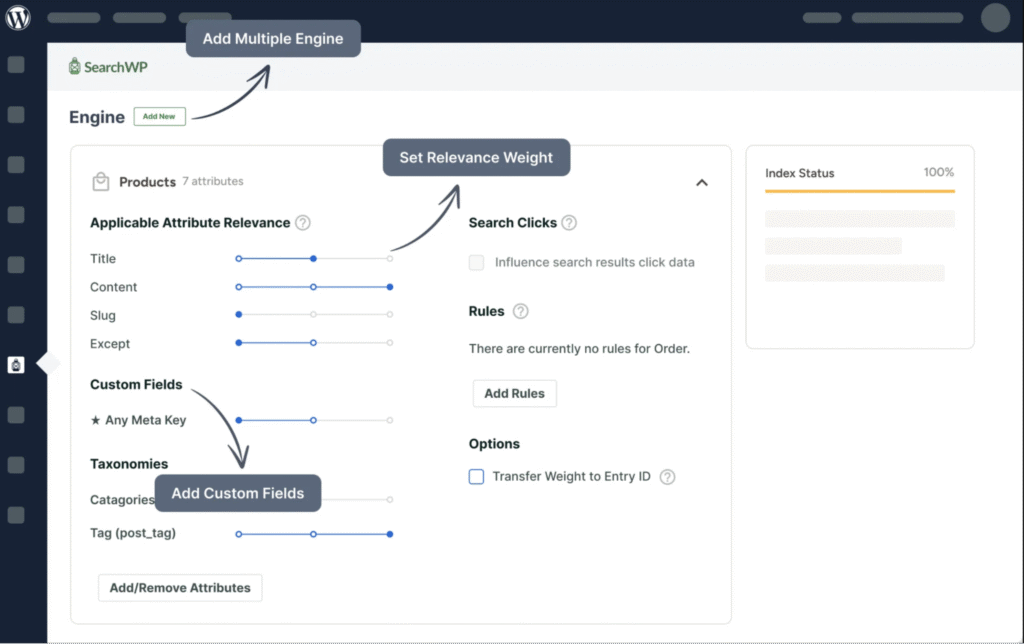
SearchWP is the best Jetpack alternative for WordPress search enhancement. SearchWP is a premium WordPress plugin designed to replace and enhance the default search functionality on WordPress websites.
SearchWP is best for site owners, e‑commerce stores, and content‑heavy platforms that need more accurate, configurable, and comprehensive search capabilities than what the native WordPress or Jetpack search modules offer.
 Via SearchWP
SearchWP enables you to index everything on your site (posts, custom post types, PDFs, media, custom fields). It supports live AJAX instant search, customizable search algorithms, drag‑and‑drop weighting of result factors, advanced filtering and Boolean search, e‑commerce integration (like WooCommerce/EDD), multisite search, and built‑in analytics showing what users are searching for.
As an alternative to the Jetpack WP plugin, SearchWP specifically replaces the Limited Search module in Jetpack by providing deep control of search relevance, indexing of data types Jetpack ignores, and advanced search forms tailored to your site’s structure.
While Jetpack offers site‑search as part of a broader suite (security, backups, etc.), SearchWP focuses purely on search enhancement, which makes it a good Jetpack alternative when your goal is improving search experience, content discoverability, or site navigation.
SearchWP is a paid plugin with licensing tiers starting at $99/year for one site (Standard), moving to $199/year (Pro for multiple sites), and $399/year (Agency/unlimited sites).
Comparatively, the Jetpack Complete plan costs $299.40/year, so for a single‑site license, SearchWP is roughly $200 less annually. It offers far more tailored search functionality, though you’ll still need additional tools if you also require the full feature set in Jetpack (security, backups, performance).
According to the SearchWP review, on the plus side, SearchWP provides comprehensive indexing of custom fields and documents, real‑time AJAX search, search analytics to guide content strategy, and full control over relevance and result ordering.
On the downside, the cost is higher than simpler search plugins for small sites, advanced configuration requires development skills, and if your need is only a basic search upgrade, SearchWP is over‑engineered.
15. Smush: Best Jetpack Alternative for Image Optimization
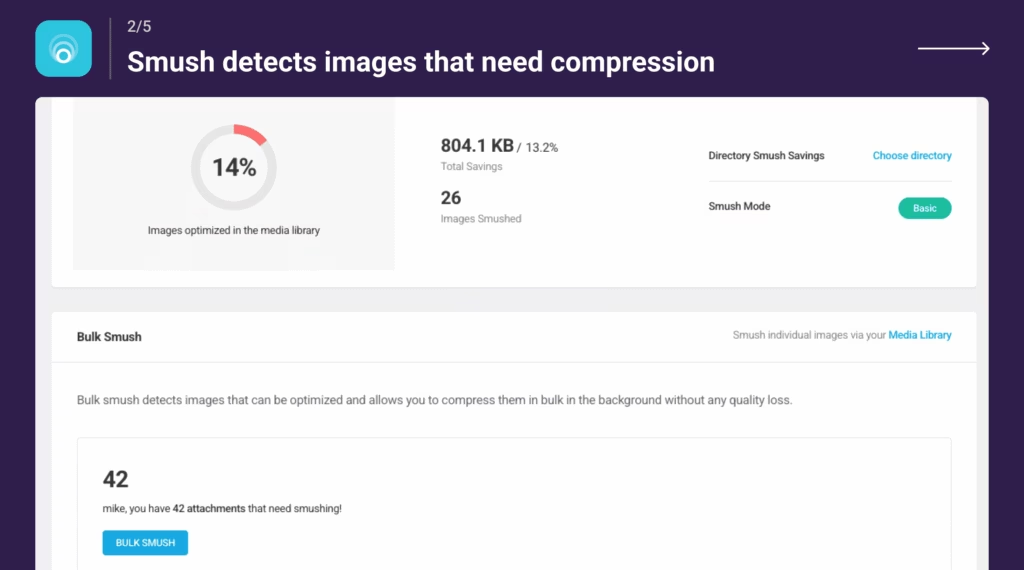
Smush is the best Jetpack alternative for advanced image compression and delivery optimization in WordPress. It targets site owners and developers looking to improve site speed, user experience, and SEO through automated image resizing, lazy loading, and WebP/AVIF conversion without sacrificing image quality.
Features of Smush include unlimited bulk compression, 5x lossy compression, lazy loading for all images and videos, WebP and AVIF conversion, 119-point global CDN delivery, auto-resize, EXIF metadata control, and compatibility with multisite networks and all major WordPress builders.
 Via WordPress
The Smush plugin supports image compression for files outside the media library and parallel processing for faster optimization.
Smush is an alternative to the Jetpack image CDN and performance modules because it offers more granular compression controls, native next-gen format conversion, and full bulk optimization without needing Jetpack’s bundled suite. Smush gives developers greater control over image behavior, while Jetpack handles images as part of an all-in-one service.
Smush pricing starts at $1.50/month for 1 site (billed annually at $18), scales up to $10/month for unlimited sites (billed annually at $120).
The Jetpack Complete plan costs $299.40/year, which makes Smush a $180 to $280 cheaper option, depending on the license tier, while still offering more advanced image features.
The pros included in the Smush review are high compression limits (up to 256MB), automatic next-gen image conversion, compatibility with every major theme and plugin, and smart delivery via CDN.
The cons of Smush include limited features in the free version, no backup before compression, and a reliance on annual billing for the lowest prices.
16. Ahrefs Web Analytics: Best Jetpack Alternative for Privacy-Friendly Traffic Insights
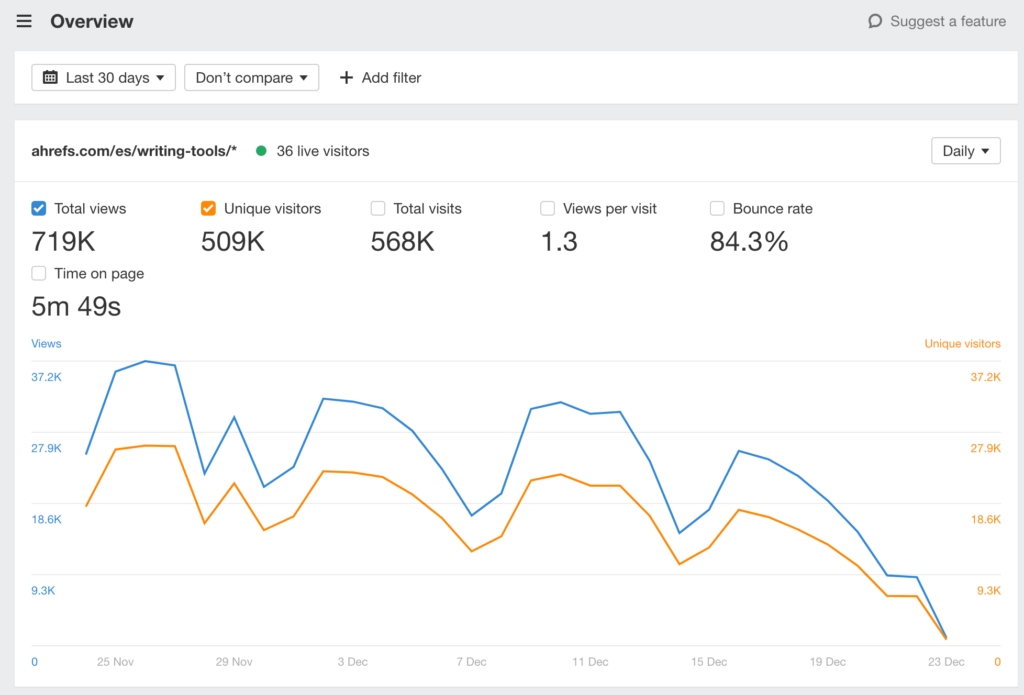
Ahrefs Web Analytics is the best Jetpack alternative for users who want privacy-first, cookie-free website analytics with simplified dashboards and fast data refresh. Ahrefs Web Analytics suits SEO-conscious site owners and privacy-focused publishers who want lightweight analytics without the tracking baggage.
Ahrefs Web Analytics tracks up to 1 million events per month for free and updates traffic data within 1 minute.
 Via Ahrefs
Ahrefs Web Analytics enables tracking SEO traffic, ad clicks, outbound links, and AI-generated visits from tools like ChatGPT and Perplexity. The 2KB script requires no cookie banners or consent popups. Unlike Jetpack, Ahrefs gives real-time, raw traffic data with zero personal information collection.
Compared to the built-in analytics module in Jetpack, Ahrefs is cleaner, faster, and more privacy-compliant. Jetpack uses cookies, delays data sync, and bundles metrics into its broader platform. Ahrefs Web Analytics separates analytics from hosting, emails, or site tools.
Ahrefs Web Analytics is free for verified websites. For higher volume, add-ons scale with site size.
The pros of Ahrefs Web Analytics, included in the Ahrefs review, are instant traffic reporting, AI chatbot source detection, no cookies, lightweight scripts, and integration with Ahrefs Webmaster Tools.
The cons of Ahrefs Web Analytics are limited event customization compared to GA4 and no eCommerce tracking at this stage.
17. WP Meta SEO: Best Jetpack Alternative for Bulk On-Page SEO and Redirect Management
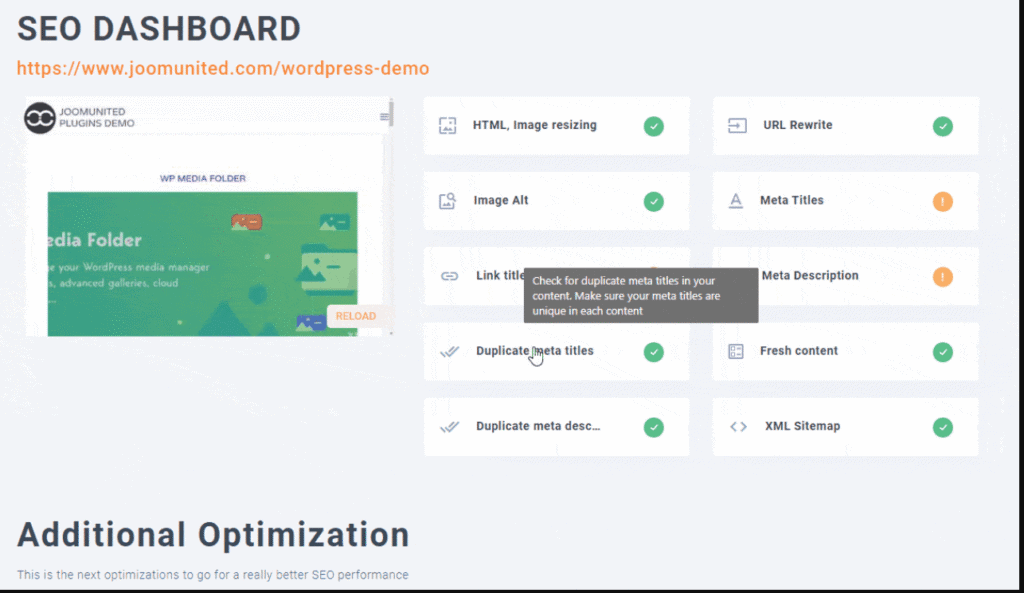
WP Meta SEO is the best Jetpack alternative for bulk on-page SEO and redirect management. WP Meta SEO is a WordPress plugin focused on bulk metadata editing, SEO error fixing, and redirect handling across pages, images, and custom post types.
WP Meta SEO offers Google Search Console keyword suggestions, broken link audits, on-page SEO analysis, and automatic sitemap generation.
 via JoomUnited
WP Meta SEO replaces the basic SEO modules with advanced control over meta content, social tags, and image optimization, including bulk editing and live SEO previews inside Gutenberg and Elementor. Compared to Jetpack, it offers broader metadata coverage, more redirect rules, and deep on-page validation across popular page builders.
The plugin is part of a premium bundle, starting at $49/year, which includes SEO analysis, 404 monitoring, and integration with analytics tools. Jetpack’s SEO tools are bundled with higher-tier plans from $9.95/month, but lack the same level of metadata bulk control and redirect logic.
The WP Meta SEO review shows advantages like full-page and image SEO editing, sitemap management, and integration with Google Analytics and Search Console. The disadvantages of WP Meta SEO include no longer offering a free version and a UI (user interface) that feels cluttered for new users.
18. WP Statistics: Best Jetpack Alternative for On-Server Stats
WP Statistics is the best Jetpack alternative for on-server WordPress statistics. WP Statistics tracks website visitors entirely within WordPress installation storing all data in the WordPress database without external services.
WP Statistics offers visitor tracking, referrer analysis, and search engine statistics and maintains complete data ownership.
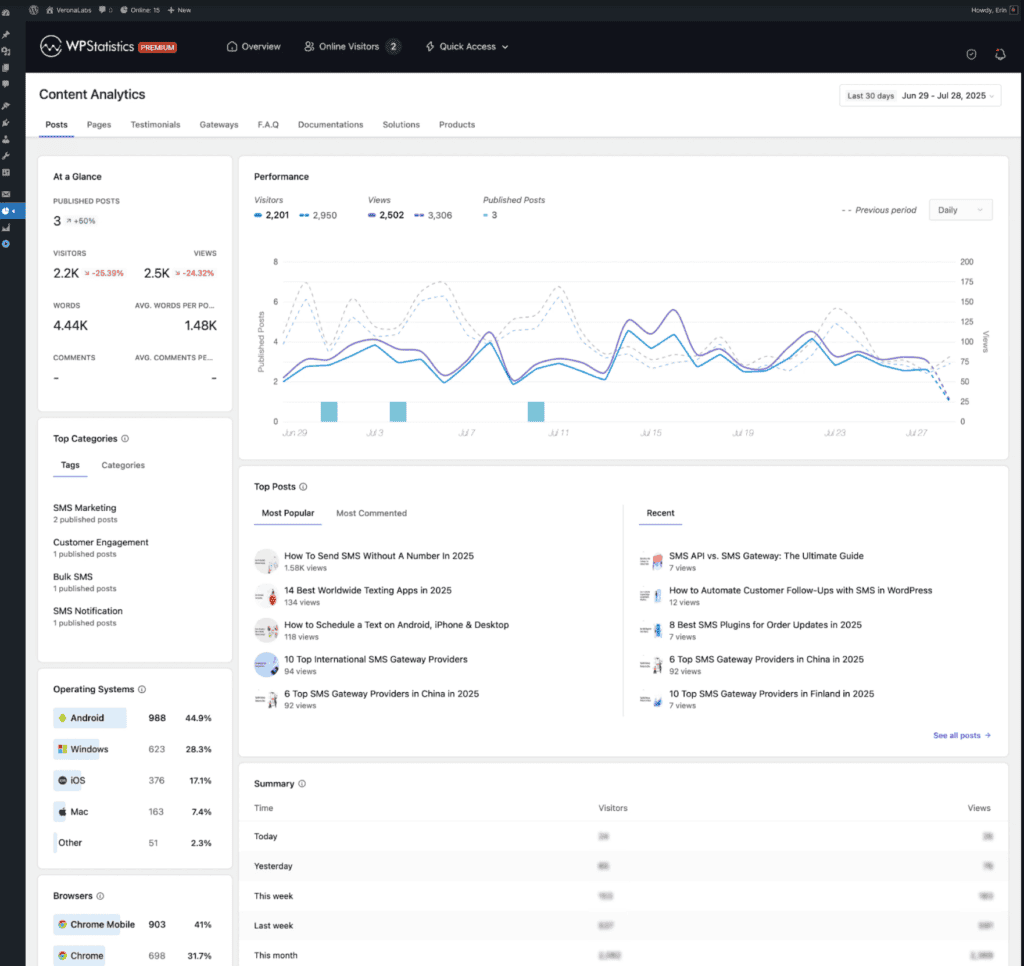 Via WP Statistics
WP Statistics features include visitor and pageview tracking stored in WordPress database, referrer source identification (search engines, websites, social media), and search keyword tracking for SEO insights.
It provides GeoIP location detection for visitor geography, browser and operating system statistics, daily and monthly summary reports, top pages and posts ranking, recent visitor activity log, and privacy-focused tracking without third-party services.
WP Statistics has integration with popular cache plugins, and REST API for custom reporting. The plugin enables exclusion rules for specific users or IPs, data retention management, and CSV export for external analysis.
As a Jetpack alternative, WP Statistics provides complete data control through local WordPress database storage, while Jetpack stats processes data through WordPress.com infrastructure.
WP Statistics eliminates external dependencies and ensures all visitor data remains within site owner control, which contrasts with Jetpack that requires WordPress.com connection and processes statistics through external servers.
WP Statistics has a free plan with unlimited pageviews, cookie‑less tracking, traffic source reports, and GDPR compliance. Premium plans start at $119/year for one site, scale to $249/year for five sites, and include Google Search Console integration, UTM analytics, custom events, and white‑label reporting. The Unlimited plan at $449/year covers up to 100 sites and is around $150 more expensive than Jetpack Complete at $299.40/year, with a focus on privacy‑first analytics instead of bundled extras.
The benefits detailed in the WP Statistics review include complete data ownership within the WordPress database, privacy-focused tracking without external services, GDPR compliance through local storage, free core functionality suitable for most sites, and GeoIP integration for location insights.
The downsides of WP Statistics include database growth over time requiring maintenance, potential performance impact on high-traffic sites, limited advanced features compared to enterprise analytics platforms, and basic reporting requiring external tools for deeper analysis.
19. WP Activity Log: Best Jetpack Alternative for Security Logging
WP Activity Log is the best Jetpack alternative for activity tracking and audit logging on WordPress sites. WP Activity Log records all user and system actions in real time, and offers transparency into site changes, plugin configurations, user role updates, and potential security risks.
The WP Activity Log plugin includes integrations with WooCommerce, MemberPress, and Yoast SEO, which makes it valuable for teams that are managing dynamic or multi-user WordPress environments.
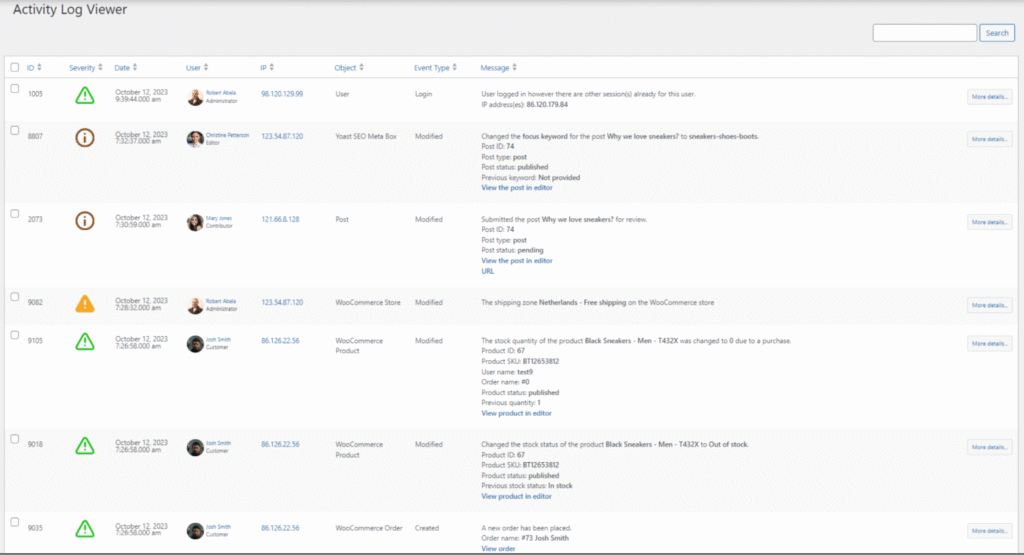 Via WordPress
Key WP Activity Log features include detailed activity logs with timestamps, user roles, IP addresses, and change metadata, session management to block simultaneous logins or idle users, and configurable reports with email scheduling.
It includes compliance-ready tracking for GDPR, PCI-DSS (Payment Card Industry Data Security Standard), and SOC2 standards. The plugin involves third-party log mirroring (Splunk, AWS CloudWatch), SIEM (Security Information and Event Management) integration, and real-time alerts via Slack, email, or SMS.
Compared to the limited activity log in Jetpack (available only in higher-tier plans), WP Activity Log offers more granular event tracking, external storage options, and security use cases.
WP Activity Log creates a permanent audit trail of all site changes that enable forensic analysis and troubleshooting, which contrasts with Jetpack security features that prevent attacks without logging internal site activities for administrative review.
Jetpack focuses more on general site management, whereas WP Activity Log prioritizes security auditing and user accountability. This makes it a stronger fit for agencies, ecommerce operators, and regulated industries needing traceability and compliance features.
WP Activity Log pricing starts at $0 for the free version, with Premium at $139/year (1 site, reports, alerts, session control) and Enterprise at $189/year (adds external log storage and integrations). For site logging, WP Activity Log is a $160+ cheaper alternative to Jetpack Complete, and it offers broader functionality in its category.
The pros noted in the WP Activity Log review relate to the depth of activity detail, security alerts, session control, and multi-plugin integration.
Cons of WP Activity Log refer to limited support in the free version, a potential learning curve for non-technical users, and no native Jetpack-style site uptime or backups.
20. Statify: Best Jetpack Alternative for Minimal Analytics
Statify is the best Jetpack alternative for minimal privacy-first analytics. Statify provides basic website statistics (daily visitors, referrer sources) through lightweight code that stores data within the WordPress database without external services or cookies.
Statify delivers essential metrics through minimal performance overhead that appeals to privacy-conscious site owners.
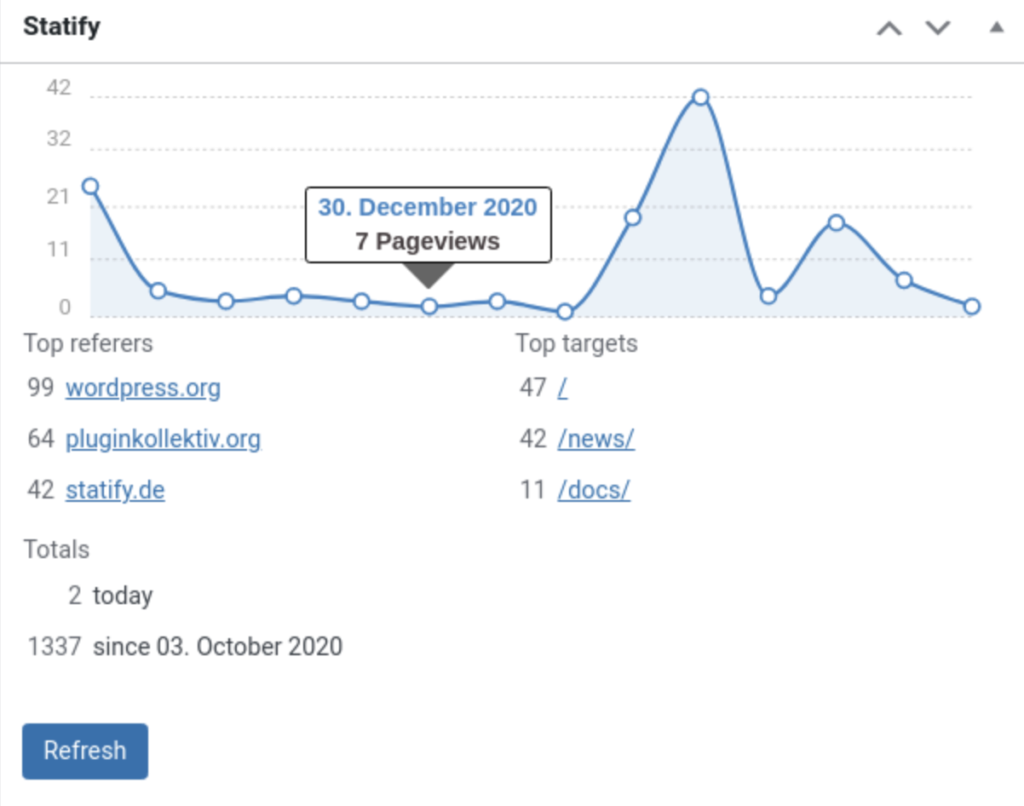 Via WordPress
Statify features include lightweight tracking code optimized for performance, WordPress database storage that ensures data ownership, cookie-free implementation complying with privacy regulations, and daily visitor and pageview statistics.
WP users get referrer source identification, a simple dashboard widget in WordPress admin, data retention management for database optimization, and complete GDPR compliance without requiring consent. The plugin operates with minimal configuration and provides essential statistics without complex analytics features.
Statify serves as an alternative to Jetpack since it prioritizes absolute simplicity and minimal resource consumption, while Jetpack provides more comprehensive statistics within a larger feature bundle.
Statify reduces analytics to essential daily metrics that are locally stored, which contrasts with Jetpack stats that offer more detailed reporting (popular posts, search terms, click tracking), which are processed through external infrastructure.
Statify is completely free with all features included and no premium versions or paid upgrades.
The pros mentioned in the Statify review include minimal performance impact from lightweight implementation, complete privacy compliance without cookies, simple interface reducing complexity, free access to all functionality, and local database storage ensuring data control.
The cons of Statify include an extremely limited feature set compared to comprehensive analytics platforms, the absence of detailed visitor tracking (pages per visit, time on site, bounce rate), no advanced reporting or visualization tools, and a lack of integrations with marketing platforms requiring manual data export for analysis.
Why do People Seek Alternatives to Jetpack WordPress Plugin?
People seek alternatives to the Jetpack WordPress plugin because the plugin bundles excessive features that degrade site performance through increased page load times and resource consumption.
Jetpack reviews consistently highlight performance concerns where the all-in-one approach combines security, statistics, social media, and performance features that many users consider bloated for sites that only require specific functionality (analytics, backups, security).
Another reason centers on the mandatory WordPress.com account requirement for accessing full Jetpack functionality. Jetpack requires a connection to WordPress.com servers for stats, backups, and social features, which creates dependency on external services that some users reject in favor of self-hosted solutions.
The complexity and feature redundancy in Jetpack drive users toward simpler alternatives. Jetpack includes 40-plus features through modules that users activate or deactivate, yet this complexity overwhelms site owners who prefer straightforward plugins that address specific functions (Search Atlas for SEO, OptinMonster for lead generation) without navigating the Jetpack settings maze.
What to Look for in a Jetpack Alternative?
The most important factors to look for in a Jetpack alternative are feature specialization, performance impact, and pricing structure. Jetpack bundles multiple functions (security, analytics, backups, SEO, social media) into one plugin, so effective alternatives focus on specific capabilities without unnecessary feature bloat that degrades site performance.
Why is Search Atlas the Best Jetpack Alternative?
Search Atlas is the best Jetpack alternative because it provides complete SEO workflow automation that the Jetpack statistics and security features are not able to address. Search Atlas consolidates rank tracking, technical audits, keyword research, content optimization, and backlink analysis in a unified platform that eliminates the need for multiple disconnected plugins.
The Search Atlas WordPress plugin enables one-click content publishing with optimized meta tags and schema markup pre-implemented, AI-powered bulk meta updates across entire sites, and Google Search Console integration within WordPress admin.
Search Atlas delivers the OTTO SEO agent that automatically implements technical fixes (schema markup, meta optimization, internal linking) without manual intervention, which surpasses the focus on site statistics and basic security monitoring in Jetpack.
Agencies, marketing teams, and SEO professionals choose Search Atlas because it reduces tool fragmentation, provides Google-integrated real-time data, and automates optimization workflows that scale with portfolio growth.
Jetpack monitors site statistics and provides security features (brute force protection, downtime alerts), yet Search Atlas enables visibility improvement, authority building, and measurable traffic growth through comprehensive SEO management.
Search Atlas operates beyond monitoring to provide actionable optimization recommendations, automated technical implementation, and strategic SEO workflows that convert site performance data into revenue outcomes.
Start a free 7-day trial with Search Atlas and move from basic site monitoring to full-scale SEO automation that drives visibility and revenue growth.