Executive Summary: Is Moz Worth It in 2026?
Verdict: Yes for beginners and small teams. No for scale.
Checked against the Moz Pro pricing page on September 25, 2026.
What Moz Does Well
- Beginner-friendly interface and guided workflows
- Domain Authority and Page Authority as industry-referenced metrics
- Keyword Explorer, Link Explorer, and Site Crawl in one dashboard
- Strong educational content, including Moz Blog and Whiteboard Friday
Where Moz Falls Short
- Smaller keyword database and 1,000-suggestion export cap
- No organic traffic estimates and no global search-volume totals
- Slower backlink and rank updates than larger research platforms
- Dated interface and limited competitor-analysis depth
| Need | Moz fit | Why |
|---|---|---|
| Learn SEO and run basic audits | Strong | Guided tools plus educational resources |
| Track a small site on a budget | Conditional | Entry plan is $49/month; Standard is $99/month |
| Large-scale keyword or backlink research | Weak | Smaller index, slower updates, export caps |
| Implementation plus AI visibility | Weak | Research-first; compare Search Atlas or Ahrefs for those jobs |
[!TIP] Evaluating Moz Alternatives? If you require faster backlink indexing, larger keyword datasets, and automated on-page execution without Moz's export limits, explore Search Atlas Site Explorer and our autonomous cloud SEO engine. Check our side-by-side comparison in Search Atlas vs Moz vs Ahrefs.
Moz is an SEO software platform for keyword research, backlink analysis, site auditing, and rank tracking. Its three core tools are Keyword Explorer, Link Explorer, and Site Crawl.
Moz Pro pricing starts at $49/month for the entry-level option. The current public plans are Standard at $99/month ($79/month billed yearly), Medium at $179/month ($143/month billed yearly), and Large at $299/month ($239/month billed yearly). A free trial is shown on the Medium plan. Moz Local starts at $16/month per location and rises to $33/month.
The main pro is beginner-friendly design and educational resources. The main con is data depth and update frequency. This review covers features, pricing, limits, and alternatives so you can decide whether Moz fits the work you actually need to do.
What is Moz?
Moz is an SEO software platform that offers a range of tools aimed at improving website visibility and performance on search engines. Moz combines several core tools under one interface and is especially known for its educational content and accessibility to SEO beginners. Moz’s blog, Whiteboard Friday videos, and community-driven content help simplify SEO topics for newcomers.
A notable feature of Moz SEO software is the Domain Authority (DA) metric, which is a proprietary score that estimates a website’s ability to rank on SERPs. DA is widely referenced in the SEO community, but it is not a Google-recognized ranking factor and can sometimes give a misleading impression of actual search performance. Other features of the SEO Moz Tool include keyword research, site audit, and backlink analysis. Additionally, Moz includes basic on-page optimization suggestions, rank tracking, and local SEO capabilities.
However, Moz’s feature depth may fall short for advanced users or large-scale agencies compared to other tools in the market. Some users find limitations in Moz’s keyword database size and crawl speed, which can be a drawback for large-scale projects or power users.
What is Moz Pro?
Moz Pro is the subscription-based SEO software suite developed by Moz, aimed at helping users manage key search optimization tasks. Moz Pro combines several core tools that support keyword research, technical auditing, backlink analysis, and rank tracking. The Moz Pro platform is positioned as a comprehensive solution, but its feature set leans more toward beginner and intermediate users rather than advanced SEO professionals or enterprise teams.
The Moz Pro dashboard enables users to track website performance, uncover areas for improvement, and receive automated SEO suggestions. The Moz Pro dashboard’s clean interface and guided features make it a practical choice for small businesses or marketers who need to cover the basics without steep learning curves.
However, Moz Pro reviews reveal that the tool’s functionality can feel limited for advanced SEO professionals. Moz Pro’s keyword databases are smaller compared to other leading tools, which can restrict competitive analysis and long-tail keyword discovery. Additionally, Moz Pro’s site audit and rank tracking tools are slower to update and less customizable, which may hinder users from managing multiple or large-scale websites.
While Moz Pro works well as a centralized SEO toolkit, it is best suited for those looking for an introductory or mid-level solution rather than a high-powered enterprise-grade platform.
What is Moz Local?
Moz Local is a tool designed by Moz to help businesses manage their local SEO presence. The primary function of Moz Local is to help maintain consistency in key business information, such as name, address, phone number, and operating hours, across its network of supported directories.
The Moz Local platform works by syndicating business data from a single dashboard. Users enter their information once into Moz Local, and the tool distributes it across supported directories. This reduces manual effort, but the approach is reliant on Moz Local’s integration network, which may not cover all directories businesses are listed on. The listings outside Moz Local’s ecosystem still require manual updates.
The Moz Local interface includes basic review monitoring features, allowing users to view and respond to customer feedback from a central dashboard. However, Moz Local’s review management capabilities are limited when compared to more advanced reputation management platforms.
Moz Local is generally used by small to mid-sized businesses with a physical presence that relies on local search traffic. While Moz Local helps with foundational listing accuracy, it lacks the breadth of data integrations, reporting depth, and location-level insights offered by more reliable local SEO tools.
What is the History of Moz?
Moz was founded in 2004 by Rand Fishkin and his mother, Gillian Muessig, in Seattle, Washington. Moz originally began as SEOmoz, a blog and online forum focused on sharing search engine optimization insights and best practices. The SEOmoz platform quickly gained traction among early SEO practitioners, largely due to its accessible content and community engagement.
SEOmoz shifted from consultancy toward software development by 2007 and formally transitioned to a SaaS model by 2008, developing tools aimed at improving search visibility. The name was changed from SEOmoz to Moz in 2013 to reflect this broader direction.
The Moz company maintained a strong presence through its content and community engagement, but faced increasing pressure from more technically advanced platforms. Moz’s trajectory reflects a company that successfully transitioned from a blog to a software business, but one that has had to adapt continuously in a highly competitive and rapidly evolving industry.
In 2021, Moz was acquired by iContact, a digital marketing company. The acquisition shifted the Moz company under a broader marketing technology umbrella, with Moz continuing to operate as part of a suite that includes email and digital marketing tools.
Who is Moz Tool For?
Moz is a fit for small businesses, in-house marketers, and SEO beginners who need keyword research, rank tracking, site audits, and backlink checks in one interface. It is a weaker fit for agencies and enterprise teams that need larger keyword coverage, faster index updates, or implementation workflows.
Choose Moz if you want a guided dashboard, Domain Authority as a comparative score, and educational resources such as Moz Blog and Whiteboard Friday. Compare other platforms if you need organic traffic estimates, global search-volume totals, or research that stays current at scale.
What Are the Moz Features?
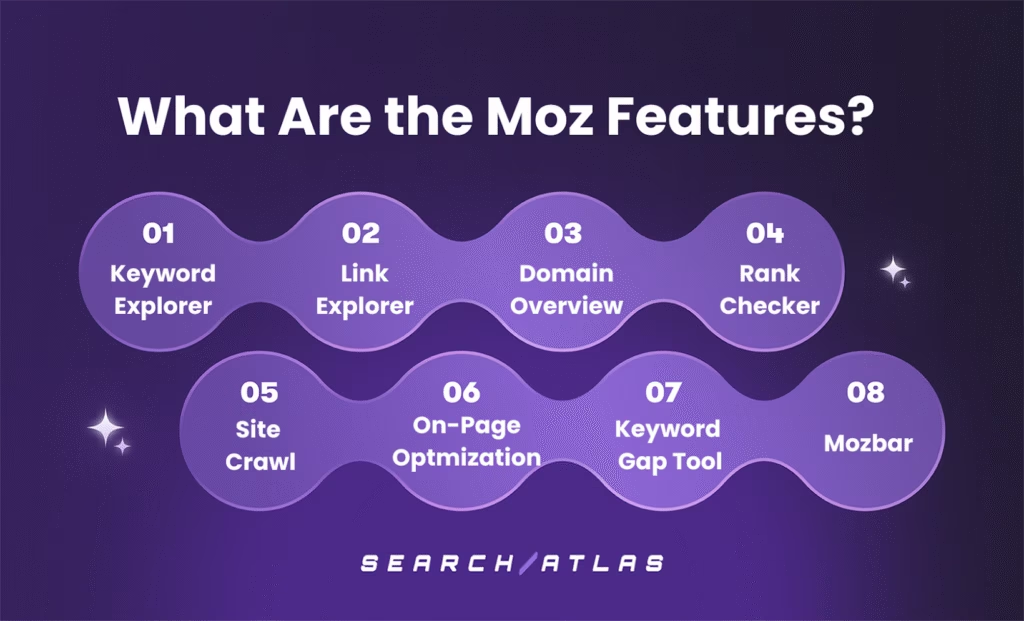
There are 8 main Moz features that aim to help users manage and improve their SEO strategy. The 8 main features of Moz are listed below.
1. Moz Keyword Explorer
Moz Keyword Explorer is a keyword research feature within the Moz platform, designed to help users identify and evaluate keywords for SEO and content planning. Moz Keyword Explorer provides standard metrics such as monthly search volume, keyword difficulty, estimated organic click-through rate (CTR), and a proprietary “Priority” score, which is a composite metric that attempts to weigh overall keyword value.
The Moz Keyword Explorer Tool offers related keyword suggestions and highlights SERP features currently associated with a given term. The Moz Keyword Explorer dashboard offers basic support for keyword planning by helping users quickly evaluate keyword options based on search volume and competition. The Moz Keyword Explorer interface allows for the identification of keywords that may offer a reasonable balance between visibility potential and ranking difficulty. Additionally, the Moz Keyword Tool can surface long-tail keyword variations and provides general data to assist in aligning content with common search behaviors. However, the insights are limited by Moz Keyword Explorer’s smaller keyword database and less granular metrics compared to more advanced tools.
To conduct keyword research using the Moz Keyword Explorer, enter a keyword or topic into the search bar. The Moz Keyword research tool will then generate an overview that includes search volume, difficulty score, and potential organic CTR.
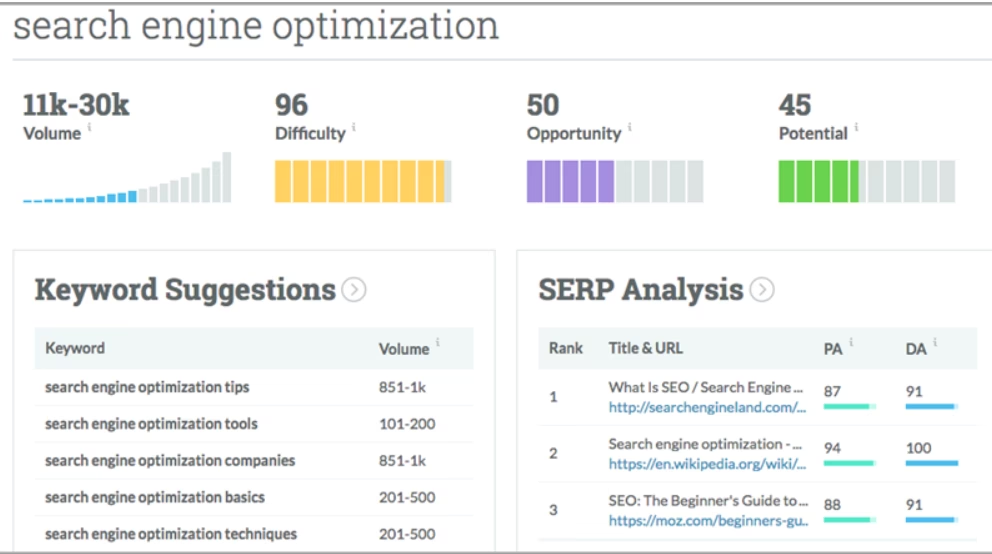 Via Moz
2. Moz Link Explorer
Moz Link Explorer is a backlink analysis tool used to review the link profile of a website, either your own or a competitor’s. Moz Link Explorer displays metrics such as total backlinks, referring domains, anchor text, spam score, and Moz’s proprietary Domain Authority and Page Authority (PA) scores. These metrics are intended to offer a high-level view of a site’s linking structure and relative authority.
The Moz Link Explorer Tool offers insight into backlink quality by identifying referring domains and flagging potentially harmful or low-quality links. This insight can assist in addressing SEO issues related to spammy or irrelevant backlinks.
Users can review backlink profiles of other websites to identify linking domains and general patterns in competitor strategies. This data may help surface potential outreach targets or industry-specific linking trends. However, the level of detail available is limited compared to more advanced link intelligence tools, which offer deeper filtering, historical link data, and more comprehensive reporting.
Tracking gained or lost links is possible within the Moz Link Explorer dashboard, offering a way to monitor link-building efforts over time. That said, delays in data updates and limited reporting granularity can make it harder to assess campaign performance in real-time or at scale. The Moz Backlink Explorer interface is best used for basic backlink evaluations rather than in-depth link audits or strategic planning.
To use Moz Link Explorer, enter a domain or URL in the search field. The Moz Link Explorer Tool will then generate an overview of backlink metrics.
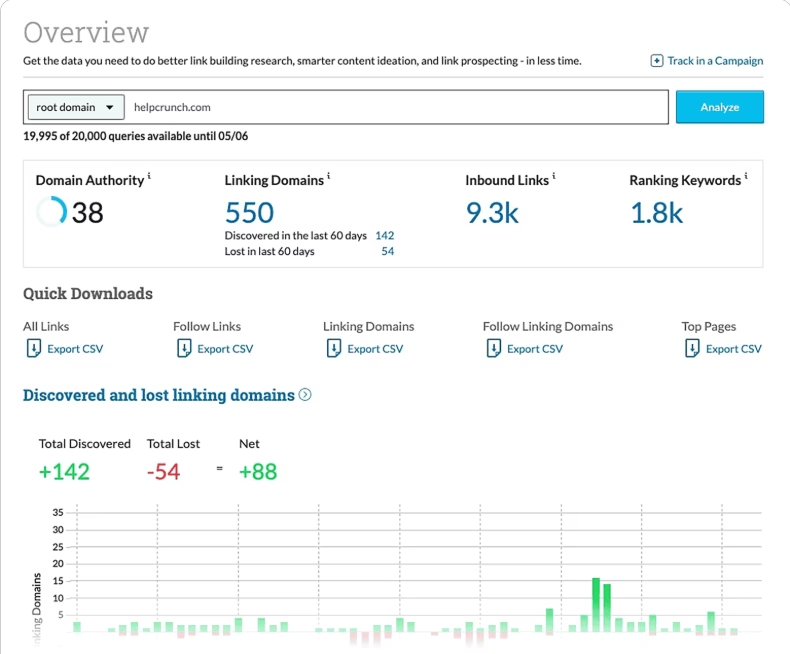 Via Moz
3. Moz Domain Overview
Moz Domain Overview is a tool that offers a high-level summary of a domain’s SEO performance. Moz Domain Overview provides metrics such as Domain Authority, Page Authority, spam score, estimated traffic, top-performing pages, and linking domains. While useful for quick overviews, the Moz Domain Overview Tool pulls from a limited dataset and lacks the detail needed for deep SEO evaluation. Users looking for deeper analysis will likely need to supplement Moz Domain Overview with other tools.
The Moz Domain Overview Tool is commonly used to get a general sense of a domain’s visibility and authority. Additionally, the Moz Domain Overview dashboard surfaces which keywords a site ranks for and highlights pages that attract the most backlinks. However, since these metrics are based on Moz’s own algorithms and index, they often differ from real-world performance or data seen in platforms with larger crawling infrastructure.
Users can view a domain’s spam score, intended to indicate whether a site may have questionable backlinks. This insight can help flag potential SEO risks, but should be interpreted cautiously, as the scoring system is not always aligned with actual search engine penalties or trust signals.
To use the Moz Domain Overview tool, enter a domain into the search field. The Moz Domain Overview will then provide a basic dashboard summarizing key SEO indicators.
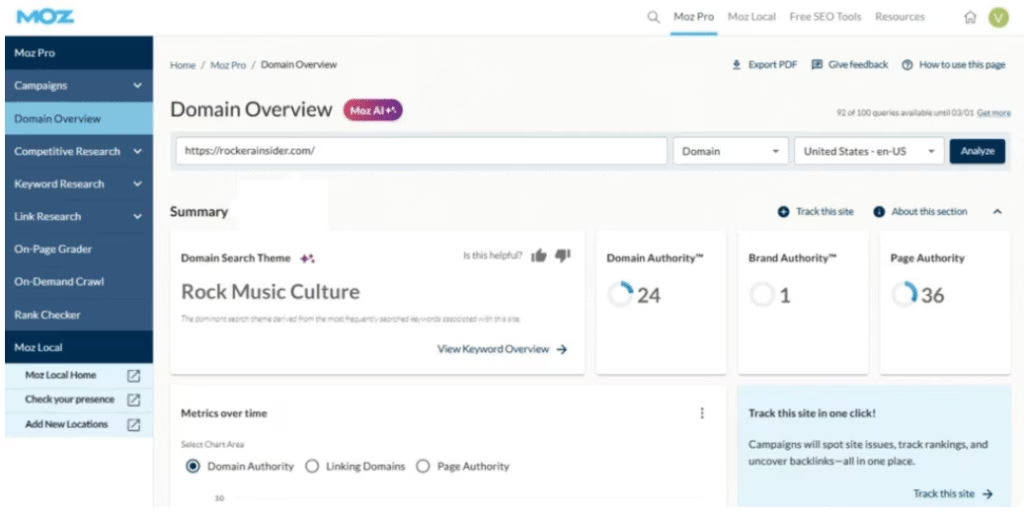 Via Moz
4. Moz Rank Checker
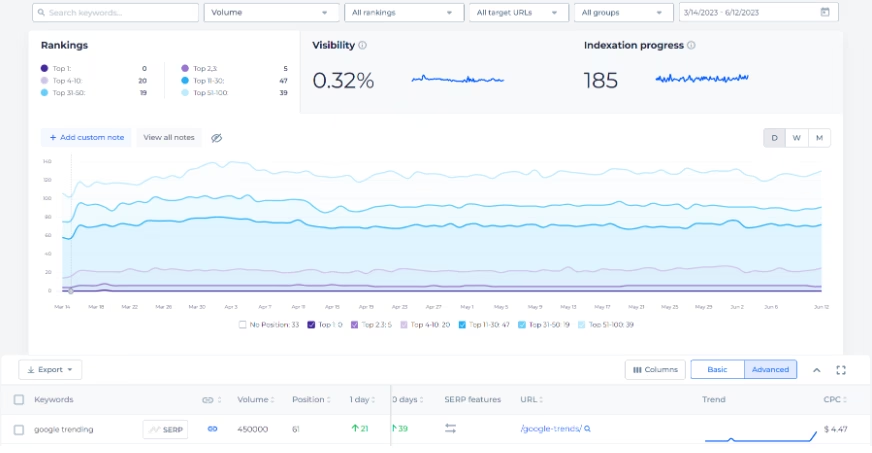
Moz Rank Checker is a tool designed to monitor keyword performance over time. Moz Rank Checker tracks selected keywords across search engines, primarily Google, and provides historical data on changes in position. The Moz Rank Checker Tool is intended to help users assess how SEO efforts are affecting search visibility.
The Moz Rank Checker dashboard includes visual trend charts and reports that show how keyword rankings shift over days or weeks. These visuals are sufficient for general reporting but lack the depth, filtering options, and SERP feature tracking available in more advanced rank tracking platforms.
Users can monitor both their own rankings and those of competitors, offering a way to identify opportunities or areas where rankings are declining. However, the Moz Rank Tracking interface offers less frequent updates and limited tracking flexibility compared to other SEO platforms. Moreover, daily tracking is only available on higher-tier plans, and support for multiple devices and granular location data is basic.
To use the Moz Rank Checker Tool, create a campaign within Moz Pro, add your target keywords, and configure tracking preferences such as location or competitor domains. The Moz Rank Checker will then track keyword rankings and display them on a timeline, with visualizations for changes in position.
 Via Moz
5. Moz Site Crawl
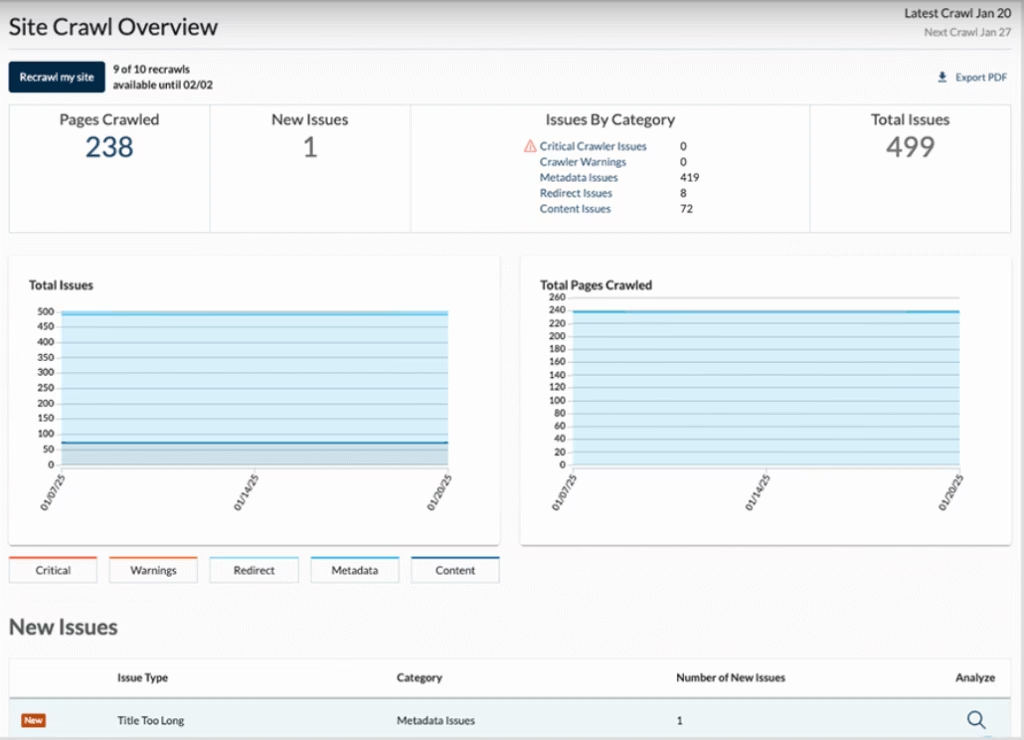
Moz Site Crawl is a tool that scans websites for technical SEO problems by mimicking how a search engine bot navigates the site. Moz Site Crawl checks for common issues such as broken links, duplicate content, missing title tags, redirect chains, and crawlability errors. The Moz Site Crawl Tool generates a site audit report that outlines detected problems and general suggestions for resolution.
The Moz Site Crawl Tool is aimed at helping users maintain basic site hygiene. The Moz Site Crawl dashboard ensures that common technical errors don’t interfere with organic visibility. While the Moz Site Crawl dashboard identifies standard issues, its scope is limited compared to more advanced crawlers that offer deeper diagnostics, JavaScript rendering, and customizable crawl settings.
The Moz Site Crawl interface groups problems by severity to help users decide what to fix first. Moreover, alerts notify users of newly detected issues, but crawling frequency and customization options are relatively basic. Historical data tracking is available to monitor how technical changes affect site health over time, although the insights remain high-level.
To conduct an SEO audit using the Moz Site Crawl Tool, set up a campaign in Moz Pro and enter a website URL. The Moz Site Crawl will then scan the site and present a summary of technical issues through a visual dashboard.
 Via Moz
6. Moz On-Page Optimization
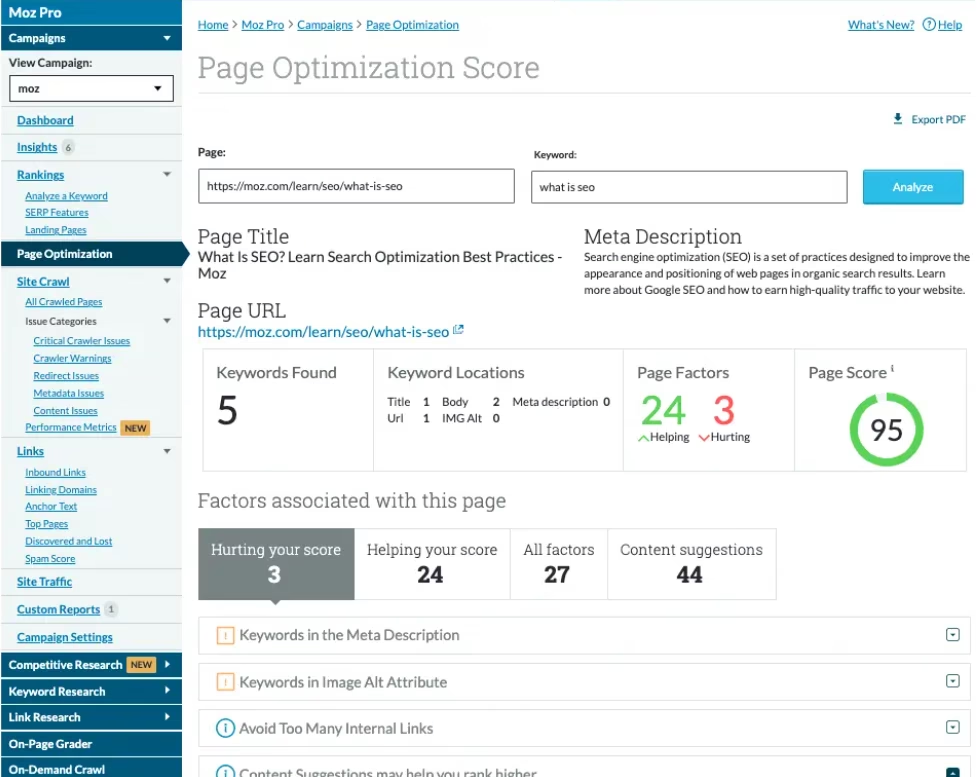
Moz On-Page Optimization is a tool designed to evaluate how well individual web pages are optimized for specific keywords. Moz On-Page Optimization reviews standard on-page elements such as title tags, headers, keyword usage, internal links, and metadata, then assigns a basic optimization score and suggests general improvements.
The Moz On-Page Optimization Tool offers a way to identify common on-page SEO gaps, but its analysis is limited in scope. The Moz On-Page Optimization Tool does not account for nuanced content quality, user intent alignment, or competitive benchmarking beyond surface-level checks. Moreover, the Moz On-Page Optimization interface is centralized and convenient for reviewing multiple pages. The Moz On-Page Optimization dashboard can save time compared to manual audits, but its prescriptive advice is broad and may not reflect current ranking factors or nuanced competitive conditions.
The Moz On-Page Optimization Tool is designed for simplicity, which may suit less technical users. However, the On-Page Optimization Tool can be limiting for SEO professionals looking for deeper insight or flexibility. Users can track changes over time, but progress tracking is confined to Moz’s scoring system, which does not always reflect real-world ranking outcomes.
To use the Moz On-Page Optimization Tool, enter the target URL and keyword in the search field. The Moz On-Page Optimization will then generate a report with a score and actionable tips.
 Via Moz
7. Moz Keyword Gap Tool
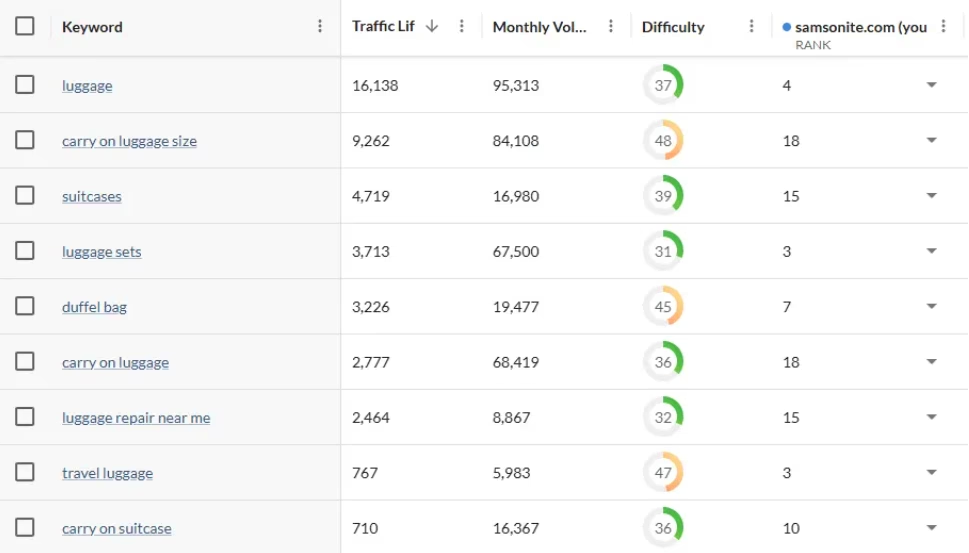
Moz Keyword Gap Tool allows users to compare their website’s keyword rankings against up to three competitors. Moz Keyword Gap Tool identifies keywords competitors rank for that your site does not, as well as terms where your rankings are similar or slightly behind. The goal of the Moz Keyword Gap Tool is to highlight content gaps and potential opportunities to gain visibility in search results.
While the Moz Keyword Gap dashboard can help surface untapped keyword opportunities, the tool relies on its own keyword database, which may not capture the full breadth of search queries relevant to every niche. Keyword difficulty and volume estimates are available. However, these metrics should be treated as directional rather than precise, especially when compared to tools with broader datasets or more frequent updates.
The Moz Keyword Gap interface is most useful for basic benchmarking and opportunity spotting. However, the Moz Keyword Gap Tool lacks advanced filters and does not allow for much customization in terms of geography, device type, or SERP features. Additionally, the Moz Keyword Gap dashboard is helpful for a high-level overview of where competitors might be outperforming you. That said, deeper competitive keyword research will likely require additional tools or manual validation.
To use the Moz Keyword Gap Tool, enter your domain and up to three competitors into the search field. The Moz Keyword Gap Tool will then show shared, missing, and unique keywords along with position data and basic metrics.
 Via Moz
8. Mozbar
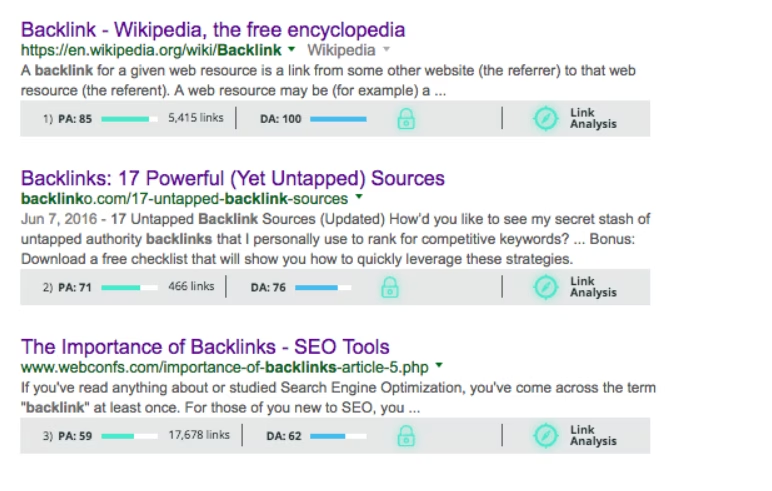
MozBar is a free Chrome extension from Moz that displays basic SEO metrics directly in the browser. Mozbar is designed to give users a quick snapshot of elements like Domain Authority, Page Authority, and spam score without logging into a full platform. Additionally, Mozbar highlights on-page features such as title tags and meta descriptions, which can be useful for basic content checks. While convenient for quick reference, the data shown in Mozbar can be limited in scope compared to more comprehensive auditing tools.
MozBar enhances real-time competitive research and link analysis. Mozbar identifies follow and nofollow links, offers some keyword difficulty insights, and allows users to compare link metrics directly in the search results. However, Mozbar’s keyword data isn’t always as detailed or up-to-date as what you would get from more advanced SEO platforms. Moreover, some users find Mozbar’s interface cluttered or occasionally buggy, particularly when working across multiple browser tabs or with certain search filters enabled.
To use MozBar, install it from the Chrome Web Store, log in with your Moz account, and start browsing. Once active, the Mozbar will display metrics as you visit web pages or search in Google.
 Via Moz
How Does Moz Tool Work?
The Moz Tool works by collecting and analyzing data from search engines and websites to offer a broad overview of a site’s search performance. The Moz Tool evaluates areas such as keyword rankings, backlink profiles, technical SEO issues, and on-page elements. The goal of the Moz Tool is to identify areas that may impact rankings and provide general recommendations for improvement.
Moz pulls its data from multiple channels, including its proprietary Mozscape index, which continuously crawls and stores billions of URLs. Additionally, the Moz platform incorporates information from third-party providers and public search engine results to supplement its analysis. The resulting data is organized into dashboards that highlight metrics like Domain Authority, keyword difficulty, and link metrics. These outputs are intended to help users monitor trends and identify potential SEO issues.
However, the accuracy of some metrics, such as keyword volume or link quality, can vary compared to more specialized or data-rich platforms. While Moz offers general guidance for improving visibility and performance, users looking for highly detailed or customized analysis may find its insights somewhat limited.
How Accurate is Moz Tool?
Moz is accurate enough for beginner and intermediate SEO work: Domain Authority comparisons, basic keyword research, site-audit hygiene, and high-level backlink reviews.
Treat Moz metrics as directional, not as a substitute for Google Search Console, Google Analytics, or a second research dataset. Moz does not provide organic traffic estimates. Keyword volume is country-level, not global. Backlink and rank data can lag larger indexes. If coverage, freshness, or competitive depth is the decision factor, compare Moz against a second independent dataset before buying.
What Pricing Plans Does Moz Tool Offer?
Moz Pro has four public options: an entry-level plan at $49/month, then Standard, Medium, and Large. The figures below were checked on the Moz Pro pricing page on September 25, 2026. Yearly billing is advertised as 20% off. Confirm live terms before purchase because prices, trial eligibility, and limits can change.
| Plan | Price | Best scale signal | AI visibility included |
|---|---|---|---|
| Entry-level | $49/month | 1 site; limited tracking | Not listed on the public comparison |
| Standard | $99/month ($79 yearly) | 1 seat; 3 sites; 300 keywords/month; 400K pages/month | 1 dashboard; 50 prompts; 2 AI briefs |
| Medium | $179/month ($143 yearly) | 2 seats; 10 sites; 1,500 keywords/month; 2M pages/month | 2 dashboards; 100 prompts; 10 AI briefs |
| Large | $299/month ($239 yearly) | 3 seats; 25 sites; 3,000 keywords/month; 5M pages/month | 4 dashboards; 200 prompts; 50 AI briefs |
A free trial is shown on Medium. Standard, Medium, and Large include MozBar Premium, 24/7 support, and four tracked AI models (GPT, Gemini, Google AI Mode, and Perplexity). Extra AI visibility dashboards are listed at $20 each. Extra prompts are listed at $50 per 100. Overages are not included.
Moz Pro is worth it when a beginner or small team needs core keyword tracking, site audits, and backlink analysis in one dashboard. It is a weaker value when the work depends on larger keyword coverage, faster updates, or organic traffic estimates.
Moz Local is priced per location: Lite at $16/month for listing management and review monitoring, Preferred at $24/month with reputation management and social posting, and Elite at $33/month with extra directory submissions and analytics. Moz Local is useful for multi-location listing consistency. A single-location business with light local SEO needs may not need a paid listing tool.
What is the Moz Tool Rating?
The Moz Tool receives varied ratings across different software review platforms. The varied feedback reflects Moz Tool’s comprehensive feature set and ease of use, alongside certain limitations in data depth and competitive analysis. Ratings and review counts change over time, so readers should check the current Moz pages on each review site rather than treat a copied score as current.
- Trustpilot. Review Moz on Trustpilot.
- Capterra. Review Moz on Capterra.
- G2. Review Moz on G2.
- TrustRadius. Review Moz on TrustRadius.
- Gartner Peer Insights. Review Moz on Gartner Peer Insights.
Published reviews commonly describe Moz as an entry-level SEO platform with a clean interface for keyword research and site audits. The same reviews often flag weaker backlink tracking, a smaller keyword database, and slower updates. Check the live review-site pages above rather than treating any copied score as current.
What Are the Pros of Moz?
Pros and cons
Weigh Moz’s strengths against its limits
Each point is explained in the pros and cons sections below.
Pros
- Simple, Beginner-Friendly Interface
- All-In-One Feature Set
- Recognized Metrics
- Accessible Learning Materials
- Local SEO Support
- Reporting and Tracking Tools
- Free Tools Available
- Trial access on Pro Medium
Cons
- Limited Keyword Database
- Limited Keyword Exports
- No Traffic Estimates
- Lacks Global Search Volumes
- No Broken Outbound Link Detection
- Strict Reporting Limits
- Less Accurate Rank Tracking
- Slow Backlink Index Updates
- Basic Competitor Analysis
- Fewer Advanced Features
- Interface Can Feel Dated
The pros of Moz lie in its straightforward interface, extensive toolset, and trusted metrics that create a dependable foundation for improving search rankings. The Pros of Moz are discussed below.
- Simple, Beginner-Friendly Interface. Moz’s layout and navigation are straightforward, making it easy for users new to SEO to get started.
- All-In-One Feature Set. Moz combines key SEO functions like keyword research, rank tracking, site audits, and backlink analysis in a single dashboard.
- Recognized Metrics. Moz’s Domain Authority and Page Authority remain widely referenced in the industry despite their limitations.
- Accessible Learning Materials. Moz offers a range of free and paid resources, like Moz Blog and Moz Academy, to support SEO education.
- Local SEO Support. Moz Local provides tools for managing listings and improving consistency across directories.
- Reporting and Tracking Tools. Moz includes options for scheduled reports and monitoring keyword trends over time.
- Free Tools Available. Tools like MozBar and Domain Analysis in Moz offer limited but useful functionality without a subscription.
- Trial access on Pro Medium. Moz provides a free trial option for its Moz Pro Medium plan ($179/mo tier); confirm current trial eligibility and terms on the Moz Pro pricing page before purchasing.
The Moz’s benefits may appeal to users who want a reliable, easy-to-use SEO platform with all the essential tools in one place. However, Moz’s data depth and real-time accuracy can be limited compared to some competitors, which may affect advanced users or those needing highly detailed insights.
What Are the Cons of Moz?
The cons of Moz affect its suitability for more advanced or large-scale SEO needs. The cons of Moz are discussed below.
- Limited Keyword Database. Moz tracks fewer keywords compared to competitors, which can limit insights, especially for long-tail and niche terms.
- Limited Keyword Exports. Users can only access or export 1,000 keyword suggestions at a time, regardless of the subscription level. Competing tools often allow tens of thousands.
- No Traffic Estimates. Moz does not provide organic traffic estimates for domains, making it harder to gauge competitor performance or site reach.
- Lacks Global Search Volumes. Moz’s keyword search volume data is restricted to individual countries, meaning global search volume metrics are not available.
- No Broken Outbound Link Detection. Moz doesn’t allow you to find broken outbound links on your own site, which is a useful feature offered by several competitors.
- Strict Reporting Limits. Moz’s report generation limits are tight, especially on lower-tier plans, which may hinder frequent or large-scale reporting needs.
- Less Accurate Rank Tracking. Some Moz users report inconsistencies or delays in keyword position updates.
- Slow Backlink Index Updates. Moz’s backlink database updates less frequently, which can result in outdated link data.
- Basic Competitor Analysis. Moz’s competitive research tools are less in-depth and data-rich than those offered by other platforms.
- Fewer Advanced Features. Moz lacks some of the advanced functionalities preferred by seasoned SEO professionals.
- Interface Can Feel Dated. While functional, Moz’s UI is not as modern or customizable as other tools in its class.
Moz’s drawbacks make it less ideal for users who require in-depth data, frequent updates, or highly advanced SEO functionalities. While Moz remains a solid tool for beginners and smaller teams, users managing large-scale SEO campaigns or demanding precise data may find better value in more reliable alternatives.
What Do Public Discussions Say About Moz?
Public discussion about Moz is mixed. This review does not treat unsourced forum comments as market evidence. Evaluate the current feature set, pricing, support terms, and data coverage against your own workflow.
Recurring themes in published reviews, not a claimed consensus: Moz is often described as easy to start with, useful for Domain Authority checks, and weaker on index size, update speed, and advanced competitive analysis. Confirm those limits on the live product before treating them as current.
How Does Moz Treat its Long-term Subscribers?
Moz’s current pricing and support terms should be checked directly before renewal. The publicly listed plans and annual-billing terms can change, so readers should compare the current offer with their existing contract rather than assume a loyalty discount or penalty.
How Responsive is Moz’s Customer Support?
Support availability and response expectations depend on the current plan and published terms. Readers managing complex or large-scale campaigns should confirm the available support channel and service level before purchase.
How Reliable and Legit is Moz as an SEO Tool?
Moz is an established SEO software provider. Its suitability depends on the reader’s required data coverage, update frequency, workflow depth, and budget; those criteria are more useful than an unsupported claim about whether a tool is “legit” or a “scam.”
What is the Best Alternative to Moz Tool?
The best Moz alternative depends on the job.
- Choose Search Atlas if you want SEO research, AI visibility, and implementation in one platform. Review current features, pricing, and OTTO SEO before signup.
- Choose Ahrefs if the job is backlink depth, historical data, and competitor research.
- Choose Semrush if the job is broader marketing and PPC research alongside SEO.
- Stay on Moz if the job is beginner SEO education, Domain Authority checks, and a guided all-in-one dashboard.
Search Atlas pricing and product capabilities can change. Use the current product pages to compare cost, data coverage, integrations, and support. For a migration-specific workflow, see how to migrate from Moz Pro to Search Atlas.
Are There Any Other Moz Alternatives?
Yes, there are several strong Moz alternatives that cater to different SEO needs and budgets. Alternatives like the Search Atlas SEO Software Platform, SE Ranking, Semrush, Serpstat, Mangools, Raven Tools, and Ahrefs provide similar features such as keyword tracking, backlink analysis, site audits, and competitor research. All Moz alternatives come with their strengths and weaknesses, so the right choice depends on your specific SEO goals and budget.
Are There Any Alternatives to Moz Local for Business Listings?
Yes, there are several alternatives to Moz Local for managing business listings that many users find more flexible or better suited to their needs. Platforms like Search Atlas Local SEO Software, Yext, BrightLocal, Synup, Uberall, and Whitespark offer features such as real-time updates, citation tracking, rank monitoring, and broader directory coverage, often with more automation, responsive support, or competitive pricing. These Moz Local alternatives are frequently chosen by businesses seeking a more scalable or user-friendly solution than what Moz Local currently provides.
Do SEO Professionals Rank Moz Among the Best SEO Tools?
Moz remains widely referenced because of Domain Authority, beginner-friendly tools, and educational content. That does not make it the best tool for every workflow. Professionals who need larger indexes, faster updates, or implementation usually compare Moz with Ahrefs, Semrush, or Search Atlas against the job, not against brand familiarity.