AI automation is the use of machine learning, natural language processing (NLP), and AI-based decision models to execute tasks that previously required human input. AI automation applies trained models to pattern recognition, data processing, or decision-making at scale. AI automation differs from rule-based systems because it adapts to new data and adjusts its behavior based on outcomes, which is what sets it apart from earlier generations of automation technology.
AI automation requires different operational practices because its outputs are probabilistic rather than deterministic. The same input produces different results, and model accuracy degrades when real-world data shifts away from training data. This means deployment is not the finish line. Monitoring, retraining, and human review checkpoints are structural requirements, not optional safeguards. Teams that treat AI automation as a configure-and-forget system consistently encounter output quality problems they did not anticipate.
AI automation is in active production deployment across marketing, finance, healthcare, logistics, legal, software development, and customer operations, wherever workflows generate large volumes of repetitive, pattern-based tasks. The adoption pace has accelerated with the availability of large language models (LLMs) capable of handling unstructured text inputs that previous automation approaches do not process. Most organizations that have deployed AI automation report using it across multiple workflow categories simultaneously.
In SEO and content workflows, AI automation covers keyword research, content brief generation, draft production, metadata writing, internal link analysis, on-page optimization, and performance reporting. These tasks share high volume, structured inputs, and a need for consistent output quality. The efficiency gain comes from removing manual execution from the time budget. The quality gain depends on the accuracy of the automation and the effectiveness of the human review processes built around it.
What is AI Automation?
AI automation combines artificial intelligence with software automation to execute tasks, make decisions, process information, and complete workflows without continuous human input. AI automation extends beyond rule-based automation because AI systems analyze patterns, interpret context, and adapt outputs based on data instead of following fixed instructions. This capability allows automation systems to process language, evaluate conditions, and execute complex workflows across business environments.
What technologies power AI automation systems? AI automation systems operate through machine learning and natural language processing that expand how automation platforms process information and execute workflows. Machine learning improves prediction accuracy through historical data analysis. Natural language processing allows systems to interpret and generate human language across emails, documents, and conversations.
How does machine learning improve AI automation? Machine learning improves AI automation by allowing systems to identify patterns, evaluate outcomes, and improve predictions over time. Machine learning models analyze historical datasets and adjust outputs based on previous results instead of relying on static instructions. This learning process improves forecasting, recommendation systems, classification workflows, and operational decision-making.
How does natural language processing improve AI automation? Natural language processing improves AI automation by allowing systems to read, interpret, generate, and respond to human language. NLP systems process unstructured information (support tickets, emails, chats, and documents while extracting intent and contextual meaning. This capability improves conversational workflows, content generation, sentiment analysis, and customer interaction automation.
What Are the Different Types of AI Automation?
AI automation divides into distinct categories based on the type of task performed, the input format, and the underlying AI method applied. Understanding the categories matters because the right type for a task determines the correct tooling, the correct quality criteria, and the correct monitoring approach.
Applying the wrong category using a generative tool for a classification task, or a rule-based system where pattern inference is required, recreates avoidable quality failures and maintenance problems.
The 4 main categories of AI automation are listed below.
1. Cognitive automation. Cognitive automation applies natural language processing and machine vision to interpret documents, classify inputs, and extract information from unstructured sources. It functions in tasks (parsing customer support tickets, categorizing legal contracts by clause type, or extracting named entities from research documents). The mechanism relies on trained classification models that assign meaning to raw input rather than matching it against a fixed pattern set, which is what allows cognitive automation to handle text that does not conform to a template.
2. Predictive automation. Predictive automation uses trained machine learning models to forecast future states from historical data and trigger automated actions based on those forecasts. In SEO contexts, predictive automation surfaces which pages are likely to lose ranking before they drop, which content topics will generate traffic based on trend signals, or which pages have the highest conversion probability given current user behavior. The system evaluates large variable sets simultaneously, a task that exceeds practical manual analysis capacity.
3. Generative automation. Generative automation produces new content or code outputs from LLMs’ inference rather than from pre-written templates. Generative automation differs from cognitive automation in that the output is created, not interpreted. Applications include generating article structures, producing metadata variants, creating schema markup, and drafting first-pass copy for editorial review. Output quality depends on model training, prompt construction, and the quality of the input data, which is why first-draft outputs require human review before publication.
4. Process automation. Process automation uses AI-enhanced workflow engines to coordinate multi-step tasks across systems, people, and data sources, replacing manual handoffs with conditional logic, routing rules, and API connections. In a content workflow, process automation handles the steps between production stages (routing a completed draft to a review queue, triggering a quality check when a brief is submitted, or publishing approved content when a sign-off condition is met). The AI layer within process automation handles the variable, judgment-dependent routing decisions that rule-based workflow tools cannot make.
Most production automation systems combine multiple types within a single pipeline. Cognitive automation classifies the input, predictive automation scores its priority, generative automation produces the required output, and process automation routes that output to the correct downstream step. The categories are not mutually exclusive. They represent layers within an integrated system that each address a distinct stage of processing.
What Is the Difference Between Rule-Based and AI-Driven Automation?
The difference between rule-based and AI-driven automation lies in how each approach makes decisions. Rule-based systems execute fixed conditions written by developers; AI-driven systems apply probabilistic inference from trained models. This distinction determines where each approach applies, how it fails, and what it requires to maintain over time.
The core differences between rule-based and AI-driven automation are below.
| Dimension | Rule-Based Automation | AI-Driven Automation |
|---|---|---|
| Decision method | Fixed if-then conditions written at deployment | Probabilistic model inference from trained patterns |
| Input handling | Structured, predefined formats only | Variable and unstructured formats, including text and images |
| Exception handling | Escalate to human or fail | Confidence-weighted fallback to human review |
| Adaptability | Static requires a developer update to change | Adaptive improves with new training data |
| Transparency | Fully auditable, every decision is traceable | Probabilistic decisions expressed as confidence scores |
| Maintenance | Code-level rule updates by a developer | Model retraining on updated labeled data |
| Best for | High-frequency, narrow, structured tasks | Variable, language-heavy, pattern-rich tasks |
| Failure mode | Predictable breaks on out-of-rule inputs | Gradual accuracy degradation over time |
How does rule-based automation handle decisions? Rule-based automation executes tasks by following a fixed set of if-then conditions written by a developer or analyst before deployment. Every scenario needs to be explicitly defined. The system executes the corresponding action if the input matches a condition. The system fails or escalates to a human if the input falls outside the defined rules. This structure makes rule-based systems predictable and auditable but brittle when inputs vary beyond the conditions that were anticipated.
How does AI-driven automation handle decisions differently? AI-driven automation makes decisions using probability scores generated by a trained model rather than a pre-written condition tree. The model assigns a confidence level to each possible output and selects the highest-scoring action. Because the decision comes from learned patterns rather than explicit instructions, AI-driven automation handles inputs that fall outside any predefined category. It degrades gracefully on novel inputs instead of failing outright, which is the operationally meaningful difference between the two approaches.
What determines when to use rule-based versus AI-driven automation? The choice depends on whether the task involves structured, deterministic inputs or variable, unstructured data. Rule-based automation performs well on data entry validation, form routing, and workflow triggers with binary outcomes. AI-driven automation performs better on language-dependent tasks (classifying intent, matching documents, extracting entities, generating content) where inputs vary too widely for fixed rules to cover reliably.
Where do the two approaches differ in deployment risk? Rule-based automation is lower risk in regulated, high-stakes workflows because every decision is traceable to a specific condition. AI-driven automation carries a higher risk in those same contexts because model decisions are probabilistic and harder to audit step by step. In practice, most production automation combines rule-based systems to enforce hard constraints while AI models handle classification, routing, and content generation within those constraints.
What Is the Difference Between RPA, BPA, and Intelligent Automation?
Robotic process automation (RPA), business process automation (BPA), and intelligent automation each operate at different scopes and layers of the automation stack. The distinction matters because choosing the wrong approach for a workflow creates integration gaps, maintenance problems, and automation coverage limits that degrade performance at scale.
The core differences between RPA, BPA, and intelligent automation are below.
| Dimension | RPA | BPA | Intelligent Automation |
|---|---|---|---|
| Scope | Single UI-level tasks | Full business process orchestration | End-to-end workflows with AI decision layers |
| Input type | Structured digital data | Structured and semi-structured | Structured, semi-structured, and unstructured |
| AI component | None or optional add-on | Optional | Core requirement |
| Integration method | UI interaction mimicry | API and workflow engine | API, model inference, and data connectors |
| Exception handling | Escalate or fail | Rule-based routing | Model-guided routing with human fallback |
| Setup complexity | Low script-based | Medium workflow configuration | High model training and workflow design |
| Best for | Legacy system data transfer | Process orchestration with defined rules | Variable-input workflows requiring inference |
| Maintenance | Script updates | Workflow rule updates | Model retraining and workflow updates |
What is robotic process automation (RPA)? Robotic process automation is a software layer that mimics user interactions with existing applications to move data between systems without API access. An RPA bot logs into a web application, reads fields, copies values, and pastes them into another system exactly as a human would. RPA does not interpret data; it executes scripted sequences. It works for legacy system integration where APIs do not exist, which is the primary scenario where it adds value over API-based alternatives.
What is business process automation (BPA)? Business process automation applies workflow software to coordinate multi-step processes across people, systems, and data sources within a single orchestration layer. BPA covers approval chains, task routing, document management, and notification triggers. It differs from RPA in that it manages process logic at the workflow level rather than mimicking user interface actions. BPA platforms typically integrate through APIs and include visual workflow builders, making them easier to modify and maintain than RPA scripts.
What is intelligent automation, and why does it require AI? Intelligent automation combines RPA or BPA with AI components, machine learning models, natural language processing, or computer vision to handle unstructured inputs within automated workflows. An intelligent automation system receives an email, extracts the intent using NLP, classifies the request, routes it to the correct workflow, and generates a draft response, all without human intervention. The AI layer handles interpretation while the automation layer handles execution. The combination is what allows the system to process inputs that neither layer handles alone.
How do RPA, BPA, and intelligent automation differ in scope? RPA is a tool for data transfer between systems. BPA is a framework for orchestrating multi-step processes, and intelligent automation is an architecture that applies AI within either framework to handle variable, unstructured inputs. RPA is the narrowest in scope and easiest to deploy, but it is limited to scripted sequences. BPA handles more complex process logic but still requires structured inputs. Intelligent automation extends to accommodate unstructured data, which is where most real-world content and SEO workflows operate.
What Is the Difference Between AI Automation and Traditional Automation?
AI automation and traditional automation address fundamentally different operational conditions. Traditional automation executes defined sequences on structured inputs without learning or adaptation. AI automation applies trained models to infer the correct action from patterns in data, which allows it to handle the input variation that causes traditional systems to fail.
The core differences between AI automation and traditional automation are below.
| Dimension | Traditional Automation | AI Automation |
|---|---|---|
| Decision logic | Deterministic, where the same input always produces the same output | Probabilistic output depends on model inference |
| Input handling | Structured, uniform formats | Variable and unstructured formats |
| Adaptability | Fixed at deployment | Learns and updates with new data |
| Failure mode | Predictable breaks on undefined inputs | Gradual accuracy degradation from data drift |
| Maintenance | Code updates by a developer | Model retraining on updated datasets |
| Auditability | Almost every step is traceable to a rule | Lower decisions expressed as confidence scores |
| Setup requirement | Rule definition and scripting | Labeled training data and model configuration |
| Best for | High-frequency, narrow, well-defined tasks | Pattern-rich, variable, language-based tasks |
What defines traditional automation? Traditional automation executes a pre-defined sequence of operations on structured inputs without learning, adaptation, or probabilistic decision-making. It operates on a fixed logic condition, which is evaluated, a branch is taken, and a task is performed. Traditional automation includes macros, scheduled batch jobs, and rule-based workflow engines. Given the same input, the system always produces the same output, which is its defining characteristic and its primary limitation.
How does AI automation handle input variation differently? AI automation applies trained models to classify, predict, or generate outputs based on patterns in data rather than explicit instructions, which allows it to process input variation that causes a traditional system to fail or escalate. The system adapts as new data is introduced, improving when feedback is incorporated and degrading when the underlying data distribution shifts. This adaptability distinguishes AI automation from traditional systems and is the source of most of its deployment complexity.
How do the two approaches compare in handling exceptions? Traditional automation fails or escalates when inputs fall outside its defined rule set. AI automation assigns a confidence score and selects the best available action even on novel inputs. In content and SEO automation, the ability to handle variation is critical (keyword intent shifts, page structures differ, and language is rarely clean enough for deterministic rules to cover reliably). AI automation handles that variability by design. Traditional automation requires a new rule for every new exception.
What are the practical trade-offs between traditional and AI automation? Traditional automation is faster to audit, easier to debug, and more reliable for narrow,w well-defined tasks. AI automation covers broader input variation but requires more data, more monitoring, and more careful deployment. For teams beginning automation, traditional methods are appropriate for structured, repetitive tasks, spreadsheet updates, alert triggers, and report formatting. AI automation becomes necessary when the task involves language interpretation, content generation, or pattern detection across large, irregular datasets.
How Does AI Automation Work?
An AI automation system takes an input, processes it through a trained model, produces an output or decision, and triggers a downstream action based on that output. The system does not follow a script but applies statistical patterns extracted during training to generate a probability-weighted response. The automation layer workflow engine, API call, or process scheduler then routes that response into a business operation (publishing content, filing a document, or sending a notification).
How is an AI automation system trained? Training involves exposing a model to large volumes of labeled examples so it learns the patterns that distinguish one output category from another. For a content classification system, the training data consist of thousands of articles labeled by topic, intent, or quality score. The model adjusts its internal parameters during training to minimize error on that labeled dataset. At inference time, it applies the learned parameters to new, unlabeled inputs and generates a prediction based on pattern similarity.
What happens after training in a production AI automation system? After training, the model integrates into an automation workflow through an API or SDK, where it receives inputs from other systems and returns structured outputs that trigger downstream tasks. A trained NLP model receives a support ticket, returns an intent classification, and routes the ticket to the appropriate team without human review. Monitoring systems track model accuracy and alert on drift degradation in prediction quality when real-world inputs diverge from the distribution the model was trained on.
What Role Does Machine Learning Play in Automation?
Machine learning is the mechanism that allows an automation system to improve its decision-making from data rather than requiring manual updates to its logic. Without machine learning, automation systems only follow rules written by developers. With it, they adapt to new patterns, classify novel inputs, and refine their outputs over time. Machine learning is what separates adaptive automation from traditional scripted workflows.
How do supervised learning models support automation? Supervised learning trains a model on input-output pairs so it predicts the correct output for new inputs it has not seen before. In automation, supervised models are used for classification tasks, determining whether a content brief matches a keyword cluster, whether a product description meets quality standards, or whether a support ticket belongs to a specific issue category. The accuracy of the model depends on the quality and volume of the labeled training data.
How does reinforcement learning contribute to automation? Reinforcement learning trains an agent to optimize a sequence of decisions by maximizing a reward signal over time. Unlike supervised learning, which maps inputs to outputs from labeled examples, reinforcement learning learns through trial and feedback within an environment. In automation contexts, it applies to tasks that involve sequential decision-making, bid optimization in advertising, dynamic content sequencing, or adaptive workflow routing, where no single correct answer exists, only outcomes to optimize toward.
What are the limits of machine learning in automation? Machine learning models degrade when the distribution of real-world inputs shifts away from the distribution of training data, a phenomenon called model drift. In content automation, drift occurs when search terminology evolves, audience intent shifts, product categories change, or writing standards update, none of which are reflected in a model trained on historical data. Automation systems that depend on machine learning require continuous monitoring and periodic retraining to maintain output quality as conditions change.
How does model retraining work in production automation? Retraining involves collecting a labeled sample of recent production inputs, annotating them with the correct output, and fine-tuning or retraining the model on this updated dataset. Production pipelines that include automated data collection, labeling workflows, and deployment infrastructure are retrained on a scheduled basis, monthly or quarterly, without manual engineering effort on each cycle. The retraining frequency determines how quickly the system recovers from drift and how closely its behavior matches current input patterns.
How Does Natural Language Processing Enable Automated Tasks?
Natural language processing (NLP) is a class of machine learning techniques that enables automation systems to read, interpret, and generate human language as structured inputs and outputs. Without NLP, automation is limited to structured data, numbers, fields, and fixed categories. With NLP, automation processes emails, documents, web pages, and any text-based data source. NLP is the layer that converts unstructured language into structured signals that a workflow engine acts on.
How does NLP enable document processing automation? NLP extracts entities, classifies intent, and summarizes content from raw text, which allows automation systems to route, file, and process documents without human reading. In a legal document workflow, NLP identifies party names, contract clauses, and dates. In a content workflow, it classifies article topics, extracts target keywords, and flags compliance issues. The mechanism involves tokenization, entity recognition, and classification models working in sequence on the raw text input.
How does NLP support content generation at scale? The NLP architecture behind most generative AI tools generates text outputs from prompt inputs by predicting the most likely next token sequence based on training data. Content automation systems use this capability to produce first-draft copy, metadata variants, FAQ sections, and structured content blocks at volume. The outputs are probabilistic rather than deterministic, which means quality control and human review remain necessary for any content that requires brand accuracy or factual precision.
What are the NLP capabilities most relevant to SEO automation? In SEO automation, the most applied NLP capabilities are entity recognition, semantic similarity scoring, intent classification, and text summarization. Entity recognition identifies named topics and their relationships within a document. Semantic similarity compares how closely a piece of content matches a target query. Intent classification categorizes whether a query is informational, navigational, or transactional. Text summarization condenses long documents into structured signals for analysis and comparison across large content sets.
How does NLP quality affect the downstream automation pipeline? NLP classification errors propagate through the automation workflow. A misclassified support ticket routes to the wrong team, a misunderstood document extracts incorrect data, and a mislabeled content piece fails quality scoring. NLP accuracy determines the effective automation rate of the entire pipeline. Systems with below-threshold NLP accuracy require more human review gates, which reduces the throughput advantage of automation and increases per-unit labor cost across the workflow.
What Are the Main Use Cases for AI Automation?
AI automation is in active production use across marketing and content, customer support, finance and accounting, HR operations, supply chain, software development, legal document processing, and healthcare administration. In each domain, the tasks that are automated most readily share three characteristics (high volume, repetitive structure, and clear quality criteria). The use cases that generate the most measurable return are those where the volume of manual work is high enough to justify the setup and maintenance costs of the system.
The main use cases for AI automation across business functions are listed below.
-
Content and SEO operations. Keyword research, brief generation, first-draft production, metadata writing, internal link analysis, on-page optimization deployment, and schema markup across large page inventories. AI automation allows content teams to execute at catalog scale without proportional headcount increases.
-
Customer support. Ticket classification, intent detection, response drafting, routing to the correct team, and escalation triggering based on sentiment or topic signals. AI automation reduces average handle time by handling triage and draft generation before human agents take over.
-
Finance and accounting. Invoice processing and data extraction, expense categorization, transaction anomaly detection, and automated reconciliation across connected systems. Document intelligence models extract line items from invoices regardless of layout variation, routing data into ERP systems without manual entry.
-
HR and recruiting. Resume parsing, candidate scoring against job requirements, interview scheduling, and onboarding document processing. NLP models parse resume text into structured profiles and rank candidates by fit, which reduces recruiter time on early-stage screening.
-
Marketing automation. Audience segmentation, email personalization, ad copy testing, bid management, and campaign performance reporting. Segmentation models classify contacts by behavioral signals, bidding models adjust spend allocation in real time based on conversion data.
-
Supply chain and logistics. Demand forecasting, inventory reorder triggering, shipment tracking, route optimization, and exception alerting. Prediction models forecast inventory requirements by product and location; exception monitors flag delays and trigger reroutes without human initiation.
-
Legal document processing. Contract clause extraction, obligation tracking, compliance flagging, and document summarization across large contract sets. NLP extraction models identify party obligations, renewal dates, and liability terms, reducing the time legal teams spend reading raw contracts.
-
Software development. Code completion, automated test generation, pull request review assistance, and documentation generation from function signatures. AI-assisted development tools accelerate engineer output and reduce the manual effort required to maintain test coverage as codebases grow.
What determines whether an AI automation use case delivers measurable ROI? ROI from AI automation correlates with three factors (the volume of the task, the cost of manual execution per unit, and the accuracy the system achieves on production inputs). Low-volume tasks rarely justify automation infrastructure costs. High-accuracy systems reduce rework overhead that erodes the efficiency gain. The highest-return use cases combine all three (a task that occurs thousands of times per period, requires meaningful manual time per occurrence, and is automated at an accuracy level high enough to avoid significant rework).
How does the use case profile differ between cognitive and generative automation? Cognitive automation use cases classification, extraction, rand outing are generally more mature, with higher accuracy ceilings and smaller training data requirements than generative automation use cases. Document extraction and intent classification are well-understood problems with production-ready model architectures. Content generation and multi-step reasoning are newer, with higher output variability and greater dependence on prompt quality and review infrastructure. Teams adopting AI automation for the first time typically see faster ROI from cognitive tasks.
How Does AI Automation Affect SEO and Content Performance?
AI automation affects SEO performance through its effect on content production speed, consistency of on-page optimization, and the ability to act on technical signals across large page sets simultaneously. Teams using AI automation for content operations identify and address optimization gaps across hundreds of pages faster than teams relying on manual review. The quality of that impact depends on the accuracy of the automation and the discipline of human review at each stage of the workflow.
What Role Does AI Automation Play in Content Production?
AI automation changes content production by handling the mechanical steps of the process (brief generation, outline creation, draft production, metadata writing, and internal link suggestions) while leaving editorial judgment, brand alignment, and factual verification to human editors. The division is the key design principle where automation covers volume and structure; humans cover accuracy and voice. Teams that use automation output as final copy without editorial review introduce quality and accuracy risks that compound at scale.
What specifically can AI automation produce in a content workflow? AI automation produces structured content briefs from keyword data, first-draft article sections from briefs, metadata variants from existing copy, FAQ content from search query data, and internal link recommendations from semantic similarity analysis. The more advanced version of this workflow uses AI agents for content gap analysis to decide which briefs deserve priority before any drafting starts. Each of these outputs is a structured, reviewable asset that an editor evaluates and approves in less time than it takes to produce from scratch. The automation reduces production time per piece without removing editorial oversight from the workflow.
What Search Atlas tools support AI-driven content production? Content Genius handles AI-assisted draft creation within the Search Atlas platform, while OTTO SEO automates on-page optimization tasks, which include metadata updates, schema markup, and internal linking. Content Genius produces structured content against target keyword data and Scholar quality criteria. OTTO SEO executes optimization tasks directly on connected web properties, which reduces the time between analysis and deployment. Together, they cover both the creation and the technical optimization sides of content production automation.
How does automation affect the consistency of content quality at scale? Automation improves consistency by applying the same structural rules to every piece, regardless of the contributor or deadline. Human-only production workflows introduce variability when team capacity is stretched or when contributors change. Automation enforces structure heading hierarchy, keyword placement, metadata format, and word count ranges uniformly across a content set. That consistency is measurable in content audits (automated workflows produce fewer structural outliers than manual ones).
How does automated content production affect editorial quality? Automated first drafts reduce time-to-publish but introduce accuracy and quality risks if outputs are not reviewed against factual sources and brand guidelines. The production speed advantage is only realized when the review process is designed to catch model errors efficiently, meaning structured review criteria, clear brand rules, and human editors who check outputs rather than generate from scratch. Teams that skip the review layer experience accuracy and brand consistency failures that reduce content quality below what manual production would have achieved.
How Do Search Engines Evaluate AI-Automated Content?
Search engines evaluate automated content by the same signals applied to all content (topical relevance, entity accuracy, user engagement, backlink quality, and page experience). There is no documented ranking penalty specific to AI-generated content. Google stated the standard is whether content demonstrates expertise, authoritativeness, and trustworthiness.
What quality signals matter most for AI-automated content in search? The quality signals most critical for automated content are factual accuracy, semantic completeness, and entity clarity because these are the dimensions where automated content most commonly underperforms compared to expert-written content. AI models generate fluent text but do not verify facts against authoritative sources. They miss nuance, conflate terminology, or produce technically accurate but contextually wrong answers. These gaps become ranking liabilities when search engines cross-reference entity claims against knowledge graphs or when users signal low satisfaction through engagement metrics.
How does Scholar evaluate AI-generated content quality? Scholar is a 12-dimensional content grading system within Search Atlas that evaluates content against topical coverage, keyword use, structural standards, and semantic depth to identify optimization gaps before publication. When applied to AI-generated drafts, Scholar surfaces the dimensions where the content underperforms, missing entities, thin sections, and overused terminology, so editors address those gaps specifically rather than reviewing the full document without structured guidance. The system converts subjective quality assessment into a measurable, actionable score.
What is the relationship between automation scale and content cannibalization risk? Automated content production at scale increases the risk of topical overlap and internal cannibalization when content planning is not enforced upstream of the generation pipeline. Producing many pieces on closely related topics without topical differentiation creates multiple pages competing for the same queries, which dilutes ranking potential. Topical map planning, defining which queries are addressed by which URL, is the upstream control that prevents automation from generating competing content at scale.
How to Implement AI Automation in Your Workflow?
Implementing AI automation requires mapping the existing workflow, identifying tasks with clear inputs and outputs, selecting tools matched to those task types, building the automation logic, and establishing monitoring before deployment. Each step depends on the previous one,e where automation built on an unmapped process will automate the inefficiencies along with the productive work. The sequence matters because the cost of correcting automation architecture after deployment is significantly higher than correcting it during planning.
1. Identify Tasks Suitable for AI Automation
Identifying suitable tasks is the first step because automation built on unsuitable tasks produces outputs that require as much human review and correction as the original manual process. Tasks suitable for AI automation share three characteristics (high repetition, consistent structure, and inputs that are digitized and documented). These conditions allow a model to learn the pattern reliably and produce checkable outputs. Tasks that involve subjective judgment, relationship context, or novel problem-solving are not suitable candidates until the foundational, high-volume tasks are automated.
How do you assess whether a specific task is ready for automation? A task is ready for automation when you describe its inputs, the transformation applied to those inputs, and the expected output format in explicit terms. The task needs to be standardized before it is automated. “Write a meta description” is too vague. “Write a 150-character meta description that includes the primary keyword and two specific use cases, following the client’s tone standard,” is documentable and automatable. The difference is the specificity of the criteria. Automation requires the same precision as a detailed style guide.
What is the risk of automating unsuitable tasks? Automating unsuitable tasks with undefined quality standards, inconsistent inputs, or variable stakeholder expectations produces outputs that require as much human time to review and correct as the original manual task. The operational cost shifts from production to quality control without reducing total time. Worse, defects accumulate faster than in manual production because automation operates at a higher volume. The result is a backlog of low-quality outputs that require corrective effort and damage the team’s confidence in the system.
How do you measure automation task volume to justify investment? Volume assessment requires measuring the current time cost of the task (hours per week multiplied by hourly labor rate gives the annual cost of manual execution). Compare this to the estimated implementation and maintenance cost of the automation. Tasks that cost more than the automation infrastructure over a 12-month horizon are strong candidates. Tasks performed fewer than 50 times per week often do not justify the investment unless the per-task labor cost is very high.
2. Choose the Right AI Automation Tools for Your Use Case
Choosing the right tool requires matching the tool’s core capability to the task type before evaluating any other criteria. NLP tools handle language processing workflows, computer vision tools handle image analysis, ML platforms handle predictive modeling, and generative AI tools handle content creation. The secondary criteria are integration compatibility with existing systems, output format requirements, and the ability to monitor and manage the tool after deployment. A tool that performs well in isolation but requires manual data handoffs between systems adds friction rather than reducing it.
What distinguishes general-purpose AI tools from purpose-built automation platforms? General-purpose AI tools, large language model APIs, and open-source ML libraries offer maximum flexibility but require custom integration work for each use case. Purpose-built automation platforms deliver pre-built workflows, connectors, and monitoring dashboards at the cost of configurability. For SEO and content teams, purpose-built platforms that combine content creation, on-page optimization, and performance tracking within a single interface reduce integration overhead and produce outputs already formatted for the target workflow.
What should teams evaluate before deploying an AI automation tool in production? Before production deployment, teams need to evaluate output accuracy on a representative sample of real inputs, measure latency against workflow requirements, verify that the tool outputs integrate with downstream systems, and confirm that monitoring and alerting capabilities are included. Accuracy testing on real inputs is the most important evaluation step. It reveals edge cases, failure modes, and systematic biases that controlled demonstrations do not expose.
How do integration requirements affect tool selection? Integration compatibility with existing systems (CRM, CMS, ERP, data warehouses) determines whether the automation adds real workflow value or creates a new manual handoff between the tool and the next step. Tools that export only to generic formats without API access require a human to move data downstream, which limits the achievable automation rate. Evaluating integration before deployment prevents choosing a high-accuracy tool that cannot connect to the workflow it is intended to serve.
3. Map and Build Your Automation Workflows
Workflow mapping documents every step in the current process (input sources, transformations, decision points, output formats, and handoffs between people or systems) before any automation tooling is introduced. The map distinguishes steps that add value from steps that exist because of manual process constraints that automation will eliminate. Without a map, automation replicates the current process exactly, including its inefficiencies, and the team loses the primary structural benefit of the implementation.
What is the structure of a well-built automation workflow? A well-built automation workflow has a defined trigger, a linear sequence of steps with explicit inputs and outputs at each stage, exception handling for predictable failure modes, and a logging layer that records what happened at every step. In content automation, trigger on new keyword brief submission → retrieve SERP data → generate content structure → produce draft → run quality check → route to editor queue. Each step has a defined input, output, and failure condition, so the system fails gracefully rather than silently.
How do you handle exceptions in an automated workflow? Exception handling routes inputs that fall outside the model confidence threshold or the system’s expected input format to a human review queue rather than generating a low-quality output automatically. Setting a confidence threshold prevents the system from producing results it is not qualified to produce. In practice, this means defining the conditions under which the automation defers to a human before deployment, not after the first production failure.
What is the role of an orchestration layer in complex AI automation? An orchestration layer sequences and coordinates multiple automation steps, model inference, data retrieval, rule evaluation, system writes, and notifications into a coherent workflow execution. Without orchestration, individual AI model calls produce outputs, but those outputs do not automatically feed into the next step. Orchestration platforms define the execution graph, which step runs first, what triggers each subsequent step, how errors at any node are handled, and where results are written. This layer is what converts isolated AI model capabilities into complete workflow automation.
4. Test, Monitor, and Adjust Over Time
Testing an AI automation workflow before deployment requires evaluation across three dimensions (unit accuracy of each model, end-to-end workflow accuracy across complete cases, and edge case handling for inputs outside the training distribution). Unit accuracy testing measures whether each model component produces correct outputs on a held-out evaluation set. End-to-end testing measures whether the complete workflow produces the correct final output across a representative sample of real cases. Edge case testing documents failure modes at the boundaries of the system’s coverage.
What should be monitored after an AI automation system goes live? After deployment, the critical monitoring points are output quality scores, model confidence distributions, task completion rates, human intervention rates, and downstream impact metrics. Output quality and confidence distribution reveal whether the model is performing as expected or drifting. Human intervention rate measures how often the system defers to human review. A rising intervention rate signals model degradation before quality metrics surface the problem.
How often should AI automation workflows be adjusted? AI automation workflows need to be reviewed at defined intervals, at a minimum quarterly, and adjusted when monitoring data signal degradation, when input data patterns shift, or when business requirements change. Automation is not a deploy-and-forget system. The conditions that made a model accurate at launch change as data evolves, products update, and user behavior shifts. Teams that do not schedule regular reviews discover degradation through output failures rather than through monitoring, the more expensive discovery method.
What does adjustment involve as an AI automation system ages? Adjustment covers model retraining, prompt revision, threshold recalibration, workflow restructuring, and tool replacement as the system encounters real production conditions. Models retrain on accumulated labeled production data to recover accuracy lost to data drift. Prompts and classification instructions are revised to handle edge cases discovered in production. Thresholds recalibrate as the team learns which confidence levels actually predict correct outputs. Adjustment is not a one-time task but a continuous maintenance function that determines long-term system performance.
What Are Best Practices for AI Automation Without Losing Quality?
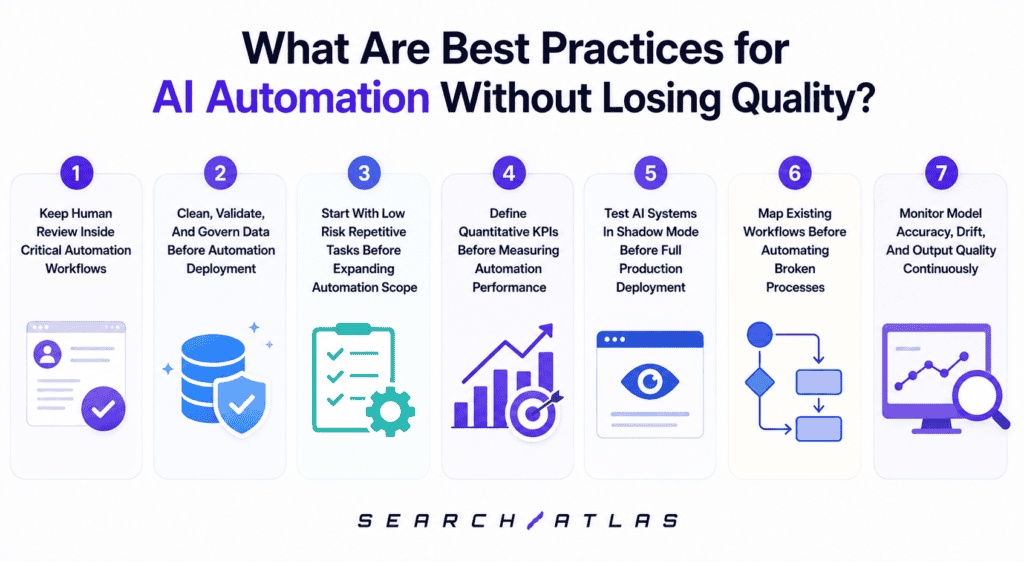
The core principle of maintaining quality in AI automation is that automation handles volume and structure while humans retain responsibility for accuracy, judgment, and quality thresholds. AI systems are not self-certifying. They produce outputs that require evaluation by someone THAT distinguish correct from incorrect, on-brand from off-brand, and accurate from plausible-sounding but wrong. Building human checkpoints into the workflow is not a failure of automation. It is the design pattern that makes automation reliable at scale.
1. Keep Human Review Inside Critical Automation Workflows
Human review is a structural requirement in high-stakes automation because AI models produce probabilistic outputs that are accurate in aggregate but wrong in individual cases, and individual errors in certain workflows carry significant consequences. In content automation, a model produces a factually incorrect statistic or a compliance issue across a small percentage of outputs. Without human review, those errors are published. With review, they are caught before they affect the audience or the brand.
Human review needs to be placed at the point where AI output transitions into external-facing action, before content is published, before data is sent to a customer system, or before a document is filed. Placing a review too early on intermediate pipeline outputs that are not yet final, the DDS cost without catching the errors most likely to cause damage. Placing rea view too late after publication turns a quality control problem into a correction and removal problem with broader reach.
What does an effective human review checkpoint look like? An effective human review checkpoint presents the AI-generated output alongside the specific criteria it is being evaluated against, so the reviewer makes a targeted judgment rather than reading for general quality. Vague review instructions, “check this for quality,” are ineffective because reviewers apply different standards and miss different issues. Structured review criteria “verify the primary keyword is in the first sentence, confirm all statistics are sourced, check that the meta description is under 160 characters” produce consistent outcomes across reviewers.
2. Clean, Validate, And Govern Data Before Automation Deployment
AI automation output quality is bounded by the quality of the data used to train and run the system, models trained on inconsistent or incorrect data, learn the inconsistencies as patterns,s and reproduce them in their outputs. A content automation system trained on briefs with inconsistent keyword formats will generate outputs with inconsistent keyword handling. The errors are systematic rather than random, which makes them harder to detect and more expensive to correct after deployment.
Data validation before automation deployment requires checking for completeness, consistency, and format compliance across every input field the automation system will process. Completeness checks flag missing required fields. Consistency checks identify values that fall outside expected ranges or conflict with other fields. Format checks verify that dates, URLs, identifiers, and text fields conform to the schema the model expects. Running these checks on the full input dataset before deployment identifies problems that would otherwise surface as automation failures in production.
Data governance defines ownership, access controls, update protocols, and quality standards for each data source the automation uses, preventing input quality from degrading after deployment. Without governance, data sources drift (field definitions change, updates stop, new contributors apply different standards). The automation continues running on degraded data without signaling that its inputs have changed. Governance creates the conditions for monitoring to catch these changes before they accumulate into significant output quality problems.
3. Start With Low-Risk Repetitive Tasks Before Expanding Automation Scope
Low-risk repetitive tasks are the correct starting point for AI automation because they allow the team to validate tooling, integration, and model accuracy in production conditions before errors carry high stakes. A low-risk repetitive task has a clearly defined output, a reversible or reviewable result, and low consequence for error. Formatting reports, populating metadata templates, routing completed content drafts to a CMS queue, and tagging documents by category are examples. Beginning with them allows teams to build confidence in automation behavior and surface process issues before they reach high-stakes applications.
Scope expansion risk is underestimated because automation that performs well on narrow inputs often degrades when extended to broader, more variable inputs, and the degradation is not always visible in early expanded outputs. A content brief automation system that works well for standard blog posts produces structurally incorrect outputs for technical documentation or product category pages where brief requirements differ. Expanding the scope without retesting on representative samples from the new scope creates false confidence in the system’s reliability.
Teams need to sequence expansion by risk level and input complexity, starting with tasks that share input structure with already-automated tasks before moving to tasks with new input types or higher consequences for error. Each expansion step requires the same testing and monitoring setup as the initial deployment. The expansion timeline needs to be governed by quality data from the previous stage, not by schedule pressure to automate more tasks faster.
4. Define Quantitative KPIs Before Measuring Automation Performance
KPIs need to be defined before deployment because post-deployment KPI selection is biased toward metrics the system happens to perform well on, rather than metrics that reflect the actual business objective. Defining only throughput after seeing results encourages over-counting automation’s contribution while ignoring quality degradation.
What are the right quantitative KPIs for content automation? For content automation, the relevant KPIs are pieces produced per team member per week (throughput), content quality score distribution (output quality), editor revision rate (rework volume), time from brief to published (cycle time), and organic performance of automated content against benchmarks (downstream impact). These 5 metrics together measure whether the automation produces more content, whether that content meets quality standards, how much human correction it requires, how fast it moves through the workflow, and whether it performs in search.
How do KPI baselines enable automation ROI measurement? Baselines were introduced as the reference point against which all post-deployment performance is measured. Without a baseline, a team cannot distinguish automation’s contribution from other changes that occurred in the same period. Collecting baselines requires measuring the KPIs for a defined period before automation deployment, not estimating them after the fact. The baseline measurement period needs to be long enough to capture typical variability in the workflow.
5. Test AI Systems In Shadow Mode Before Full Production Deployment
Shadow mode testing runs an AI automation system in parallel with the existing workflow, processing real inputs and generating outputs without routing those outputs into production. The automation runs live against real data, in real time, but its outputs are logged for evaluation rather than acted on. This allows teams to compare automation outputs against human outputs on the same inputs without exposing the system’s decisions to production consequences. Shadow mode is the most reliable pre-production test environment because it uses real inputs rather than controlled test data.
Shadow mode testing needs to run long enough to capture the full range of input variation the system will encounter in production, typically a minimum of 2 to 4 weeks for content workflows, or until the input sample covers all major content types and topic categories. Testing for too short a period produces accuracy estimates based on a non-representative sample. Edge case inputs, unusual formats, high-stakes content categories, and rare topic types need to be present in the shadow mode dataset for the test results to be valid.
What decisions does shadow mode testing inform? Shadow mode testing informs whether to deploy the system at all, where to set the confidence threshold that triggers human review, and which input types require different model configurations or additional training. Deployment is premature if shadow mode accuracy falls below the threshold needed to reduce net human effort. Targeted retraining or routing rules address those categories before full deployment, if accuracy is strong overall but weak on specific input categories.
6. Map Existing Workflows Before Automating Broken Processes
Automating a broken process replicates its structural failures at the speed and volume of automation, amplifying the damage rather than correcting it. Automating brief generation will produce inconsistently formatted briefs faster if a content production workflow produces inconsistent briefs because brief requirements are undefined. Workflow mapping is the diagnostic step that identifies which parts of the process are sound and which need correction before automation is applied.
A broken process reveals itself through output defects that recur consistently, handoff failures between steps, undefined quality criteria, and disagreement among team members about what the expected output looks like. Before building automation, documenting the workflow and interviewing the people who run it surfaces these issues at a fraction of the cost of discovering them post-deployment. The workflow map needs to document both what the process is intended to produce and where manual execution currently deviates from that intent.
What should be fixed in a workflow before automation is applied? Before automation, the workflow needed to have defined inputs with documented formats, defined outputs with documented quality criteria, clear handoff points between steps, and documented exception conditions. These are the preconditions for reliable automation. Automation built on an underdefined workflow requires constant human intervention to handle cases the system was not designed for, which is the definition of a broken process automated rather than fixed.
7. Monitor Model Accuracy, Drift, And Output Quality Continuously
Model drift is the degradation in a model’s predictive accuracy that occurs when the distribution of real-world inputs shifts away from the distribution of the training data. In content automation, drift occurs when search terminology evolves, audience intent shifts, product categories change, or writing standards update, any of which are reflected in a model trained on historical data. As drift accumulates, the model’s outputs become progressively less accurate without any change to the model itself.
Model drift is detected by monitoring the distribution of model confidence scores, output quality metrics, and downstream performance indicators over time and flagging deviations from the baseline established at deployment. A falling average confidence score signals that the model is encountering inputs further from its training distribution. Rising human intervention rates signal that reviewers are catching more errors, a lagging indicator of drift that often surfaces after the model has already degraded significantly.
What actions address model drift? Model drift is addressed through retraining on recently collected data that reflects the current input distribution, or through routing inputs that fall outside the model’s confidence range to alternative handling paths. Retraining is the correct long-term solution, but it requires collecting and labeling new training data. Routing is a faster interim measure that limits damage from drift by reducing the model’s exposure to inputs no longer handled reliably. Both actions require that drift be detected through monitoring before accumulated output failures reach production at scale.
What Tools Are Used for AI Automation?
An AI automation stack typically includes model providers or APIs (the AI inference layer), workflow orchestration platforms (the automation execution layer), data connectors and integration tools (the input and output routing layer), and monitoring and observability tools (the quality assurance layer). Each category handles a distinct function. Using a single tool to cover all four trades is configurable for convenience, a valid trade-off for teams building their first automation workflows, but a constraint for teams scaling complex multi-step pipelines.
The tools most commonly used in AI automation workflows are listed below.
1. OTTO SEO (Search Atlas). OTTO SEO is an AI SEO autonomous agent that deploys live on-page modifications, titles, descriptions, headings, schema markup, internal links, and technical fixes through a single JavaScript pixel across any CMS. It connects to Google Search Console to prioritize changes by live ranking signals and executes months of on-page and technical SEO work autonomously without requiring developer access or manual CMS editing per page. OTTO SEO reduces manual SEO labor by executing optimization at a scale and speed that manual workflows cannot match.
2. UiPath. UiPath is an enterprise RPA platform for UI-level task automation across desktop and web applications. It handles scripted sequences across enterprise applications without requiring API access to each system, and is used for legacy system integration, data migration, and structured data processing in environments where direct API connections are unavailable.
3. Automation Anywhere. Automation Anywhere is a cloud-native RPA and intelligent automation platform with document intelligence, NLP processing, and API-based workflow orchestration for enterprise-scale deployments. It combines RPA scripting with AI-powered document understanding to handle semi-structured inputs that rule-based bots cannot process.
4. Microsoft Power Automate. Microsoft Power Automate is a low-code workflow automation platform integrated across Microsoft 365 and Azure services. It handles approvals, notifications, data routing, and scheduled tasks within Microsoft-centric environments, connecting Office tools to external systems through pre-built connectors.
5. n8n. n8n is an open-source workflow automation platform for API-connected pipelines. It handles content operations, marketing automation, and data processing workflows that require custom logic between external services without vendor lock-in or per-task pricing.
6. Make (formerly Integromat). Make is a visual workflow builder for connecting apps and automating data flows between systems without custom code. It is suited for marketing automation, CRM updates, and content distribution pipelines across common SaaS tools.
7. LangChain / LangGraph. LangChain and LangGraph are open-source frameworks for building multi-step LLM-powered workflows and AI agents. Engineering teams use them to build custom automation where pre-built platforms lack the required flexibility, typically in complex reasoning pipelines that require sequential model calls and tool use.
8. OpenAI / Anthropic API. LLM APIs provide text generation, classification, summarization, and extraction capabilities for custom automation builds. They require prompt engineering, integration work, and output validation before production use, but offer the broadest capability range of any available model layer.
9. Zapier. Zapier is a consumer and SMB-oriented automation platform for connecting web apps through triggers and actions. It is suited for lower-complexity automation workflows between common SaaS tools and serves as a starting point for teams building their first automated connections.
What Are Common Examples of AI Automation in Action?
The most widespread real-world applications of AI automation are customer support ticket routing, document processing and data extraction, marketing content production at scale, lead scoring, fraud detection, and SEO on-page optimization across large page inventories. These applications share common characteristics: they operate on high volumes of input, the inputs are partially or fully unstructured, and the required output is structured and consistent. Each represents a task class where AI automation produces measurable efficiency gains against the manual alternative.
Real-world examples of AI automation running in production across industries are listed below.
- Customer support triage. NLP classifiers read incoming support tickets, assign a category and priority, and route each to the correct team or generate a draft response. Human agents review or approve rather than composing from scratch, reducing average handle time per ticket.
- Invoice and document processing. Document intelligence models extract line items, amounts, dates, and vendor details from invoices regardless of layout variation. The extracted data routes into ERP or accounting systems without manual data entry, eliminating per-invoice human processing time.
- Content production pipelines. Content Genius generates structured first drafts, metadata variants, and FAQ content from keyword and brief data. Editors review and approve outputs rather than producing from scratch, compressing cycle time per piece while maintaining quality gate coverage.
- Email marketing personalization. Segmentation models classify contacts by behavioral signals, purchase history, and engagement patterns. Content selection models match the correct message to each segment at send time without manual rule creation per campaign.
- HR resume screening. NLP models parse resume text into structured candidate profiles, extract education and experience fields, and score candidates against job requirements. Recruiters review ranked shortlists rather than reading every application, with high-volume early-stage screening handled without human time per application.
- Financial fraud detection. Anomaly detection models score transactions against expected behavioral patterns in real time, flagging outliers for review before they clear. The models run continuously on every transaction without requiring manual inspection of each record.
- Supply chain demand forecasting. Prediction models trained on sales history, seasonality, and external demand signals forecast inventory requirements by product and location. Automated reorder triggers execute when forecasted demand exceeds current stock levels without requiring manual purchasing decisions.
- Ad campaign bid management. Bidding models adjust spend allocation across keywords, audiences, and channels in real time based on conversion signals, cost-per-acquisition trends, and budget pacing targets. Campaign managers review performance dashboards rather than adjusting bids manually at the keyword level.
- Legal contract review. NLP extraction models identify contract clauses, party obligations, renewal dates, and liability terms across large contract sets. Legal teams receive structured summaries and flagged clauses rather than reading every contract in full, reducing review time per document.
What Types of Tasks Are Most Commonly Automated With AI?
The task categories most frequently automated with AI are text classification, data extraction, content generation, predictive scoring, and sequential decision routing.
The specific task types automated with AI are listed below.
- Text and document classification. Assigning labels to emails, tickets, documents, content pieces, and data records based on trained pattern recognition across variable text inputs
- Entity extraction. Pulling names, dates, amounts, addresses, product references, and other structured fields from unstructured text inputs at scale
- Content and copy generation. Producing first drafts, metadata, summaries, FAQ sections, and structured content blocks from briefs or input data
- Predictive lead and customer scoring. Ranking contacts by conversion probability, churn risk, or engagement likelihood based on behavioral and demographic signals
- Sentiment and intent detection. Identifying whether a message, review, or ticket carries positive, negative, or neutral intent and routing accordingly
- Image and visual recognition. Classifying products, detecting manufacturing defects, extracting text from images, and identifying brand mentions in visual media
- Scheduled reporting and data aggregation. Pulling metrics from multiple sources, formatting against templates, and distributing on schedule without manual compilation
- Workflow routing and escalation. Makes branching decisions in process flows based on model-classified input properties, replacing manual triage steps with automated dispatch
These tasks are suitable for AI automation because they produce measurable outputs from structured input-output mappings, operate at volumes that exceed practical human capacity, and have defined quality criteria that allow automated evaluation. Text classification and data extraction have long track records in production automation with mature model architectures. Content generation and predictive scoring are newer applications with higher output variability and greater dependence on training data quality, which is why they require more rigorous monitoring.
Does AI automation fully replace human workers?
No, AI automation eliminates specific tasks within jobs rather than jobs as complete units. Most roles combine structured, repetitive tasks with judgment-dependent tasks. AI automation reliably handles the structured, repetitive portion of data entry, document formatting, report generation, and content classification, while the judgment-dependent portion, strategy, stakeholder communication, exception handling, and quality oversight remains human.
Is AI automation the same as agentic AI?
No, Agentic AI and AI automation are related but structurally distinct. AI automation executes defined tasks within structured workflows triggered, step-bound, and scoped. Agentic SEO plans, sequences, and executes multi-step actions autonomously toward a goal, using tools, APIs, and model reasoning to navigate toward an outcome without a pre-defined workflow — the same autonomous execution pattern seen in agentic browsers, which plan and complete multi-step web tasks without per-step direction. Automation operates within a defined process while agents construct and execute processes dynamically. Most production content and SEO workflows today use AI automation rather than agents, because automation offers the output predictability and auditability that high-stakes workflows require.
Can AI automation improve search rankings?
Yes, AI automation improves organic search rankings indirectly by enabling teams to execute more optimization tasks, at higher consistency, across more pages than manual workflows allow. The automation itself does not rank content quality, technical signals, or backlinks. What automation does is remove production bottlenecks that limit how much optimization work a team completes in a given period.
What are the main limitations of AI automation?
The main limitations of AI automation are data dependency, output variability, model drift, limited decision auditability, and a lack of contextual judgment in complex decision environments. These limitations matter because AI systems depend on training data, statistical prediction, and probabilistic outputs rather than human reasoning or real-world understanding. AI automation improves execution speed and scalability, but automation reliability weakens when systems operate outside expected conditions or require strategic judgment.
The 6 main limitations of AI automation are listed below.
1. Data dependency that limits output quality to the accuracy and recency of training data.
2. Output variability that produces inconsistent responses across changing input conditions.
3. Model drift that reduces accuracy as real-world conditions change over time.
4. Limited decision auditability that obscures how models reached specific conclusions.
5. Lack of contextual judgment that prevents nuanced strategic or relationship-based decision making.
6. Dependence on human oversight for high-stakes workflows that require accountability and expertise.