SEO software for in-house teams is the set of platforms a company's own SEO staff uses to research, fix, publish, and report on organic search work while sharing that work with developers, writers, and leadership. The buying problem differs from an agency's, because one or two specialists usually carry requests from product, content, and engineering without extra headcount. Choosing SEO software for an in-house team means matching the platform to the jobs the team repeats every month, such as technical fixes, content briefs, rank tracking, and leadership reports, and to the people who approve each one.
Disclosure: Search Atlas publishes this guide and is one of the platforms it discusses. Every vendor price below was read from that vendor's official pricing page in October 2026, with its billing term stated.
What does SEO software need to solve for an in-house team?
SEO software for an in-house team needs to solve a capacity problem first. Most in-house programs run with one specialist or a small group that depends on developers and writers who answer to other managers. The software earns its cost when it shortens the path from finding an SEO issue to shipping the fix and reporting the result. Five recurring pressures slow that path from issue to fix to report.
Limited specialist capacity
Limited specialist capacity means the SEO lead spends more hours routing work than doing it. A specialist who turns a crawl into tickets, chases approvals, and rebuilds a monthly deck has little time left for strategy, so automating the repetitive steps returns those hours to planning.
Cross-functional requests
Cross-functional requests are the asks that reach the SEO team from product, content, legal, and sales, often with no shared intake process. In-house teams need a way to log and rank these requests before handing them off, whether inside the SEO platform or in the team's existing SEO project management setup.
Technical backlogs
A technical backlog is the queue of crawl and indexing fixes that wait on developer time. In-house SEO rarely owns the code, so useful software explains each issue in plain language and exports a ticket a developer acts on directly, with the affected URLs attached.
Content governance
Content governance is the set of rules that decides who briefs, writes, approves, and publishes content. Without it, writers publish pages that compete for the same query, and SEO software helps when briefs and approval states sit in one place that editors and legal reviewers also see.
Reporting to leadership
Reporting to leadership is the recurring job of translating rankings and traffic into outcomes an executive recognizes, such as pipeline or revenue. Scheduled reports built from Google Search Console and GA4 (Google Analytics 4) save the specialist a day every cycle and keep every stakeholder reading the same numbers.
Which evaluation criteria matter most when in-house teams compare SEO software?
The evaluation criteria that matter most when in-house teams compare SEO software are the ones tied to monthly work, from data quality to how cleanly results leave the platform. A long feature list says little about whether a specialist gets through a backlog faster. Score each vendor on these eight criteria.
- Data quality. The source and refresh rate of keyword, ranking, and backlink data, plus a documented method.
- Technical auditing. Crawl limits that fit the site's real size and issue exports developers accept.
- Content workflows. Briefs, grading against search intent, and publishing to the CMS (content management system).
- Rank and visibility monitoring. Tracked keyword quotas, location settings, and coverage of AI answers from systems such as ChatGPT and Google AI Mode. The guide to choosing an AI visibility tracking tool covers that last category in depth.
- Integrations. Native connections to Google Search Console, GA4, the CMS, and the team's chat or task platform.
- Permissions. Seat counts and limited access for contractors. Google Search Console itself separates owners, full users, and restricted users, and paid software should offer at least that much control.
- Collaboration. Shared projects and notifications that reach the people who approve work.
- Export and reporting. Scheduled reports and a way to take historical data out at the end of a contract.
Weight these criteria by the team's actual bottleneck. A team whose fixes stall in engineering should weight technical auditing above content workflows, while a content-led program should do the reverse.
Which SEO software fits an in-house team best?
The SEO software that fits an in-house team best depends on the team's main bottleneck, so this shortlist pairs each product with the in-house job it handles well. Prices come from each vendor's official pricing page in October 2026, and ratings are the figures G2 and Capterra listed in October 2026. Moz Pro appears on many lists, but its pricing page could not be verified for this guide, so it is left out.
| Software | Best for | Entry price and billing term |
|---|---|---|
| Search Atlas | Small teams that want audits, fixes, content, and reporting in one platform | Starter $99 per month, billed monthly |
| Semrush | Teams centered on keyword and competitor research | SEO plan $139 per month billed monthly, or $117.33 per month billed annually |
| Ahrefs | Teams centered on backlink research | Lite $129 per month, billed monthly |
| SE Ranking | Cost-conscious teams running several sites | Core $129 per month billed monthly, or $103.20 per month billed annually |
| Screaming Frog SEO Spider | Technical specialists who need a deep desktop crawler | $199 per licence per year |
| Google Search Console | Every team, as the free first-party baseline | Free |
1. Search Atlas
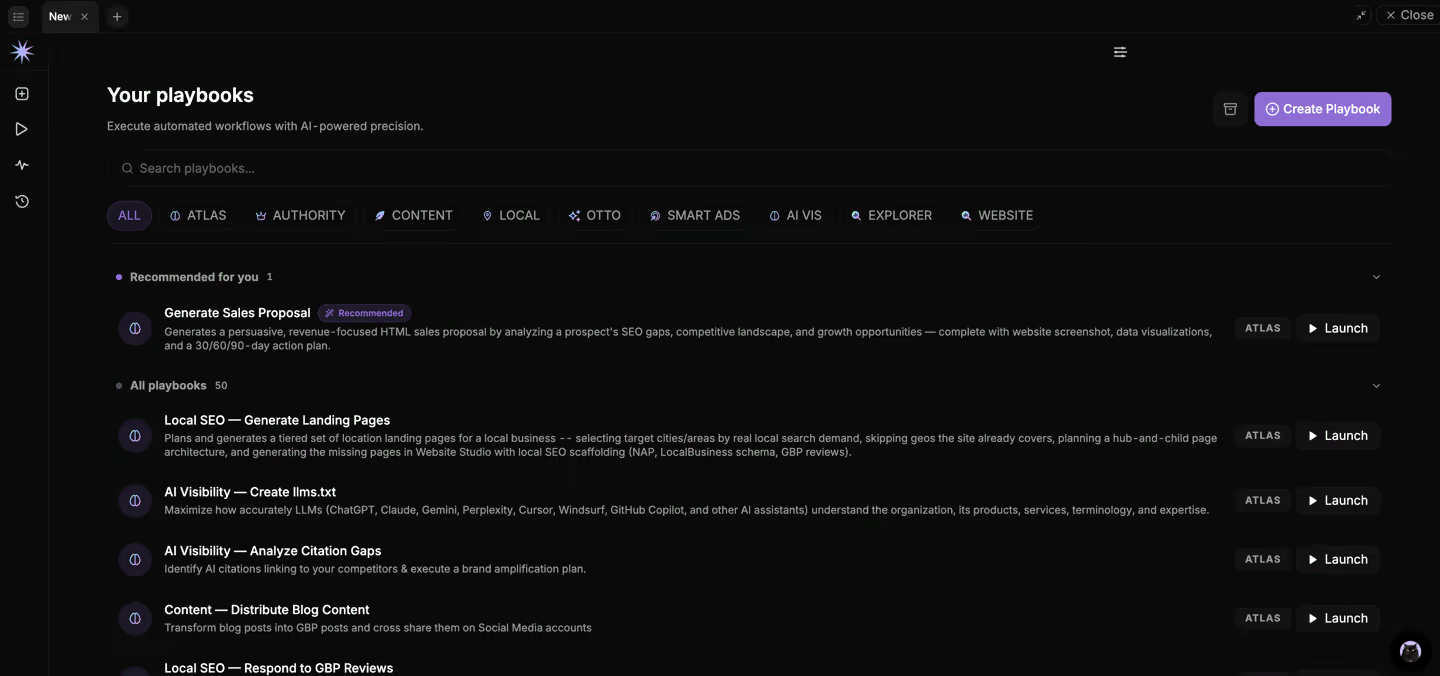 Atlas Agent turns a plain-language goal into planned SEO actions inside Search Atlas
Search Atlas is an SEO platform that combines site auditing, automated on-page fixes, content creation, rank and AI visibility tracking, and reporting in one account. In-house teams work with it through two agents. Atlas Agent runs inside the platform and turns a plain-language goal into planned SEO work, and the Search Atlas Coworker brings performance updates into the chat tools the wider company already uses.
Search Atlas publishes this guide, so treat this entry as first-party information and test it with the same workflow method as any other vendor. The platform suits teams where one or two specialists carry technical, content, and reporting work without a dedicated developer.
Why does Search Atlas fit in-house teams?
Search Atlas fits in-house teams that are short on specialist hours, because Atlas Agent, the Search Atlas Coworker, and OTTO SEO take repetitive SEO work off the team while keeping a person in the approval step.
- Atlas Agent: the specialist describes a goal in plain language or runs a Playbook, and Atlas Agent breaks the task down, shows the planned actions and outputs, and executes only after the team reviews and approves them. It covers technical fixes, content, authority building, and AI visibility work.
- Search Atlas Coworker: posts scheduled performance summaries into Slack or Microsoft Teams, so leadership and other departments read results where they already work. Approval mode holds every change it proposes until a person signs off.
- OTTO SEO: applies on-page fixes to the live site through a JavaScript pixel instead of a developer ticket, and teams choose which fix categories run automatically and which require approval.
What are the main Search Atlas features for in-house teams?
- OTTO SEO: fixes titles, meta descriptions, headings, internal links, canonical tags, and schema markup, with rollback from the dashboard.
- Report Builder: pulls Google Search Console, GA4, rank tracking, Google Business Profile, and backlink data into one report and sends it on a schedule as a live dashboard, PDF, or link.
- LLM Visibility: tracks brand mentions and share of voice in ChatGPT, Gemini, and Google AI Mode on Growth, with Copilot and Perplexity added on Pro.
- Content Genius: drafts articles from live search results and grades them against the target query before publishing to the CMS.
- Site Explorer: traffic, keyword, backlink, and competitor research for any domain.
How much does Search Atlas cost?
On monthly billing, Search Atlas Starter costs $99 per month with one seat, one OTTO project, 2,000 tracked keywords, and 50,000 Universal Credits. Growth costs $199 per month with three seats and 3,500 tracked keywords, Pro costs $399 per month with five seats and 6,000 tracked keywords, and Agency starts at $999 per month with ten seats. Every action draws from one shared monthly credit pool, and current terms sit on the Search Atlas pricing page.
What are the pros and cons of Search Atlas for in-house teams?
Pros
- One platform covers auditing, fixes, content, tracking, and reporting.
- OTTO SEO ships on-page fixes without a developer ticket, with approval and rollback.
- Atlas Agent and the Search Atlas Coworker reduce routing and reporting work.
- Growth includes three seats for $199 per month on monthly billing.
Cons
- The platform spans many SEO skills, so new users need time to learn it, and free onboarding is available.
- Every AI feature spends from one monthly Universal Credits pool, so larger sites need to track that usage.
- Starter is built for a solo specialist, so teams of three or more start on Growth.
What do reviewers say about Search Atlas?
Search Atlas holds 4.6 out of 5 on G2 from 159 reviews and 4.8 out of 5 on Capterra from 82 reviews. Reviewers praise replacing several separate products with one platform, and some mention occasional glitches and a learning curve.
2. Semrush
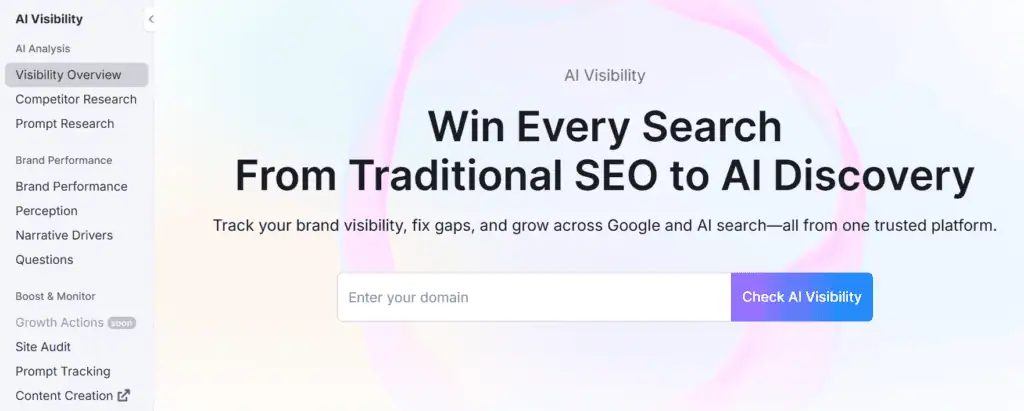 Semrush's AI Visibility overview
Semrush is an SEO and marketing suite built around keyword research, competitor analysis, site auditing, and rank tracking. Its pricing page lists an entry SEO plan followed by SEO and AI Search tiers named Starter, Pro+, and Advanced, with AI visibility features added as the tiers rise.
For an in-house team, Semrush works as a research hub. The SEO lead plans content and tracks competitors in one account, then shares specific projects with writers or managers instead of exporting spreadsheets.
Why does Semrush fit in-house teams?
Semrush fits in-house teams whose work centers on keyword research, competitor research, and content planning, because its keyword and competitor databases cover most research jobs in one place. Project sharing gives writers or managers view or edit access to specific projects, and the free plan lets a team test the interface before buying.
What are the main Semrush features for in-house teams?
- Site Audit: crawls for broken links, speed problems, schema gaps, and crawlability issues.
- Position Tracking: shows daily rankings by location, device, and search engine, plus competitor movement.
- AI visibility: tracks brand presence and sentiment across ChatGPT, Perplexity, Gemini, Claude, and AI Overviews.
- Reports: branded reports and dashboards delivered to stakeholders on a schedule.
- Roles and sharing: Owner, Admin, User, and Guest roles, with Viewer and Editor access per project.
How much does Semrush cost?
The Semrush SEO plan costs $139 per month billed monthly, or $117.33 per month billed annually. Every plan includes one user seat, and extra users cost $45 to $100 per month depending on the plan. A free plan with one demo project and a seven-day trial are available, and SSO with audit logs sits on Enterprise.
What are the pros and cons of Semrush for in-house teams?
Pros
- Broad keyword and competitor research in one account.
- Built-in roles and per-project Viewer and Editor sharing.
- A free plan and a seven-day trial for testing.
- AI visibility tracking across five AI answer surfaces.
Cons
- Every plan starts with one seat, and extra users cost $45 to $100 per month.
- SSO and audit logs require Enterprise.
- Reviewers mention price and a steep learning curve.
What do reviewers say about Semrush?
Semrush holds 4.4 out of 5 on G2 from about 4,000 reviews and 4.6 out of 5 on Capterra from about 2,300 reviews. Reviewers praise the breadth of the toolset and mention price and a steep learning curve as drawbacks.
3. Ahrefs
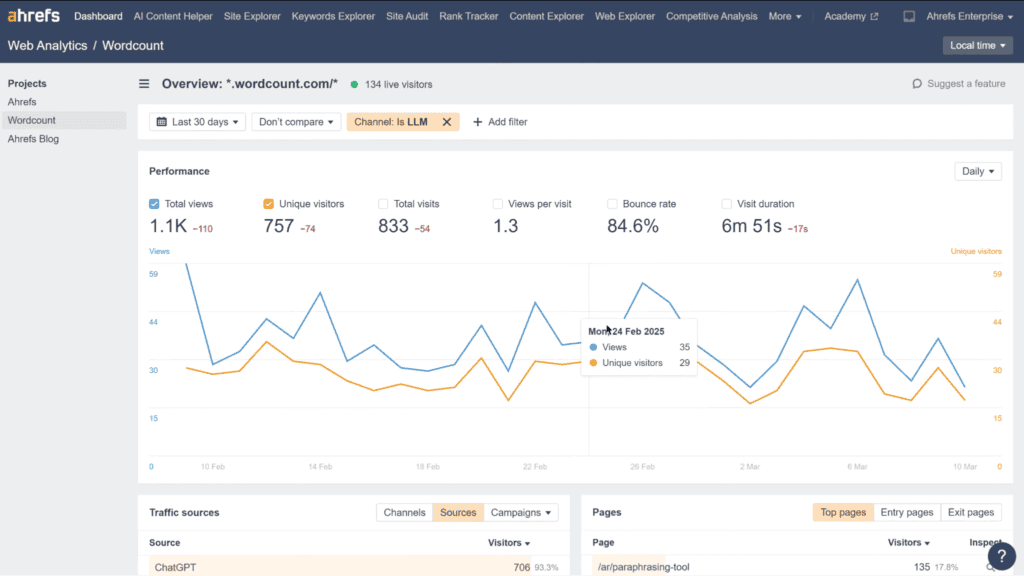 Ahrefs Web Analytics showing traffic from AI assistants
Ahrefs is an SEO research platform known for its backlink index, keyword research, and competitor analysis. Its account brings together Site Explorer, Keywords Explorer, Site Audit, Rank Tracker, and Brand Radar, which tracks brand visibility in AI chatbots and LLM answers.
Ahrefs also offers Ahrefs Webmaster Tools, a free tier for verified site owners that covers a site audit and a limited view of backlinks and keywords for the team's own sites. Analyzing competitor sites requires a paid plan.
Why does Ahrefs fit in-house teams?
Ahrefs fits in-house teams that rely on backlink and competitor data, and its free Webmaster Tools covers a team's own verified sites at no cost. Workspace roles let the SEO lead share projects with every member or with selected people only.
What are the main Ahrefs features for in-house teams?
- Site Explorer and Keywords Explorer: backlink, organic traffic, and keyword research for any domain.
- Site Audit: technical audits with optimization suggestions.
- Rank Tracker: ranking monitoring for tracked keywords.
- Brand Radar: brand visibility tracking in AI chatbots and LLM answers.
- Workspace roles: Owner, Admin, and Member roles, with Looker Studio connectors on Advanced and higher plans.
How much does Ahrefs cost?
Ahrefs Lite costs $129 per month billed monthly for one user, with up to two extra users at $40 per month each. Standard allows up to six users and Advanced up to eleven. SSO, access management, and audit logs require Enterprise at $1,499 per month with an annual commitment.
What are the pros and cons of Ahrefs for in-house teams?
Pros
- Reviewers praise the accuracy of its backlink data.
- Free Webmaster Tools for the team's own verified sites.
- Brand Radar tracks visibility in AI answers.
- Looker Studio connectors on Advanced and higher plans.
Cons
- Lite allows at most three users in total.
- SSO and access management require Enterprise at $1,499 per month with an annual commitment.
- Reviewers mention the cost for small teams.
What do reviewers say about Ahrefs?
Ahrefs holds 4.5 out of 5 on G2 from about 700 reviews. Reviewers praise the accuracy of its backlink data and mention the cost for small teams as the main drawback.
4. SE Ranking
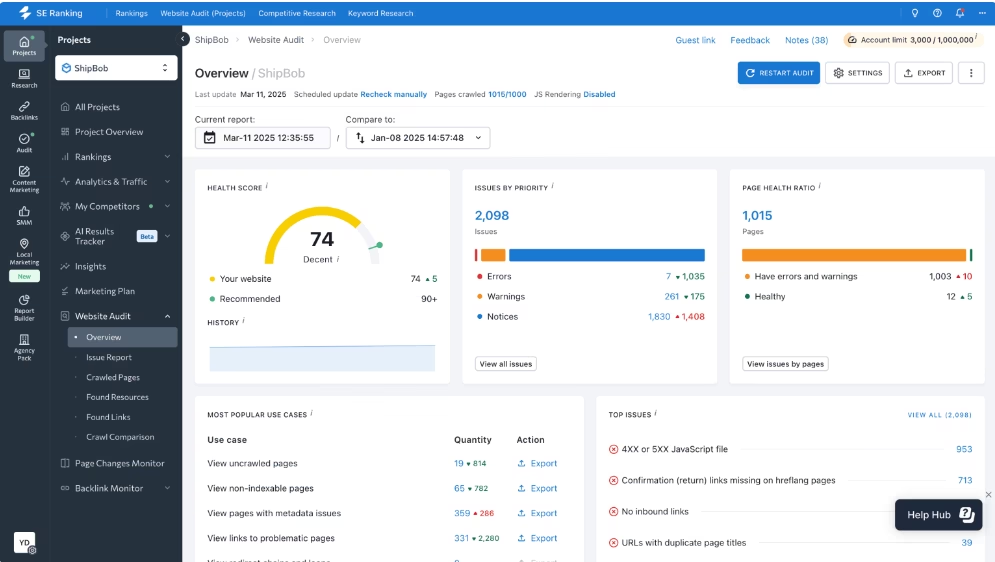 SE Ranking's Website Audit groups technical issues by type and trend
SE Ranking is an SEO platform covering rank tracking, website auditing, AI visibility tracking, and reporting at a lower entry price than most suites. Its Core plan includes connections to Looker Studio, Google Analytics, and Google Search Console, plus 25,000 research API credits per month.
SE Ranking's seat model separates people who edit from people who only read. Manager seats create and edit projects, while client seats and guest links give stakeholders view-only access, which keeps paid seats for the specialists doing the work.
Why does SE Ranking fit in-house teams?
SE Ranking fits cost-conscious in-house teams that manage several sites and want Google Search Console, Google Analytics, and Looker Studio connections on the entry plan. Per-user permissions by section and tool let the SEO lead decide exactly what each person can change.
What are the main SE Ranking features for in-house teams?
- Rank Tracker: daily positions by device and location, with SERP feature alerts.
- Website Audit: crawlability, indexability, mobile, and structured data checks with issue trends.
- AI visibility tracker: brand presence and citations in ChatGPT and Google AI answers.
- Report Builder: reports built from live ranking, audit, and backlink data.
- Permissions: per-user permissions by section and tool.
How much does SE Ranking cost?
SE Ranking Core costs $129 per month billed monthly, or $103.20 per month billed annually, with one manager seat. Growth costs $279 per month billed monthly with three manager seats, extra seats start at $16, and the 14-day trial needs no credit card. SSO is not published on the pricing page.
What are the pros and cons of SE Ranking for in-house teams?
Pros
- Lower entry price with annual billing.
- Looker Studio, Google Analytics, and Search Console connections on Core.
- View-only client seats and guest links for stakeholders.
- A 14-day trial with no credit card.
Cons
- SSO is not published on the pricing page.
- Reviewers mention price increases and interface changes.
What do reviewers say about SE Ranking?
SE Ranking holds 4.7 out of 5 on Capterra from about 300 reviews. Reviewers praise its all-in-one coverage and mention price increases and interface changes as drawbacks.
5. Screaming Frog SEO Spider
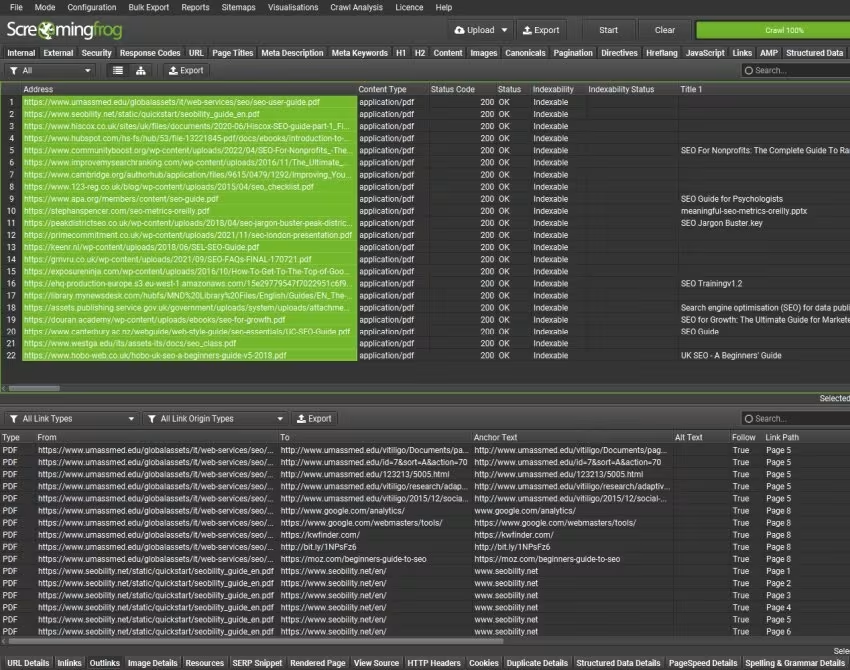 Screaming Frog SEO Spider crawl results with status codes and indexability
Screaming Frog SEO Spider is a desktop crawler that audits websites for technical SEO issues from the user's own machine. The paid licence removes the free version's 500-URL limit, and crawl size then depends on the computer's memory and storage.
In-house technical specialists use it for jobs cloud audits handle less flexibly, such as rendering JavaScript pages, comparing a staging site against production, and extracting custom page elements at scale.
Why does Screaming Frog fit in-house teams?
Screaming Frog fits in-house technical specialists who need crawl depth and custom extraction that cloud audits rarely match. It is a crawler only, so teams pair it with a research or reporting product and share results through exports, Google Sheets, or Looker Studio.
What are the main Screaming Frog features for in-house teams?
- JavaScript rendering: crawls pages as a Chromium browser renders them.
- Scheduled crawls: recurring crawls with automatic exports, including to Google Sheets.
- Crawl comparison: compares crawls over time, including staging against production.
- Integrations: pulls data from Google Analytics, Search Console, and PageSpeed Insights.
- Custom extraction: collects any page element with XPath, CSS selectors, or regex.
How much does Screaming Frog cost?
A Screaming Frog SEO Spider licence costs $199 per user per year. The free version crawls up to 500 URLs and restricts features such as JavaScript rendering and saved crawls.
What are the pros and cons of Screaming Frog for in-house teams?
Pros
- Deep crawls with JavaScript rendering and custom extraction.
- Scheduled crawls with automatic exports.
- A free version for sites up to 500 URLs.
Cons
- A crawler only, with no keyword, backlink, or rank data.
- Desktop software licensed per user, with no shared workspace.
- Reviewers mention heavy memory use on very large sites.
What do reviewers say about Screaming Frog?
Screaming Frog SEO Spider holds 4.9 out of 5 on Capterra from about 130 reviews. Reviewers praise the depth of its crawl data and mention heavy memory use on very large sites.
6. Google Search Console
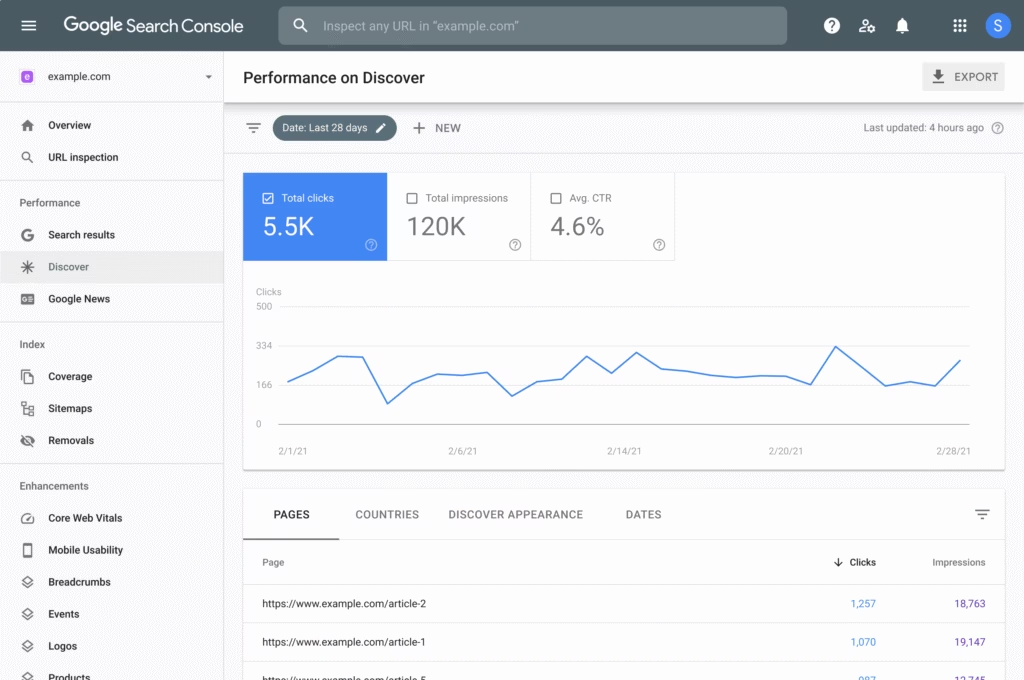 Google Search Console's Performance report: clicks, impressions, and CTR from Google
Google Search Console is Google's free service for monitoring a site's search performance, indexing, and technical issues with first-party data. It reports clicks, impressions, and average position by query and page, along with index coverage and URL-level crawl details.
Google added generative AI performance reports in 2026, showing impressions in AI Overviews and AI Mode, and rolled them out to all websites by August 31, 2026. For in-house teams, that makes Search Console the free reference point for checking any paid AI visibility figures.
Why does Google Search Console fit in-house teams?
Google Search Console fits every in-house team as the baseline that every paid product should be checked against, because its clicks and impressions come straight from Google. Owners can give developers or writers full or restricted access without sharing a login.
What are the main Google Search Console features for in-house teams?
- Performance reports: clicks, impressions, CTR, and average position by query, page, country, and device.
- Generative AI performance reports: impressions in AI Overviews and AI Mode.
- URL Inspection: index status and crawl details for a single URL.
- Annotations: notes on performance charts that everyone on the property sees.
- User roles: owners, full users, and restricted users.
How much does Google Search Console cost?
Google Search Console is free for any verified site.
What are the pros and cons of Google Search Console for in-house teams?
Pros
- Free first-party data straight from Google.
- Impressions in AI Overviews and AI Mode.
- Owner, full user, and restricted user roles.
Cons
- No competitor, keyword database, or backlink research.
- Performance history is limited to 16 months.
- Reviewers mention slow data updates.
What do reviewers say about Google Search Console?
Google Search Console holds 4.7 out of 5 on G2 from about 500 reviews and 4.8 out of 5 on Capterra from about 220 reviews. Reviewers praise its reliable first-party data and mention slow data updates as the main drawback.
Should an in-house SEO team buy point tools or an integrated platform?
An in-house SEO team should buy an integrated platform when moving data between products costs more time than specialist depth saves, and point tools when one job needs depth no platform matches. Point tools are single-purpose products, such as a standalone crawler or rank tracker. An integrated platform puts research, auditing, content, tracking, and reporting under one login and one bill. The ranked list of the best SEO tools compares both kinds product by product.
The table below compares the two models on operating cost rather than features.
| Factor | Point tools | Integrated platform |
|---|---|---|
| Workflow coverage | One job each, covered deeply | Several jobs on shared data |
| Implementation ownership | Separate setup and admin per product | One setup and one admin owner |
| Data handoffs | Exports and imports between products | Data moves inside one system |
| Operating burden | Several renewals, logins, and seat counts | One renewal and one seat pool |
| Best fit | One deep specialty need | Teams short on time for glue work |
The hidden cost of point tools is glue work, the manual exporting and reconciling that connects one product's output to the next. When the crawl lives in one product and the rankings in another, the specialist becomes the integration layer. Many in-house teams settle on a mixed stack: an integrated platform for daily work, one specialist product where the site justifies it, and Google Search Console underneath as the first-party data source.
How do SEO software requirements change as an in-house team matures?
SEO software requirements for an in-house team shift from automation and price at the solo stage toward permissions and governance at the multi-stakeholder stage. Buyers should read seat limits and approval controls against where the team expects to be in 12 to 24 months.
Solo specialist
A solo specialist needs software that does work, because there is no second person to delegate to. The top priority is automation that turns an audit into deployed fixes after a quick review, and scheduled reporting comes second. A marketer still weighing whether to keep SEO in-house compares the options in the guide to cost-effective SEO.
Growing team
A growing team of two to five people needs shared projects and clear ownership more than extra features. Once a content specialist and a technical specialist share an account, they need separate seats and one list of keyword targets, so two writers never chase the same query. Connections to the team's chat platform start paying off here, because status updates stop living in one inbox.
Multi-stakeholder organization
A multi-stakeholder organization needs governance controls, such as role-based permissions, approval steps before changes go live, and contract terms that pass security review. Regional teams, brand, legal, and engineering all touch search, so the real question becomes who approves what.
How should an in-house team test SEO software vendors before buying?
Step by step
How should teams test SEO software vendors in six steps?
Step through the sequence here. Each step is explained in the list below.
- Test one technical fix, one content refresh, and one leadership report
- Run each task end to end in every product
- Verify data sources
- Document approval controls
- Estimate implementation effort
- Model billing and usage
An in-house team should test SEO software vendors by running the same real tasks through every shortlisted product during the trial window. A demo shows the vendor's chosen path through the product, and a workflow test shows the one the team will walk. The general criteria in the SEO vendor evaluation checklist still apply, and these steps add an in-house layer.
- Test one technical fix, one content refresh, and one leadership report. Take each from the current backlog, for example redirecting 20 retired product URLs, refreshing a page that lost clicks in Google Search Console, and building next month's executive report.
- Run each task end to end in every product. Time the steps from finding the issue to a shippable output, and note where someone outside SEO had to step in.
- Verify data sources. Compare each vendor's ranking and traffic figures against Google Search Console for the same pages and dates.
- Document approval controls. Record who sees a change before it goes live and whether it rolls back.
- Estimate implementation effort. Count the setup work, including tags or pixels, CMS connections, and developer hours.
- Model billing and usage. Map the team's monthly volume of tracked keywords, crawled pages, and drafted articles onto each plan's quotas or credits, then price the month the team runs out.
Written notes on every task become the evidence column when the shortlist gets scored.
What is a good scoring framework for an SEO software shortlist?
A good scoring framework for an SEO software shortlist is a weighted rubric that rewards the required workflow first and cost predictability last, so the cheapest product never wins by default. Score each vendor from 1 to 5 per criterion using the test notes, then rank the weighted totals. The weights below suit a mixed technical and content workload.
| Criterion | Weight | What a score of 5 looks like |
|---|---|---|
| Required workflow | 30% | Every test task finished inside the product |
| Evidence quality | 20% | Figures track Google Search Console closely, with documented sources |
| Collaboration fit | 15% | Seats and notifications reach the people who approve work |
| Governance | 15% | Approval steps and rollback |
| Help and onboarding | 10% | Onboarding included, with answers inside the trial window |
| Cost predictability | 10% | Real usage fits the plan with headroom, and overage rules are in writing |
Evidence quality earns its own weight because a platform that reports flattering numbers costs the SEO lead credibility with leadership. Present the result in metrics leadership already tracks, and the list of SEO KPIs is a practical reference for picking them.
What belongs on an in-house SEO software procurement checklist?
An in-house SEO software procurement checklist covers the contract and security questions a workflow test leaves open, from seat permissions to how data leaves the platform at exit. Procurement and IT often raise these late, so collecting written answers during the trial keeps the purchase from stalling.
- Security: SSO (single sign-on through the company's identity provider), security documentation, and a data privacy agreement.
- Seats and permissions: seats per plan, the price of extra seats, and role levels for admins, editors, and viewers.
- Integrations: which connections are native, which need an API key, and who owns the credentials.
- Data retention: how long history stays available after a downgrade or cancellation.
- Onboarding: what setup help is included and how long it lasts.
- Help access: channels, response times, and whether a named contact is part of the plan.
- Contract terms: billing term, renewal notice, and refund policy.
- Exit and export: formats for keywords, rankings, audits, and reports, plus whether exports still work after the plan ends.
What do in-house teams ask before buying SEO software?
Before buying SEO software, in-house teams usually settle what to automate first, when an all-in-one platform pays off, how many seats to buy, what stays in Google Search Console, and how to compare pricing.
- Automate repetitive, low-risk SEO work first. Recurring audits, metadata fixes behind an approval step, rank tracking, and scheduled reports suit automation, while strategy and legal review stay with people.
- An all-in-one SEO platform pays off when moving data between products costs more time than specialist depth saves. One deep specialty, such as large-scale log file analysis, can still justify a separate point tool.
- Buy one seat for each person who edits work in the platform. Executives and other viewers can rely on scheduled reports or view-only access.
- Google Search Console keeps the first-party data only Google has. Google's documentation notes that Search Console keeps 16 months of performance data, and Google states that requesting a crawl does not guarantee inclusion, so a vendor promise of guaranteed indexing is a warning sign.
- Compare SEO software pricing at the team's real size. Three people on Ahrefs Lite cost $209 per month billed monthly ($129 plus two $40 seats), while Search Atlas Growth includes three seats at $199 per month billed monthly.