SEO analysis is the process of evaluating various elements of a website to determine how well it is optimized for search engines. SEO analysis involves examining technical SEO, on-page and off-page factors, keyword performance, content quality, and user engagement to identify strengths, weaknesses, and opportunities for improvement. The importance of SEO analysis lies in its ability to guide strategic decision-making, make sure websites stay aligned with algorithm updates, and boost organic traffic and search rankings.
This guide covers the definition, the four main types of SEO analysis, and a 9-step method for analysing any website, from visibility checks to competitor benchmarking. Each step pairs the analysis question with the tool that answers it.
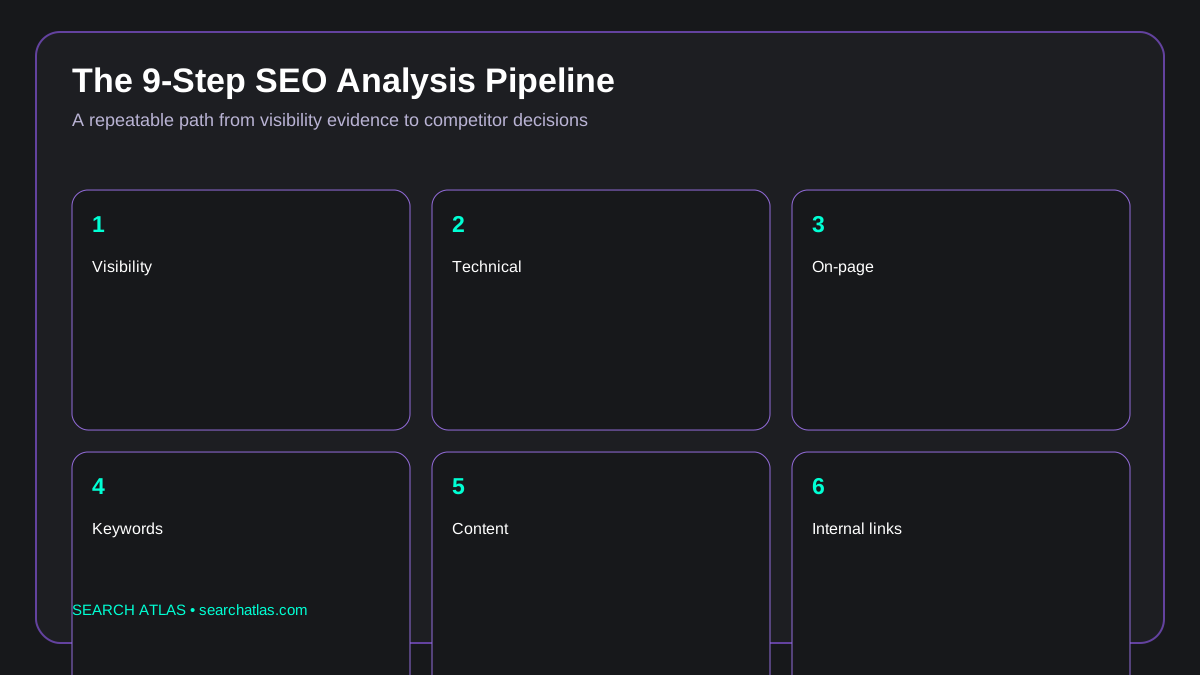 Infographic: nine-step SEO analysis pipeline.
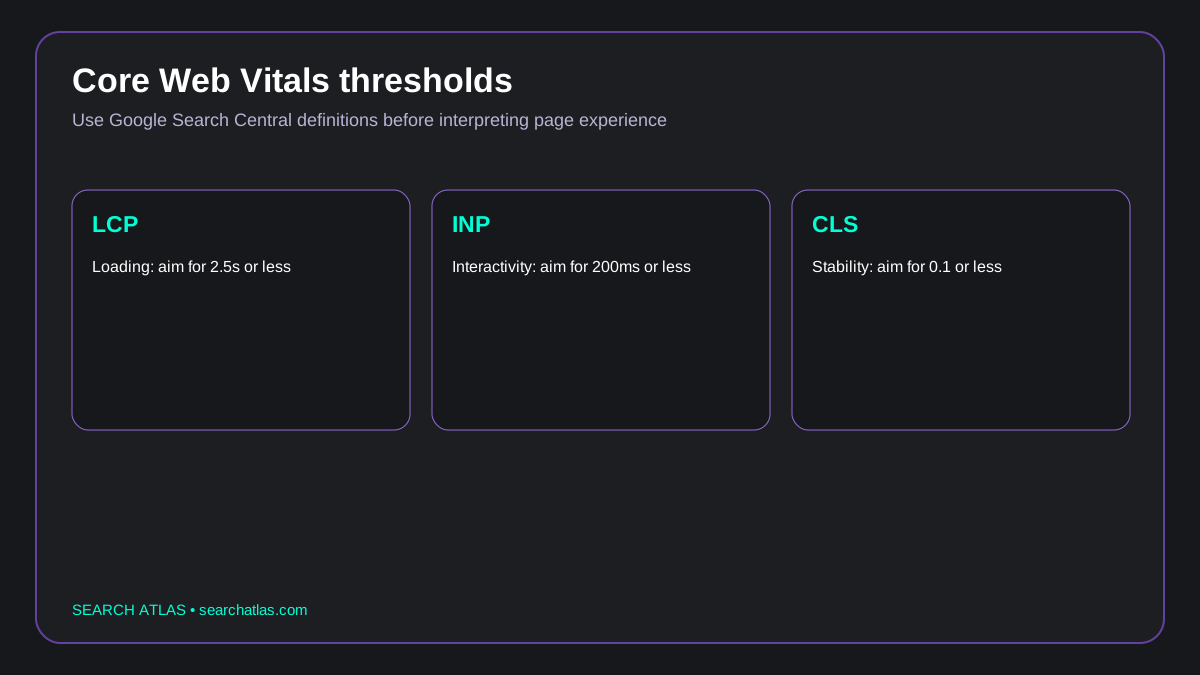 Infographic: Core Web Vitals thresholds from Google guidance.
What is SEO Analysis?
SEO analysis is the process of evaluating a website to determine how well it’s optimized for search engines. SEO analysis involves examining on-page elements like meta tags, headings, and content structure, technical elements such as site speed, indexing status, and broken links, and off-page signals like backlinks and social engagement. SEO website analysis allows website owners, marketers, or SEO professionals to detect technical issues, improve user experience, and align content with search intent. Google’s Search Central documentation, in its “SEO Starter Guide,” covers the same ground from the search engine’s side: helping Google find your pages, presenting them clearly, and making them useful to searchers.
The goal of SEO analysis is to identify strengths, weaknesses, and opportunities for improvement. A comprehensive SEO analysis helps businesses make informed changes to their website to improve visibility, increase organic traffic, and maintain a competitive edge in digital search landscapes. Regular SEO analysis is essential as search algorithms, market conditions, and competitor activities continually evolve.
What is the Importance of SEO Analysis?
The importance of SEO analysis lies in its ability to provide a clear picture of how a website is performing and where it can improve. SEO analysis examines key elements such as technical issues, keyword usage, content quality, and backlink profiles to help identify both strengths and weaknesses. SEO analysis makes sure that the website aligns with current search engine algorithms and performs optimally in terms of visibility. Through these insights, website SEO analysis assists businesses in making informed decisions to refine their SEO efforts and maintain strong search engine rankings.
Additionally, SEO analysis plays a critical role in guiding effective optimization strategies. For example, discovering slow page load times, broken links, or poor mobile usability allows for technical improvements that improve both user experience and search engine favorability. See the related technical SEO guide for the implementation layer. Analysing SEO makes sure that content remains relevant and aligned with user intent, which is a key factor in ranking algorithms.
In addition to its impact on search engine rankings, SEO performance analysis contributes to broader digital strategy by offering insights into audience behavior, content gaps, and market trends. SEO analysis enables businesses to stay ahead of algorithm updates and shifting consumer expectations. Furthermore, regular SEO analysis provides measurable data to evaluate the effectiveness of current SEO strategies and justify future investments. In essence, a comprehensive SEO analysis is an essential diagnostic and planning tool that makes sure a website remains optimized, competitive, and aligned with long-term digital marketing goals.
The evidence itself now matters beyond the ten blue links: in research on how generative engines select the sources they cite, Aggarwal et al. (KDD 2024), in “GEO: Generative Engine Optimization,” measured visibility gains of up to 40% for pages that include citations, quotations, and hard statistics.
What Are the 4 Types of SEO Analysis?
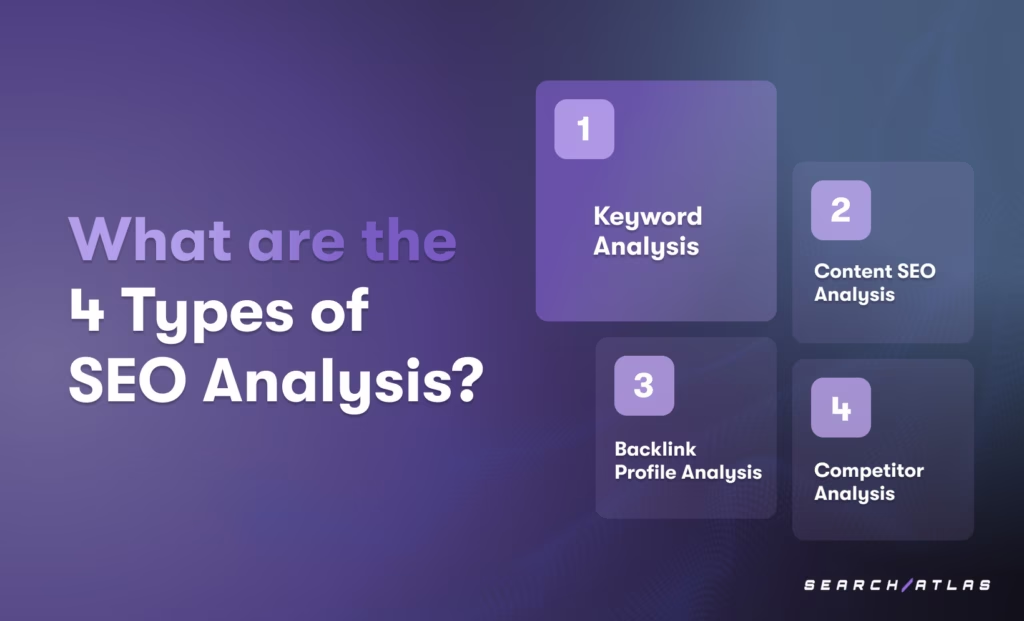
The four types of SEO analysis are keyword analysis, content SEO analysis, backlink profile analysis, and competitor analysis. Each type plays a specific role in identifying opportunities, resolving issues, and strengthening a website’s overall SEO strategy.
-
Keyword Analysis. Keyword analysis involves researching and evaluating the search terms your target audience uses to find content online. Keyword analysis helps identify high-value keywords to target, analyze keyword difficulty, and understand search intent to drive relevant organic traffic.
-
Content SEO Analysis. Content SEO analysis focuses on evaluating the quality, relevance, and structure of your website’s content. Content SEO analysis makes sure that content is well-optimized with the right keywords, includes clear headings, offers value to users, and aligns with what search engines prioritize.
-
Backlink Profile Analysis. Backlink profile analysis examines the quantity, quality, and relevance of links pointing to your website from external sources. Backlink profile analysis helps identify toxic links that may harm rankings, opportunities for acquiring valuable new links, and how your link profile compares to competitors.
-
Competitor Analysis. Competitor analysis involves reviewing your competitors’ SEO strategies, keywords, content, and backlink profiles. Competitor analysis helps identify opportunities, benchmark performance, and refine your own SEO tactics to stay ahead in your niche.
How to Do SEO Analysis of a Website?
Step by step
Run an SEO analysis in nine steps
Step through the sequence here. Each step is explained in the sections below.
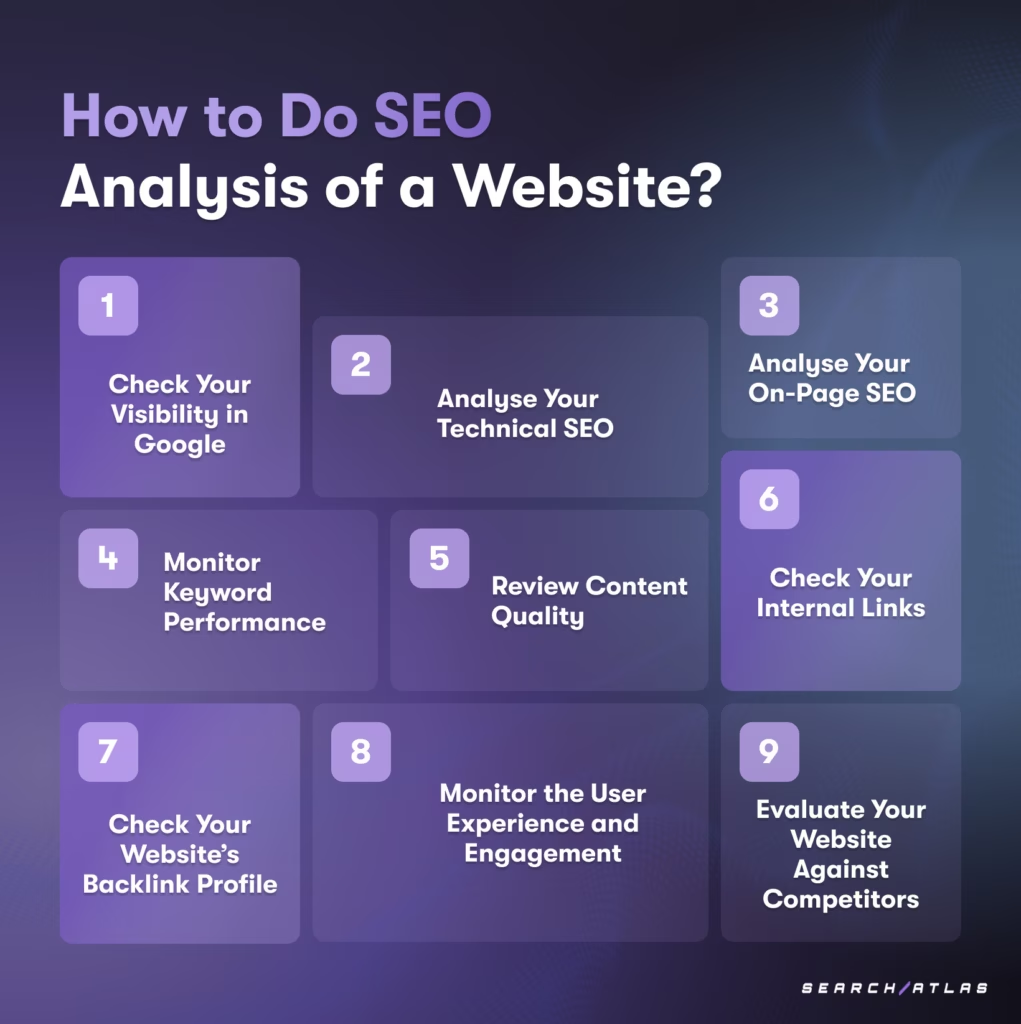
There are 9 steps to analyse a website for SEO and discover technical and content-related issues, understand where your SEO stands, and develop a strategy to improve search engine rankings and drive more organic traffic. The 9-step SEO analysis checklist is given below.
1. Check Your Visibility in Google
Check your visibility in Google to see how often and where your website appears in search results for relevant queries.
Google’s Search Console documentation, in its “Performance Report” guide, defines the core metrics for this step: impressions, clicks, and average position for your queries and pages.
The tips on how to check your visibility in Google are given below.
| What to check | Tool or method |
|---|---|
| Site visibility, keyword rankings, and best-performing pages | Search Atlas Site Explorer |
| Impressions, clicks, average position, and click-through rates | Google Search Console |
| Where your site ranks for specific keywords, without personalized or location-based results | Manual searches in incognito mode |
| How users arrive from search engines and which pages perform best | Google Analytics (organic search traffic) |
| Which of your pages are indexed and visible in search results | The site: search operator (e.g., site:yourdomain.com) |
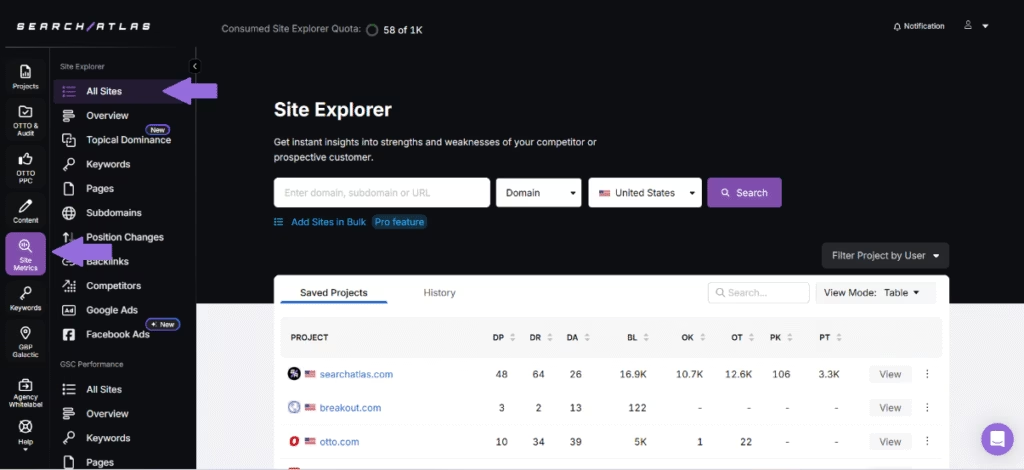
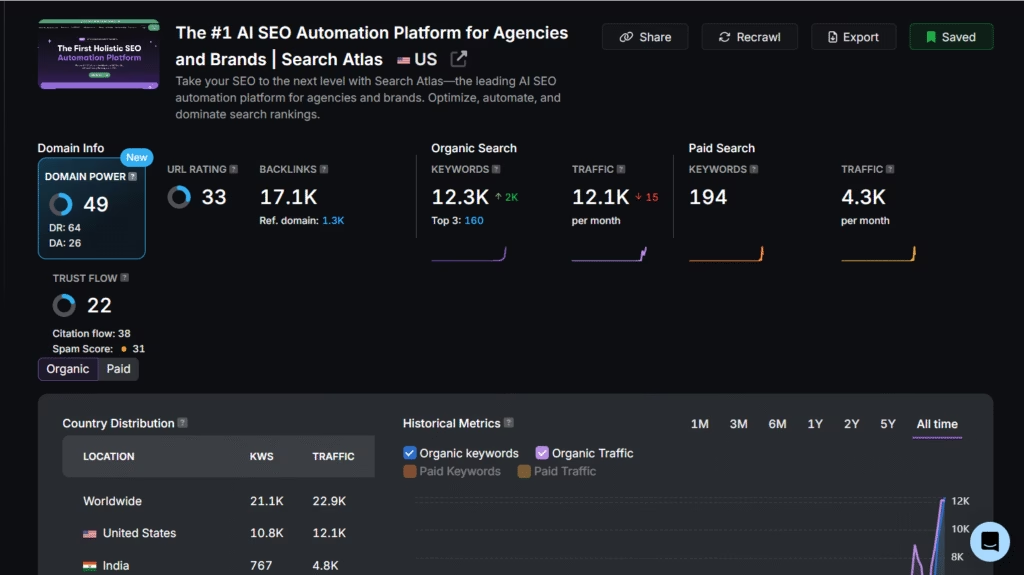
The Search Atlas Site Explorer provides detailed SEO metrics and competitive insights when you enter a website URL. The Search Atlas Site Explorer helps assess your site’s visibility by identifying authority scores like Domain Power, Domain Authority, and Domain Rating, along with organic and paid traffic data. Additionally, the Search Atlas Site Explorer tracks keyword rankings, backlink profiles, spam scores, and URL ratings to offer a comprehensive view of your website’s performance.
2. Analyse Your Technical SEO
Analyse your technical SEO to evaluate the backend elements that affect how search engines crawl, index, and rank your pages: site speed, mobile-friendliness, crawlability, indexing status, structured data, and URL structure.
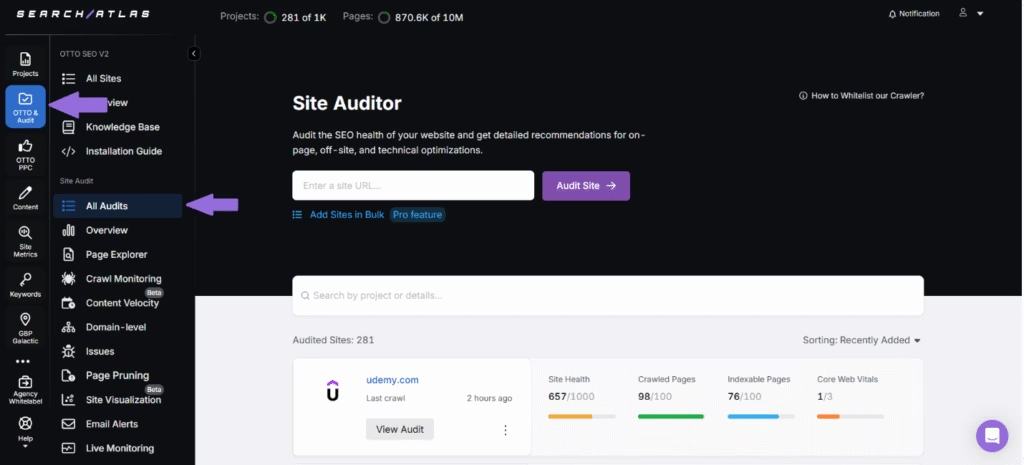
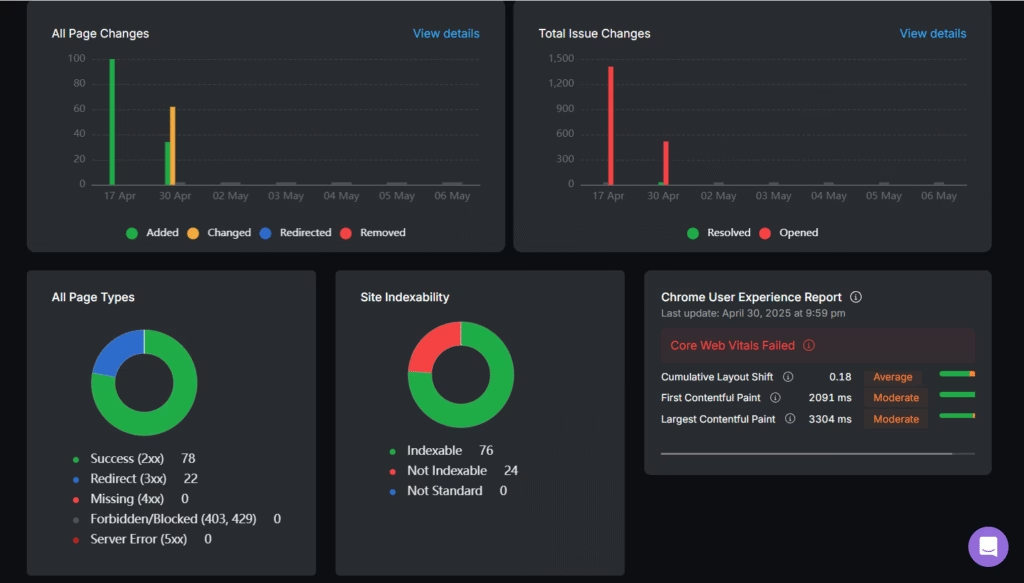
Use the Search Atlas Site Auditor to identify crawl errors, indexing issues, and core web vitals performance. Check page speed performance using Google PageSpeed Insights or GTmetrix to assess how your site loads across devices. Validate structured data using Google’s Rich Results Test to make sure schema markup is correctly implemented and error-free. Monitor your robots.txt file and XML sitemap to make sure they are accessible, up to date, and correctly guiding search engines. Review canonical tags and redirect chains to identify potential indexing and duplication issues.
The Search Atlas Site Auditor provides a detailed overview of your website’s technical performance by identifying issues related to crawlability, indexability, and site structure. Enter your domain, set the maximum number of pages to crawl, configure the crawl frequency, and click **“**Start Audit.” The Search Atlas Site Auditor then scans your pages and highlights the most critical SEO issues using customizable Page Explorer reports. The Search Atlas Site Auditor allows you to combine crawl data with metrics from Google Search Console and Google Analytics to help you quickly identify problems on your most important landing pages. This type of targeted, data-driven analysis makes sure your website’s technical foundation is solid and supports better search visibility and long-term SEO success.
What Are the Core Web Vitals Thresholds?
Check your numbers
Check your Core Web Vitals
Enter your 75th-percentile values from PageSpeed Insights or the Search Console Core Web Vitals report.
Thresholds: Google, web.dev “Web Vitals”, checked September 25, 2026.
Core Web Vitals are Google’s three page experience metrics, each rated good, needs improvement, or poor at the 75th percentile of page loads. Largest Contentful Paint (LCP) measures loading: it is good at 2.5 seconds or less and poor above 4 seconds. Interaction to Next Paint (INP) measures responsiveness: it is good at 200 milliseconds or less and poor above 500 milliseconds. Cumulative Layout Shift (CLS) measures visual stability: it is good at 0.1 or less and poor above 0.25.
A page passes the Core Web Vitals assessment when all three metrics are good (Google, Web Vitals, checked September 25, 2026).
3. Analyse Your On-Page SEO
Analyse your on-page SEO to evaluate the elements directly on your pages that affect rankings and user experience: title tags, meta descriptions, header tags, URL structure, internal linking, image optimization, and content quality. A thorough on-page analysis makes sure your content matches user intent and helps search engines clearly understand what each page is about.
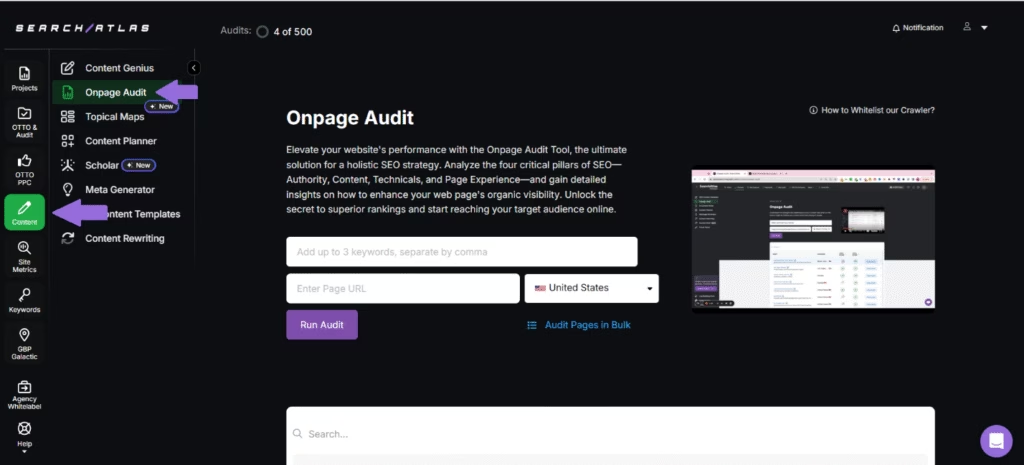
Use the on-page SEO guide alongside the Search Atlas On-Page Audit to automate this process and uncover specific on-page issues. Check that headers (H1, H2, etc.) are used logically to structure content and include relevant terms. Evaluate URL structures for clarity and keyword inclusion, and assess internal linking to make sure important pages are easily discoverable.
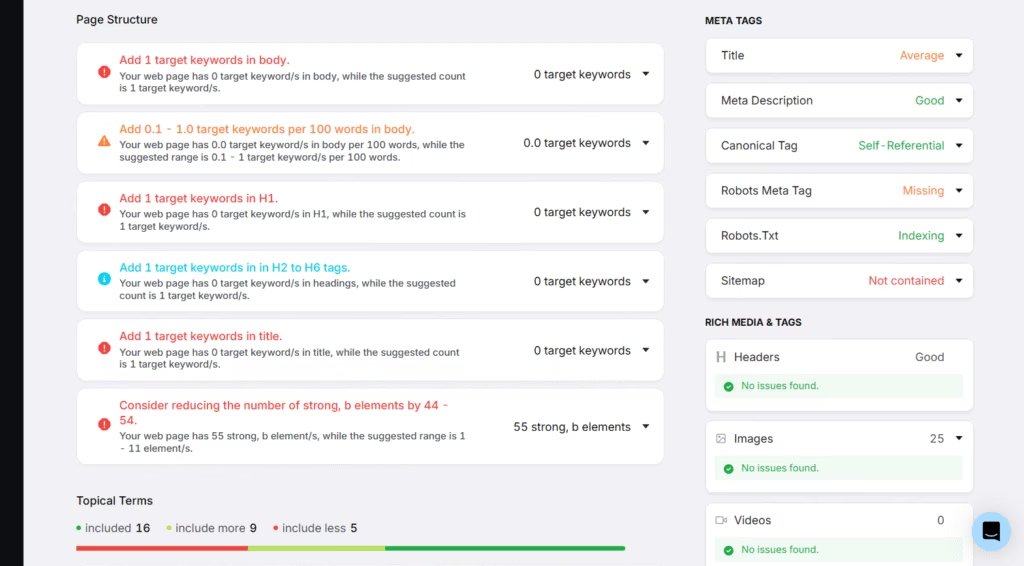
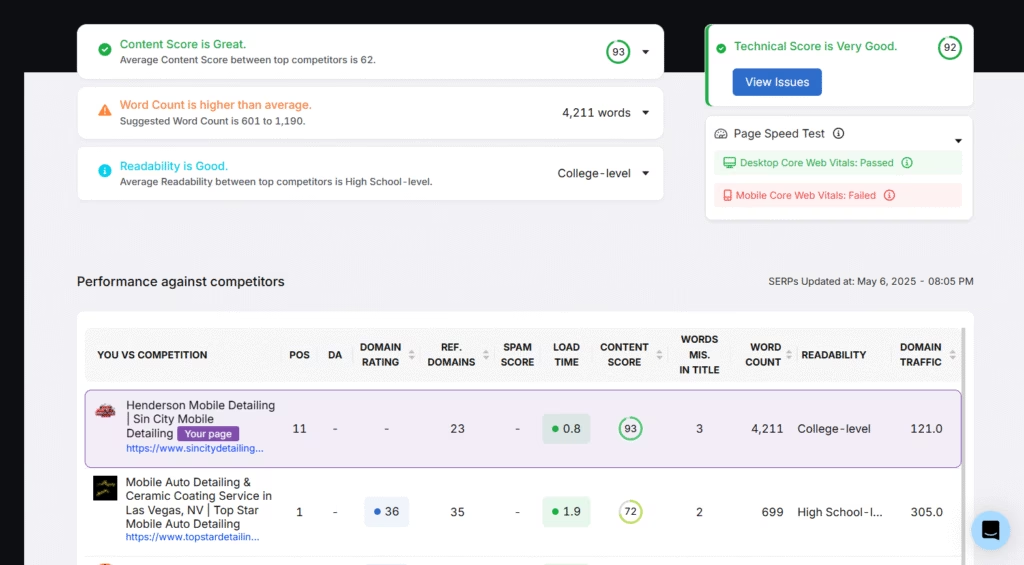
The Search Atlas On-Page Audit uses in-depth analytical data to provide detailed feedback on your content’s performance based on targeted keywords. The Search Atlas On-Page Audit assesses your page’s structure to look into optimization opportunities to improve its visibility, relevance, and user experience. Additionally, the Search Atlas On-Page Audit helps you easily compare your content score, word count, and readability against top-ranking content to help you make informed improvements to boost your search visibility.
4. Monitor Keyword Performance
Monitor keyword performance to track how your chosen keywords rank in search engine results over time and how much traffic, engagement, and conversions they generate. Regular tracking lets you respond quickly to ranking changes, capitalize on rising search trends, and identify which keywords need more optimization.
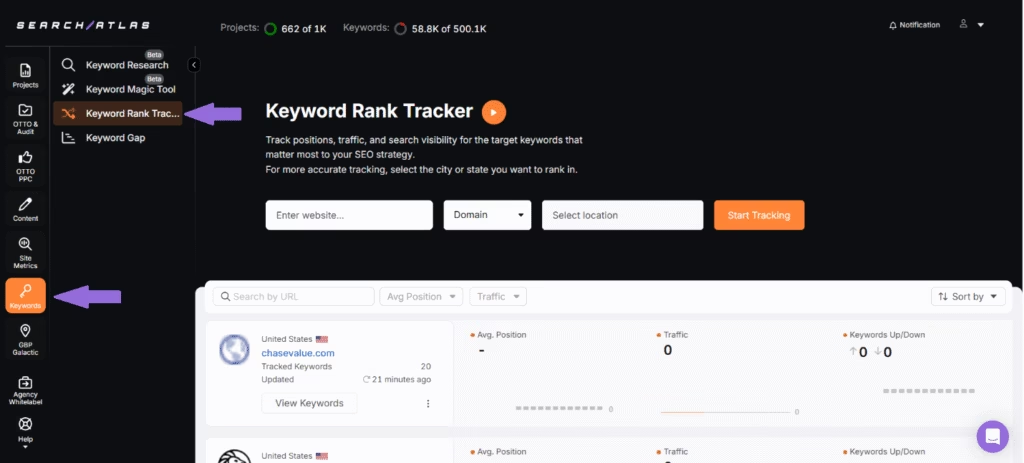
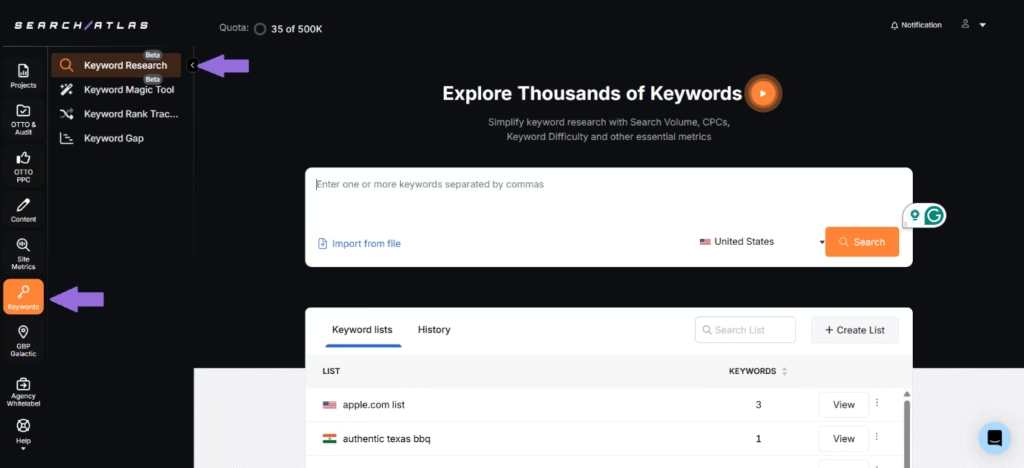
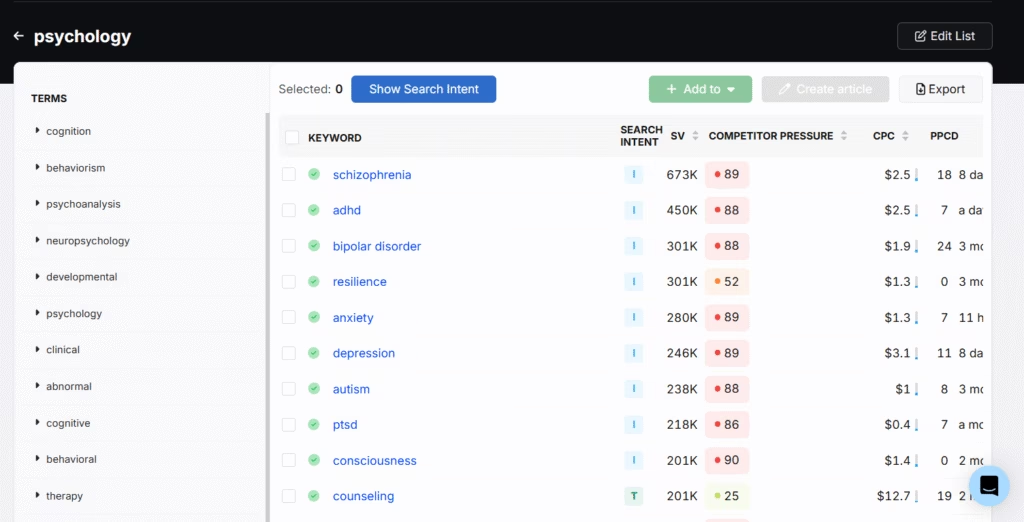
Use the Search Atlas Keyword Rank Tracker to track keyword rankings regularly and identify upward or downward trends early. Track both primary and long-tail keywords, observe how they perform on key landing pages, and analyze their impact on traffic and conversions. Analyze which pages rank for each keyword to guarantee content relevance and optimization. Use the Search Atlas Keyword Research to keep an eye on emerging keyword opportunities and declining terms to adjust your strategy proactively. Compare keyword performance against competitors to identify content gaps and potential ranking opportunities.
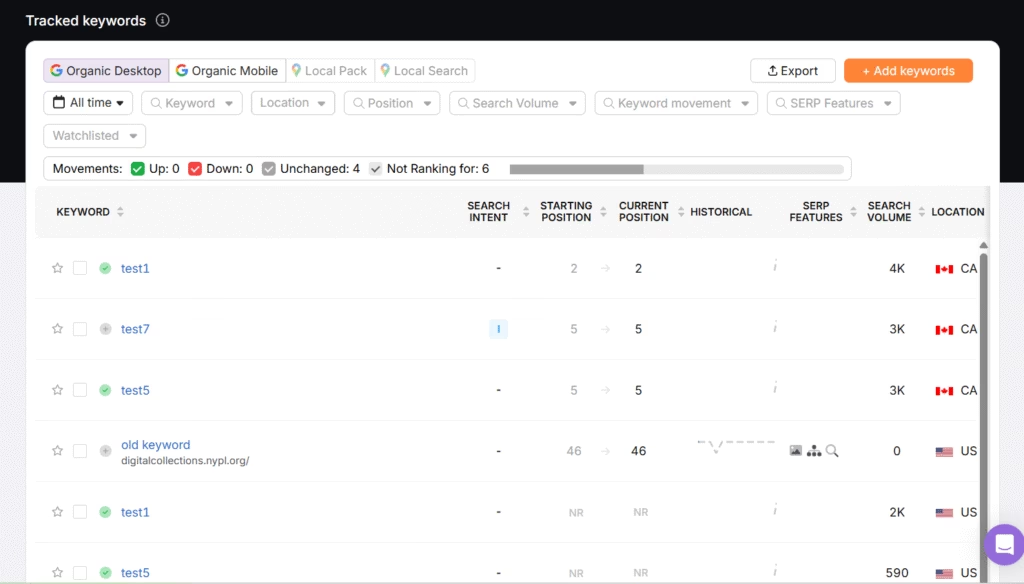
The Search Atlas Keyword Rank Tracker automatically checks the rankings of your target keywords at your chosen frequency and provides insights into key metrics, including current position, search volume, SERP features, and ranking trends over time, to help you evaluate your keyword performance and adjust your SEO strategy accordingly. Additionally, the Search Atlas Keyword Rank Tracker provides a detailed overview of the number of keywords your competitors have in the top 10 and the rate of their search visibility to help you identify content gaps and possible ranking opportunities.
The Search Atlas Keyword Research helps you identify emerging keyword opportunities to help you stay ahead of SEO trends and capture traffic early in the search cycle. The Search Atlas Keyword Research provides comprehensive insights into key metrics such as search volume, cost-per-click (CPC), keyword difficulty, top-ranking pages, and related keyword suggestions. Additionally, the Search Atlas Keyword Research helps you to explore keyword variations, semantically related terms, and commonly asked questions to help you build a more targeted, high-performing SEO strategy.
5. Review Content Quality and SEO
Review content quality and SEO to check how well each page’s content meets user intent while following optimization best practices. The review covers readability, keyword relevance, originality, structure, accuracy, and how engaging the content is for its audience.
The tips for reviewing content quality and SEO are listed below.
| Content-quality check | What good looks like |
|---|---|
| Page purpose | Each page has a clear purpose and satisfies specific search intent |
| Originality, accuracy, and freshness | The content is original, accurate, and regularly updated |
| Readability and structure | Evaluated using the Search Atlas On-Page Audit and the Search Atlas Scholar |
| Factual accuracy | Data, statistics, and claims cross-checked with reputable sources |
| Keyword usage | Proper usage without overstuffing and natural integration |
| Internal and external linking | Functional and relevant, pointing to authoritative sources |
| Multimedia use (images, videos, charts) | Supports and improves the textual content |
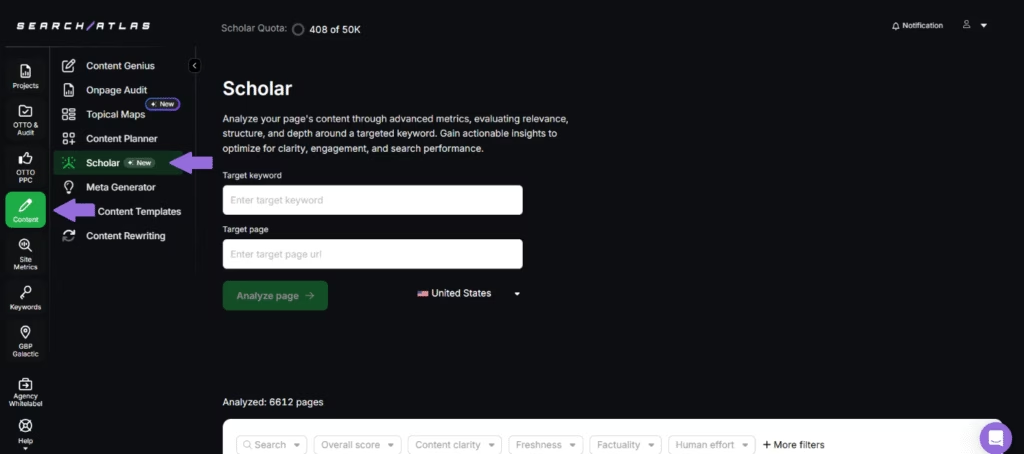
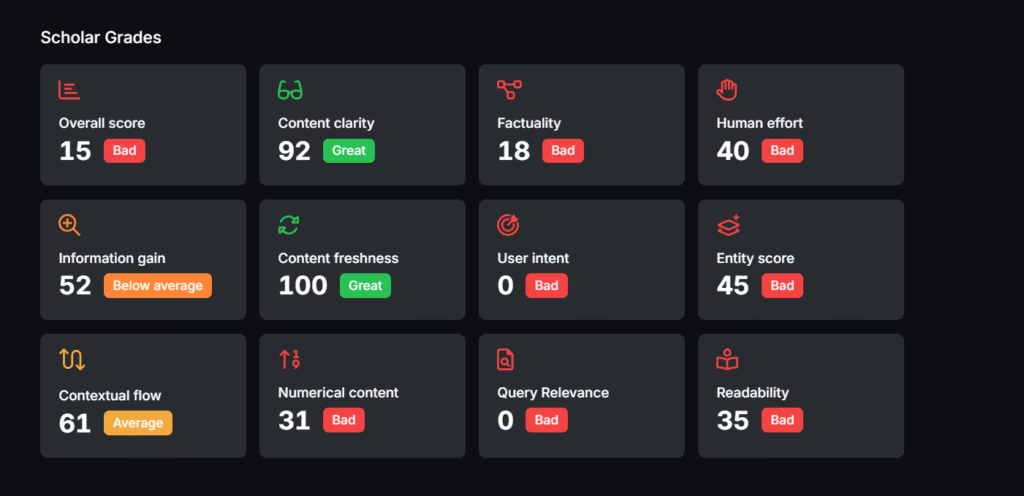
The Search Atlas Scholar grades your content against page quality and information retrieval principles and provides clear, actionable insights to help you improve content quality and search performance. To review your content using the Search Atlas Scholar, enter your target keyword, upload your content, URL, or draft, and click **“**Analyze Page.” The Search Atlas Scholar will then assess your content from all angles and generate a data-driven score, highlighting specific areas for optimization.
Additionally, the Search Atlas On-Page Audit evaluates your content quality and SEO by analyzing key elements such as content score, word count, and readability. The Search Atlas On-Page Audit allows you to compare your page against the top 10 ranking competitors for your target keyword to identify the areas where your content may fall short and need improvement. With detailed insights and guidance, The Search Atlas On-Page Audit makes sure that your content is relevant and engaging and aligns with what search engines prioritize to help you improve visibility, boost rankings, and better connect with your target audience.
6. Check Your Internal Links
Check your internal links to make sure search engines can crawl and index every page and users can reach related content. Link audits also surface orphaned pages, broken links, and redirect chains that waste crawl budget and weaken site structure.
The tips for checking internal links are given below.
| Internal-link check | What good looks like |
|---|---|
| Link audits | Run regularly with the Search Atlas On-Page Audit to identify broken, redirected, or orphaned links |
| Link destinations | Links on key pages direct users to the correct and intended destination |
| Orphaned pages | Every important page is linked from at least one other relevant page |
| Anchor text | Descriptive, relevant, and not over-optimized with exact-match keywords |
| Link count | Not so many that they dilute link equity and confuse users |
| Link placement | Natural within the content, not crammed into footers or sidebars |
| Link depth | Important content no more than 3 clicks away from the homepage |
| URL format consistency | No mixing of www and non-www, or HTTP and HTTPS |
| Redirect chains or loops | Fixed when found; they can hurt crawl efficiency and user experience |
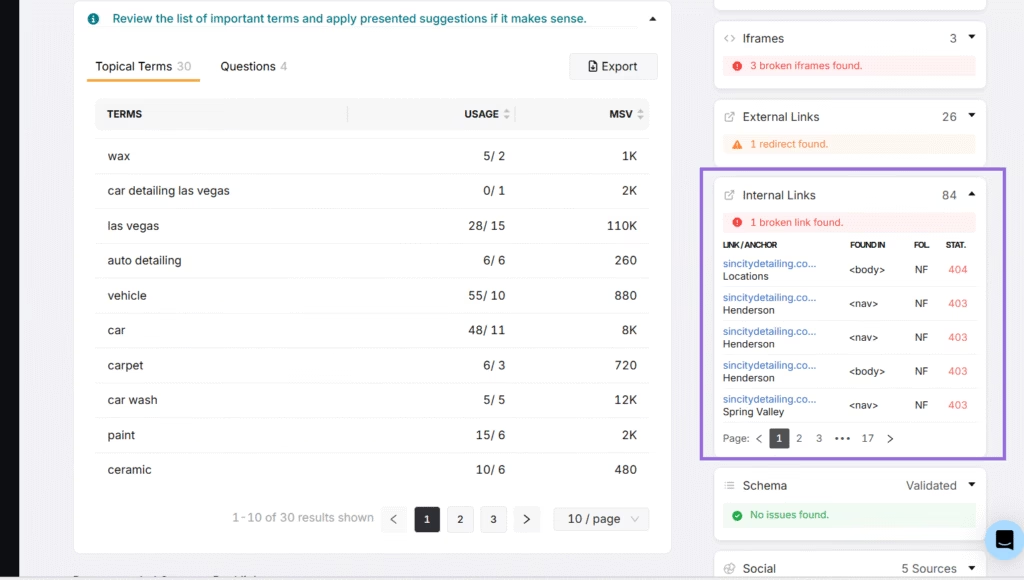
The Search Atlas On-Page Audit serves as an effective way to check and optimize internal linking across your website. The Search Atlas On-Page Audit helps identify broken links that disrupt user experience, orphaned pages that are not linked from any other part of your site, and redirect chains that can waste crawl budget and slow down site performance.
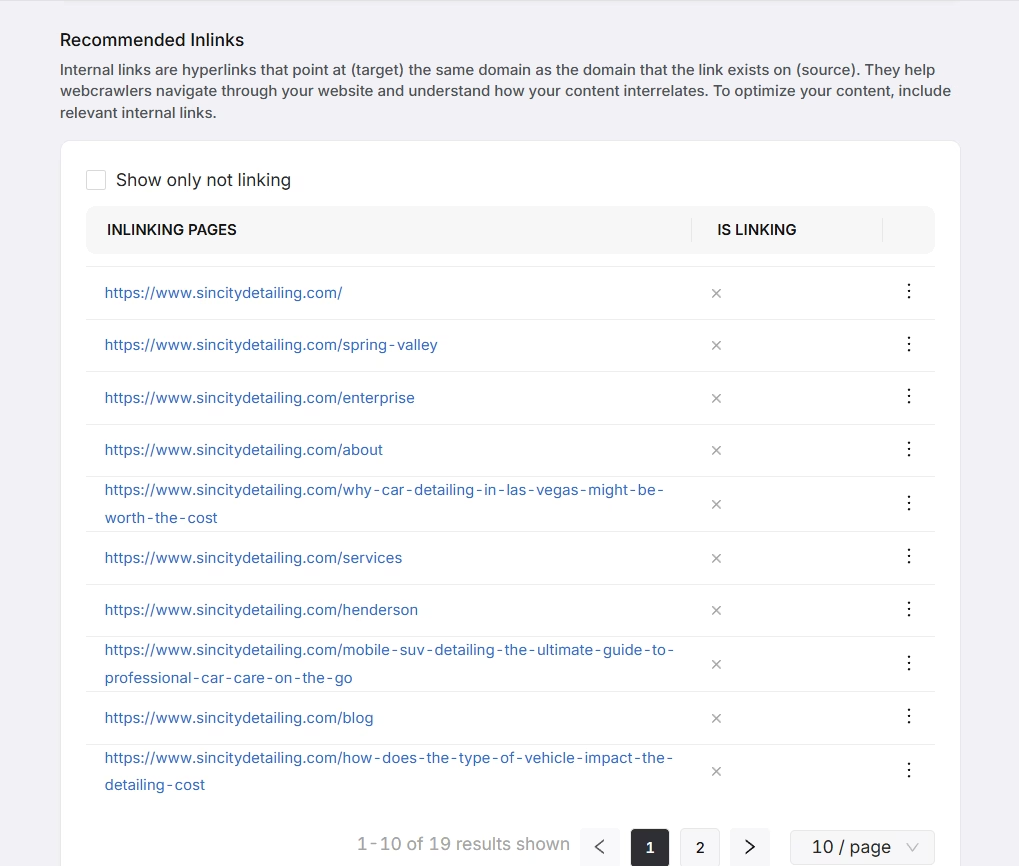
Additionally, the Search Atlas On-Page Audit provides internal linking recommendations to strengthen your site’s structure by improving navigation, increasing crawlability, and guaranteeing better distribution of link equity.
7. Check Your Website’s Backlink Profile
Check your website’s backlink profile to review the external sites that link to your pages. A clean, diverse profile supports credibility and rankings, and regular checks catch spammy links or negative SEO attacks early.
The tips for checking your website’s backlink profile are outlined below.
| Backlink check | What good looks like |
|---|---|
| Quantity, quality, and diversity | Analysed with the Search Atlas Backlink Research |
| Toxic backlinks | Monitored regularly; harmful or spammy links disavowed |
| Linking-domain authority | Reputable and relevant to your niche |
| Anchor text | Varied and natural, avoiding overuse of exact-match keywords |
| New backlinks | Tracked to spot profile growth and high-value linking opportunities |
| Competitor comparison | Run with the Search Atlas Backlink Profile Comparison |
| Link distribution | Spread across key pages: blogs, product pages, landing pages |
| Context and relevance | Backlinks contribute to your site’s overall topical authority and relevance |
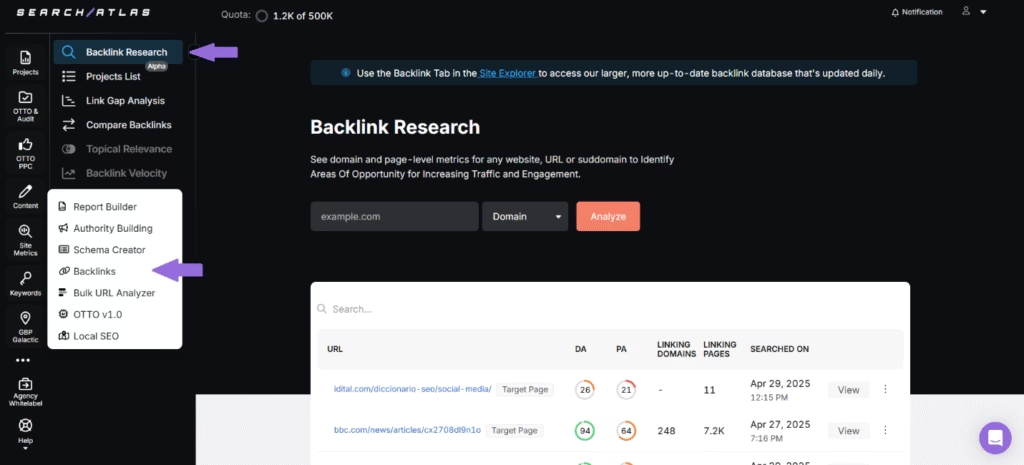
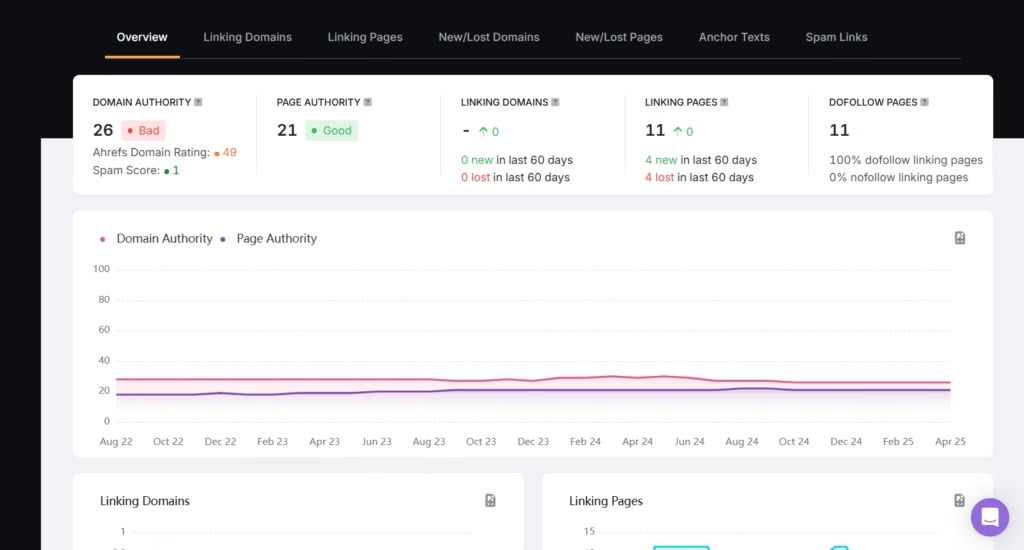
The Search Atlas Backlink Research helps you to analyze and understand the backlink profile of any website, page, or subdomain. The Search Atlas Backlink Research provides detailed insights into both domain-level and page-level metrics. The Search Atlas Backlink Research identifies linking domains, linking pages, anchor text distribution, and tracks new or lost backlinks as well as potential spam links to help you discover link-building opportunities, monitor backlink health, and strengthen your site’s authority and search visibility.
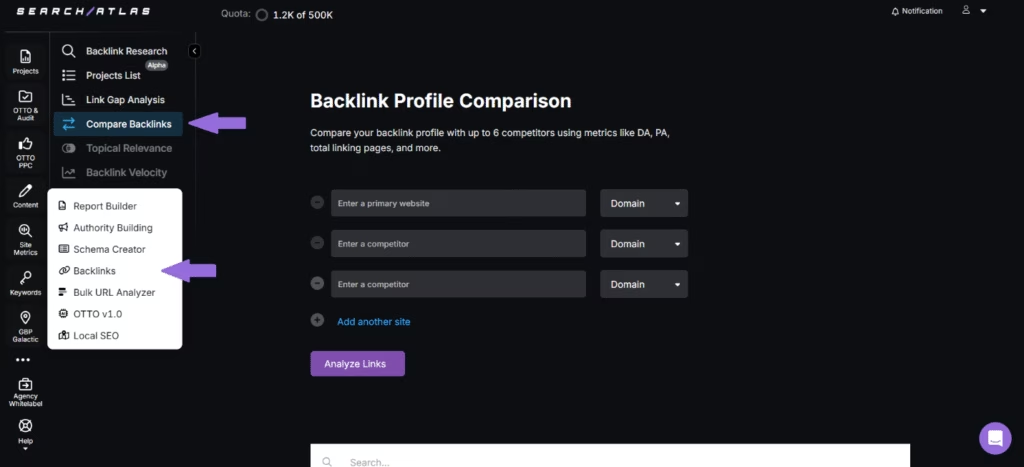
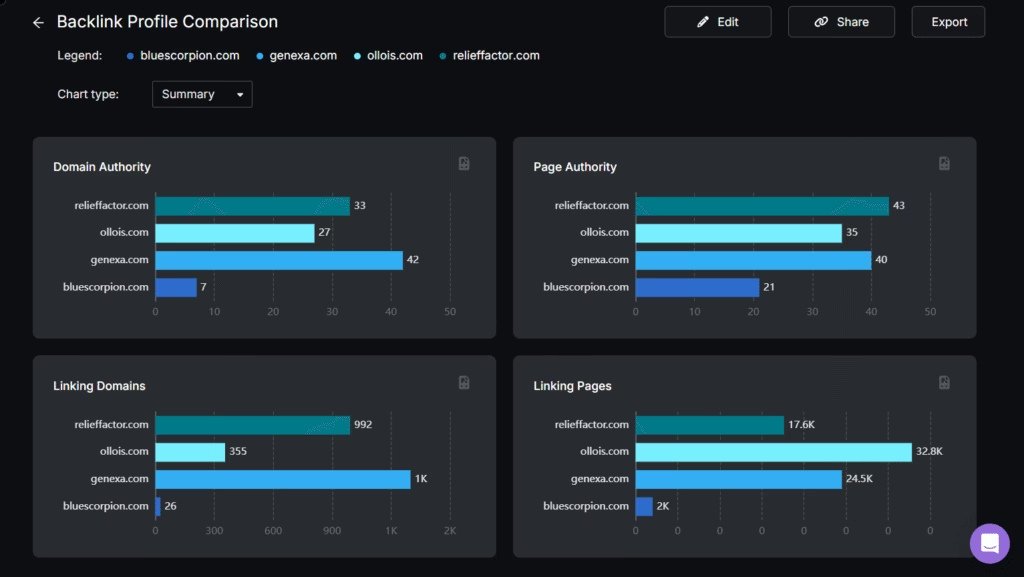
The Search Atlas Backlink Profile Comparison allows you to compare your website’s backlink profile with up to six competitors side by side. The Search Atlas Backlink Profile Comparison analyzes essential SEO metrics such as Domain Authority, Page Authority, total linking pages, linking domains, and more to help you identify gaps, evaluate your competitive standing, and uncover opportunities to strengthen your link-building strategy.
8. Monitor the User Experience and Engagement
Monitor the user experience and engagement to see how easily visitors navigate your website, how long they stay, and whether they find what they need. Metrics like bounce rate, average session duration, page views, and user behavior patterns reveal where the user journey works and where it breaks down.
Use tools like Google Analytics or Microsoft Clarity to track user interactions and engagement metrics. Monitor key engagement indicators such as bounce rate, average session duration, pages per session, and exit rates. Analyze heatmaps and session recordings to visually understand where users click, scroll, or drop off on your pages. Set up goal tracking and conversion funnels to monitor how users navigate your site and whether they complete desired actions. Identify and address friction points in the user journey to improve satisfaction and encourage deeper engagement. Continuously test and optimize elements like page layout, CTAs, and content structure to improve usability and interaction.
Consistently tracking and improving user experience and engagement helps you keep visitors satisfied while improving their interaction with your site. Regularly monitoring the user experience and engagement helps build a strong foundation for long-term SEO success because a positive experience encourages repeat visits, deeper engagement, and increased trust.
9. Evaluate Your Website Against Competitors
Evaluate your website against competitors to compare your SEO performance with the businesses ranking in your niche. Benchmarking reveals gaps in content, backlinks, and keyword strategy, and shows which tactics drive competitors’ organic and paid traffic.
The best practices for evaluating your website against your competitors are outlined below.
| What to benchmark | Tool or method |
|---|---|
| Your top SEO competitors | Search Atlas Site Explorer |
| Competitors’ organic and paid traffic, and the keywords or ads driving it | Organic and paid traffic analysis |
| Domain Power, Domain Authority (DA), and Domain Rating (DR) | Domain-level metrics comparison |
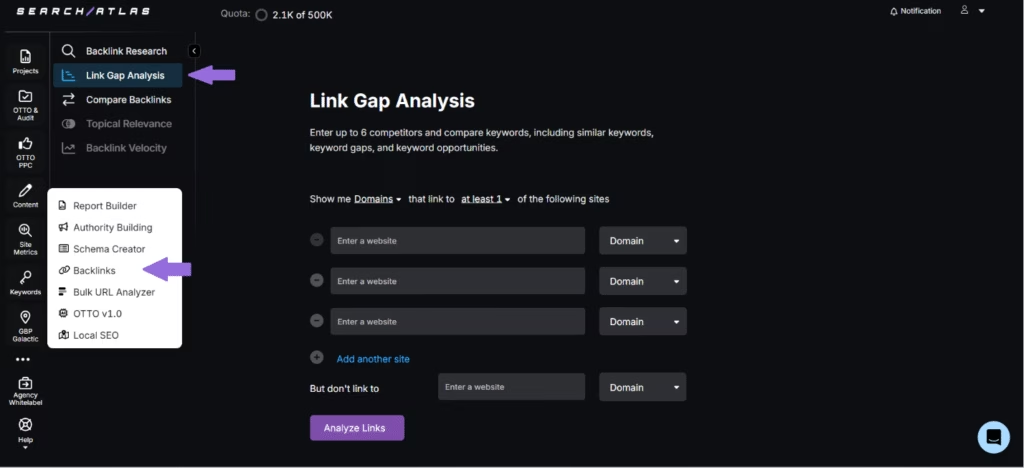
| Backlink gaps and opportunities | Search Atlas Link Gap Analysis |
| High-performing keywords you may have missed | Review of competitors’ keyword rankings |
| Content update frequency and content depth | Content benchmarking |
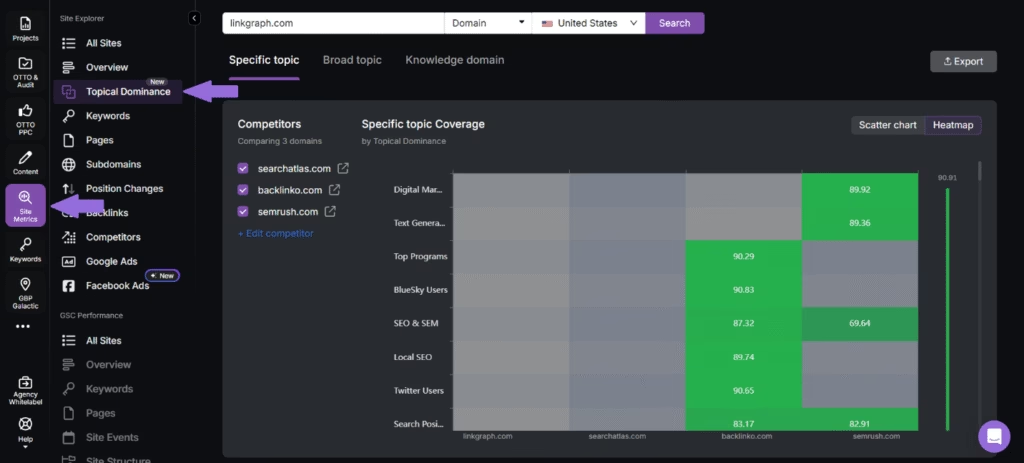
| Topical authority by subject area | Topical Dominance tab in Site Explorer |
| Changes in competitor strategies | Regular audits |
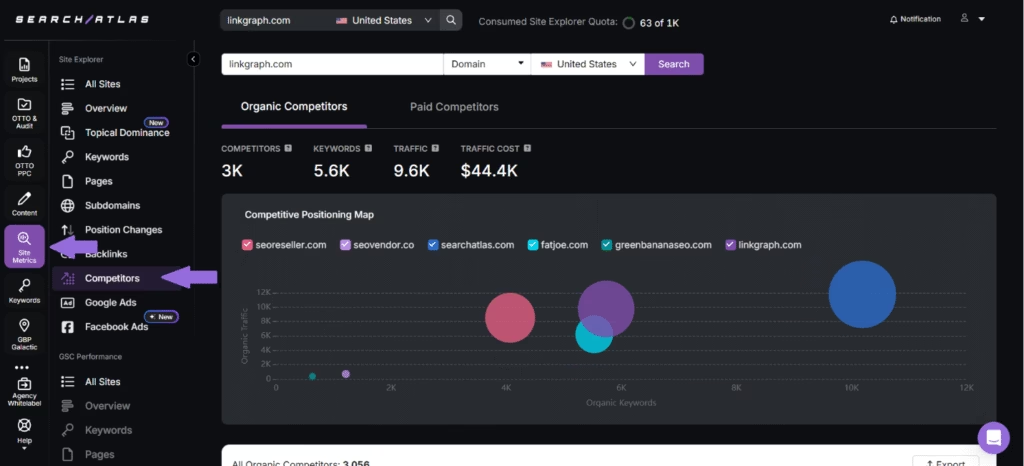
The Search Atlas Site Explorer’s Competitors tab helps you identify your top online competitors and evaluate their competitive positioning based on key SEO metrics such as organic keywords and organic traffic. Enter your domain and target country and click “Search.” The Search Atlas Site Explorer’s Competitors tab helps you better understand where you stand in relation to other players in your niche, helping you shape more effective SEO and content strategies.
The Search Atlas Link Gap Analysis helps you identify the backlink gap between your website and competitors. The Search Atlas Link Gap Analysis provides you with a list of websites, their Domain Authority scores, spam scores, and the top linking page for each competitor.
The Topical Dominance tab within the Search Atlas Site Explorer helps you compare your website’s topical authority against competitors for specific subject areas. Enter your domain and a competitor’s, and the Search Atlas Site Explorer’s Topical Dominance tab analyzes and scores how well each site covers various topics, highlighting strengths and gaps. Additionally, the Search Atlas Site Explorer’s Topical Dominance tab pinpoints content areas where your site is underperforming, allowing you to refine your strategy.
How to Automate SEO Analysis Process Using OTTO?
Automating the SEO analysis process using OTTO, the Search Atlas SEO skill, makes website optimization more efficient by handling technical, on-page, and off-page SEO tasks with minimal manual effort. To get started, you just need to add the OTTO pixel, which is a small code snippet, to your website’s header. The OTTO pixel grants OTTO the access needed to analyze your site’s structure and content.
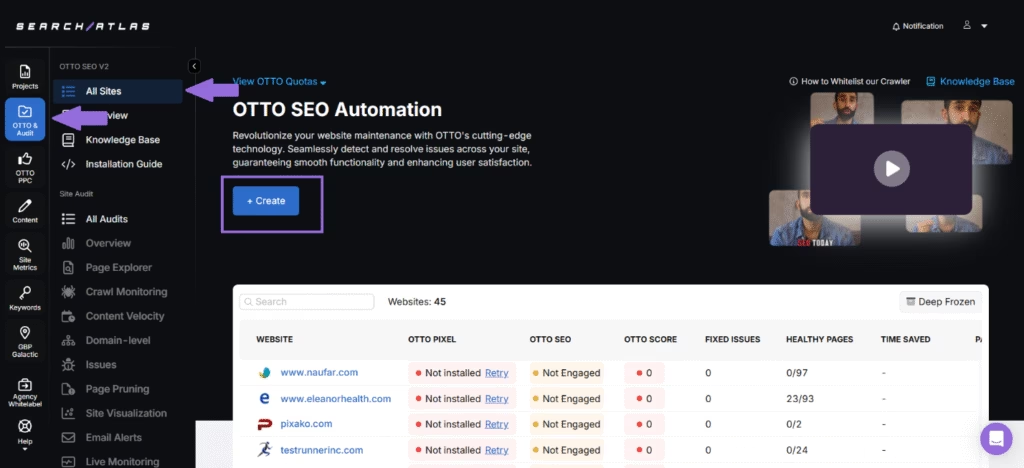
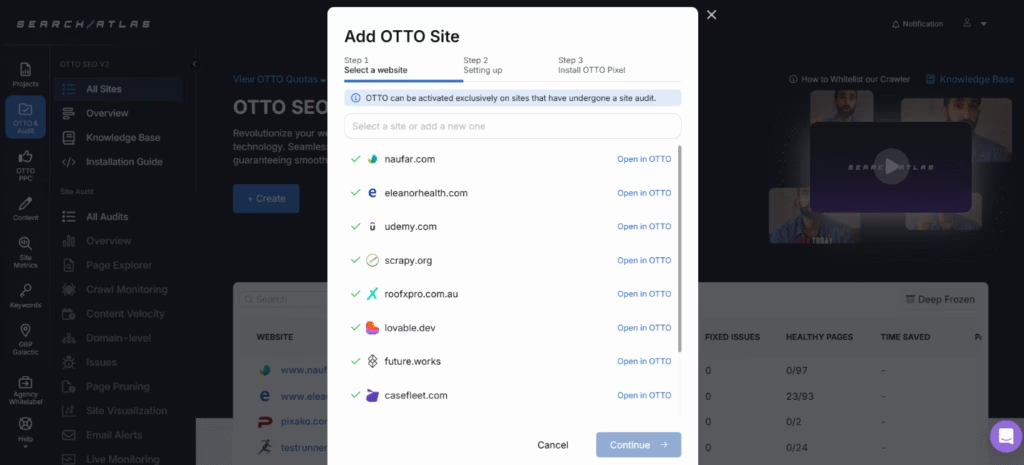
Once enabled, the Search Atlas OTTO conducts an in-depth audit of your website, examining technical SEO signals as well as strategic SEO factors. The Search Atlas OTTO analyzes your site against Search Atlas’s Holistic SEO blueprint, which is a comprehensive framework based on modern best practices, to fix issues and align your website with search engine expectations for long-term visibility. Additionally, the Search Atlas OTTO integrates data from your Google Search Console to analyze live performance metrics, such as keyword rankings, click-through rates, impressions, and page indexing issues, and generate highly tailored and actionable optimization suggestions.
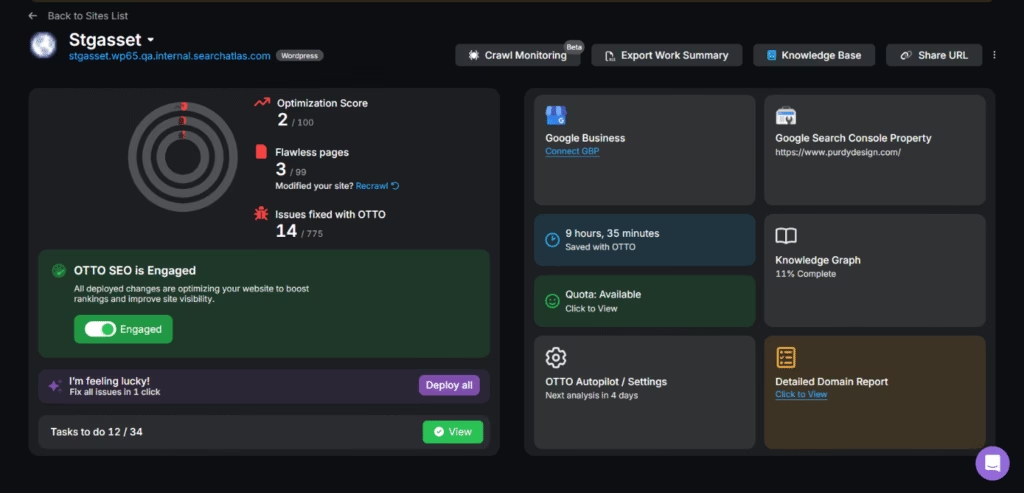
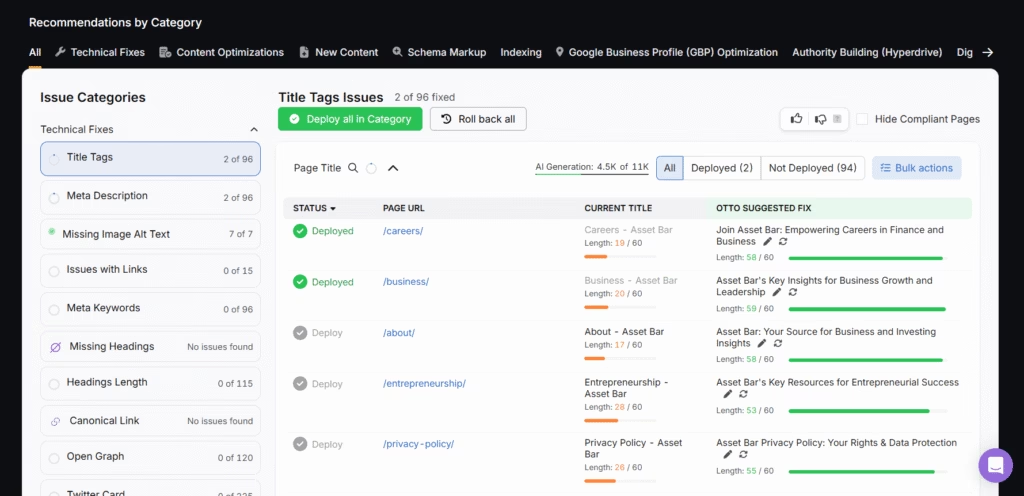
What makes the Search Atlas OTTO unique is its ability to automatically implement these optimization suggestions with a single click, regardless of your CMS. After reviewing the recommendations, you can choose which ones to apply, and OTTO will handle the updates directly on your website without requiring manual changes.
Additionally, the Search Atlas OTTO provides ongoing monitoring of your website. As your site structure or performance changes, or as new search trends emerge, the Search Atlas OTTO updates its recommendations accordingly to make sure that your SEO strategy stays current without constant manual tracking.
By automating SEO analysis with the Search Atlas OTTO, you significantly reduce time spent on repetitive tasks, avoid overlooking critical issues, and maintain strong site health. The automated SEO analysis enables faster execution of optimizations and makes sure your site is always positioned for long-term visibility and success in search results.
What Tools to Use for SEO Analysis?
There are various tools to use for SEO analysis and to make sure your website is visible and highly competitive in SERPs. Free tools like Google Search Console help track how your website appears in search results and provide insights into keyword rankings, click-through rates, indexing status, mobile usability, and search performance across pages. Google Analytics complements this by offering detailed user behavior data, such as bounce rate, session duration, conversion paths, and traffic sources, helping you assess how users interact with your site. Additionally, Google PageSpeed Insights focuses specifically on performance by evaluating loading times and suggesting improvements that improve both user experience and search rankings.
The Search Atlas platform, on the other hand, provides a more advanced and integrated suite for deep SEO analysis and optimization. The Search Atlas Site Explorer gives a complete overview of any domain’s SEO metrics, including authority scores like Domain Rating and Trust Flow, organic and paid keyword rankings, backlink profiles, spam scores, and traffic estimates. The Search Atlas Site Auditor checks for crawl errors, indexing issues, broken links, and site structure problems, offering actionable recommendations to improve site health.
The Search Atlas On-Page Audit zooms in on individual pages, analyzing internal linking, heading structure, keyword placement, and metadata to fine-tune on-page SEO. The Search Atlas Keyword Research helps identify valuable search terms using real-time data, showing metrics such as difficulty scores, volume, and traffic potential. Meanwhile, the Search Atlas Keyword Rank Tracker lets you monitor keyword rankings over time, helping you stay on top of your performance in SERPs.
The Search Atlas Scholar grades your content across multiple dimensions to help you align your writing with what Google deems authoritative, trustworthy, and relevant. The Search Atlas Backlink Research gives a detailed overview of your backlink profile, highlighting linking domains, anchor texts, spammy links, and lost links to identify link-building opportunities and improve domain authority. Additionally, the Search Atlas Link Gap Analysis compares your backlink profile with competitors to identify missing backlink opportunities, helping you close the SEO gap and improve your off-page strategy.
To simplify all of this, the Search Atlas OTTO automates the entire SEO analysis process, analyzing your site, offering recommendations, and even applying changes directly to save time and guarantee continuous optimization without manual intervention.
🧰 Google's Free Toolkit
- Google Search Console - keyword rankings, click-through rates, indexing status, mobile usability
- Google Analytics - bounce rate, session duration, conversion paths, traffic sources
- PageSpeed Insights - loading times and improvement suggestions
🚀 The Search Atlas Platform
- Site Explorer - domain metrics, keyword rankings, backlink profiles, traffic estimates
- Site Auditor - crawl errors, indexing issues, broken links, site structure
- On-Page Audit - internal linking, heading structure, keyword placement, metadata
- Keyword Research + Rank Tracker - difficulty, volume, traffic potential, rankings over time
- Scholar - content graded for authority, trust, and relevance
- Backlink Research + Link Gap Analysis - linking domains, anchor texts, spammy and lost links, competitor gaps
- OTTO - automates the entire SEO analysis process and applies changes directly
Together, Google’s standard toolkit and the Search Atlas platform’s specialized features offer a holistic SEO analysis framework to enable data-driven decisions and stronger search performance. It is important to be equipped with the best SEO analysis tools to improve your strategy and drive lasting results.
Technical SEO, on-page SEO, and internal linking provide the implementation detail behind this analysis. For a complete site-level review, see the SEO site audit guide.
SEO analysis and SEO reporting work as a pair: analysis discovers performance data and optimization opportunities, while reporting organizes and presents those insights in a structured, actionable format. SEO reporting commonly includes charts, keyword trends, traffic patterns, and recommendations that help stakeholders track progress, measure ROI, and make informed decisions.
SEO analysis and SEO metrics work the same way: metrics are the measurable data points, such as organic traffic, keyword rankings, click-through rates, bounce rate, domain authority, and backlink count, while SEO analysis is the process of interpreting those metrics to decide what to improve and how.
What to Know About Website SEO Analysis Besides SEO Strategy?
Website SEO analysis is the process of evaluating various on-site and off-site factors that affect a website’s visibility in search engines. Website SEO analysis involves reviewing technical elements, content quality, backlinks, keyword performance, and user engagement to identify opportunities for optimization.
SEO strategy, on the other hand, is a structured plan that outlines how you will improve your website’s rankings, drive organic traffic, and achieve long-term search visibility. SEO strategy includes setting goals, targeting specific keywords, optimizing content, and building authority over time.
Website SEO analysis plays a key role in guiding and shaping your SEO strategy. Website SEO analysis discovers how well your website is performing in areas like crawlability, keyword targeting, and backlink strength, and helps you understand what’s working and what needs improvement. This data-driven insight makes sure that your SEO strategy is focused, realistic, and aligned with your site’s actual performance. SEO analysis provides clear direction, instead of guessing which areas to optimize, to help you prioritize efforts that will yield the highest impact on search visibility and overall SEO success.